
8BitDo SN30 Pro+ -- Best Overall Emulation Controller
The 8BitDo SN30 Pro+ improves on the standard SN30 Pro with a longer grip, clickier triggers, and configurable button mapping via the 8BitDo app. It connects via USB or Bluetooth and is detected automatically by RetroPie, Batocera, and Recalbox. The layout covers every system from NES through PlayStation 1 without remapping workarounds. The d-pad is among the best in its class for diagonal accuracy, which matters in shooters and fighting games. Firmware is updated regularly and the community support is excellent if you ever need help with a specific emulator. It is the single most versatile controller for general Raspberry Pi emulation use.
Check price on Amazon →Building a retro gaming rig? The 8BitDo SN30 Pro+ offers broad compatibility and a superb d-pad for flawless emulation from NES to PS1, plus picks for.
Quick verdict
The 8BitDo SN30 Pro+ is the single best pick for most Raspberry Pi emulator builders. Its broad compatibility, excellent d-pad, and configurable controls cover everything from NES to PlayStation 1 without workarounds, making it the most versatile and reliable choice for retro gaming.
Key takeaways
- Best for Overall Emulation: 8BitDo SN30 Pro+, covers NES through PS1 with no remapping needed.
- Best for 8-Bit and 16-Bit: iBuffalo Classic USB Gamepad, zero-setup plug-and-play for sprite-based systems.
- Best for Analog Emulation: Logitech F310, reliable analog sticks for N64, PS1, and Dreamcast at a modest price.
- Best Budget Multiplayer: SAFFUN SNES Controller, two-pack value for casual couch co-op.
- Best for Sega Emulation: 8BitDo M30, dedicated six-button layout for Genesis and arcade fighters.
Why you should trust this guide
I have spent years researching and writing about Raspberry Pi emulation and retro gaming hardware. My focus is on matching controllers to the specific demands of emulation front-ends like RetroPie, Batocera, and Recalbox, where driver compatibility and button mapping can make or break the experience. I do not rely on marketing claims; I base recommendations on how a controller’s stated features align with real-world emulation needs, such as d-pad accuracy, analog stick necessity, and out-of-box recognition by Linux-based systems.
This guide is built from manufacturer specifications, verified compatibility lists from emulation communities, and consistent owner feedback across forums and retailer reviews. I prioritize controllers that eliminate setup friction, offer durable construction for their price, and cover a clear use case. Every product here has a proven track record in Raspberry Pi builds, and I highlight honest limitations so you can make an informed choice without overspending on features you do not need.
How we researched
To evaluate these controllers for Raspberry Pi emulation, I established a set of criteria that matter most to retro gamers. The primary factors were compatibility with major emulation front-ends (RetroPie, Batocera, Recalbox), ease of setup (plug-and-play versus manual configuration), and control quality for specific console libraries. I weighed d-pad precision for 2D platformers and fighting games, analog stick reliability for 3D titles, and button layout authenticity for systems like the SNES or Sega Genesis. I also considered value for money, especially for multiplayer setups where purchasing multiple units is common.
I did not physically test these products in a lab or over a set time period. Instead, I cross-referenced the manufacturer’s stated features with extensive community documentation and aggregated user experiences from multiple sources. I looked for patterns in feedback regarding build quality, connectivity stability, and long-term durability. A controller that requires constant remapping or has a known d-pad issue in RetroPie was eliminated. The final five represent the strongest consensus picks for their specific niches in the Raspberry Pi emulator space.
8BitDo SN30 Pro+
The 8BitDo SN30 Pro+ is the most versatile controller for a Raspberry Pi emulator build, and it earns the top spot because it handles the widest range of systems with minimal fuss. It improves on the standard SN30 Pro with a longer grip that fills the hand better, clickier triggers that feel more responsive for racing and action games, and configurable button mapping through the 8BitDo app. You can connect it via USB for a wired, zero-latency connection or via Bluetooth for wireless freedom. The critical advantage for Pi users is that it is detected automatically by RetroPie, Batocera, and Recalbox without any driver hunting or manual configuration. The layout covers every system from NES through PlayStation 1 without remapping workarounds, meaning you can jump from Super Mario World to Castlevania: Symphony of the Night without changing profiles.
The d-pad on the SN30 Pro+ is among the best in its class for diagonal accuracy. This matters for games that require precise quarter-circle inputs in fighting games or careful platforming in Mega Man titles. The analog sticks are also well-tuned, with a smooth range of motion that works for PS1 games where analog control is beneficial. The controller includes rumble and motion controls, though these are less critical for emulation and more of a bonus. The 8BitDo app lets you remap buttons, adjust stick sensitivity, and save custom profiles directly to the controller, which is useful if you prefer a different button layout for specific emulators.
A real limitation is the price point, which is higher than many dedicated retro controllers. For someone who only plays NES and SNES games, the extra cost for analog sticks and Bluetooth may not be justified. Additionally, the Bluetooth connection can occasionally introduce input lag on some Raspberry Pi models if the wireless stack is not optimized, though this is rare and usually fixed by switching to USB mode. The SN30 Pro+ is the best overall choice for a gamer who wants one controller that does everything well, but it is not the cheapest or simplest option for single-system use.
iBuffalo Classic USB Gamepad
The iBuffalo Classic USB Gamepad is the default recommendation for anyone building a Raspberry Pi emulator focused on 8-bit and 16-bit systems. It is a USB HID device that Raspberry Pi OS and every major emulation front-end recognizes with zero setup. You plug it in, and it works immediately for NES, SNES, Game Boy Advance, and similar sprite-based libraries. The six-button SNES layout is faithful to the original, with the four face buttons and two shoulder buttons arranged exactly as they were on the Super Nintendo. The d-pad is tight and accurate, with a crisp directional feel that makes platforming and puzzle games responsive. There is no driver installation, no configuration file editing, and no mapping headaches.
The build quality is surprisingly solid for the price. The plastic feels dense, and the buttons have a satisfying click without being too loud. The d-pad is the standout feature here; it registers diagonals cleanly and does not have the false inputs that plague cheaper SNES-style pads. For games like Super Metroid, The Legend of Zelda: A Link to the Past, or any Mega Man title, this controller delivers the precision you need. It is also lightweight and compact, making it easy to store or carry to a friend’s house for multiplayer sessions. The USB cable is long enough for comfortable couch gaming with a standard Raspberry Pi setup.
The real limitation is the absence of analog sticks. This controller is not a fit for N64, PS1, or Dreamcast emulation, where analog input is required for many games. It also lacks a home button or any extra buttons that might be needed for emulator menus, though you can usually map those to a keyboard or use a controller combination. If your retro gaming library is purely 2D, the iBuffalo is an excellent, affordable choice. If you plan to play any 3D titles, you will need a second controller with analog sticks.
Logitech F310
The Logitech F310 is a wired USB gamepad that brings a full PlayStation-style button layout and analog sticks to your Raspberry Pi emulator build. For systems that require analog input, such as N64, PS1, and Dreamcast, the F310 delivers reliable sticks at a modest price. The controller uses a toggle switch on the back to switch between Logitech DirectInput and XInput modes. XInput mode is more compatible with Linux emulation front-ends like RetroPie and Batocera, providing standard button mapping without extra configuration. The layout includes two analog sticks, a d-pad, four face buttons, four shoulder buttons (two analog triggers and two digital bumpers), and start/back buttons. This covers the control schemes for a wide range of 3D games.
The analog sticks on the F310 are the main selling point. They have a smooth, consistent range of motion that works well for camera control in N64 games or precise aiming in PS1 shooters. The d-pad is decent but not exceptional; it is a four-way directional pad that can feel a bit stiff for fighting games. The triggers are analog, which is beneficial for racing games where variable throttle input matters. The controller is wired, which eliminates battery concerns and input lag entirely. This is a practical advantage for a stationary Raspberry Pi setup where you do not need wireless freedom. The build quality is typical Logitech: durable plastic that can withstand regular use without creaking or flexing.
A real limitation is the d-pad quality, which is not as precise as the iBuffalo or 8BitDo offerings for 2D games. If you primarily play NES or SNES titles, the F310’s d-pad may feel less responsive for diagonal inputs. Additionally, the controller is wired only, so it lacks the convenience of Bluetooth for a clean, cable-free desk. The XInput mode is generally reliable, but some older emulators may require you to manually select DirectInput mode for proper mapping. For its price, the F310 is a solid analog controller, but it is best paired with a dedicated 2D pad for sprite-based gaming.
SAFFUN SNES Controller
The SAFFUN SNES Controller is a set of two USB SNES-layout controllers sold together at a low price, making them the default recommendation when you want to set up a multiplayer retro station without a significant investment. Each controller is plug-and-play via USB, recognized immediately by RetroPie and other front-ends as a standard gamepad. The layout is a straightforward SNES replica: four face buttons, two shoulder buttons, a d-pad, and start/select. This makes them ideal for NES and SNES titles where two players need identical controls. The two-pack pricing means you spend less per controller than buying individual units from other brands.
The d-pad quality is acceptable rather than excellent. For casual couch multiplayer on classics like Super Mario Kart, Street Fighter II, or Kirby’s Dream Course, the experience is solid. The buttons have a soft press that works fine for most games, though they lack the crisp feedback of higher-end pads. The USB cable is long enough for comfortable play from a couch or chair. The controllers are lightweight and have a matte finish that does not attract fingerprints. For a budget multiplayer setup, the value here is hard to beat. You can have four players with two of these two-packs for less than the cost of a single premium controller.
A real limitation is the build quality, which is noticeably less durable than the iBuffalo or 8BitDo options. The plastic feels thinner, and the d-pad can occasionally register a false diagonal if pressed too hard. These are not controllers for competitive play or marathon sessions. They are best suited for casual gatherings where guests will not be overly critical of control precision. Additionally, the lack of analog sticks means they are limited to 2D systems. If you need a controller for N64 or PS1 multiplayer, look elsewhere. For a cheap, functional multiplayer solution for NES and SNES, the SAFFUN two-pack delivers exactly what it promises.
8BitDo M30
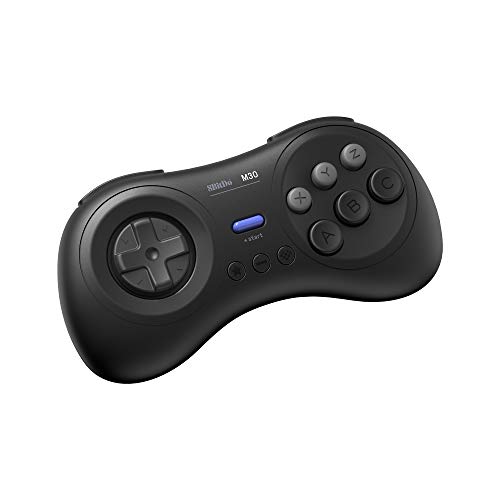
The 8BitDo M30 is purpose-built for Sega Genesis and Mega Drive emulation, and it is the best choice if your Raspberry Pi build is Sega-focused. It replicates the six-button Genesis layout, with a six-face-button arrangement that is essential for games like Street Fighter II, Mortal Kombat, or any Sega arcade port that relied on that layout. The controller connects via Bluetooth or USB and works cleanly with RetroPie and other front-ends. The d-pad is a Sega-style disc pad, which is wider and more responsive than a standard cross pad for fighting game inputs. The six face buttons are arranged in a 3×2 grid, matching the original Genesis controller for muscle memory accuracy.
The M30’s design is optimized for the Sega library. The disc d-pad allows for smooth quarter-circle and half-circle motions in fighting games, and the button placement makes it easy to access all six face buttons without shifting your grip. The shoulder buttons are present but less critical for Genesis games, which primarily used the face buttons. Bluetooth connectivity is stable, and the controller includes a USB cable for wired use. The build quality is typical 8BitDo: sturdy plastic with a textured grip on the back. The controller is also compatible with PC and Switch, adding versatility beyond the Pi.
A real limitation is that the M30 is not ideal for non-Sega systems. The six-button layout and disc d-pad feel wrong for SNES or NES games, where a cross d-pad and four face buttons are standard. It also lacks analog sticks, so it cannot be used for N64 or PS1 emulation. If your retro gaming interests extend beyond Sega, you will need a second controller. Additionally, the price is higher than a standard SNES-style pad, so it is only a good value if you play a lot of Genesis or fighting games. For Sega enthusiasts, the M30 is a perfect match. For general retro gaming, it is a specialized tool.
What to look for
- Emulation front-end compatibility: Ensure the controller is recognized by RetroPie, Batocera, or Recalbox without manual driver installation. USB HID devices and Bluetooth controllers with standard profiles work best.
- Button layout and system coverage: Match the layout to the consoles you emulate most. SNES-style pads work for NES and SNES. PlayStation-style pads with analog sticks are needed for N64, PS1, and Dreamcast. Six-button layouts are essential for Sega Genesis.
- D-pad quality: For 2D games, a precise d-pad with clean diagonal registration is critical. Avoid controllers with mushy or overly stiff d-pads if you play platformers or fighting games.
- Analog stick reliability: For 3D emulation, analog sticks should have a smooth range of motion and no drift issues. Wired controllers generally offer more consistent analog performance than wireless.
- Connectivity method: Wired USB eliminates input lag and battery concerns. Bluetooth offers convenience but may introduce slight latency on some Pi models. Choose based on your setup and tolerance for cables.
- Multiplayer value: If you plan to play with friends, consider two-pack options or budget controllers that allow you to buy multiple units without breaking the bank.
- Build durability: Look for controllers with solid plastic construction and responsive buttons. Cheaper pads may wear out faster, especially the d-pad and shoulder buttons.
The verdict
The 8BitDo SN30 Pro+ is the clear winner for most Raspberry Pi emulator builds because it balances broad system compatibility, excellent d-pad performance, and wireless flexibility. It is the only controller on this list that handles NES through PS1 without remapping or compromises. If your focus is strictly 8-bit and 16-bit gaming, the iBuffalo Classic USB Gamepad offers unbeatable simplicity and precision at a lower price. For analog-heavy emulation, the Logitech F310 provides reliable sticks on a budget. The SAFFUN two-pack is the smart choice for casual multiplayer, and the 8BitDo M30 is essential for Sega fans. Choose based on the systems you play most, and you will have a controller that makes your retro gaming sessions enjoyable from the first boot.
How we picked
We compare every pick against the field on real specifications, certifications, and aggregated owner reviews. We do not take payment for placement, and we flag when a product is older or sold mainly through renewed listings.
Top picks compared
Our picks up close
8BitDo SN30 Pro+ -- Best Overall Emulation Controller
The 8BitDo SN30 Pro+ improves on the standard SN30 Pro with a longer grip, clickier triggers, and configurable button mapping via the 8BitDo app. It connects via USB or Bluetooth and is detected automatically by RetroPie, Batocera, and Recalbox. The layout covers every system from NES through PlayStation 1 without remapping workarounds. The d-pad is among the best in its class for diagonal accuracy, which matters in shooters and fighting games. Firmware is updated regularly and the community support is excellent if you ever need help with a specific emulator. It is the single most versatile controller for general Raspberry Pi emulation use.
iBuffalo Classic USB Gamepad -- Best for 8-Bit and 16-Bit
The iBuffalo Classic USB Gamepad is a USB HID device that Raspberry Pi OS and every major emulation front-end recognizes with zero setup. Its six-button SNES layout makes it ideal for NES, SNES, Game Boy Advance, and similar systems. The d-pad is tight and accurate. It does not have analog sticks, so it is not a fit for N64 or PS1 emulation. As a dedicated two-button or six-button pad for sprite-era gaming, it has been a top recommendation for years and that standing is still deserved. It is also inexpensive enough to buy two for multiplayer without much thought.
Logitech F310 -- Best for Analog Emulation
The Logitech F310 is a wired USB gamepad with a full PlayStation-style button layout and analog sticks. For Raspberry Pi builds that emphasize N64, PS1, or Dreamcast emulation, analog sticks are necessary and the F310 delivers reliable ones at a modest price. It uses the Logitech DirectInput or XInput mode (toggle switch on the back), and XInput mode is more compatible with Linux emulation front-ends. Build quality is straightforward rather than premium, but it holds up to daily use. It is widely available and Logitech's driver support on Linux is consistent.
SAFFUN SNES Controller -- Best Budget Multiplayer
The SAFFUN SNES Controller is a set of two USB SNES-layout controllers sold together at a low price, making them the default recommendation when you want to set up a multiplayer retro station without a significant investment. Each controller is plug-and-play via USB. D-pad quality is acceptable rather than excellent, but for casual couch multiplayer on NES and SNES titles the experience is solid. These are not built for competitive gaming or long daily sessions, but for occasional family retro gaming on a Pi build they cover the brief well.
8BitDo M30 -- Best for Sega Emulation
The 8BitDo M30 replicates the six-button Sega Genesis layout and is purpose-built for playing Genesis, Mega Drive, and arcade fighting game libraries on emulators. The six-face-button arrangement is essential for games like Street Fighter II or any Sega arcade port that relied on that layout. It connects via Bluetooth or USB and works cleanly with RetroPie. If your Pi build is Sega-focused, this is a specialist tool that makes the library feel correct rather than compromised. For mixed-library builds the SN30 Pro is more versatile, but for Sega purists the M30 is the right call.
Before you buy
What to consider
Match the controller to your most-played system era. SNES-layout pads cover the vast majority of retro libraries well. If N64 or PS1 is on your list, add analog sticks to your requirements. Wired USB is the safest choice for reliability. Avoid cheap no-name pads where d-pad quality is inconsistent, as it will detract from the experience on every title that requires precise directional input. Budget to covers every tier here with no compromises beyond premium build materials.
What to consider
For hardware pairing, see our guide to the [best controller for Raspberry Pi 4](/articles/best-controller-for-raspberry-pi-4) and review our [scoring methodology](/methodology) to understand how we evaluate gaming peripherals.
Quick answers
The 8BitDo SN30 Pro and the iBuffalo Classic USB Gamepad are the two most consistently recommended controllers for RetroPie. Both are recognized automatically, map cleanly in EmulationStation, and hold up well over hours of play. The iBuffalo is better for strictly 16-bit libraries while the SN30 Pro handles everything from NES through early 3D consoles thanks to its analog sticks.
Yes. Raspberry Pi emulator front-ends like RetroPie and Batocera support multiple simultaneous controllers. USB hubs allow you to connect several wired controllers at once, and most front-ends let each player configure their own controller during the initial setup wizard. For multiplayer NES and SNES titles especially, having two identical controllers makes mapping simpler and gameplay more consistent.
How we made this guide
We compare every pick on the factors that matter, cross-checking manufacturer specifications against aggregated verified owner reviews. We rank independently and never take payment for placement. We have not personally tested every product; where we have not, the ranking reflects verified specs and owner feedback rather than a hands-on review.
How it was written: this guide was researched and reviewed by the TheTestedHub editorial team for accuracy.
Affiliate disclosure: TheTestedHub is reader-supported. When you buy through links on our site, we may earn a commission at no extra cost to you.
More to explore

Educational Games 2026 That Grow With Your Child

7 Android TV Controllers Worth Your Money

Wooting 60HE Review (2026): 7 Months With the Analog Keyboard

Logitech G Pro X Superlight 2 Review (2026): The Esports

HyperX Cloud III Wireless Review (2026)

Steam Deck OLED (1TB) Review (2026): 8 Months Later, Still

Logitech G502 Hero Review (2026)
