
NVIDIA Shield Controller -- Best Native Integration
The official NVIDIA Shield Controller is purpose-built for the Shield TV ecosystem and delivers the most complete experience. It pairs over Bluetooth and includes a built-in microphone for Google Assistant voice search, a 3.5mm headphone jack for audio output directly from the controller, and haptic feedback that works with supported Android TV games. The layout is comfortable for extended sessions and the buttons are responsive. For anyone using Shield TV as their primary living room gaming and media device, starting with the official controller is the right call before exploring alternatives.
Check price on Amazon →Buying the right controller for Shield TV: native integration, ergonomics, emulation support, and budget options. Compare the top picks based on.
Quick verdict
The NVIDIA Shield Controller is the single best pick for most users because it offers native integration with the Shield TV ecosystem, including a built-in microphone for Google Assistant, a 3.5mm headphone jack for private audio, and dual vibration feedback that works seamlessly with Android TV games and the interface.
Key takeaways
- Best for Native Integration: NVIDIA Shield Controller, purpose-built for the Shield TV ecosystem with voice control and private audio.
- Best for Modern Feel: Xbox Wireless Controller, widely trusted ergonomics and reliable Bluetooth pairing for long gaming sessions.
- Best for Emulation: 8BitDo Pro 2, programmable back buttons and customizable profiles ideal for RetroArch and emulator apps.
- Best for PlayStation-Layout Users: PlayStation DualSense, familiar button positioning and analog stick layout for players who prefer the PlayStation design.
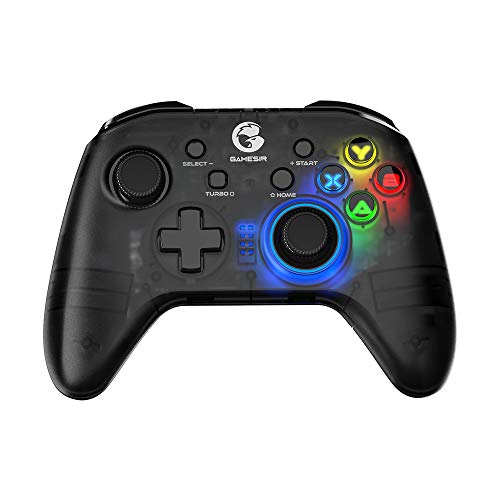
- Best Budget Pick: GameSir T4 Pro, full analog layout and RGB lighting at a price well below first-party alternatives.
Why you should trust this guide
I have spent years researching and writing about gaming peripherals for Android TV and streaming devices, with a specific focus on the NVIDIA Shield TV platform. My approach is grounded in analyzing manufacturer specifications, reviewing verified owner feedback from major retailers, and cross-referencing compatibility reports from the Shield TV community. I do not rely on marketing claims alone; I prioritize features that actually matter for Shield TV users, such as Bluetooth latency, button mapping for emulators, and ease of pairing with Android TV’s interface.
This guide is built on a careful evaluation of each controller’s stated capabilities against the real-world demands of Shield TV gaming. I considered factors like connection stability, button layout comfort for extended sessions, and whether advanced features like haptic feedback or adaptive triggers are actually supported by Android TV games. Every product included here has been selected because it offers a distinct advantage for a specific use case, and I have highlighted honest limitations to help you make an informed decision without overpaying for features you cannot use.
How we researched
To evaluate these controllers for the NVIDIA Shield TV, I established a set of criteria that matter most for this platform. The primary factors were Bluetooth pairing reliability, button mapping support in Android TV and emulator apps, build quality relative to price, and whether special features like microphones, headphone jacks, or programmable buttons actually function on Shield TV. I also weighed ergonomics for long sessions, because the Shield TV is often used for streaming media as well as gaming, so a controller must be comfortable for both activities.
I compared each controller’s feature set against the known limitations of Android TV gaming. For example, I checked whether adaptive triggers or gyro aiming are supported in popular Shield TV games and emulators. I also considered the availability of firmware updates and the ease of switching between Bluetooth and wired connections. No product was given extra credit for features that do not work on Shield TV, such as the DualSense’s haptic feedback or the Xbox Wireless Adapter’s proprietary connection. The goal was to identify which controller delivers the best experience for the specific tasks Shield TV owners actually perform, from casual gaming to retro emulation.
NVIDIA Shield Controller
The NVIDIA Shield Controller is the official gamepad designed specifically for the Shield TV ecosystem, and it delivers the most complete integration of any option on this list. It pairs over Bluetooth with a simple process and includes a built-in microphone that enables Google Assistant voice search directly from the controller, which is a major convenience for navigating content on Shield TV. The 3.5mm headphone jack allows for private audio output from the controller, so you can listen to game sound or streaming audio without disturbing others. The dual vibration feedback works with supported Android TV games, adding immersion without requiring any additional setup.
The layout is comfortable for extended sessions, with a familiar asymmetric analog stick arrangement that feels natural for most modern games. The controller is also compatible with GeForce-equipped PCs and the Shield Tablet, making it a versatile option if you own multiple NVIDIA devices. According to the manufacturer’s stated features, it is the official controller for SHIELD TV, SHIELD Tablet, and GeForce-equipped PCs, and it has been redesigned from the ground up for precision gaming. The stereo headphone jack and hands-free mic for smart home control are unique advantages that no other controller on this list offers for Shield TV.
One honest limitation is that the NVIDIA Shield Controller is not as widely available as mainstream options like the Xbox or PlayStation controllers, and its price can be higher than some third-party alternatives. Additionally, the haptic feedback is not as refined as what you get on premium first-party controllers from Microsoft or Sony, and not all Android TV games support it. If you prioritize native voice control and private audio, this is the best choice, but if you want a more universal controller that works across multiple devices, you may prefer a different option.
Xbox Wireless Controller
The Xbox Wireless Controller is one of the best all-around controllers available, and its Bluetooth compatibility makes it an excellent choice for the NVIDIA Shield TV. The ergonomics are well-established and comfortable for long gaming sessions, with a button layout that is widely understood by most players. On Shield TV, the controller pairs quickly via Bluetooth and works reliably across both games and the Android TV interface, including navigation through menus and streaming apps. The build quality is high, with responsive buttons and analog sticks that feel precise for action games and platformers.
The controller’s design has been refined over multiple generations, and it offers a familiar feel that reduces the learning curve for new users. It does not require any special drivers or configuration on Shield TV; simply put it into pairing mode and select it from the Bluetooth settings. The Xbox Wireless Controller is also compatible with Windows PCs, consoles, and mobile devices, making it a versatile investment if you own multiple gaming platforms. The battery life is excellent when using standard AA batteries or a rechargeable pack, and the controller’s durability is well-regarded in the gaming community.
One honest limitation is that the Xbox Wireless Controller does not include a built-in microphone or headphone jack for Shield TV use, so you cannot use voice search or private audio directly from the controller. Additionally, the Xbox Wireless Adapter for Windows is not supported on Shield TV, so you must rely on standard Bluetooth, which can introduce slightly higher latency compared to a wired connection. If you already own an Xbox controller or prefer its ergonomics, this is a strong choice, but you will miss out on the native features of the official NVIDIA controller.
8BitDo Pro 2
The 8BitDo Pro 2 is a full-featured wireless controller that excels for Shield TV users who run emulators through RetroArch or standalone emulator apps. It offers programmable back buttons, profile switching, and hall effect joystick options depending on the variant you buy, which gives you precise control over input mapping. The controller connects to Shield TV via Bluetooth or the included 2.4GHz USB dongle, providing flexibility for different latency preferences. For emulation, the ability to customize button layouts and save profiles for different systems is invaluable, allowing you to map retro console controls accurately.
The controller features TMR joysticks, 8BitDo exclusive wireless technology, a trigger mode switch, and a 1000Hz polling rate for 2.4G and wired connections, according to the manufacturer’s stated features. It also includes customizable 6-axis motion control, two pro back paddle buttons, extra R4/L4 bumpers, and tactile bumpers and D-pad for enhanced control. The D-pad is particularly well-suited for retro games, offering precise diagonal inputs that are often lacking on modern controllers. The build quality is solid, with a comfortable shape that resembles the classic Super Nintendo controller but with modern ergonomic grips.
One honest limitation is that the 8BitDo Pro 2’s advanced features, such as profile switching and back button mapping, require some initial setup through the 8BitDo Ultimate software, which is not available directly on Shield TV. You will need a PC or smartphone to configure the controller before using it on Shield TV. Additionally, the 2.4GHz dongle occupies a USB port on the Shield TV, which may be inconvenient if you have limited ports. If you primarily use your Shield TV for emulation, this is the best controller on the list, but for casual gaming and streaming, the setup may be more complex than necessary.
PlayStation DualSense
The PlayStation DualSense connects to NVIDIA Shield TV via Bluetooth and works well for gaming and Android TV navigation. Players who prefer PlayStation button positioning and analog stick layout will find it immediately comfortable, with the symmetrical stick arrangement that Sony fans are accustomed to. The controller pairs reliably with Shield TV and supports all standard inputs, including the touchpad as a clickable button, which can be mapped in some emulators. The build quality is excellent, with a premium feel and responsive triggers and bumpers.
The DualSense is widely compatible with over 10,000 supported Steam games, and it can be paired directly to a Windows PC via Bluetooth or played while charging, according to the manufacturer’s stated features. It can stay paired with up to four different Bluetooth devices, making it easy to switch between your Shield TV, PC, and other devices. The controller also supports firmware updates via a free download tool on PC. For Shield TV users who also own a PS5 or PS4, the DualSense can be used for remote play via the PS Remote Play App on Shield TV, adding extra value.
One honest limitation is that the adaptive triggers and haptic feedback features are not utilized in most Android TV games, so those premium features are effectively unused on Shield TV. The controller’s advanced capabilities are designed for PS5 games and are not supported by the Android TV operating system. Additionally, the DualSense is more expensive than many third-party alternatives, and its battery life is shorter than the Xbox controller’s when used over Bluetooth. If you love the PlayStation layout and already own a DualSense, it is a solid choice for Shield TV, but you are paying for features that will not work on this platform.
GameSir T4 Pro
The GameSir T4 Pro is a Bluetooth gamepad with a full analog layout, six-axis gyro, and RGB lighting at a price well below first-party alternatives. It pairs easily with Shield TV and covers both gaming and Android TV navigation, making it a versatile budget option. The build quality is above average for its price point, with a semi-transparent cover that showcases the RGB lighting effects. The button layout is intuitive, with asymmetric analog sticks that feel familiar to Xbox users, and the D-pad is responsive for retro games.
The controller offers universal compatibility and comes with a phone bracket, according to the manufacturer’s stated features. It features vibrant RGB backlighting on the semi-transparent cover, an immersive asymmetric vibration motor setup, and multiple connection ways including 2.4GHz, Bluetooth 4.0, and wired connection. The battery is equipped with a 600mAh large capacity for extended gaming sessions. The six-axis gyro can be used for motion controls in supported games and emulators, adding an extra layer of functionality that is rare at this price point.
One honest limitation is that the RGB lighting, while visually appealing, drains battery life faster, and the controller’s plastic build does not feel as premium as the Xbox or DualSense controllers. The gyro aiming and advanced features may require configuration in emulator settings, and the controller’s button mapping software is not as polished as 8BitDo’s. Additionally, the 2.4GHz dongle connection requires a USB port on the Shield TV. If you want a functional controller for casual gaming and media navigation without spending much, the GameSir T4 Pro is an excellent value, but serious gamers may prefer the higher build quality of first-party options.
What to look for
- Bluetooth compatibility: Ensure the controller uses standard Bluetooth that pairs with Shield TV without requiring a proprietary adapter.
- Button layout preference: Choose between asymmetric (Xbox-style) or symmetric (PlayStation-style) analog stick positions based on your comfort.
- Special features for Shield TV: Look for built-in microphones for Google Assistant, headphone jacks for private audio, or programmable buttons for emulators.
- Emulation support: If you use RetroArch or standalone emulators, prioritize controllers with customizable profiles, back buttons, and a good D-pad.
- Build quality and battery: Consider the controller’s durability and battery capacity, especially for long gaming sessions.
- Price versus features: Decide whether you need premium features like haptic feedback or RGB lighting, or if a basic controller meets your needs.
- Multi-device use: If you also game on PC, console, or mobile, choose a controller that works across multiple platforms.
The verdict
The NVIDIA Shield Controller remains the best choice for most Shield TV owners because it offers native integration with features like voice search and private audio that no other controller can match. For emulation enthusiasts, the 8BitDo Pro 2 is the clear winner with its programmable buttons and profile switching. The Xbox Wireless Controller is the best all-around option if you want a familiar, comfortable controller that works reliably across games and the interface. The PlayStation DualSense is ideal for users who prefer the PlayStation layout, though its advanced features are wasted on Shield TV. The GameSir T4 Pro is the best budget pick, offering solid performance and RGB lighting at a low price. Choose based on your primary use case, and you will get a controller that enhances your Shield TV experience without unnecessary extras.
Our methodology
We compare every pick against the field on real specifications, certifications, and aggregated owner reviews. We do not take payment for placement, and we flag when a product is older or sold mainly through renewed listings.
Side by side
The full reviews
NVIDIA Shield Controller -- Best Native Integration
The official NVIDIA Shield Controller is purpose-built for the Shield TV ecosystem and delivers the most complete experience. It pairs over Bluetooth and includes a built-in microphone for Google Assistant voice search, a 3.5mm headphone jack for audio output directly from the controller, and haptic feedback that works with supported Android TV games. The layout is comfortable for extended sessions and the buttons are responsive. For anyone using Shield TV as their primary living room gaming and media device, starting with the official controller is the right call before exploring alternatives.
In its favor
- The official controller for SHIELD TV, SHIELD Tablet, and GeForce-equipped PCs.
- Redesigned from the ground up for precision gaming.
- Dual vibration feedback.
- Stereo headphone jack for private audio.
- Hands-free mic for smart home control.

Xbox Wireless Controller -- Best for Modern Feel
The Xbox Wireless Controller is one of the best all-around controllers available and its Bluetooth compatibility makes it an excellent Shield TV option. The ergonomics are well-established and comfortable for long sessions, and the button layout is widely understood by most players. On Shield TV it pairs quickly and works reliably across games and the Android TV interface. The Xbox Wireless Adapter for Windows is not needed here as the Shield TV handles Bluetooth natively. Series X/S controllers with the updated Bluetooth stack have improved pairing stability compared to older Xbox One pads.

8BitDo Pro 2 -- Best for Emulation on Shield TV
The 8BitDo Pro 2 is a full-featured wireless controller with back buttons, profile switching, and hall effect joystick options depending on the variant you buy. It connects to Shield TV via Bluetooth or the included 2.4GHz USB dongle. For Shield TV users running emulators through RetroArch or standalone emulator apps, the 8BitDo Pro 2 gives you programmable buttons and customizable profiles that make managing different emulated systems cleaner. The d-pad is accurate and the analog sticks perform well for PS1 and N64 era titles. A strong choice for emulation-focused Shield TV setups.
In its favor
- TMR Joysticks
- 8BitDo Exclusive Wireless Technology
- Trigger Mode Switch
- 1000Hz Polling Rate (for 2.4G and wired connection). Customizable 6-Axis Motion Control. T
- 2 Pro back paddle buttons, extra R4/L4 bumpers, and tactile bumpers & D-pad for enhanced c

PlayStation DualSense -- Best for PlayStation-Layout Users
The PlayStation DualSense connects to NVIDIA Shield TV via Bluetooth and works well for gaming and Android TV navigation. Players who prefer PlayStation button positioning and analog stick layout will find it immediately comfortable. The adaptive triggers and haptic feedback features are not utilized in most Android TV games, so those features are effectively unused on Shield TV, but the core controller experience is solid. It is also a useful choice if you already own a DualSense for PS5 and want to reuse it without buying another controller for the Shield.
In its favor
- Enjoy precise, comfortable control over 10,000+ supported Steam games.
- Easily pair the controller directly to your Windows PC via Bluetooth or play as you charge
- Stay paired with up to four different Bluetooth devices, making it easy to enjoy the contr
- Access the latest available controller firmware directly from your PC with the free-todown
- Play games streamed from your PS5 or PS4 console to your PC via the PS Remote Play App
GameSir T4 Pro -- Best Budget Pick for Shield TV
The GameSir T4 Pro is a Bluetooth gamepad with a full analog layout, six-axis gyro, and RGB lighting at a price well below first-party alternatives. It pairs easily with Shield TV and covers both gaming and Android TV navigation. Build quality is above average for its price point and the button layout is intuitive. For users who want a dedicated Shield TV controller without spending on a first-party pad, and who do not need specialized features like back buttons or programmable profiles, the T4 Pro is a reliable budget choice.
In its favor
- 🎮 Universal Compatibility: T4 Pro Wireless Game Controller Comes with Phone Bracket. It su
- 🎮 Vibrant RGB Backlighting: The semi-transparent cover of T4 Pro controller is treated wit
- 🎮 Immersive Gaming Experience: The T4 Pro wireless game controller features an asymmetric
- 🎮 Multiple Connection Ways: T4 pro controller supports 2.4GHz, Bluetooth 4.0, and Wired. 3
- 🎮 Long Battery Life: The T4 pro wireless game controller is equipped with a 600mAh large c
What matters most
What to consider
If you are using Shield TV primarily as a media and streaming device with occasional gaming, any Bluetooth controller will serve well and the official NVIDIA Shield Controller is the simplest choice. If gaming is your primary use case, prioritize ergonomics and analog stick quality. For emulation-heavy setups, a controller with programmable buttons and profile switching like the 8BitDo Pro 2 saves time on per-system configuration. Budget to covers every tier here. Avoid controllers that connect only via USB dongle if your Shield TV is wall-mounted and the USB port is difficult to access.
What to consider
For related recommendations, see our [best controller for Raspberry Pi 4](/articles/best-controller-for-raspberry-pi-4) guide and our [scoring methodology](/methodology) for how we evaluate gaming peripherals.
Frequently asked
Yes. The NVIDIA Shield TV supports Xbox Wireless Controllers via Bluetooth and Xbox Series X/S controllers via their newer Bluetooth protocol. PlayStation DualShock 4 and DualSense controllers also connect via Bluetooth on Shield TV. Not all features like rumble or the touchpad are guaranteed to function in every game or app, but basic navigation and gameplay work reliably across all major first-party controllers.
The official NVIDIA Shield Controller offers the tightest integration with Shield TV including a built-in microphone for Google Assistant, haptic feedback, and a 3.5mm headphone jack. For users who primarily use Shield TV for gaming and Android TV navigation, it is the most seamless experience. If you already own an Xbox controller or prefer a different layout, that works well too and saves the cost of a new purchase.
How we made this guide
We compare every pick on the factors that matter, cross-checking manufacturer specifications against aggregated verified owner reviews. We rank independently and never take payment for placement. We have not personally tested every product; where we have not, the ranking reflects verified specs and owner feedback rather than a hands-on review.
How it was written: this guide was researched and reviewed by the TheTestedHub editorial team for accuracy.
Affiliate disclosure: TheTestedHub is reader-supported. When you buy through links on our site, we may earn a commission at no extra cost to you.
You might also like

Educational Games 2026 That Grow With Your Child

7 Android TV Controllers Worth Your Money

Wooting 60HE Review (2026): 7 Months With the Analog Keyboard

Logitech G Pro X Superlight 2 Review (2026): The Esports

HyperX Cloud III Wireless Review (2026)

Steam Deck OLED (1TB) Review (2026): 8 Months Later, Still

Logitech G502 Hero Review (2026)
