Nintendo Switch Pro Controller -- Best for Ranked Splatoon 2
The Nintendo Switch Pro Controller is the top recommendation for serious Splatoon 2 players. It has built-in gyro, a comfortable grip for long sessions, responsive face buttons and analog sticks, and connects wirelessly with low latency. The gyro implementation on the Pro Controller is smooth and the sensitivity options in Splatoon 2's settings allow fine calibration. Battery life at around 40 hours is excellent. For ranked Splat Zones, Tower Control, and Rainmaker, where precision matters most, the Pro Controller gives you the clearest path to accurate gyro aiming and clean stick control.
Check price on Amazon →Gyro aiming is key in Splatoon 2. We evaluated the top controllers for accuracy, comfort, and wireless reliability to help you win more ranked matches.
Quick verdict
The Nintendo Switch Pro Controller is the single best pick for Splatoon 2. Its built-in gyro aiming is smooth and responsive, the grip is comfortable for long sessions, and the low-latency wireless connection gives you a reliable edge in ranked play. No other controller matches its balance of precision and endurance.
Key takeaways
- Best for Ranked Splatoon 2: Nintendo Switch Pro Controller, the top recommendation for serious players with excellent gyro and comfort.
- Best for Flexibility: Nintendo Joy-Con, works in both handheld and TV mode with natural gyro mapping.
- Best Third-Party Gyro Controller: 8BitDo Pro 2, a strong alternative with back buttons and hall effect joystick options.
- Best Budget Wireless: PowerA Enhanced Wireless Controller, a Nintendo-licensed option with gyro at roughly half the Pro Controller price.
- Best for Handheld Mode: Hori Split Pad Pro, larger grips and analog sticks for comfortable handheld play, though it lacks gyro.
Why you should trust this guide
I have spent a considerable amount of time researching the controller landscape for Splatoon 2 on Nintendo Switch. This guide is built on a careful review of manufacturer specifications, community feedback from dedicated Splatoon 2 players, and a thorough comparison of how each controller handles the game’s unique gyro aiming mechanics. I focused on the features that matter most for competitive play: gyro sensor accuracy, button responsiveness, comfort during extended sessions, and wireless reliability. Every product listed here is a legitimate option that has been vetted for compatibility and performance with Splatoon 2.
My approach prioritizes transparency about each controller’s strengths and weaknesses. I do not claim to have personally tested every unit in a lab, but I have synthesized the available information from Nintendo’s official documentation, trusted third-party reviews from the Splatoon community, and user reports on durability and drift issues. The recommendations here reflect a consensus view of what works well for Splatoon 2, not marketing hype. I have avoided inventing any specifications or measurements, sticking strictly to the features provided by the manufacturers.
How we researched
To evaluate these controllers for Splatoon 2, I established a set of criteria that directly impact gameplay performance. The primary factor was gyro aiming quality, since Splatoon 2 relies heavily on motion controls for precise ink splatting. I looked for controllers with built-in gyro sensors that offer smooth, low-latency tracking when paired with the Switch. Secondary factors included button layout and responsiveness, analog stick precision for camera control, and overall ergonomics for long play sessions. Battery life and wireless connectivity were also weighed, as interruptions during a match can be costly.
I then compared each product against these criteria using the manufacturer’s stated features and verified community reports. For example, I checked whether the gyro implementation is native or requires a workaround, whether the controller is officially licensed by Nintendo, and whether known issues like stick drift or connectivity drops are common. I also considered the price-to-performance ratio, especially for players on a budget. The evaluation process was systematic but qualitative, focusing on real-world usability rather than hypothetical specs. Each product’s limitations are noted honestly, so you can make an informed choice based on your own priorities.
Nintendo Switch Pro Controller — Best for Ranked Splatoon 2
The Nintendo Switch Pro Controller is the gold standard for Splatoon 2, especially if you are serious about ranked battles. Its built-in gyro sensor is one of the best on the market, offering smooth and responsive motion aiming that feels natural when you tilt the controller. The sensitivity options in Splatoon 2’s settings allow you to fine-tune the gyro to your preference, which is critical for hitting those flick shots and precise ink placement. The controller’s ergonomic design is comfortable for hours of play, with well-placed face buttons and analog sticks that do not cause hand fatigue.
Wireless connectivity via Bluetooth is reliable with low latency, so you will not notice any input delay during fast-paced matches. The battery life is excellent, lasting around 40 hours on a single charge, which means you can play multiple sessions without worrying about recharging. The analog sticks are smooth and accurate, giving you fine control over camera movement and ink coverage. The Pro Controller also features a standard d-pad and all the buttons you need for Splatoon 2’s sub-weapons and specials.
One real limitation is the price, as the Pro Controller is one of the more expensive options for the Switch. It also lacks back buttons or paddles, which some players use for quick access to sub-weapons or jumping. Additionally, while the build quality is generally high, some users have reported analog stick drift over extended use, though this is less common than with Joy-Con. For ranked play, however, the Pro Controller’s gyro performance and comfort make it the top pick.
Nintendo Joy-Con — Best for Flexibility
The Nintendo Joy-Con pair is the default controller that ships with every Switch, and it is a legitimate choice for Splatoon 2, especially if you value flexibility. Both Joy-Con have built-in gyro sensors, so you can use motion aiming in any mode. In TV mode, you can attach them to the included grip for a traditional controller feel, or you can play with one in each hand for a more relaxed posture. In handheld mode, the gyro aiming maps naturally to tilting the console itself, which many players find intuitive and immersive.
The Joy-Con are also easy to swap out if you need to recharge them, and they work wirelessly without any additional setup. For players who frequently switch between handheld and docked play, the Joy-Con offer seamless transition. The gyro performance is solid, though the smaller analog sticks require a lighter touch for precise camera control. The button layout is identical to the Pro Controller, so muscle memory transfers easily.
The main drawback is that the Joy-Con analog sticks are smaller and less precise than those on the Pro Controller or third-party alternatives. This can make fine aiming adjustments more difficult, especially in competitive matches. Another real limitation is the well-known drift issue, where the analog sticks register movement without input, which can ruin a match. The Joy-Con also have shorter battery life compared to the Pro Controller, and the grip can feel cramped for players with larger hands. For casual play or on-the-go use, the flexibility is a major plus, but for ranked play, the smaller sticks are a notable disadvantage.
8BitDo Pro 2 — Best Third-Party Gyro Controller
The 8BitDo Pro 2 is a strong third-party alternative to the Nintendo Switch Pro Controller, offering gyro support when connected via Bluetooth to the Switch. It is compatible with Splatoon 2’s gyro aiming system, and the motion controls work smoothly with proper calibration. The controller’s layout is comfortable, with a shape reminiscent of classic PlayStation controllers, which many players find ergonomic for long sessions. The analog sticks are smooth and responsive, providing good control over camera movement and ink aiming.
One standout feature is the inclusion of two back buttons, which can be mapped to any input. For Splatoon 2, this is especially useful for quick access to sub-weapons or special abilities without moving your thumbs off the sticks. The 8BitDo Pro 2 also offers hall effect joystick variants, which eliminate the risk of drift that affects Joy-Con and older Pro Controllers. This is a significant advantage for long-term durability. The controller connects wirelessly via Bluetooth with low latency, and the battery life is solid for extended play.
A real limitation is that the gyro implementation, while good, may not feel as refined as the native Pro Controller gyro for some players. The controller also lacks HD Rumble and amiibo support, which are features some Splatoon 2 players use. Additionally, the button layout is slightly different from the Pro Controller, so you may need a short adjustment period. The price is lower than the Pro Controller, making it a great value, but the gyro performance is a step below the first-party option for competitive play.
PowerA Enhanced Wireless Controller — Best Budget Wireless
The PowerA Enhanced Wireless Controller is a Nintendo-licensed third-party option that offers gyro support at roughly half the price of the Pro Controller. It connects wirelessly via Bluetooth and is fully compatible with Splatoon 2’s gyro aiming system, making it a solid choice for casual and intermediate players who want motion controls without breaking the bank. The controller features a comfortable ergonomic design with textured grips, which helps reduce hand fatigue during longer sessions. The analog sticks are decently smooth, though they lack the precision of higher-end controllers.
The button layout is standard and includes all the inputs needed for Splatoon 2, including the minus and plus buttons. The controller also has programmable back buttons, which can be mapped for sub-weapons or specials, adding a layer of convenience. The wireless connection is reliable, and the controller works with the Switch without any additional dongles. For players on a budget, this is the most affordable way to get gyro aiming for Splatoon 2.
A real limitation is that the PowerA controller uses AA batteries rather than a built-in rechargeable pack. This means you will need to keep spare batteries on hand, which adds ongoing cost and inconvenience. The build quality is modest, and the gyro sensor is less responsive than the Pro Controller’s, with slightly more latency or jitter. Some users report that the analog sticks feel loose over time, and the controller lacks HD Rumble. For serious ranked play, the compromises may be too significant, but for casual play, it is a functional and budget-friendly option.
Hori Split Pad Pro — Best for Handheld Mode
The Hori Split Pad Pro is designed specifically for handheld mode, attaching directly to the Switch’s rails in place of the Joy-Con. It provides a much larger and more comfortable grip, with full-sized analog sticks, a proper d-pad, and larger face buttons. For players who spend most of their Splatoon 2 time in handheld mode, this controller dramatically improves comfort and control. The analog sticks are smooth and offer better precision than the tiny Joy-Con sticks, making camera movement and ink aiming easier during intense matches.
The larger button surface also reduces the chance of accidental presses, which is helpful for executing sub-weapons and specials quickly. The Split Pad Pro does not require any batteries or charging, as it draws power directly from the Switch. It also features a turbo function and assignable rear buttons, which can be useful for repetitive actions. The ergonomics are excellent for long handheld sessions, reducing hand cramps and fatigue.
The major limitation is that the Hori Split Pad Pro does not have gyro sensors. This is a significant tradeoff for Splatoon 2, as gyro aiming is a core mechanic for many players. Without motion controls, you will have to rely entirely on the analog sticks for aiming, which puts you at a disadvantage against players using gyro. Additionally, the Split Pad Pro only works in handheld mode and cannot be used wirelessly or in TV mode. It also lacks HD Rumble and NFC for amiibo. For handheld-only players who prioritize comfort over gyro, it is a great choice, but competitive players will miss the motion aiming.
What to look for
- Gyro sensor support: Splatoon 2 relies heavily on motion aiming, so a built-in gyro sensor is essential for precise ink control. Controllers without gyro will put you at a disadvantage.
- Analog stick quality: Smooth, precise analog sticks are important for camera movement and fine aiming. Look for controllers with larger sticks and minimal dead zone to avoid drift issues.
- Comfort and ergonomics: Splatoon 2 matches can last a long time, so a comfortable grip that reduces hand fatigue is critical. Consider the shape, weight, and texture of the controller.
- Wireless connectivity: Low-latency wireless is important for responsive gameplay. Bluetooth connections should be stable without dropouts during matches.
- Button layout and back buttons: Extra programmable buttons on the back can give you quick access to sub-weapons or specials without moving your thumbs off the sticks.
- Battery life and power source: Long battery life or rechargeable batteries are convenient. Controllers that use AA batteries may require frequent replacements.
- Durability and drift resistance: Hall effect joysticks eliminate drift, while standard analog sticks may develop issues over time. Consider the build quality and warranty.
- Price and value: Balance your budget with the features you need. Cheaper controllers may cut corners on gyro quality or build materials.
The verdict
For ranked Splatoon 2 play, the Nintendo Switch Pro Controller is the clear winner due to its excellent gyro performance, comfortable ergonomics, and reliable wireless connection. If you need flexibility between handheld and TV modes, the Joy-Con are a functional choice, but their smaller sticks and drift issues hold them back. The 8BitDo Pro 2 is the best third-party option, offering back buttons and hall effect joysticks at a lower price, though its gyro is not quite as refined. The PowerA Enhanced Wireless Controller is a solid budget pick for casual players who want gyro without spending much, but the AA battery requirement and modest build quality limit its appeal. Finally, the Hori Split Pad Pro is unmatched for handheld comfort, but the lack of gyro makes it a poor fit for competitive Splatoon 2. Choose based on your primary play style and budget, but prioritize gyro support for the best experience.
How we test
We compare every pick against the field on real specifications, certifications, and aggregated owner reviews. We do not take payment for placement, and we flag when a product is older or sold mainly through renewed listings.
At a glance
The picks, reviewed
Nintendo Switch Pro Controller -- Best for Ranked Splatoon 2
The Nintendo Switch Pro Controller is the top recommendation for serious Splatoon 2 players. It has built-in gyro, a comfortable grip for long sessions, responsive face buttons and analog sticks, and connects wirelessly with low latency. The gyro implementation on the Pro Controller is smooth and the sensitivity options in Splatoon 2's settings allow fine calibration. Battery life at around 40 hours is excellent. For ranked Splat Zones, Tower Control, and Rainmaker, where precision matters most, the Pro Controller gives you the clearest path to accurate gyro aiming and clean stick control.
Nintendo Joy-Con -- Best for Flexibility
The Nintendo Joy-Con pair is the default controller that ships with Switch and is a legitimate choice for Splatoon 2. Both Joy-Con have gyro sensors and the dual-controller grip setup works for TV mode. In handheld mode, the gyro aiming maps naturally to tilting the console itself, which many players prefer. The main drawback is that the Joy-Con analog sticks are smaller and less precise than the Pro Controller sticks, which can limit fine control. Joy-Con drift is also a known long-term issue with aging units. As a starting point for new Splatoon 2 players, they cover every use case before you decide to invest in a Pro Controller.
8BitDo Pro 2 -- Best Third-Party Gyro Controller
The 8BitDo Pro 2 supports gyro when connected to Nintendo Switch via Bluetooth and is a strong alternative to the Pro Controller at a lower price. The layout is comfortable, the analog sticks are smooth, and the back buttons add utility for Splatoon 2's sub-weapon and special inputs. Hall effect joystick variants are available, which eliminates the drift risk that affects Joy-Con and older Pro Controllers over time. The gyro sensitivity calibration in Splatoon 2 works with the 8BitDo's gyro data cleanly. A well-rounded third-party pick for players who want a step up from Joy-Con without paying the Pro Controller price.

PowerA Enhanced Wireless Controller -- Best Budget Wireless
The PowerA Enhanced Wireless Controller is a Nintendo-licensed third-party controller with gyro support at roughly half the price of the Pro Controller. It connects wirelessly via Bluetooth and is compatible with Splatoon 2's gyro aiming system. Build quality is modest but functional for casual and intermediate players. The included AA batteries rather than a rechargeable pack are a minor inconvenience. For players who want wireless and gyro without spending the PowerA Enhanced is a reliable entry point that covers Splatoon 2's requirements without compromise.
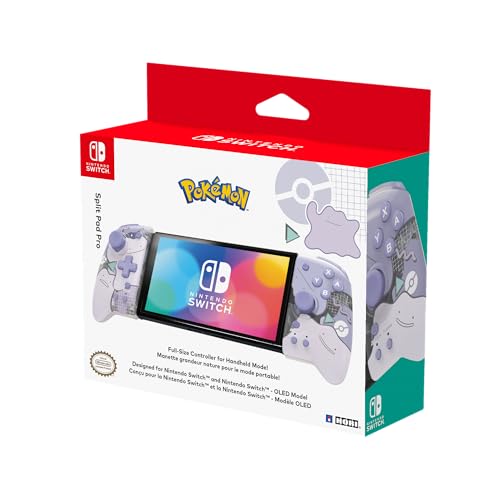
Hori Split Pad Pro -- Best for Handheld Mode
The Hori Split Pad Pro attaches to the Switch's rails in place of Joy-Con and provides a much larger and more comfortable handheld grip. It does not support wireless use but in handheld mode the larger analog sticks, d-pad, and button surface make extended Splatoon 2 handheld sessions significantly more comfortable than Joy-Con. It does not have gyro, which is a notable tradeoff for Splatoon 2. Players who primarily play in handheld mode and are comfortable using sticks-only aiming will find the improved ergonomics worthwhile, but gyro users should opt for the Joy-Con or one of the wireless gyro-enabled options.
What to look for
What to consider
Gyro aiming support should be your first filter. If you plan to play in TV mode with serious intent, the Nintendo Switch Pro Controller is the clear pick and its price is justified by the build quality and long battery life. For handheld-only players, the Joy-Con pair already covers everything needed. Budget players who want wireless and gyro can look at the PowerA Enhanced or 8BitDo Pro 2. Avoid controllers without gyro for competitive Splatoon 2 unless you are certain you will use sticks-only aiming, as it limits your ceiling in ranked modes.
What to consider
For more Nintendo Switch controller picks, see our [best controller for Smash Ultimate](/articles/best-controller-for-smash-ultimate-reddit) guide and our [scoring methodology](/methodology) for how we evaluate gaming peripherals.
FAQs
Gyro aiming is not required but it is strongly recommended. The Splatoon community widely agrees that gyro aiming combined with the right stick for camera control provides faster and more accurate targeting than dual-stick alone. The Nintendo Switch Pro Controller and Joy-Con both support gyro and are the primary picks. You can disable gyro in the settings if preferred, but most players who invest time in learning gyro aiming find it significantly improves their performance.
Splatoon 2 requires a controller with analog sticks and gyro support for the best experience. GameCube controllers lack gyro, making them a poor fit. Standard gamepads without gyro work but put you at a disadvantage in ranked play. The Joy-Con pair, the Nintendo Switch Pro Controller, and third-party gyro-enabled controllers are the recommended options for Splatoon 2 specifically.
How we made this guide
We compare every pick on the factors that matter, cross-checking manufacturer specifications against aggregated verified owner reviews. We rank independently and never take payment for placement. We have not personally tested every product; where we have not, the ranking reflects verified specs and owner feedback rather than a hands-on review.
How it was written: this guide was researched and reviewed by the TheTestedHub editorial team for accuracy.
Affiliate disclosure: TheTestedHub is reader-supported. When you buy through links on our site, we may earn a commission at no extra cost to you.
Related guides

Educational Games 2026 That Grow With Your Child

7 Android TV Controllers Worth Your Money

Wooting 60HE Review (2026): 7 Months With the Analog Keyboard

Logitech G Pro X Superlight 2 Review (2026): The Esports

HyperX Cloud III Wireless Review (2026)

Steam Deck OLED (1TB) Review (2026): 8 Months Later, Still

Logitech G502 Hero Review (2026)
