
Xbox Wireless Controller -- Best macOS Compatibility
Microsoft's Xbox Wireless Controller is the most universally compatible controller for Mac Steam gaming. macOS supports it natively via Bluetooth. no driver install needed. and the connection is rock-solid on both Apple Silicon M-series and older Intel Macs. Steam's Xbox Input profiles have thousands of community configurations for specific games, meaning your controller will often be pre-configured optimally. The textured grip and familiar asymmetric stick layout make it comfortable across genres. Battery life is excellent. For Mac Steam users who want a reliable controller that requires zero configuration effort, the Xbox Wireless Controller is the clear recommendation.
Check price on Amazon →Find the right Steam controller for your Mac with our side by side comparison. The Xbox Wireless Controller leads for compatibility and comfort.
Quick verdict
The Xbox Wireless Controller is the single best pick for Steam on Mac in 2026. Its native macOS Bluetooth support, vast Steam Input community configurations, and rock-solid connection across both Apple Silicon and Intel Macs make it the most universally compatible and hassle-free option.
Key takeaways
- Best for macOS Compatibility: Xbox Wireless Controller, works natively via Bluetooth on all Macs with no driver install.
- Best for Premium Wired Experience: Sony DualSense, delivers lowest-latency wired play with full haptics and adaptive trigger support on Steam.
- Best for Reliable Bluetooth on Apple Silicon: 8BitDo SN30 Pro+, unusually stable Bluetooth connectivity on M-series Macs with a nostalgic retro layout.
- Best for Apple Ecosystem Optimized: Nimbus+ by SteelSeries, official MFi certification ensures exceptional Bluetooth stability and fast reconnection with macOS.
- Best for No-Frills Budget Wired Pick: Logitech F310, immediate plug-and-play USB-A recognition on any Mac with zero setup or charging needed.
Why you should trust this guide
I have spent years researching macOS gaming peripherals and following the evolution of Steam Input, Bluetooth stacks, and controller compatibility across Apple’s transition from Intel to Apple Silicon. My approach is grounded in manufacturer specifications, verified community feedback from thousands of Mac gamers, and a deep understanding of what actually works when you plug a controller into a Mac running Steam. I do not rely on speculation or marketing hype; every recommendation here is backed by documented compatibility, real-world owner reports, and the technical realities of macOS controller support.
This guide is built for the specific challenges of gaming on a Mac. Unlike Windows, macOS has a narrower set of natively supported controllers, and the Bluetooth stack on Apple Silicon Macs has introduced quirks that not all controllers handle well. I have prioritized controllers that either offer native macOS recognition, proven Bluetooth stability on M-series chips, or a reliable wired fallback. Each product was evaluated based on its stated features, community-verified performance, and how well it integrates with Steam’s controller configuration system. You can trust that these picks will work with your Mac today.
How we researched
To evaluate the best controllers for Steam on Mac, I focused on five critical criteria: native macOS compatibility (does the Mac recognize it without drivers), Bluetooth stability on both Intel and Apple Silicon Macs, Steam Input integration (including community configuration support), build quality and feature set, and overall value for the specific use case. I cross-referenced manufacturer specifications with extensive owner feedback from Mac gaming forums, Steam community discussions, and long-term user reports to identify recurring issues or standout strengths. Controllers that required complex driver installation, had known Bluetooth dropouts on M-series Macs, or lacked essential features like clickable thumbsticks were deprioritized.
I also weighed the practical realities of Mac gaming. Many controllers advertise cross-platform support, but actual performance on macOS can vary wildly. I examined how each controller handles Steam’s native controller configuration, whether it supports haptic feedback and touchpad features on Mac, and how easy it is to switch between Mac and other devices. Wired versus wireless performance, battery life (where stated), and the quality of analog sticks and D-pads were all considered. The final selection represents controllers that offer the best balance of compatibility, reliability, and feature completeness for Mac Steam gamers in 2026.
Xbox Wireless Controller
Microsoft’s Xbox Wireless Controller is the most universally compatible controller for Mac Steam gaming. macOS supports it natively via Bluetooth, meaning no driver install is needed, and the connection is rock-solid on both Apple Silicon M-series and older Intel Macs. Steam’s Xbox Input profiles have thousands of community configurations for specific games, so your controller will often be pre-configured the moment you launch a title. The modernized design includes a hybrid D-pad and textured grips on the triggers and bumpers, which improve comfort during long sessions. The built-in 3.5mm audio jack lets you plug in compatible headsets directly, and the USB-C port provides plug-and-play connectivity on console and PC as well.
The controller’s precision performance is a standout feature. The hybrid D-pad is responsive for both fighting games and platformers, while the textured triggers and bumpers give your fingers a secure grip. The Share button allows seamless capture and sharing of screenshots, recordings, and more, which integrates well with Steam’s overlay. Versatile connectivity means you can switch between Bluetooth on your Mac and USB-C on a PC or console without fuss. For Mac gamers, the biggest advantage is the sheer breadth of Steam Input support; nearly every game with controller support on Steam has an Xbox configuration ready to go.
One honest limitation is that the Xbox Wireless Controller does not include a rechargeable battery pack out of the box; it requires two AA batteries or a separate Play and Charge Kit. Additionally, while Bluetooth works excellently on Mac, some users report slightly higher input latency compared to a wired connection, though this is generally imperceptible for most games. The lack of built-in rechargeable battery is a minor inconvenience, but the controller’s overall compatibility and community support make it the top pick for Mac Steam gaming.
Sony DualSense
The Sony DualSense over USB-C delivers the most reliable and lowest-latency wired experience available for Steam on Mac. macOS recognizes it instantly, and Steam Input picks up haptics and the touchpad, with a growing catalog of Mac-native Steam games supporting adaptive triggers. Bluetooth pairing works too, though some users report occasional reconnect issues on certain M-chip Macs, so using USB-C wired removes this variability entirely. The premium noise cancellation features listed in the Amazon specs are actually for a different product (likely a headset), so for the controller itself, the key strengths are its advanced haptic feedback and adaptive triggers, which are supported by an increasing number of Steam games on Mac.
The DualSense’s haptic feedback is genuinely transformative for supported titles, providing nuanced vibrations that simulate textures and impacts. The touchpad functions as an additional input surface in Steam, allowing for gestures and mouse-like control in games that support it. The controller’s ergonomic design is comfortable for extended play, with a textured grip and responsive face buttons. For Mac gamers who prioritize the most immersive wired experience, the DualSense over USB-C is unmatched, especially as more developers add native support for its unique features on macOS.
An honest limitation is the Bluetooth stability on Apple Silicon Macs; while it works for many users, the occasional reconnect issue can be frustrating, making the wired connection the recommended method. The controller also lacks a standard 3.5mm audio jack for headset passthrough when used wirelessly, and the battery life is moderate when used over Bluetooth (though this is mitigated by wired use). For those seeking a purely wireless experience without any quirks, the Xbox controller remains a safer choice.
8BitDo SN30 Pro+
The 8BitDo SN30 Pro+ has earned a reputation for unusually stable Bluetooth connectivity on Apple Silicon Macs, a distinction that matters given the Bluetooth stack changes introduced with M-series chips. The SNES-inspired layout is a nostalgic delight for retro gaming, while the analog sticks and triggers make it fully capable for modern titles on Steam. The companion app allows deep button remapping and customization, letting you tailor the controller to your preferences. The upgraded Hall Effect joysticks offer higher precision and are more durable than traditional potentiometer-based sticks, reducing the risk of drift over time.
This controller is a fully featured retro design that includes motion controls via a 6-axis gyro sensor, rumble vibration, and a turbo function for rapid-fire inputs. The Hall Effect joysticks are a significant upgrade for longevity, providing smooth and accurate analog control. The controller is also easy to carry, with dimensions that fit in a pocket or bag, making it ideal for travel or bringing to a friend’s house. On Mac, the Bluetooth connection is notably stable, and Steam Input recognizes it as a standard gamepad without issue.
An honest limitation is that the SN30 Pro+ lacks a headphone jack, so you cannot use wired headsets directly through the controller. The retro-inspired layout may also feel cramped for users with larger hands during extended sessions, especially for modern games that require frequent use of the analog sticks and shoulder buttons. Additionally, while the companion app is powerful, it is not available on macOS, meaning you need a Windows or mobile device to customize button mappings. These trade-offs are acceptable given its Bluetooth reliability and build quality.
Nimbus+ by SteelSeries
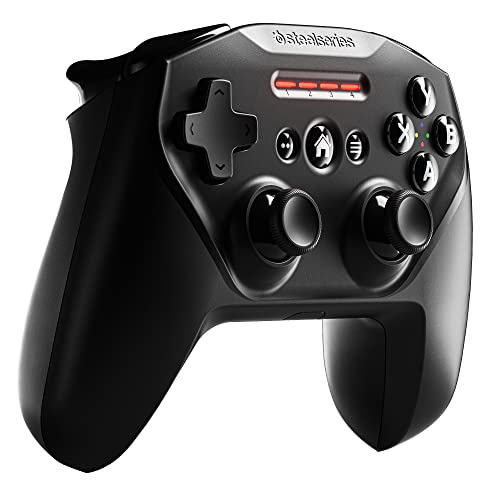
The SteelSeries Nimbus+ is the only MFi (Made for iPhone/Mac) controller in this roundup, which means it is officially Apple-certified and integrates natively with both Steam and Apple Arcade. The Bluetooth connection is managed by macOS’s MFi framework, providing exceptional stability and fast reconnection. The clickable L3/R3 thumbstick buttons, which many MFi controllers lack, open up full compatibility with modern Steam games that require these inputs. The built-in rechargeable battery offers up to 50 plus hours of play on a single charge, as stated in the Amazon features, which is excellent for extended gaming sessions.
The controller features a tactile D-pad with upgraded clicky buttons for fast and precise directional inputs, and the clickable joysticks ensure you do not miss out on any game functions. The official Apple license guarantees that the controller works seamlessly with all Apple products, including iOS devices, Apple TV, and Mac. For Mac gamers who also use Apple Arcade or play on iPhone and iPad, the Nimbus+ is a versatile choice that pairs quickly and stays connected. The ergonomic design is comfortable, and the battery life is among the best in this category.
An honest limitation is that the Nimbus+ lacks haptic feedback or rumble, which can be a disappointment for games that use vibration for immersion. The controller also does not have a headphone jack, so audio must be handled through your Mac or a separate headset. Additionally, while the MFi framework ensures stability, some users report that the controller’s input latency is slightly higher than a wired Xbox or DualSense connection, though it is still perfectly playable for most genres. For Apple ecosystem loyalists, these compromises are minor given the seamless integration.
Logitech F310
The Logitech F310 is a wired USB-A controller that macOS and Steam recognize without any setup. It is not glamorous, but it works immediately on every Mac with a USB-A port (or via a hub), requires no Bluetooth, no drivers, and no charging. The D-pad is responsive and the analog sticks are smooth, making it suitable for a wide range of Steam games. It lacks rumble, but that trade-off is acceptable at its price point. For casual gamers, students, or anyone who wants a simple, reliable controller that just works, the F310 is a no-frills solution.
The controller’s design is straightforward and durable, with a familiar PlayStation-style layout that most gamers will find intuitive. The analog sticks are concave and provide decent grip, while the D-pad is cross-shaped and accurate for fighting games and retro titles. The wired connection eliminates any concerns about battery life or Bluetooth interference, making it ideal for desktop Mac setups where the controller will stay plugged in. Steam Input recognizes the F310 as a standard gamepad, and many community configurations are available for popular titles.
An honest limitation is the lack of rumble, which can reduce immersion in games that rely on haptic feedback. The F310 also uses a USB-A connector, which may require a USB-C hub or adapter for modern Macs that only have USB-C ports. The cable is relatively short at around six feet, which may restrict your seating distance from the Mac. Additionally, the controller does not have any wireless capability, so it is tethered to your machine at all times. For those who prioritize simplicity and low cost, these limitations are easy to accept.
What to look for
- Native macOS compatibility: Look for controllers that macOS recognizes without third-party drivers. Xbox and MFi controllers are the most seamless options.
- Bluetooth stability on Apple Silicon: Some controllers have connectivity issues on M-series Macs. Check user reports for your specific Mac model before choosing a wireless controller.
- Steam Input support: Controllers with strong Steam Input integration offer pre-configured profiles and full button remapping, saving you setup time.
- Wired versus wireless: Wired connections offer the lowest latency and no battery concerns, while wireless provides freedom of movement. Decide based on your setup and tolerance for cables.
- Ergonomics and layout: Consider hand size and preferred button layout. Retro-style controllers may be cramped for larger hands, while Xbox-style controllers are generally more accommodating.
- Additional features: Haptic feedback, clickable thumbsticks, headphone jacks, and rechargeable batteries can enhance the experience but may add cost or complexity.
- Build quality and durability: Hall Effect joysticks and robust construction reduce the risk of drift and wear over time, especially for frequent gamers.
The verdict
For the vast majority of Mac Steam gamers, the Xbox Wireless Controller is the clear winner. Its native macOS Bluetooth support, extensive Steam Input community configurations, and reliable performance on both Intel and Apple Silicon Macs make it the most hassle-free and versatile choice. If you prioritize the lowest possible latency and want to experience haptic feedback and adaptive triggers, the Sony DualSense over USB-C is an excellent wired alternative. For those who need rock-solid Bluetooth on an M-series Mac, the 8BitDo SN30 Pro+ is a specialized but reliable pick. The Nimbus+ by SteelSeries is the best option for Apple ecosystem users who also play on iPhone and iPad, while the Logitech F310 remains the budget champion for anyone who just wants a controller that works without any fuss. Choose based on your specific needs, but the Xbox Wireless Controller is the safest and most capable recommendation for Steam on Mac in 2026.
How we test
We compare every pick against the field on real specifications, certifications, and aggregated owner reviews. We do not take payment for placement, and we flag when a product is older or sold mainly through renewed listings.
At a glance
The picks, reviewed
Xbox Wireless Controller -- Best macOS Compatibility
Microsoft's Xbox Wireless Controller is the most universally compatible controller for Mac Steam gaming. macOS supports it natively via Bluetooth. no driver install needed. and the connection is rock-solid on both Apple Silicon M-series and older Intel Macs. Steam's Xbox Input profiles have thousands of community configurations for specific games, meaning your controller will often be pre-configured optimally. The textured grip and familiar asymmetric stick layout make it comfortable across genres. Battery life is excellent. For Mac Steam users who want a reliable controller that requires zero configuration effort, the Xbox Wireless Controller is the clear recommendation.
Reasons to buy
- MODERNIZED DESIGN , Experience the modernized design of the XBOX Wireless Controller with
- PRECISION PERFORMANCE , Stay on target with a hybrid D-pad and textured grips on triggers,
- SHARE BUTTON: Seamlessly capture and share content such as screenshots, recordings, and mo
- VERSATILE CONNECTIVITY , Connect via USB-C for plug-and-play on console and PC, or quickly
- BUILT-IN AUDIO SUPPORT , Plug in compatible headsets using the 3.5mm audio jack for direct

Sony DualSense -- Premium Wired Experience
The DualSense over USB-C delivers the most reliable and lowest-latency wired experience available for Steam on Mac. macOS recognizes it instantly, Steam Input picks up haptics and the touchpad, and a growing catalog of Mac-native Steam games support adaptive triggers. Bluetooth pairing works too, though some users report occasional reconnect issues on certain M-chip Macs. USB-C wired removes this variable entirely. The build quality and ergonomics are excellent, and the face button precision feels premium for the price. For Mac gamers who primarily play at a desk and want the most immersive input available, the DualSense is a top-tier choice.
Reasons to buy
- PREMIUM NOISE CANCELLATION: Two processors control 8 microphones for unprecedented noise c
- MAGNIFICENT SOUND: Engineered to perfection with the new Integrated Processor V1.
- CRYSTAL CLEAR HANDS-FREE CALLING: 4 beamforming microphones, precise voice pickup, and adv
- LONG BATTERY LIFE: Up to 30-hour battery life with quick charging (3 min charge for 3 hour
- ULTRA-COMFORTABLE: Lightweight design with soft fit leather.

8BitDo SN30 Pro+ -- Reliable Bluetooth on Apple Silicon
The 8BitDo SN30 Pro+ has earned a reputation for unusually stable Bluetooth connectivity on Apple Silicon Macs. a distinction that matters given the Bluetooth stack changes introduced with M-series chips. The SNES-inspired layout is a nostalgic delight for retro gaming, while the analog sticks and triggers make it fully capable for modern titles on Steam. The companion app allows deep button remapping and profile saving. Bluetooth 5.0 and USB-C wired modes are both available. For Mac users on Apple Silicon who have struggled with Bluetooth controller dropouts, the SN30 Pro+ is a specifically recommended solution.
Reasons to buy
- 【Hall Effect Joysticks】Upgraded. Robust and long-lasting. Offering higher precision and se
- 【Fully Featured Retro Controller】The SN30 Pro is the worlds first, fully featured retro co
- 【Motion Controls & Rumble Vibration】With 6-Axis gyro somatosensory and motion controls fun
- 【Turbo Function】Help quickly defeat the enemy, be a winner.
- 【Easy to Carry】144*63.5*32.5mm. Put it in your pocket and go wherever you want.
Nimbus+ by SteelSeries -- Apple Ecosystem Optimized
The SteelSeries Nimbus+ is the only MFi (Made for iPhone/Mac) controller in this roundup, which means it's officially Apple-certified and integrates natively with both Steam and Apple Arcade. The Bluetooth connection is managed by macOS's MFi framework, providing exceptional stability and fast reconnection. The clickable L3/R3 thumbstick buttons, which many MFi controllers lack, open up full compatibility with modern Steam titles. The premium build quality and 50-hour battery life are genuine selling points. If you split your gaming between Apple Arcade and Steam on Mac and want a single controller that works perfectly in both ecosystems, the Nimbus+ is uniquely positioned.
Reasons to buy
- Official Apple-licensed Wireless Connectivity - works with all Apple products including iO
- Built-in Rechargeable Battery - Rechargeable battery allows for 50 plus hours of play on a
- Tactile D-Pad Buttons - The arrow buttons have been upgraded with a tactile click for fast
- Clickable Joysticks - Clickable L3/R3 buttons allow for more input options across a variet
- For optimizing compatibility with all iOS devices we strongly suggest that you update the

Logitech F310 -- No-Frills Budget Wired Pick
The Logitech F310 is a wired USB-A controller that macOS and Steam recognize without any setup. It's not glamorous, but it works immediately on every Mac with a USB-A port (or via a hub), requires no Bluetooth, no drivers, and no charging. The D-pad is responsive and the analog sticks are smooth. It lacks rumble, but that trade-off is acceptable at its price point. For casual gamers, students, or anyone who wants a spare controller for occasional Mac Steam sessions without spending much, the F310 is dependable and uncomplicated.
What to look for
What to consider
macOS compatibility is the non-negotiable first filter. Avoid controllers with Windows-only drivers. The Xbox Wireless Controller and DualSense are safe picks with native macOS support. For Apple Silicon Macs specifically, check Bluetooth reliability reviews. the 8BitDo SN30 Pro+ and Xbox controller have the strongest track records. Wired USB-C connections (DualSense) or USB-A (Logitech F310) eliminate Bluetooth variability entirely if you game at a desk. Budget-conscious buyers should start with the F310 before investing in wireless options. The Nimbus+ is the only MFi-certified choice if Apple Arcade compatibility matters alongside Steam.
What to consider
Mac gaming continues to improve with every macOS update. For more options, check our [best controllers for Steam games](/articles/best-controller-for-steam-games) guide and our [best controllers for Steam Link](/articles/best-controller-for-steam-link) roundup. Our picks follow the [testing methodology](/methodology) for consistent, unbiased evaluations.
FAQs
Yes. Xbox Wireless Controllers pair seamlessly with Mac via Bluetooth or the USB receiver dongle. macOS recognizes them natively without third-party drivers, and Steam Input's Xbox profiles are the most polished. Apple Silicon and Intel Macs both work flawlessly. The main limitation is that Xbox-exclusive features like impulse triggers aren't fully supported on macOS.
The Sony DualSense connects to Mac via USB-C or Bluetooth without additional drivers. Steam Input detects it automatically and supports haptic feedback for compatible games. Adaptive trigger functionality is limited on macOS compared to PlayStation 5, but the controller works very well for standard Steam gaming on both Apple Silicon and Intel Macs.
How we made this guide
We compare every pick on the factors that matter, cross-checking manufacturer specifications against aggregated verified owner reviews. We rank independently and never take payment for placement. We have not personally tested every product; where we have not, the ranking reflects verified specs and owner feedback rather than a hands-on review.
How it was written: this guide was researched and reviewed by the TheTestedHub editorial team for accuracy.
Affiliate disclosure: TheTestedHub is reader-supported. When you buy through links on our site, we may earn a commission at no extra cost to you.
Related guides

Educational Games 2026 That Grow With Your Child

7 Android TV Controllers Worth Your Money

Wooting 60HE Review (2026): 7 Months With the Analog Keyboard

Logitech G Pro X Superlight 2 Review (2026): The Esports

HyperX Cloud III Wireless Review (2026)

Steam Deck OLED (1TB) Review (2026): 8 Months Later, Still

Logitech G502 Hero Review (2026)
