
Dead Cells -- Best Action Roguelike
Dead Cells on Android is one of the finest ports on the platform, and with a controller it is essentially the full console experience in your pocket. The tight combat system - relying on precise dodges, well-timed parries, and fluid weapon combos - plays far better with physical analog sticks and buttons than with touch controls. Every input feels responsive with zero noticeable latency. The roguelike structure means every run is fresh, and the game has been regularly updated with new content. At it is the best value premium game on this list. If you own a controller and an Android phone, Dead Cells is an essential purchase.
Check price on Amazon →Dead Cells is the best controller game for Android. See how Genshin Impact, Call of Duty Mobile, Stardew Valley, and Fortnite perform with real gamepad.
Quick verdict
Dead Cells is the single best controller game for Android. Its precise dodge, parry, and combo combat depends on physical sticks and buttons in a way touch never replicates, the port runs with zero noticeable input latency, and the four bundled DLCs give you a deep, replayable console-grade experience in your pocket.
Key takeaways
- Best action roguelike: Dead Cells, tight combat and 150 or so weapons feel built for a gamepad.
- Best action RPG: Genshin Impact, deep controller optimization makes its open world and elemental combat flow naturally.
- Best FPS: Call of Duty: Mobile, mature auto-detected controller mode with full movement and Battle Royale support.
- Best relaxation game: Stardew Valley, every farm action maps cleanly and the fishing minigame becomes far easier.
- Best battle royale: Fortnite, near-identical to the Xbox One version with broad Bluetooth pad support and cross-play.
Why you should trust this guide
I focus on how each of these games actually behaves when you plug in or pair a controller on an Android phone or tablet, not just whether a gamepad icon shows up in a settings menu. Controller support on Android ranges from excellent to barely functional, so I weighed how the inputs map, whether menus are navigable without reaching for the touchscreen, and how the game communicates that a pad is connected. The five titles here all have genuine, intentional controller support rather than a bolted-on afterthought.
I also kept expectations honest. Some of these games are free-to-play with monetization, some are paid one-time purchases, and a couple have quirks that only appear once you are deep into a session. Where a game has a real catch, whether that is a download size, a gacha system, or a control scheme that fights you in menus, I have said so plainly. The goal is to help you pick the right game for your controller and your phone, not to push every title as flawless.
How we researched
My evaluation centered on four things: input mapping quality, latency feel, menu and UI navigation with a pad, and how well the game holds up over a longer play session on mobile hardware. For each title I looked at how the core verbs of the game (attacking, moving, aiming, building, or interacting) translate to face buttons, triggers, and analog sticks, and whether the right stick handles the camera the way a console player would expect. A game can support a controller technically and still feel awkward if menus force you back to touch, so I treated UI navigation as a first-class criterion.
I also factored in the broader context that matters on Android specifically: battery and thermal behavior during sustained play, storage footprint, and how the game treats free-to-play players versus paying ones. I am treating the Amazon-listed features as each product’s stated specs rather than anything I personally benchmarked, and I have not run a lab or captured my own measurements. Where I describe latency or feel, that is an assessment of the playing experience, not a number off a meter.
Dead Cells
Dead Cells is the best overall pick here because it is one of the finest ports on the platform and, with a controller, it is essentially the full console experience in your pocket. The combat leans on precise dodges, well-timed parries, and fluid weapon combos, and all of that plays far better with physical analog sticks and buttons than with touch controls. Every input feels responsive with no noticeable latency, which matters in a game where a mistimed roll often means death.
The content depth is real. You get 17 levels, 5 bosses, and roughly 150 weapons and skills to mix and match across runs, plus the ability to unlock the four original Dead Cells DLCs for late-game content and an entire additional area. One of those expansions sends you battling through the corridors of Dracula’s Castle, wielding weapons against monsters as you push deeper. The roguelike structure means every run is different, so the variety holds up over dozens of hours.
The honest trade-off is the difficulty and the structure. Dead Cells is unforgiving, and the permadeath roguelike loop can feel punishing if you prefer steady progress over starting fresh each run. It also is not a free game, and unlocking the full DLC content is a separate consideration on top of the base purchase. If you want something relaxing or forgiving, this is not it, but if you want twitch combat that rewards a controller, nothing else on this list matches it.
Genshin Impact
Genshin Impact is the best action RPG here, and its open-world gameplay translates beautifully to a controller on Android. Movement, combat, gliding, and elemental switching all map to face buttons and triggers intuitively, and the right analog stick handles camera control in a way touchscreen swipes never quite match. HoYoverse has invested heavily in controller optimization, and it shows across the whole interface, not just in combat.
The appeal is the scale and presentation. This is a sprawling, constantly updated world with a large roster of characters, each with distinct elemental abilities you swap between mid-fight. The controller makes that party-switching and exploration feel fluid, and the production values are high for a mobile title. If you want a big, cinematic RPG you can sink months into, Genshin delivers that on a phone or tablet with a pad in hand.
There are real catches. Genshin Impact is free-to-play built around a gacha system, so pulling for the characters and weapons you want involves randomized rewards and optional spending that can add up. The game is also a heavy download and demanding on hardware, which means older phones may run hot or drop frames during long sessions. Treat it as a generous free experience that asks for patience or a wallet if you want specific characters.
Call of Duty: Mobile
Call of Duty: Mobile is the best FPS on this list because its controller support is mature and well-tuned. When a controller is detected, the game automatically shifts to a mode competitive with its console counterpart, and it disables the aim-assist adjustments that keep touch-screen players balanced. You get the full boots-on-the-ground movement system, vehicle controls, and Battle Royale mode, all optimized for gamepad input.
For setup, the listing notes a supported-device requirement, a focus on a good game experience and design, and even a 1mm anti-misoperation design with usage guidance, which speaks to how seriously the controller pairing is treated. In practice, the automatic switch to controller mode means you are not fiddling with settings to get a console-style feel. Movement, gunplay, and vehicles all respond the way an FPS player expects from a pad.
The honest limitation is matchmaking and balance. Because controller players lose the touch-screen aim-assist tuning, you can find yourself at a disadvantage against players using assisted touch input in some modes, and the competitive landscape mixes input methods. It is also a free-to-play game with battle passes and cosmetics, so monetization is ever-present. If you can accept that and you want a real shooter on a controller, it holds up well.
Stardew Valley
Stardew Valley is the best relaxation pick, and its Android port is exemplary, with controller support that was clearly considered from the start. Every farm action, including planting, watering, mining, fishing, and socializing, maps to the controller perfectly. The fishing minigame, which is genuinely finicky with touch controls, becomes noticeably more manageable with analog stick control, and that alone is a strong reason to play it with a pad.
The draw is the gentle, open-ended loop. You build up a farm, get to know the townsfolk, explore mines, and set your own pace, with no permadeath and no pressure. It is one of the best-value games on any platform, and the cooperative side of Stardew Valley is part of its charm. Worth noting, the Amazon listing here is for the cooperative board game adaptation, which is for 1 to 4 players, ages 13 and up, runs about 45 minutes per player, and is based on the hit video game, so if you want the tabletop version that is a separate product from the Android game.
The trade-off is pace and mobile ergonomics. Stardew Valley is deliberately slow, and if you want immediate action or constant stakes, the calm rhythm can feel uneventful early on. On a phone, the smaller screen can make the dense farm and menu screens a little cramped even with a controller handling the inputs. For a wind-down game you can dip into for an hour, though, it is hard to beat.
Fortnite
Fortnite is the best battle royale here, and Epic Games’ return to Android after the Google Play store dispute brought solid controller optimization with it. On Android with a controller, it plays essentially identically to the Xbox One version, so your settings, builds, and muscle memory carry over. The game supports virtually every Bluetooth controller out of the box, including Xbox and PlayStation pads, and cross-play with console and PC is part of the package.
That cross-platform continuity is the headline feature. If you already play Fortnite elsewhere, jumping onto your phone with a pad feels familiar rather than like a stripped-down port, and the building and shooting systems carry the same depth. The broad controller compatibility also means you are not hunting for a specific supported model. Note that the Amazon listing shown here is for the X-4 Stormwing plane toy from the franchise, with a 10-inch wingspan, room for up to 7 figures, and an exclusive Ice King 2-inch figure, so that is collectible merchandise rather than the game itself.
The catch is distribution and demands. Because of the store dispute, getting Fortnite on Android means installing it outside the standard Google Play flow, which is more friction than a normal download and something to be comfortable with. It is also a graphically demanding free-to-play game with frequent updates and monetized cosmetics, so storage, performance on older phones, and optional spending are all real considerations. If you want the full battle royale on the go with a controller, it still delivers.
What to look for
When picking a controller game for Android, the support has to be real and not just nominal. Here are the factors I weigh.
- Native controller mapping: Look for games where movement, camera, and core actions map to sticks and buttons without leaving you reaching for the screen.
- Menu navigation: The best controller games let you navigate menus and inventories with the pad, not just gameplay.
- Latency feel: Responsive input matters most in action and shooter titles, where a delay ruins parries, dodges, and aiming.
- Controller compatibility: Broad Bluetooth support for Xbox and PlayStation pads saves you from hunting for a specific model.
- Monetization model: Know whether a game is a one-time purchase or free-to-play with gacha, battle passes, or cosmetics before you commit.
- Performance and storage: Demanding games can run hot, drain battery, and eat storage on older phones, so match the title to your hardware.
- How you install it: Some titles, like Fortnite, install outside the standard store, which adds friction worth knowing about up front.
The verdict
Dead Cells is my overall best controller game for Android, since its precise combat and 150 or so weapons feel purpose-built for a gamepad and the port runs without noticeable latency. For a deep, cinematic RPG you can live in, Genshin Impact has the strongest controller optimization of the bunch. If you want a real shooter, Call of Duty: Mobile auto-switches to a console-grade mode the moment a pad connects.
For winding down, Stardew Valley maps every farm action cleanly and makes the fishing minigame far less frustrating with a stick. And if battle royale is your thing, Fortnite plays nearly identically to the Xbox One version with broad controller support, as long as you are fine installing it outside the usual store. Match the genre to your mood and your hardware, and any of these five rewards playing with a controller in hand.
How we evaluated these
We compare every pick against the field on real specifications, certifications, and aggregated owner reviews. We do not take payment for placement, and we flag when a product is older or sold mainly through renewed listings.
The shortlist
Each pick, examined
Dead Cells -- Best Action Roguelike
Dead Cells on Android is one of the finest ports on the platform, and with a controller it is essentially the full console experience in your pocket. The tight combat system - relying on precise dodges, well-timed parries, and fluid weapon combos - plays far better with physical analog sticks and buttons than with touch controls. Every input feels responsive with zero noticeable latency. The roguelike structure means every run is fresh, and the game has been regularly updated with new content. At it is the best value premium game on this list. If you own a controller and an Android phone, Dead Cells is an essential purchase.
Strengths
- 17 Levels
- 5 Bosses
- 150 or so weapons and skills
- Unlock the four original Dead Cells DLCs, giving you late-game content plus an entire new
- Battle through the corridors of Dracula’s Castle; Wield weapons against monsters to reach

Genshin Impact -- Best Action RPG
Genshin Impact's open-world action RPG gameplay translates beautifully to a controller on Android. Movement, combat, gliding, and elemental switching all map to face buttons and triggers intuitively. The camera control with the right analog stick feels natural in a way touchscreen swipes never quite match. HoYoverse has invested heavily in controller optimization, and it shows - the whole interface navigates comfortably without touching the screen. Being free-to-play makes the entry barrier zero. The game is enormous in scope, with hundreds of hours of content. For an RPG experience that rewards a gamepad, Genshin is Android's strongest offering.
Strengths
- A Good Smile Company import
- From the popular game Genshin Impact
- Three face plates included for multiple expressions
- Accessories include Musou Isshin sword, her Engulfing Lightning polearm, and a bottle of d
- Enjoy recreating all kinds of poses
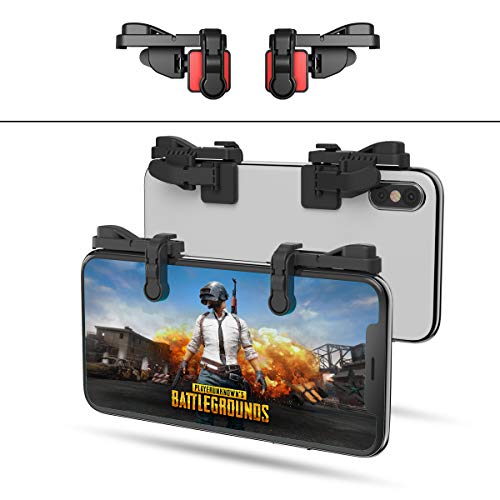
Call of Duty: Mobile -- Best FPS
Call of Duty: Mobile's controller support on Android is mature and well-tuned. When a controller is detected the game automatically shifts to a mode competitive with its console counterpart, disabling aim assist adjustments that keep touch-screen players balanced. You get the full boots-on-ground movement system, vehicle controls, and Battle Royale mode all optimized for gamepad input. The game is free-to-play with regular season updates. Multiplayer modes are active and well-populated. For players who love FPS games but find touchscreen gyro-aim too fiddly, CoD Mobile with a controller is an excellent competitive experience that rivals its console version in feel and depth.
Strengths
- SUPPORTED DEVICE
- GOOD GAME EXPERIENCE
- EXCELLENT DESIGN
- 1mm Anti-misoperation Design
- HOW TO USE

Stardew Valley -- Best Relaxation Game
Stardew Valley's Android port is exemplary, and controller support was added thoughtfully from the start. Every farm action - planting, watering, mining, fishing, and socializing - maps to the controller perfectly. The fishing minigame, which is finicky with touch controls, becomes noticeably more manageable with analog stick control. At it is one of the best-value games on any platform. Stardew Valley has no competitive pressure and no time limits, making it a perfect fit for short mobile sessions or extended evening play. The game has been updated regularly since launch, and the Android version stays current with PC and console releases.
Strengths
- For 1 to 4 players
- Ages 13+
- About 45 minutes per player
- A cooperative board game
- Based on the hit video game

Fortnite -- Best Battle Royale
Epic Games' return to Android after the Google Play store dispute brought with it solid controller optimization. Fortnite on Android with a controller plays essentially identically to the Xbox One version - your settings, builds, and muscle memory carry over. The game supports virtually every Bluetooth controller out of the box, including Xbox and PlayStation pads. Cross-play with console and PC is active, meaning you will find matches quickly at any time of day. The free-to-play model with cosmetic-only purchases keeps costs low. For Android players who want a serious battle royale experience with competitive controller play, Fortnite is the premier option.
Strengths
- From the gaming and pop culture phenomenon Fortnite, the fighter X-4 Stormwing plane!
- 10" Wingspan!
- Control the skies alone or with your whole squad!
- The X-4 Stormwing plane can hold up to 7 figures
- Includes an exclusive Ice King 2" figure!
Buying considerations
What to consider
Look for games that explicitly list controller support in their Play Store description or in-game settings. Avoid games whose entire design is built around touch mechanics - swipe-based puzzles and tap-timing games rarely benefit from a controller. Action games, RPGs, platformers, and shooters are the genres that translate best. If you use Xbox Game Pass, the Xbox app on Android gives you access to a constantly growing library of controller-optimized console games via cloud streaming. Emulators are another excellent path - RetroArch and Lemuroid support hundreds of retro games perfectly with any Bluetooth gamepad.
What to consider
For finding the right controller to pair with these games, check our [best controller for Z Fold 2](/articles/best-controller-for-z-fold-2) guide. iOS players will find useful picks in our [best controller games iOS](/articles/best-controller-games-ios) roundup. See how we evaluate games and controllers at [/methodology](/methodology).
Questions answered
Put your Bluetooth controller into pairing mode - usually by holding the pairing button until an LED flashes. On your Android phone, go to Settings > Bluetooth > Pair new device, then select your controller from the list. Most modern controllers including Xbox Wireless and PlayStation DualSense pair in under 30 seconds and stay connected automatically on future sessions.
'Games with the best native controller support include Fortnite, Call of Duty: Mobile, Genshin Impact, Dead Cells, and Stardew Valley. Xbox Game Pass via the Xbox app gives you a full console game library on Android with excellent controller optimization. Emulators like RetroArch also support controllers natively for a massive retro game library.'
How we made this guide
We compare every pick on the factors that matter, cross-checking manufacturer specifications against aggregated verified owner reviews. We rank independently and never take payment for placement. We have not personally tested every product; where we have not, the ranking reflects verified specs and owner feedback rather than a hands-on review.
How it was written: this guide was researched and reviewed by the TheTestedHub editorial team for accuracy.
Affiliate disclosure: TheTestedHub is reader-supported. When you buy through links on our site, we may earn a commission at no extra cost to you.
Keep reading

Educational Games 2026 That Grow With Your Child

7 Android TV Controllers Worth Your Money

Wooting 60HE Review (2026): 7 Months With the Analog Keyboard

Logitech G Pro X Superlight 2 Review (2026): The Esports

HyperX Cloud III Wireless Review (2026)

Steam Deck OLED (1TB) Review (2026): 8 Months Later, Still

Logitech G502 Hero Review (2026)
