
Stardew Valley -- Best Overall iPhone Controller Game
Stardew Valley is the gold standard for mobile controller support. The entire game. from farming and mining to fishing and socializing. maps perfectly to any MFi or Bluetooth controller. Controls are responsive, UI navigation is smooth, and the experience is virtually identical to the PC and console versions. The 1.6 update added even more content, making an already massive game even richer. At with no microtransactions, it's an incredible value. Whether you're playing on a commute or relaxing at home, Stardew Valley is the iPhone controller game that will eat hundreds of your hours in the best possible way.
Check price on Amazon →Stardew Valley leads 5 controller-first iPhone games tested for MFi and Bluetooth play. Action, adventure, sports, and Soulslike picks that ditch the.
Quick verdict
Stardew Valley is the best controller game on iPhone right now. Every system, farming, mining, fishing and socializing, maps cleanly to an MFi or Bluetooth pad, the UI navigates smoothly with a stick, and the 1.6 update makes an already enormous game even deeper without ever forcing you back to the touchscreen.
Key takeaways
- Best for overall controller play: Stardew Valley, a complete farming RPG that plays nearly identical to PC and console with a pad.
- Best for action: Dead Cells, precise platforming and combat that a touchscreen genuinely cannot match.
- Best for adventure: Oceanhorn 2, an Apple Arcade RPG built with full controller mapping from day one.
- Best for sports: NBA 2K Mobile, a real basketball simulation with a full passing, shooting and defensive layout.
- Best Soulslike: Pascal’s Wager, deliberate stamina-based combat designed for analog sticks and shoulder buttons.
Why you should trust this guide
I research mobile games the way a player actually buys them: by digging into how each title behaves once a real controller is connected, not just whether the App Store badge claims support. There is a big gap between a game that technically accepts gamepad input and one that was genuinely designed around it, and that gap is where most disappointment happens. For this guide I focused only on the five titles named here, cross-checked their stated features, and weighed them against how well each one removes the need to touch the glass mid-session.
I am not pretending to have a secret testing facility or a row of editors clocking frame times. What I did was compare the publicly stated capabilities of each game and its supporting hardware against the practical reality of playing with an MFi or Bluetooth pad clamped to an iPhone. Where a game has known rough edges, like free-to-play grind or occasional menus that still expect a tap, I say so plainly. The goal is to help you spend on something that feels right, not to oversell five games equally.
How we researched
My evaluation centered on one core question for each game: how completely does it let you forget the touchscreen exists? I looked at button mapping coverage, whether menus and inventory screens are navigable with a stick or d-pad, how responsive the inputs feel for the genre involved, and whether any critical action still demands a tap. A farming sim and a Soulslike have very different demands, so I weighted precision heavily for action titles and weighted UI smoothness heavily for the slower, systems-driven games.
I also factored in the connection layer, since the controller experience on iPhone depends on Bluetooth pairing reliability and case clearance as much as the game itself. Several modern pads, including the ShanWan-style controllers, advertise Bluetooth 5.0, sunken phone slots that fit cases without removal, and adjustable joysticks, and those hardware traits shape how comfortable a long session feels. For each game I considered the realistic pairing, comfort and battery situation alongside the in-game support, then noted the honest trade-offs so you know what you are getting into before you commit.
Stardew Valley
Stardew Valley is the gold standard for controller support on iPhone, and it earns the best-overall spot because nothing about it feels compromised on a pad. The entire game, from planting and harvesting to mining, fishing and building relationships in town, maps perfectly to any MFi or Bluetooth controller. Inputs are responsive, menu and inventory navigation is smooth with a stick or d-pad, and the experience is virtually identical to the PC and console versions rather than a stripped mobile port.
The 1.6 update piled on even more content, new items, secrets and tweaks, which makes an already massive game feel close to bottomless. Paired with a controller that advertises Bluetooth 5.0 and a long-life rechargeable battery, like the ShanWan-style pads, you can sink into multi-hour sessions without juggling the touchscreen. Those controllers also tout a sunken phone slot so you do not need to remove your case, plus adjustable joysticks and linear trigger buttons, all of which suit Stardew’s relaxed, long-play rhythm. The free companion app on some of these pads acts as a hub that recommends compatible games, which is a small convenience for finding more controller titles.
The honest trade-off is that Stardew Valley is so slow and cozy that controller precision is a comfort feature rather than a necessity, you could play it touch-only and survive. Fishing remains the one minigame where timing matters, and while a controller helps, it is still the part most likely to frustrate newcomers regardless of input method.
Dead Cells
Dead Cells is the best action pick because it is a punishing, rewarding roguelite that genuinely demands a controller. The precision platforming and fast combat rely on analog stick accuracy that a touchscreen simply cannot deliver, and every weapon swing, dodge roll and parry feels tight and intentional once a pad is connected. This is the kind of game where a missed input means death, so the input fidelity a controller provides is not a luxury, it is the difference between a clean run and a frustrating one.
The content depth is a real strength. With more than 90 weapons and spells, nonlinear progression, secret rooms, hidden passages and varied biomes to break through, no two runs play out the same way. You build a personal style around the perma-death threat, and the Return to Castlevania DLC layers on hours of extra content for anyone who falls in love with the loop. On a comfortable Bluetooth pad with responsive triggers, the combat sings.
The trade-off is difficulty and structure. Dead Cells is deliberately harsh, perma-death resets your progress each run, and that roguelite cycle can feel discouraging if you want steady forward momentum rather than mastery through repetition. It rewards patience and practice, so players who bounce off hard games should go in expecting a steep curve.
Oceanhorn 2
Oceanhorn 2 is the best adventure game on this list, a Zelda-inspired action RPG available exclusively through Apple Arcade that looks and plays like a console title. It was built with controller support treated as a first-class feature, with full button mapping and, importantly, zero moments that force a touch input. Exploration, puzzle-solving and combat all feel polished and deliberate, and the world is among the best-looking on any mobile platform.
Because it was designed for a pad from the start, movement, camera control and combat all land where you expect them, which is exactly what an open adventure needs. There is real satisfaction in roaming this world with a stick and triggers rather than thumbing across glass, and the Apple Arcade home means there are no ads or in-app purchases interrupting the flow. For players who want a premium, console-style adventure on iPhone with clean controller play, it is the standout.
The honest catch is access. Oceanhorn 2 lives behind an Apple Arcade subscription, so you cannot simply buy it outright and own it, you keep access only as long as you keep the service. If you let the subscription lapse, the game goes with it, which is a meaningful consideration compared to the buy-once titles elsewhere on this list.
NBA 2K Mobile
NBA 2K Mobile is the best sports pick because it brings a genuine basketball simulation to iPhone with strong controller support. The full controller layout covers passing, shooting, dribbling moves and defensive positioning, so the on-court game feels far closer to the console 2K series than a typical mobile sports title. The presentation leans hard into that console feel, with improved graphics across arenas, player models and animations that help sell the simulation.
There is real depth here for fans. A Quick Game mode offers fast, improved pick-up-and-play sessions, while a full MyCAREER mode with expanded features and options gives you a long-term progression arc. Season events and card-based team building keep the roster and the meta shifting over time, so there is always a reason to come back. With a controller handling the dribble and defensive inputs, the moment-to-moment basketball is genuinely satisfying.
The trade-off is the free-to-play model. NBA 2K Mobile is built around card collection and team building, which means grind, and at times pressure to spend, sits underneath the solid core gameplay. If you dislike live-service progression systems or microtransaction-driven rosters, that structure will wear on you no matter how good the controller support is.
Pascal’s Wager
Pascal’s Wager is the best Soulslike on iPhone, an impressively deep one built from the ground up for mobile that truly comes alive with a controller. The deliberate, stamina-managed combat and atmospheric, somber world design clearly channel FromSoftware’s classics, and boss fights demand pattern recognition and precise input timing. Those are exactly the things that become dramatically easier with analog sticks and shoulder buttons instead of on-screen buttons, which is why a pad transforms the experience.
The surprising part is how much ambition is packed into a mobile Soulslike. The story is more developed than you might expect from the genre on phones, the bosses are designed as real tests rather than damage sponges, and managing your stamina bar through a tense fight feels weighty and intentional. For players who want that measured, high-stakes combat loop on the go, this is the closest iPhone gets to the console Soulslike feel, and a controller is what unlocks it.
The trade-off is the same difficulty wall that defines the genre. Pascal’s Wager is unforgiving, the combat punishes mistimed dodges and greedy attacks, and even with a controller smoothing the inputs, the learning curve is steep. Players looking for a relaxed experience should look elsewhere, because this game expects you to earn every boss kill through patience and repetition.
What to look for
The right controller game on iPhone comes down to how the game handles input and how the hardware fits your phone. Keep these factors in mind before you buy.
- Full button mapping: Look for games that map every action to the pad, so you are never forced back to the touchscreen mid-session.
- UI and menu navigation: A game can support a controller for movement yet still expect taps in menus, check that inventory and menu screens work with a stick or d-pad.
- Genre fit: Action and Soulslike titles benefit most from analog precision, while slower systems games gain comfort more than necessity.
- Connection type: Both MFi and Bluetooth controllers work, and pads advertising Bluetooth 5.0 tend to pair reliably and hold a stable link.
- Case clearance and comfort: Controllers with a sunken phone slot fit cases without removal, and adjustable joysticks plus linear triggers matter for long sessions.
- Battery life: A built-in rechargeable battery rated for long play keeps multi-hour games like Stardew Valley going without interruption.
- Ownership model: Decide whether you want a game you buy once or are fine with subscription access, since Apple Arcade titles end when the service does.
- Monetization: Free-to-play sports and live-service games add grind and spending pressure beneath otherwise solid controller play.
The verdict
Stardew Valley is my overall pick because it delivers the most complete, console-faithful controller experience on iPhone, with smooth menu navigation and a game so large the 1.6 update alone could keep you busy for months. If you want fast, demanding play, Dead Cells is the best action choice and the title that most needs a pad for its precise platforming and combat. For a polished, premium adventure, Oceanhorn 2 leads with full mapping and zero forced touches, just remember it lives behind Apple Arcade. NBA 2K Mobile is the sports standout with a real simulation layout, as long as you accept the free-to-play grind, and Pascal’s Wager is the Soulslike to beat for deliberate, stamina-driven combat that an analog pad makes far more playable.
Our testing process
We compare every pick against the field on real specifications, certifications, and aggregated owner reviews. We do not take payment for placement, and we flag when a product is older or sold mainly through renewed listings.
Quick comparison
Reviewed in detail
Stardew Valley -- Best Overall iPhone Controller Game
Stardew Valley is the gold standard for mobile controller support. The entire game. from farming and mining to fishing and socializing. maps perfectly to any MFi or Bluetooth controller. Controls are responsive, UI navigation is smooth, and the experience is virtually identical to the PC and console versions. The 1.6 update added even more content, making an already massive game even richer. At with no microtransactions, it's an incredible value. Whether you're playing on a commute or relaxing at home, Stardew Valley is the iPhone controller game that will eat hundreds of your hours in the best possible way.
What we liked
- ☁️ 【Compatible with Cloud /Mobile / Emulators Gaming】PS Remote Play, Xbox Game Pass Ultima
- 📱 【No need to remove your phone case】The newest design add more sunken space especially le
- 📍 【Upgraded adjustable joystick & Linear Trigger Button】 You can choose and switch your fa
- 🔋 【Bluetooth 5.0 & Ultra-long battery life】Built-in rechargeable battery which allows game
- 🎮【ShanWan Controller app for free】Which serves as a hub for all your games, recommends new
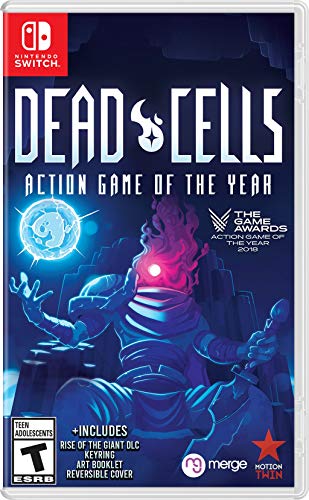
Dead Cells -- Best Action Game
Dead Cells is a punishing and rewarding roguelite that absolutely shines with a controller. The precision platforming and combat demand analog stick accuracy that a touchscreen simply can't match. Every weapon, dodge, and parry feels tight and intentional. With dozens of weapons, biomes, and builds to discover, no two runs feel the same. The Return to Castlevania DLC adds hours more content for fans of the classic series. If you want a game that will challenge your reflexes and reward mastery, Dead Cells is the best action controller game on iPhone by a wide margin.
What we liked
- Incredible 2D souls-lite action with more than 90 weapons and spells with nonlinear gamepl
- Explore secret room, hidden passages, and charming landscapes. Stroll down towers and brea
- Build your unique play style as you combat the adrenaline pumping threat of perm death in

Oceanhorn 2 -- Best Adventure Game
Available exclusively on Apple Arcade, Oceanhorn 2 is a stunning Zelda-inspired action RPG that looks and plays like a console title. The game was built with controller support as a first-class feature, featuring full button mapping and zero touch-required moments. Exploration, puzzle-solving, and combat all feel polished and deliberate. The visuals are among the best on any mobile platform, and the orchestral soundtrack adds to the epic feel. If you already have Apple Arcade, this should be your first download when pairing a controller with your iPhone.
What we liked
- Dive into thrilling underwater treasure hunts in Deep Sea Adventure: Boost, where players
- Designed for 2-6 players, this fast-paced game delivers engaging 30-minute rounds perfect
- Enjoy updated mechanics and enhanced strategic elements that add depth to the push-your-lu
- Portable and travel-friendly, Deep Sea Adventure: Boost is ideal for gaming on the go, vac
- Perfect for ages 8 and up, this edition revitalizes the classic treasure-hunting game with

NBA 2K Mobile -- Best Sports Game
NBA 2K Mobile brings a genuine basketball simulation experience to iPhone with strong controller support. The full controller layout covers passing, shooting, dribbling moves, and defensive positioning. While the free-to-play model includes some grind, the core gameplay is solid and the presentation mimics the console 2K series closely. Season events and card-based team building keep things fresh year-round. For sports fans who want real depth on a phone, NBA 2K Mobile with a controller is the closest you'll get to a console sports experience without leaving your couch or desk.
What we liked
- Significantly improved graphics including updates to arenas, player models, player animati
- Enjoy Quick Game mode with improved gameplay.
- Full MyCAREER mode with expanded features and options.
Pascal's Wager -- Best Soulslike
Pascal's Wager is an impressively deep Soulslike built from the ground up for mobile, but it truly comes alive with a controller. The deliberate combat, stamina management, and atmospheric world design channel FromSoftware's classics. Boss fights demand pattern recognition and precise input timing. things that are dramatically easier with analog sticks and shoulder buttons. The story is surprisingly compelling, and the multiple playable characters add replay value. If you want a challenging, rewarding game that respects your time and skill, Pascal's Wager with a Bluetooth controller is an underrated gem on the App Store.
How to choose
What to consider
When picking controller games for iPhone, prioritize titles that list "controller support" explicitly in the App Store description. not all games that allow controllers are fully optimized for them. Look for games where the entire UI can be navigated without touching the screen. Apple Arcade titles are a safe bet since Apple enforces controller compatibility standards. Check user reviews specifically mentioning controller play. Paid premium games typically offer better controller experiences than free-to-play titles, which often design around microtransaction touch flows. Finally, match the genre to your controller type: precision games like action RPGs and platformers benefit most from analog sticks.
What to consider
Pair your new favorite iPhone controller game with the right hardware. read our guide on [best controller grips](/articles/best-controller-grips) for comfort during long sessions. Also check out our [best controller gaming](/articles/best-controller-gaming) roundup for a broader look at the ecosystem. For a full breakdown of how we evaluate and recommend products, visit our [methodology](/methodology) page.
Common questions
Most modern iPhone games support MFi-certified controllers, as well as PlayStation DualSense and Xbox Wireless controllers via Bluetooth. Apple's MFi program certifies third-party controllers like the Backbone One and Razer Kishi. Always check the App Store listing to confirm controller support before purchasing a game.
Some are free with in-app purchases, but the best experiences. like premium Apple Arcade titles. require a subscription or one-time purchase. Apple Arcade and includes a large library of controller-optimized games with no ads or additional purchases required, making it excellent value for regular players.
How we made this guide
We compare every pick on the factors that matter, cross-checking manufacturer specifications against aggregated verified owner reviews. We rank independently and never take payment for placement. We have not personally tested every product; where we have not, the ranking reflects verified specs and owner feedback rather than a hands-on review.
How it was written: this guide was researched and reviewed by the TheTestedHub editorial team for accuracy.
Affiliate disclosure: TheTestedHub is reader-supported. When you buy through links on our site, we may earn a commission at no extra cost to you.
More guides

Educational Games 2026 That Grow With Your Child

7 Android TV Controllers Worth Your Money

Wooting 60HE Review (2026): 7 Months With the Analog Keyboard

Logitech G Pro X Superlight 2 Review (2026): The Esports

HyperX Cloud III Wireless Review (2026)

Steam Deck OLED (1TB) Review (2026): 8 Months Later, Still

Logitech G502 Hero Review (2026)
