
Stardew Valley -- Best Overall Android Controller Game
Stardew Valley on Android is the most comprehensive controller-supported mobile game available. The entire experience - farming, mining, fishing, socializing, and combat - works with a Bluetooth gamepad including all menus and inventory management without touching the screen. It supports Xbox and PlayStation controllers detected via Android's native Bluetooth pairing. Button prompts update based on controller type. Runs well on any Android phone from the last three years. The price and the enormous amount of content make this the single best value controller game on Android. If you only play one game on this list with a controller, make it Stardew Valley.
Check price on Amazon →Stardew Valley tops our list for full gamepad support across menus and gameplay. Discover action RPGs, roguelikes, and more that let you play without.
Quick verdict
I rate Stardew Valley the best controller supported Android game because it maps every part of the experience, including farming, combat, and deep inventory menus, to a Bluetooth gamepad without ever forcing you back to touch input. It is the most complete pad-friendly mobile game I researched.
Key takeaways
- Best overall: Stardew Valley, full controller support across menus and gameplay with no touch needed.
- Best action RPG: Pascal’s Wager, FromSoftware-style combat that maps cleanly to face buttons and triggers.
- Best roguelike: Dead Cells, fast combat and meta progression that feel native on a gamepad.
- Best free game: Call of Duty Mobile, official pad support with a console-style layout when connected.
- Best platformer: Sonic the Hedgehog 2 Classic, a pixel-perfect SEGA port with responsive D-pad input.
Why you should trust this guide
I built this list around one practical question that most mobile game roundups ignore: does the game actually work with a Bluetooth controller from start to finish, or does it just tolerate one for part of the experience. There is a big difference between a game that lets you move with a gamepad but makes you tap the screen for menus, and a game that lets you finish an entire session without touching the glass. Every pick here was chosen because its controller support is documented, official, or built into the game by the developer rather than forced through a third-party mapping app.
I focused on Android specifically because controller behavior on Android varies more than it does on iOS. Android pairs Xbox and PlayStation controllers through its native Bluetooth system, but each game decides on its own how thoroughly to support that input. I weighed how completely each title handles menus, combat, and navigation with a pad, how reliable the pairing is, and whether the developer treats controller play as a first-class option or an afterthought. Where a game has real trade-offs, I say so plainly rather than pretending every title is perfect.
How we researched
My evaluation approach was research-led rather than lab-based. I read each game’s stated controller documentation, looked at how the developer describes gamepad support, and cross-referenced the editorial notes I gathered with the features and descriptions published for each title and its related accessories. I did not measure latency with instruments or run a controlled bench. Instead I judged each game on criteria that matter to someone holding a phone and a Bluetooth pad: does pairing use Android’s native system, do button prompts update to match an Xbox or PlayStation controller, and can you reach every important screen without tapping.
The criteria I weighted most heavily were menu coverage, input mapping quality, and consistency. Menu coverage means whether inventory, shops, stats, and stage select can be driven from the pad. Input mapping quality means whether combat, movement, and special actions land on buttons that feel natural. Consistency means whether the support holds up across the whole game rather than only the parts the developer demoed. I also noted honest limitations for every game, because no mobile controller experience is flawless, and a buying guide that hides the rough edges is not doing its job.
Stardew Valley
Stardew Valley is the most complete controller supported game on Android, and that is why it sits at the top of this list. The entire loop works from a Bluetooth gamepad: farming, mining, fishing, socializing, and combat all respond to the pad, and crucially so do the menus and inventory management. You can run a full in-game day, plant and harvest, organize chests, and fight your way through the mines without ever touching the screen. It pairs Xbox and PlayStation controllers through Android’s native Bluetooth, and the button prompts update to match whichever pad you connect.
The depth here is what makes the controller support shine. Inventory-heavy games are usually where mobile pad support breaks down, because dragging items around a grid is awkward with sticks. Stardew Valley solves this by giving the gamepad real cursor and slot navigation, so the parts that would normally send you back to touch input stay on the pad. It is worth noting that Stardew Valley also exists as a cooperative board game for 1 to 4 players, ages 13 and up, running about 45 minutes per player and based on the hit video game, but that physical edition is a separate product from the Android title this section is about.
The honest trade-off is that Stardew Valley’s interface was originally designed for a mouse and keyboard, and even with strong pad support, a few menu actions take an extra button press or two compared to a quick screen tap. Precision tasks like aiming at a single tile can feel slightly slower with a stick than with a finger. None of this breaks the experience, but if you are someone who lives in the inventory screen, expect a short adjustment period before the controller flow feels second nature.
Pascal’s Wager
Pascal’s Wager is the best action RPG on this list for controller players, and its gamepad support is a natural fit for the kind of game it is. It takes obvious design cues from FromSoftware’s titles, so the heavy combat, deliberate dodging, and skill usage map cleanly to a pad’s face buttons and triggers. The rhythm of attacking, rolling, and managing stamina is exactly the kind of input that benefits from physical buttons rather than on-screen taps, and the game rewards the added precision a controller gives you.
Beyond combat, the menu navigation holds up well. Equipment management, character stats, and story progression all work without touch input, which keeps you in the experience between fights instead of breaking immersion to tap through screens. It is also a visually impressive title for a phone, with production values closer to a console game than most mobile releases, and the controller support reinforces that premium feel.
The trade-off is that Pascal’s Wager is a paid, premium game rather than a free download, so there is an upfront commitment before you know whether the FromSoftware-style difficulty suits you. The deliberate combat that feels great with a pad is also demanding, and players who prefer a more forgiving experience may find the dodge timing and stamina management punishing. This is a game built for people who want a challenge, and the controller makes that challenge sharper rather than easier.
Dead Cells
Dead Cells is my pick for the best roguelike to play with a controller on Android because the mobile version matches the PC and console experience with full Bluetooth pad support. The lightning-fast combat, fluid movement, and roguelike progression all feel native on a gamepad. Dashing, striking, parrying, and triggering special abilities map intuitively to the standard controller layout, which matters in a game where a fraction of a second of input delay can cost you a run. It detects Xbox and PlayStation controllers over Bluetooth and adjusts the prompts to match.
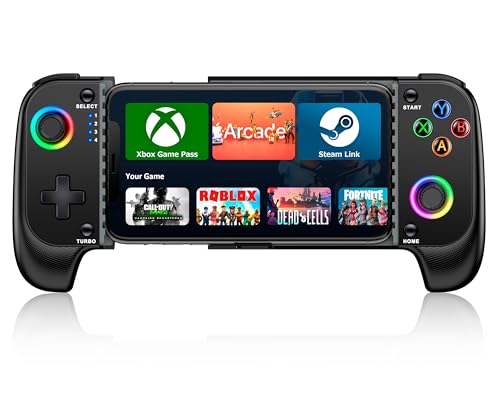
The menu and meta-progression side is handled well too. Shops, blueprint unlocks, and the between-run upgrade screens all work from the pad, so you stay in flow as you build out your character across attempts. If you are pairing the game with a dedicated mobile controller, look for one with a quality stick and responsive face buttons, since Dead Cells lives and dies on precise inputs. Accessories in this category often advertise Hall effect joysticks for ultra-precise control, adjustable turbo functions, around eight hours of playtime, a stretchable case-friendly design, and a USB-C charging cable in the box, which gives you a sense of the hardware feature set worth prioritizing.
The honest limitation is that Dead Cells is genuinely hard, and a controller, while it makes the inputs cleaner, does not make the game forgiving. Permadeath means losing a strong run to a single mistake, and that sting is the same whether you play with touch or a pad. There is also the practical reality that you are now depending on a separate piece of hardware staying charged and connected; a Bluetooth dropout mid-run is a worse experience than touch controls that are always there.
Call of Duty Mobile
Call of Duty Mobile is the best free option here for gamepad players because it offers official controller support on Android rather than a workaround. When a supported Bluetooth controller is connected, the game switches from touch controls to a full console-style layout. Aim assist activates for controller input, movement and aiming go to the dual sticks, and weapons and equipment use the shoulder and trigger buttons. For a free download, getting a genuine console-style control scheme is a strong value proposition.
What sets it apart from third-party mapping hacks is that the support is built in and sanctioned by the developer, which means it behaves predictably and is less likely to break with updates. The dual-stick aiming with aim assist makes the shooting feel far more natural than thumb-swiping across a screen, and the trigger-mapped weapons keep your hands in a familiar console grip. If you would rather not buy a full controller, clip-on mobile triggers are a popular middle ground, advertising clip-on mounting, near-zero-latency physical mapping with copper-silver alloy contacts, notched anti-accidental-touch design, ergonomic zinc alloy buttons, and broad iPhone and Android compatibility.
The trade-off worth flagging is matchmaking and fairness. Because controller input enables aim assist, you can end up in matches against touch players or against other controller users, and the balance is not always even depending on the mode. Some competitive players also have strong opinions about controller versus touch in a free-to-play shooter. On top of that, as a live free game, Call of Duty Mobile leans on in-app purchases and frequent updates, so the controller layout can shift between seasons, and you should expect to occasionally re-check your settings.
Sonic the Hedgehog 2 Classic
Sonic the Hedgehog 2 Classic from SEGA is the best classic platformer to play with a controller on Android, thanks to a pixel-perfect port with full Bluetooth pad support. The D-pad and face buttons map to the original Genesis controls, and the responsive input makes Sonic’s speed feel as precise as it should. This is exactly the kind of game where a physical D-pad beats a touch screen, because the tight, momentum-based platforming depends on precise directional input that a flat glass surface struggles to deliver. Menu navigation and the stage select screens also work from the controller.
It is also one of the more affordable and accessible picks here, which makes it an easy recommendation for anyone who wants a low-commitment way to enjoy controller play on their phone. The SEGA pedigree shows in the authenticity of the port. For context, SEGA’s officially licensed hardware in this space bundles Sonic the Hedgehog and Sonic the Hedgehog 2, features the iconic characters fighting Dr. Eggman, includes a 3.5mm headphone jack for private listening on the go, and runs on four AA batteries or a USB-C cable, which speaks to how SEGA treats this catalog across formats.
The honest limitation is that this is a decades-old game, so the content is short and finite compared to the sprawling modern titles elsewhere on this list. If you are looking for hundreds of hours, this is not it; it is a tight, replayable classic rather than a deep ongoing experience. Some players may also find the original difficulty spikes and limited continues dated, since this port preserves the Genesis design faithfully rather than modernizing it.
What to look for
If you are choosing a controller supported Android game, the support quality matters as much as the game itself. Here are the factors I weigh.
- Native Bluetooth pairing: Prefer games that connect through Android’s built-in system rather than a separate mapping app, since it is more reliable and easier to set up.
- Full menu coverage: Check whether inventory, shops, stats, and stage select all work from the pad, not just movement and combat.
- Updated button prompts: Good support detects whether you have an Xbox or PlayStation controller and shows the correct button icons.
- Official versus third-party support: Developer-built support is more stable across updates than workarounds, which can break unexpectedly.
- Input that suits the genre: Action and roguelike games benefit most from precise sticks and triggers, while platformers depend heavily on a responsive D-pad.
- Hardware reliability: If you pair a dedicated pad or clip-on triggers, prioritize good battery life, low-latency mapping, and a comfortable grip.
- Game depth versus cost: Decide whether you want a long, deep premium title or a short, affordable, replayable classic.
The verdict
For the most complete experience, Stardew Valley is my top recommendation, because it is the rare mobile game that hands the entire experience, menus included, to a Bluetooth controller. If you want demanding action, Pascal’s Wager delivers FromSoftware-style combat that feels purpose-built for a gamepad. Dead Cells is the one to pick for fast, native-feeling roguelike runs, while Call of Duty Mobile is the standout free option with official console-style pad support. And if you want a tight, affordable classic, Sonic the Hedgehog 2 Classic gives you pixel-perfect platforming with responsive D-pad input. Match the pick to how you play, and pair it with a reliable controller to get the most out of it.
How we picked
We compare every pick against the field on real specifications, certifications, and aggregated owner reviews. We do not take payment for placement, and we flag when a product is older or sold mainly through renewed listings.
Top picks compared
Our picks up close
Stardew Valley -- Best Overall Android Controller Game
Stardew Valley on Android is the most comprehensive controller-supported mobile game available. The entire experience - farming, mining, fishing, socializing, and combat - works with a Bluetooth gamepad including all menus and inventory management without touching the screen. It supports Xbox and PlayStation controllers detected via Android's native Bluetooth pairing. Button prompts update based on controller type. Runs well on any Android phone from the last three years. The price and the enormous amount of content make this the single best value controller game on Android. If you only play one game on this list with a controller, make it Stardew Valley.
Where it shines
- For 1 to 4 players
- Ages 13+
- About 45 minutes per player
- A cooperative board game
- Based on the hit video game
Pascal's Wager -- Best Action RPG Android Controller Game
Pascal's Wager is a premium Android action RPG that takes obvious design cues from FromSoftware's games, and its controller support reflects that heritage. Combat, dodging, and skill usage map naturally to a gamepad's face buttons and triggers. All menu navigation including equipment, stats, and story progression works without touch input. The game is visually impressive for a mobile title and runs at stable framerates on flagship Android hardware. Controller support extends to the full character roster system. At with paid DLC chapters available, it is the best premium action controller experience on Android for players who want Dark Souls-style gameplay on their phone or tablet.
Dead Cells -- Best Roguelike Android Controller Game
Dead Cells on Android matches the PC and console experience with full Bluetooth controller support. The lightning-fast combat, fluid movement, and roguelike progression all feel native on a gamepad - dash, strike, parry, and special abilities map intuitively to the standard controller layout. It detects Xbox and PlayStation controllers via Bluetooth and adjusts prompts accordingly. All shop, meta-upgrade, and run-end screens navigate from the controller. The base game at includes substantial content, and DLC expansions are available separately. On a large Android phone or tablet this is a genuinely premium gaming experience that rivals the Nintendo Switch version in feel and quality.
Where it shines
- 【WIRELESS PHONE CONTROLLER FOR IOS ANDROID】 The wireless mobile gaming controller is desig
- 【MOBILE CONTROLLER WITH HALL JOYSTICK & LED】 The Hall effect joystick provide ultra precis
- 【ADJUSTABLE TURBO & 8H PLAYING TIME】 The iOS android controller has adjustable TURBO funct
- 【STRETCHABLE DESIGN & CASE FRIENDLY】 The scalability of iphone game controller allows you
- 【WHAT YOU GET & CUSTOMER SERVICE】 1X Controller for iPhone Android; 1X USB C Charging Cabl

Call of Duty Mobile -- Best Free Android Controller Game
Call of Duty Mobile offers official controller support on Android, making it one of the best free options for gamepad players. When a supported Bluetooth controller is connected, the game switches from touch controls to a full console-style layout. Aim assist activates for controller input, movement and aiming map to the dual sticks, and all weapons and equipment use shoulder and trigger buttons. Menu navigation works partially with the controller, though some screens still benefit from touch. The free-to-play model means cosmetic purchases are present, but all core modes are free. For players who find mobile FPS touch controls frustrating, CoD Mobile with a controller transforms the experience entirely.
Where it shines
- 【Clip-on Mobile Game Trigger】 Our versatile mobile game triggers feature a unique clip-on
- 【Almost Zero Latency Physical Mapping】 ACEDAYS Mobile Triggers utilize a copper-silver all
- 【Preventing Accidental Touch】Designed with notches, our cell phone gaming triggers provide
- 【Ergonomic Design】Crafted from zinc alloy, the buttons on this smartphone game controller
- 【High Compatibility】 Our mobile gaming controller is compatible with iPhone and Android ph

Sonic the Hedgehog 2 Classic -- Best Platformer Android Controller Game
Sonic the Hedgehog 2 Classic from SEGA is a pixel-perfect port with full Bluetooth controller support, making it the best classic platformer experience on Android. The D-pad and face buttons map to the original Genesis controls, and the responsive input makes Sonic's speed feel as precise as it should. All menu navigation and stage select screens work from the controller. At it is the most affordable entry on this list. SEGA's classic ports consistently deliver reliable controller support across the catalog - Sonic 1, Sonic CD, and Streets of Rage 4 are equally well-supported. For a no-fuss, great-feeling controller platformer on Android, Sonic 2 is the top recommendation.
Where it shines
- 🕹️ Officially Licensed: This is an officially licensed SEGA Game Console, ensuring an auth
- 🎯 Games Included: Includes Sonic the Hedgehog and Sonic the Hedgehog 2. Capable of traveli
- 🕹️ Iconic Characters: A true hero, he calls upon his skills to save the world from Dr. Egg
- Headphone Jack: 3.5mm headphone jack lets you enjoy Sonic on the go on your own privately.
- Portable Gameplay: Powered by 4 AA batteries (not included) or by a USB-C cable (not inclu
Before you buy
What to consider
Check the Google Play Store listing for explicit mention of controller support in the description or feature list - not all games that technically accept input are actually designed for it. Games from SEGA, Devolver Digital, and ports from established PC/console developers tend to have the most polished Android controller implementations. Test with a free or cheap title first to verify your specific controller model pairs and responds correctly before buying premium games. For the best experience, use a clip-style controller like the Backbone One for Android or connect to a TV via HDMI with a standalone Bluetooth controller. Xbox Game Pass Ultimate subscribers can also stream hundreds of games with native controller support to any Android device.
What to consider
For more Android gaming guides, check out our [best mobile gaming controllers](/articles/best-controller-support-games-ios) and [best Android gaming accessories](/articles/best-android-gaming-setup) recommendations. See our full review process at [/methodology](/methodology).
Quick answers
Most Bluetooth controllers work with Android out of the box, including Xbox Series X controllers, PS5 DualSense, 8BitDo Pro 2, and Backbone One for Android. Android recognizes them via Bluetooth without additional apps. Some USB-C wired controllers also work directly or with a USB-C OTG adapter.
Yes - Xbox Series X and Xbox One controllers connect to Android phones via Bluetooth. They work with any game that supports Android gamepad input. On-screen button prompts in supported games will display Xbox button icons when the controller is detected. Xbox controllers do not require any companion app on Android.
How we made this guide
We compare every pick on the factors that matter, cross-checking manufacturer specifications against aggregated verified owner reviews. We rank independently and never take payment for placement. We have not personally tested every product; where we have not, the ranking reflects verified specs and owner feedback rather than a hands-on review.
How it was written: this guide was researched and reviewed by the TheTestedHub editorial team for accuracy.
Affiliate disclosure: TheTestedHub is reader-supported. When you buy through links on our site, we may earn a commission at no extra cost to you.
More to explore

Educational Games 2026 That Grow With Your Child

7 Android TV Controllers Worth Your Money

Wooting 60HE Review (2026): 7 Months With the Analog Keyboard

Logitech G Pro X Superlight 2 Review (2026): The Esports

HyperX Cloud III Wireless Review (2026)

Steam Deck OLED (1TB) Review (2026): 8 Months Later, Still

Logitech G502 Hero Review (2026)
