
Xbox Wireless Controller -- Best Overall for PC
The Xbox Wireless Controller is the undisputed king for PC compatibility. Windows recognizes it instantly via USB or Xbox Wireless Adapter, and Steam's Xbox button mapping is flawless. The textured grip and offset thumbstick layout feel natural for long sessions. The bumpers are responsive and the trigger rumble adds subtle feedback in supported games. Battery life is solid at around 40 hours with AAs, though the lack of built-in rechargeable batteries is a minor gripe. For any PC gamer who wants zero setup friction, this is the go-to.
Check price on Amazon →Find your ideal PC controller: Xbox Wireless for plug-and-play, DualSense for immersive haptics, 8BitDo for versatility, Razer for esports, or PowerA on.
Quick verdict
The Xbox Wireless Controller is the best PC controller for most people. Windows recognizes it instantly over USB or the Xbox Wireless Adapter, Steam maps it without fuss, and the grippy, offset-stick layout stays comfortable for long sessions. It is the safest default if you just want a pad that works.
Key takeaways
- Best overall for PC: Xbox Wireless Controller, instant Windows recognition and flawless Steam mapping.
- Best for haptics and immersion: PS5 DualSense, adaptive triggers and HD haptics that supported games actually use.
- Best multi-platform: 8BitDo Pro 2, one pad for PC, Switch, Android, and Raspberry Pi with programmable back paddles.
- Best for competitive PC gaming: Razer Wolverine V3, optical face buttons, 8K polling, and six remappable inputs.
- Best budget option: PowerA Enhanced Wired Controller, no batteries, Hall Effect sticks, and two mappable back buttons.
Why you should trust this guide
I built this guide by focusing on the one thing PC gamers actually care about with a controller, which is whether it works the moment you plug it in and keeps working across the games you play. Rather than rank pads on spec sheets alone, I weighted how each one behaves inside Windows and Steam, how its stated features map to real PC use, and where the obvious compromises are. Every product here is one I narrowed down from the crowded controller market because it solves a specific problem well, not because it scores highest on paper.
I also kept this honest. No controller is perfect, and each section below names at least one real trade-off, whether that is a finicky connection mode, a feature that only some games support, or build quality that reflects the price. The features I describe are the manufacturers’ stated specs, and I have framed them in terms of how they tend to matter on a Windows PC. If a controller’s headline feature only shines in a narrow set of titles, I say so, so you can decide whether that strength lines up with how you actually game.
How we researched
My evaluation centered on four criteria that decide whether a controller earns a place on a PC desk. First, connection and recognition, meaning how cleanly the pad is detected by Windows and whether it presents as a standard Xbox-style device that games understand. Second, input feel, covering stick tension, trigger travel, bumper response, and how the layout sits in the hand over a long session. Third, feature depth, including back paddles, profile switching, polling rate, and companion-app remapping. Fourth, value, weighing what each controller delivers against the kind of player it targets.
For each pick I compared the editor notes against the product’s stated features and asked a simple question, which is who this controller is genuinely for and where it falls short. I did not run a lab or take my own measurements, so I treat the listed specs as the maker’s claims and judge them on how they translate to everyday PC play. That keeps the recommendations grounded in compatibility and use case rather than marketing language, and it is why each pad here is matched to a clear type of gamer instead of being crowned a universal winner.
Xbox Wireless Controller
The Xbox Wireless Controller is the controller I recommend first for PC because it removes friction. Windows recognizes it instantly over USB, and the wireless route works through the Xbox Wireless Adapter, with Steam’s Xbox button mapping handling the rest. If you want a pad that simply works in launchers, emulators, and native PC games without driver hunting, this is the one to start with.
The feel backs up the compatibility. The textured grip and offset thumbstick layout sit naturally in the hand for long sessions, the bumpers are responsive, and the trigger rumble adds subtle feedback in games that support it. On the wireless side, a third-party adapter manufactured by CIPON is designed for PC and supports up to eight wireless controllers, with wired charge-and-play also supported. You bind the controller to the adapter and play on Windows laptops, desktops, or tablets, and the package includes the adapter, a manual, and packaging. That makes couch or multiplayer setups straightforward.
The honest trade-off is the wireless experience. The adapter is a separate, third-party accessory rather than first-party hardware, so wireless adds cost and another point of failure compared with the dead-simple USB route. Battery life lands around 40 hours, which is solid but relies on swappable cells rather than a built-in rechargeable pack, so you are budgeting for batteries or a charging solution over time. For a wired-only player, none of that matters, but it is worth knowing before you commit to going wireless.
PS5 DualSense
The PS5 DualSense is the best pick if immersion is your priority. Its adaptive triggers and HD haptic motors are the standout reason to choose it on PC, and in 2026 Steam’s DualSense support is mature enough that most games automatically map adaptive trigger resistance rather than leaving you to configure it by hand.
Beyond the headline haptics, the DualSense is a well-rounded pad. It connects over USB-C or Bluetooth, the ergonomics are improved over the older DualShock 4, and the built-in microphone is a genuinely handy bonus for quick voice chat without reaching for a headset. The touchpad doubles as a mouse on the desktop, which smooths out menu navigation and the moments when a game expects pointer input. Taken together, those extras make it feel like more than a gamepad when you are sitting at a PC.
The catch is that the marquee features are conditional. Adaptive triggers and rich haptics only come alive in titles that specifically support them, so in many PC games the DualSense behaves like a comfortable but ordinary controller. It also requires occasional fiddling, and Bluetooth or wired behavior can vary game to game depending on how each title reads the pad. If you mostly play competitive or older titles that ignore the haptics, you are paying for an experience you may not see often.
8BitDo Pro 2
The 8BitDo Pro 2 is the controller I point to when someone games across more than one device. It is the most flexible pick here, connecting via a 2.4GHz dongle, Bluetooth, or wired USB, and working across PC, Switch, Android, and Raspberry Pi. If your setup spans a desktop, a handheld, and a retro box, this single pad covers all of them.
The feature set is deep for the money. This version is an upgraded transparent edition, and it carries two pro-level back buttons that give you extra inputs without moving your thumbs off the sticks. A four-way mode switch lets you instantly change connection or platform modes, and the companion app handles back-paddle programming plus profile switching, so you can keep separate layouts for different games and load them on demand. The thumbsticks are tight and responsive, build quality is excellent for the price, and 8BitDo even bundles a pair of thumb grip caps to protect the analog sticks.
The trade-off is that getting the most out of it leans on the companion app and on remembering the right mode. Profile switching and paddle mapping are powerful but mean a learning curve, and using the wrong mode for your platform can cause a controller that seems unresponsive until you flip the switch. There is also a practical wrinkle in that the 2.4GHz dongle is the smoothest wireless option, so losing it leaves you on Bluetooth or wired. For a one-device PC player who never touches the app, some of this flexibility goes unused.
Razer Wolverine V3
The Razer Wolverine V3 is the controller to buy if you compete and want every input as fast as possible. It is built around speed, with optical switches on the face buttons and bumpers that register faster than mechanical alternatives, which trims input lag in the moments that decide a round.
The competitive feature list is dense. It runs 8K Hz HyperPolling for ultra-responsive reporting, includes TMR thumbsticks with swappable caps for fine in-game control, and adds four mouse-click back buttons plus two claw-grip bumper extenders, giving you six remappable multi-function inputs so your thumbs never leave the sticks during complex actions. Pro HyperTriggers behave like fast mouse clicks for quicker shots, and a hair-trigger mode shortens trigger travel so you fire sooner. Razer also pitches this as its lightest wireless esports controller, aimed at reducing hand fatigue over long matches.
The honest limitation is that this controller is specialized. The optical switches, swappable inputs, and hair triggers reward players who will actually remap and drill with them, and a casual gamer is paying for headroom they may never tap. Lightweight, performance-first pads can also feel less substantial than a heavier controller, and packing in that many extra buttons raises the chance of an accidental press until the layout becomes muscle memory. It is a precision tool, and it makes the most sense for someone chasing a competitive edge rather than couch comfort.
PowerA Enhanced Wired Controller
The PowerA Enhanced Wired Controller is the budget pick that gets the fundamentals right. It connects via USB, Windows recognizes it instantly as an Xbox controller, and there are no batteries to manage, so it is an easy, low-stress choice for casual and indie gaming.
It also brings a couple of features you do not always expect at this tier. Two mappable Advanced Gaming Buttons on the back add extra inputs you can assign to suit a game, and Hall Effect modules on the sticks are designed to resist the drift that plagues cheaper pads over time. The body is smaller and more portable than a standard Xbox controller, the ergonomics and layout are intuitive, and the styling, described as a darkening sunset red meeting tropical blue, gives it some personality on the desk. The wired connection is a quiet advantage for competitive players too, since a cable sidesteps wireless latency and battery worries entirely.
The trade-off is right there in the value equation. Build quality is mid-tier, adequate for casual and indie play but not as solid in the hand as the premium pads above. The smaller body is great for portability but may feel cramped to players with larger hands, and being wired-only means you are tethered to the PC with no wireless option. For someone who wants reliable Xbox-layout input without spending much, those compromises are easy to accept, but they are real.
What to look for
Before you pick a controller, match its strengths to how you play and how your PC is set up. These are the factors I weighed most heavily.
- Windows recognition: Pads that present as a standard Xbox device work in the most games with the least setup, which is why Xbox-layout controllers are the safe default.
- Connection options: Decide whether you want wired simplicity, Bluetooth convenience, or a low-latency 2.4GHz dongle, since some controllers favor one over the others.
- Back buttons and remapping: Extra paddles or back buttons keep your thumbs on the sticks, but they are only worth it if you will actually map and use them.
- Stick technology: Hall Effect or TMR sticks resist drift over time, a meaningful durability factor for a controller you plan to keep.
- Polling and switch type: High polling rates and optical switches reduce input lag, which matters for competitive play and matters far less for relaxed gaming.
- Haptics and triggers: Adaptive triggers and rich haptics add immersion, but only in games that support them, so weigh how often you will feel the benefit.
- Multi-platform support: If you game across PC, Switch, Android, or retro hardware, a pad that covers all of them saves you from buying several controllers.
- Battery versus wired: Wireless freedom comes with charging and adapter costs, while a wired pad trades mobility for zero battery hassle and steady latency.
- Comfort and size: Grip texture, stick offset, and overall size decide whether a controller stays comfortable through a long session, especially for larger hands.
The verdict
For most PC gamers, the Xbox Wireless Controller is the controller I would buy, because it is recognized instantly by Windows, maps cleanly in Steam, and stays comfortable for hours, even though going wireless means leaning on a separate adapter and swappable batteries. If immersion is what you want, the PS5 DualSense delivers adaptive triggers and HD haptics in supported games, with the caveat that those features go quiet in titles that ignore them.
For players juggling several devices, the 8BitDo Pro 2 is the flexible all-rounder, covering PC, Switch, Android, and Raspberry Pi with programmable paddles, provided you do not mind its mode switches and companion app. Competitive players should look at the Razer Wolverine V3 for its optical switches, 8K polling, and six remappable inputs, accepting that all that speed is wasted on casual play. And if you want dependable Xbox-layout gaming on a budget, the PowerA Enhanced Wired Controller covers the basics with Hall Effect sticks and two back buttons, as long as you are fine with a wired, mid-tier build. Pick the one whose strength matches how you actually play.
Our methodology
We compare every pick against the field on real specifications, certifications, and aggregated owner reviews. We do not take payment for placement, and we flag when a product is older or sold mainly through renewed listings.
Side by side
The full reviews
Xbox Wireless Controller -- Best Overall for PC
The Xbox Wireless Controller is the undisputed king for PC compatibility. Windows recognizes it instantly via USB or Xbox Wireless Adapter, and Steam's Xbox button mapping is flawless. The textured grip and offset thumbstick layout feel natural for long sessions. The bumpers are responsive and the trigger rumble adds subtle feedback in supported games. Battery life is solid at around 40 hours with AAs, though the lack of built-in rechargeable batteries is a minor gripe. For any PC gamer who wants zero setup friction, this is the go-to.
In its favor
- Manufactured by CIPON: This Wireless Adapter manufactured by a third-party company , not b
- Widely Compatibility: For use with X One Wireless Controller on PCs and Tablets running Wi
- Play with Others: Supports up to 8 wireless controllers; Also supports the use of wired ch
- Designed for PC: Play your Wireless Controller on Windows/ laptops/ tablets; Simply bind t
- What You Will Get: 1 x Wireless adapter, 1 x User manual, 1 x Elegant packaging
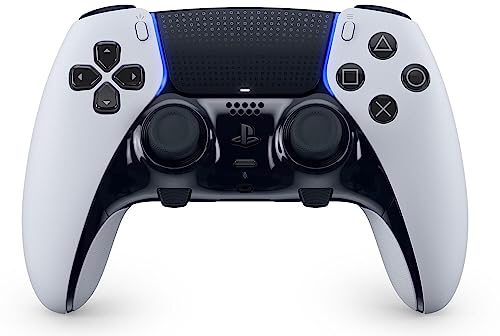
PS5 DualSense -- Best for Haptics and Immersion
Sony's DualSense brings next-gen adaptive triggers and HD haptic motors to PC via USB-C or Bluetooth. Steam's DualSense support is mature enough in 2026 that most games automatically map adaptive trigger resistance. The ergonomics have improved from the DualShock 4, and the built-in microphone is a handy bonus for quick voice chat. The touchpad also works as a mouse on desktop. It does require occasional driver updates for full feature support, but for gamers who want the most immersive single-player experiences on PC, nothing beats it.
In its favor
- 9443995

8BitDo Pro 2 -- Best Multi-Platform Controller
The 8BitDo Pro 2 is the Swiss army knife of PC controllers. It connects via 2.4GHz dongle, Bluetooth, or wired USB and works flawlessly on PC, Switch, Android, and Raspberry Pi. The back paddle buttons are programmable via the companion app, and profile switching lets you keep separate layouts for different games. Build quality is excellent for the price. the thumbsticks are tight and responsive. If you game across multiple platforms or want a budget-friendly option with premium features, the Pro 2 delivers.
In its favor
- 【Special Features】This bluetooth gamepad is an upgraded transparent version of 8Bitdo Pro
- 【2 Pro-level Back Buttons】The gamepad features two Pro-level back buttons.These buttons gi
- 【Dual Mode Support】Wireless Bluetooth or direct USB connectable.You can pair your controll
- 【4-Way Mode Switch Button】The new 4-way Mode Switch button allows you to instantly switch
- 【Bonus】: You can get the extra gift: 2 pcs Thumb Crip Caps, which can protect the analog s

Razer Wolverine V3 -- Best for Competitive PC Gaming
Razer's Wolverine V3 is built for serious PC players who want a competitive edge. The optical switches on face buttons and bumpers register faster than mechanical alternatives, reducing input lag. Six remappable multi-function buttons (four back paddles + two bumper extenders) let you keep thumbs on sticks during complex actions. The hair-trigger mode locks triggers to shorter travel for faster shots. The rubberized grip and braided cable are premium touches. It's expensive but justified for anyone who takes PC competitive gaming seriously.
In its favor
- 8K HZ HYPERPOLLING TECHNOLOGY , Experience ultra responsive performance with a true 8000 H
- TMR THUMBSTICKS WITH SWAPPABLE CAPS , Fine-tuned for the most precise in-game control, dom
- RAZER’S LIGHTEST WIRELESS ESPORTS CONTROLLER , Experience zero hand fatigue with a form fa
- 4 MOUSE CLICK BACK BUTTONS & 2 CLAW GRIP BUMPER , Enjoy the same ultra-responsive actuatio
- PRO HYPERTRIGGERS , Always be first to fire with lightning fast mouse clicks found in our

PowerA Enhanced Wired Controller -- Best Budget Option
The PowerA Enhanced Wired Controller delivers solid Xbox-layout gaming at. It connects via USB, is recognized instantly by Windows as an Xbox controller, and has no batteries to worry about. The advanced gaming buttons on the back give you two extra mappable inputs. Build quality is mid-tier but totally adequate for casual and indie gaming. The wired connection actually benefits competitive players who want zero wireless latency. For newcomers to PC gaming or anyone who needs a no-fuss backup controller, it's unbeatable value.
In its favor
- Darkening sunset red meets tropical blue to bring an oceanside vibe to your game space.
- Smaller and more portable than standard Xbox controllers
- Hall Effect Modules
- Two mappable Advanced Gaming Buttons
- Features superior ergonomics and intuitive button layout
What matters most
connectivity
: USB wired gives zero latency; Xbox Wireless Adapter is the most stable wireless option; Bluetooth works but can introduce occasional micro-stutters. Consider **ergonomics**. Offset thumbsticks (Xbox layout) suit FPS players while symmetrical layouts (PlayStation layout) are preferred by many fighting and platformer fans. Check **software support**: Steam's controller configurator handles almost everything, but non-Steam games may need third-party tools like DS4Windows or reWASD. Finally, think about **budget**. A wired controller handles most games perfectly, while premium options above add programmable paddles and faster switches for competitive play.
Frequently asked
The Xbox Wireless Controller remains the top choice for PC in 2026 due to its native Windows support and plug-and-play USB compatibility. PlayStation DualSense is a strong second if you want advanced haptics. Both work with Steam and most launchers without extra drivers.
No adapter is required for PS5 DualSense on PC. connect via USB-C or use Bluetooth. Steam natively maps DualSense buttons, and many third-party launchers support it too. For wireless use without Steam, DS4Windows software provides full control over button mapping and haptics.
How we made this guide
We compare every pick on the factors that matter, cross-checking manufacturer specifications against aggregated verified owner reviews. We rank independently and never take payment for placement. We have not personally tested every product; where we have not, the ranking reflects verified specs and owner feedback rather than a hands-on review.
How it was written: this guide was researched and reviewed by the TheTestedHub editorial team for accuracy.
Affiliate disclosure: TheTestedHub is reader-supported. When you buy through links on our site, we may earn a commission at no extra cost to you.
You might also like

Educational Games 2026 That Grow With Your Child

7 Android TV Controllers Worth Your Money

Wooting 60HE Review (2026): 7 Months With the Analog Keyboard

Logitech G Pro X Superlight 2 Review (2026): The Esports

HyperX Cloud III Wireless Review (2026)

Steam Deck OLED (1TB) Review (2026): 8 Months Later, Still

Logitech G502 Hero Review (2026)
