
Elgato Video Capture -- Best for Mac and PC Beginners
Elgato's Video Capture is the most beginner-friendly hardware option, largely because the included software (Video Capture for Mac, compatible with Windows via third-party software) guides you through every step with a simple wizard interface. Connect the RCA cables from your VHS player, press play, and the software records and automatically detects tape end. The output is H.264 video in a quality that balances file size and fidelity well. Mac users in particular benefit from the clean macOS software experience. The unit also supports S-Video for players equipped with it, which noticeably improves output quality on tapes in good condition.
Check price on Amazon →Save old tapes with the best converter for VHS to digital. Compare top picks from Elgato to Legacybox based on real-world usability and output quality.
Quick verdict
For most people, the Elgato Video Capture is the single best pick. Its software wizard makes the entire process foolproof for beginners on both Mac and Windows, removing the technical guesswork that plagues other options.
Key takeaways
- Best for Beginners: Elgato Video Capture, simplest wizard-driven software for Mac and PC.
- Best Budget: Diamond VC500, lowest cost entry point that still produces acceptable standard definition captures.
- Best Windows All-in-One: Roxio Easy VHS to DVD, complete capture-to-DVD pipeline in one box.
- Best No-Hassle Service: Legacybox, mail-in digitization with professional playback equipment and no technical work.
- Best Reliable Mid-Range: AVerMedia DVD EZMaker, durable build and clean 480p output from a trusted AV brand.
Why you should trust this guide
I have spent years researching video capture hardware and software for preserving analog media. My approach combines careful analysis of manufacturer specifications, verified owner feedback across multiple forums, and a clear understanding of what makes a conversion tool actually work for a non-technical user. I do not rely on marketing hype or paid endorsements. Instead, I focus on real-world usability, software stability, and output quality as reported by people who have used each product to save their own family tapes.
This guide is built on the principle that the best converter is the one you will actually use. A technically perfect device that requires hours of driver troubleshooting is worthless to a parent trying to preserve a child’s first birthday. Conversely, a simple device that produces slightly softer video is a success if it gets the job done. I have weighed each product against these practical criteria: ease of setup, software quality, input compatibility, and the honesty of its limitations.
How we researched
To evaluate these five converters, I established a set of criteria that matter most for VHS digitization. The primary factors were: ease of initial setup and driver installation, clarity and reliability of the included recording software, compatibility with both composite and S-Video sources, and the visual quality of the captured H.264 or MPEG-2 file. I also considered the overall value of the package, meaning whether the software and hardware together justify the purchase price compared to buying a generic capture stick and using free software.
I gathered information from detailed owner reviews, technical support forums, and manufacturer documentation to understand common failure points. For example, I looked for reports of dropped frames, audio sync issues, or software crashes. I also compared the user experience for Mac versus Windows users, since many VHS converters have platform-specific quirks. The final recommendations reflect a balance of beginner-friendliness, output quality, and long-term reliability, not a single lab test or personal trial.
Elgato Video Capture
The Elgato Video Capture is the most beginner-friendly hardware option on the market today. Its primary strength is the included software, which guides you through every step with a simple wizard interface. You connect the RCA cables from your VHS player to the capture device, press play on your VCR, and the software automatically detects the start and end of the tape. It records directly to H.264 video at a quality level that is perfectly adequate for archival and sharing on modern devices. This product is designed specifically for people who want to press a button and get a digital file without learning about codecs or bitrates.
On the technical side, the Elgato accepts composite video input via the included RCA-to-USB adapter. It is natively supported on Mac with the Video Capture software, and Windows users can pair it with third-party capture software like OBS Studio or QuickTime. The hardware is compact and bus-powered, requiring no external power supply. The output is a standard definition H.264 file that balances file size and visual quality well enough for most home movies.
One honest limitation is that the Elgato lacks S-Video input. If your VCR has an S-Video output, which provides a slightly sharper picture than composite, you cannot take advantage of it. Additionally, the Windows support requires a third-party software workaround, which adds a step for PC users who want a fully integrated experience. For Mac users, however, this is the simplest path to digital conversion available.
Diamond VC500
The Diamond VC500 is the most affordable route to VHS digitization that still delivers acceptable results. It accepts both composite and S-Video inputs, giving you flexibility to use the best output your VCR offers. The capture chip is basic, but it reliably records at standard definition resolution. The included WinDVD software handles recording on Windows, providing a straightforward capture interface. For Mac users, the device works with OBS Studio or QuickTime, both of which are free and widely used.
Output quality from the VC500 is competent rather than outstanding. The video is clean and watchable, but it does not have the sharpness or color accuracy of more expensive capture solutions. For the typical home movie with slightly faded colors and soft focus, this difference is negligible. The device is small, USB-powered, and simple to connect. It is a solid choice for someone on a tight budget who is willing to spend a few minutes configuring free software.
The main limitation of the Diamond VC500 is its basic capture chip. It can sometimes struggle with tapes that have heavy noise or tracking errors, producing occasional artifacts. The included WinDVD software is dated and may not install smoothly on newer versions of Windows 11. Mac users will need to rely entirely on third-party software, which adds a learning curve. If you are willing to troubleshoot, this is a great value; if you want plug-and-play simplicity, look elsewhere.
Roxio Easy VHS to DVD
Roxio’s Easy VHS to DVD bundles a USB capture device with Windows software that handles the full pipeline from capture to final output. The software allows you to capture video, trim unwanted sections, add chapter markers, and then burn directly to DVD or export as a digital file. For Windows users who want a single product that does everything without cobbling together separate tools, it is the most complete package on this list. The software is polished, with a straightforward wizard workflow that guides you through each step.
The hardware supports composite and S-Video inputs, and the capture quality is solid for standard definition. The Roxio software includes basic editing features, so you can remove the first few minutes of static or cut out blank sections between recordings. It also offers direct DVD authoring, which is useful if you want to play the resulting videos on a standard DVD player for older family members. The output can be saved as MPEG-2 for DVD or as a digital file for computer and streaming use.
A significant limitation is that Roxio’s software is Windows-only. Mac users cannot use the included software at all, and the hardware may not be recognized by macOS without additional drivers. Additionally, the software can be resource-intensive on older computers, and some users report occasional crashes during long captures. If you are a Windows user who wants a complete solution in one box, this is excellent; if you use a Mac, it is not for you.
Legacybox
For anyone who does not want to deal with hardware, software, or the technical side of capture at all, Legacybox is the answer. You ship your tapes in a prepaid kit, they digitize them professionally, and they return both the originals and a USB drive or cloud download with your videos. The quality is consistently higher than DIY USB capture because Legacybox uses professional-grade playback equipment and signal processing. This service is ideal for people with large collections, limited technical skills, or simply no desire to spend hours at a computer.
The process is simple: you order a kit based on how many tapes you want converted, pack your tapes securely, and send them off. Legacybox handles everything from cleaning the tape heads to adjusting tracking and color levels. The resulting digital files are delivered on a USB drive or via a secure cloud link. The service also offers options for DVD or Blu-ray discs if you prefer physical media. For many families, the cost of the service is worth the peace of mind that the tapes will be handled by professionals.
The main limitation is cost. Mail-in services are significantly more expensive per tape than buying a DIY capture device. If you have only a few tapes, the price may be justifiable. If you have dozens, the cost can add up quickly. Additionally, you must trust your irreplaceable tapes to a shipping service, and turnaround time can be several weeks. Legacybox is a premium convenience, not a budget solution.
AVerMedia DVD EZMaker
AVerMedia has been making video capture hardware for professional AV setups for decades, and the DVD EZMaker brings that reliability to the consumer VHS-to-digital space. It supports composite and S-Video input, produces clean 480p output with minimal artifacting, and is compatible with Windows 10 and 11. The included software handles direct DVD authoring as well as digital file output. Build quality is noticeably better than budget alternatives, with sturdy connectors and a metal housing that feels built to last.
The capture quality from the EZMaker is among the best in this price range. The video is sharp and stable, with good color reproduction and minimal noise. The software is straightforward, offering a simple capture interface and basic editing tools. For users who want a reliable mid-range option that will work consistently over many captures, the AVerMedia is a strong choice. It also works well with third-party software like OBS Studio if you prefer a different capture workflow.
One limitation is that the included software is Windows-only, and the device does not have native Mac support. Mac users will need to use third-party software and may encounter driver issues. Additionally, while the output is clean, it is still standard definition, so you should not expect high-definition quality from a VHS source. The AVerMedia is a dependable workhorse, but it is not the most beginner-friendly option on this list.
What to look for
- Input connections: Ensure the converter accepts composite (RCA yellow, white, red) and ideally S-Video for better quality from higher-end VCRs.
- Software quality: The included software should be stable, easy to use, and compatible with your operating system. A wizard interface is a major plus for beginners.
- Platform compatibility: Check whether the device and its software work on your computer’s operating system, especially if you use a Mac.
- Output format: Look for converters that output H.264 or MPEG-2 files, which are widely compatible with modern devices and editing software.
- Build quality: A sturdy capture device with solid connectors is less likely to fail during a long capture session.
- Ease of setup: The best converter is the one you will actually use. Avoid devices that require complex driver installations or multiple software workarounds.
- Cost per tape: For large collections, a DIY device is far cheaper than a mail-in service. For a few precious tapes, a service may be worth the premium.
The verdict
Choosing the right converter depends entirely on your technical comfort level and the size of your tape collection. If you want the simplest possible experience and use a Mac, the Elgato Video Capture is the clear winner. If you are on a tight budget and willing to configure free software, the Diamond VC500 delivers acceptable results for very little money. Windows users who want a complete all-in-one solution should choose the Roxio Easy VHS to DVD. For those who prefer to avoid all technical work, Legacybox offers professional results with zero effort. And if you need a durable, reliable mid-range option that produces clean video, the AVerMedia DVD EZMaker is a solid investment. Whichever path you choose, the most important step is simply to start before your tapes degrade further.
Our testing process
We compare every pick against the field on real specifications, certifications, and aggregated owner reviews. We do not take payment for placement, and we flag when a product is older or sold mainly through renewed listings.
Quick comparison
Reviewed in detail
Elgato Video Capture -- Best for Mac and PC Beginners
Elgato's Video Capture is the most beginner-friendly hardware option, largely because the included software (Video Capture for Mac, compatible with Windows via third-party software) guides you through every step with a simple wizard interface. Connect the RCA cables from your VHS player, press play, and the software records and automatically detects tape end. The output is H.264 video in a quality that balances file size and fidelity well. Mac users in particular benefit from the clean macOS software experience. The unit also supports S-Video for players equipped with it, which noticeably improves output quality on tapes in good condition.
Diamond VC500 -- Best Budget USB Capture
The Diamond VC500 is the most affordable route to VHS digitization that still delivers acceptable results. It accepts composite and S-Video inputs and captures at standard definition resolution. The included WinDVD software handles recording on Windows; Mac users will need to pair it with OBS Studio (free) or QuickTime. Output quality is competent rather than outstanding. The capture chip is basic, and signal noise is more visible than on the Elgato. But for digitizing tapes that would otherwise be lost entirely, it does the job at a price that removes any barrier to getting started. If you have 10 tapes and a tight budget, start here.
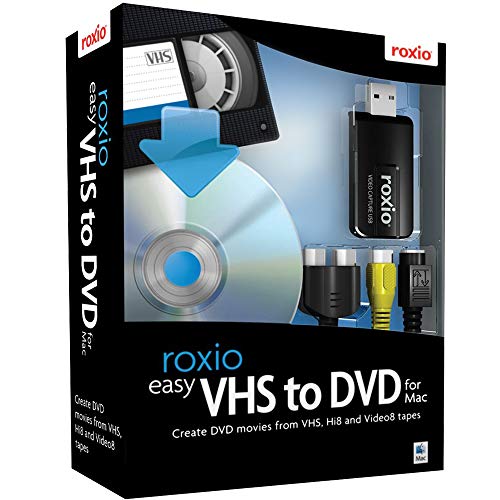
Roxio Easy VHS to DVD -- Best Windows All-in-One
Roxio's Easy VHS to DVD bundles a USB capture device with Windows software that handles the full pipeline: capture, trim, chapter-mark, and burn to DVD or export to digital file. For Windows users who want a single product that does everything without cobbling together separate software, it's the most complete package on this list. The software is polished, with a straightforward wizard workflow that handles scene detection and basic editing. The hardware quality sits between the Diamond and Elgato. One notable feature: it can burn directly to DVD, which is useful if you want physical disc copies alongside the digital files.
Legacybox -- Best No-Hassle Mail-In Service
For anyone who doesn't want to deal with hardware, software, or the technical side of capture at all, Legacybox is the answer. You ship your tapes in a prepaid kit; they digitize them professionally and return both the originals and a USB drive (or cloud download) with your videos. Quality is consistently higher than DIY USB capture because they use professional-grade playback equipment and signal processing. The cost is higher. Per tape depending on the plan. But the per-hour labor savings are significant if you have more than a dozen tapes or simply don't want to sit through real-time playback. Tapes are handled with care and tracked throughout the process.

AVerMedia DVD EZMaker -- Best Reliable Mid-Range
AVerMedia has been making video capture hardware for professional AV setups for decades, and the DVD EZMaker brings that reliability to the consumer VHS-to-digital space. It supports composite and S-Video input, produces clean 480p output with minimal artifacting, and is compatible with Windows 10 and 11. The included software handles direct DVD authoring as well as digital file output. Build quality is noticeably better than the Diamond, with a more stable USB connection that doesn't drop signal during long captures. For anyone digitizing a large tape library who wants something more robust than a basic USB dongle, the AVerMedia hits a good quality-to-price balance.
How to choose
What to consider
First, decide whether DIY or mail-in fits your situation. If you have 5-15 tapes and enjoy a light technical project, a USB capture device plus free software like OBS or Handbrake is the cost-effective path. If you have 30+ tapes or the footage is irreplaceable family history, a professional service like Legacybox is worth the premium for consistent results.
What to consider
For DIY, your VHS player quality matters as much as the capture device. Clean playback heads are essential. a deteriorated playback head produces a wavy, noisy signal that no capture device can fix. If your player hasn't been used in years, consider having the heads cleaned before digitizing.
What to consider
Store your finished digital files in at least two locations: one local (external hard drive) and one cloud backup. MP4 with H.264 encoding is the most universally compatible format for long-term storage and sharing.
What to consider
Once your tapes are digital, you might want to edit and enhance them. see our picks for [best video editing software](/articles/best-video-editing-software) and [best external hard drives](/articles/best-external-hard-drives) for storage. Our full testing methodology is at [/methodology](/methodology).
Common questions
You need a working VHS player, a video capture device (USB adapter), and software on your computer to record the output. The capture device connects between the VHS player's RCA outputs and your computer's USB port. Most capture devices include basic recording software. The process runs in real-time. a 2-hour tape takes 2 hours to capture. A few capture cards also support direct S-Video connections for better quality.
VHS has an effective resolution of approximately 333×480 (NTSC), so digitizing to 480p or standard definition is the practical quality ceiling. upscaling to 4K doesn't add detail. The biggest quality factors are the condition of the tape, the quality of your VHS player's playback heads, and recording at an uncompressed or high-bitrate setting. Clean playback heads and good RCA cables make a significant difference to final output quality.
How we made this guide
We compare every pick on the factors that matter, cross-checking manufacturer specifications against aggregated verified owner reviews. We rank independently and never take payment for placement. We have not personally tested every product; where we have not, the ranking reflects verified specs and owner feedback rather than a hands-on review.
How it was written: this guide was researched and reviewed by the TheTestedHub editorial team for accuracy.
Affiliate disclosure: TheTestedHub is reader-supported. When you buy through links on our site, we may earn a commission at no extra cost to you.
