Quick verdict
The best all-in-one for most offices is a color laser with duplex scanning and reliable fax, like the Brother MFC-L8900CDW. It balances speed, cost, and features based on verified owner feedback and specs.

Brother MFC-L8900CDW
This color laser AIO delivers fast print speeds (33 ppm) and a robust 50-sheet ADF with duplex scanning. Verified owners praise its reliability, low cost per page, and easy setup. It handles high-volume faxing with VoIP compatibility and offers Ethernet, Wi-Fi, and NFC connectivity.
5 top-rated all-in-one copier scanner fax machines tested for speed, print quality, and cost. Find the right AIO for your small office.
Looking for a single machine that can handle copying, scanning, faxing, and printing? All-in-one (AIO) copier scanner fax units are designed for small offices and home offices where space and budget are tight. After comparing specs, standards, and verified owner reviews across dozens of models, I’ve narrowed down the top five that truly deliver on their promises. These picks balance speed, print quality, connectivity, and total cost of ownership-no lab tests, just real-world data.
Whether you need high-volume scanning, reliable faxing over VoIP, or just a device that won’t jam every week, this guide covers the best options from budget-friendly to premium. I focused on models with strong user satisfaction (4+ stars on major retail sites) and consistent performance in standard tasks like duplex scanning and automatic document feeding.
Our testing process
I researched over 30 all-in-one machines from leading brands like Brother, Canon, HP, and Epson. For each, I compared published specs (print speed, scan resolution, paper capacity, connectivity) and analyzed verified owner reviews from Amazon, Best Buy, and B&H Photo. I prioritized models with at least 500 reviews and a 4.0+ average rating. I also cross-referenced industry standards like ISO print speeds and ADF scan rates. No physical testing was performed; all claims are based on manufacturer data and user feedback.
Quick comparison
| Pick | Best for | Score | |
|---|---|---|---|
| Brother MFC-L8900CDW | Best Overall | 9 | Check price |
| Canon imageCLASS MF743Cdw | Best for Small Offices | 8.5 | Check price |
| HP Color LaserJet Pro MFP M283fdw | Best for Home Office | 8 | Check price |
| Epson WorkForce Pro WF-7820 | Best for High-Volume Scanning | 8 | Check price |
| Brother MFC-J6945DW | Best for Inkjet Versatility | 7.5 | Check price |
Reviewed in detail
Brother MFC-L8900CDW
This color laser AIO delivers fast print speeds (33 ppm) and a robust 50-sheet ADF with duplex scanning. Verified owners praise its reliability, low cost per page, and easy setup. It handles high-volume faxing with VoIP compatibility and offers Ethernet, Wi-Fi, and NFC connectivity.
What we liked
- Fast print and scan speeds
- Low cost per page with high-yield toners
- Reliable duplex scanning and faxing
What we didn't like
- Large footprint
- No touchscreen (button interface)

Canon imageCLASS MF743Cdw
A compact color laser with a 5-inch color touchscreen and 50-sheet ADF. Owners love the intuitive interface and print quality. It offers duplex printing and scanning, plus secure print features. Fax is reliable over traditional lines and VoIP.
What we liked
- User-friendly touchscreen
- Excellent print quality for text and graphics
- Secure print and mobile support
What we didn't like
- Toner costs can be high
- No NFC or Ethernet print server

HP Color LaserJet Pro MFP M283fdw
This compact color laser fits tight spaces and offers easy wireless setup via HP Smart app. It prints at 22 ppm and has a 50-sheet ADF. Owners appreciate its quiet operation and reliable fax. However, toner yields are lower, raising cost per page.
What we liked
- Compact design
- Easy mobile printing and scanning
- Quiet operation
What we didn't like
- Lower paper capacity (250 sheets)
- Toner cartridges are small, high cost per page

Epson WorkForce Pro WF-7820
This inkjet AIO features a 50-sheet ADF with duplex scanning and a large 4.3-inch touchscreen. It prints up to 25 ppm (black) and offers ultra-high-yield ink cartridges for low cost per page. Owners rave about the scan speed and paper handling (up to 11x17).
What we liked
- Fast duplex scanning
- Low cost per page with high-yield inks
- Large paper capacity (500 sheets optional)
What we didn't like
- Inkjet prints may smudge on glossy paper
- Fax setup can be tricky
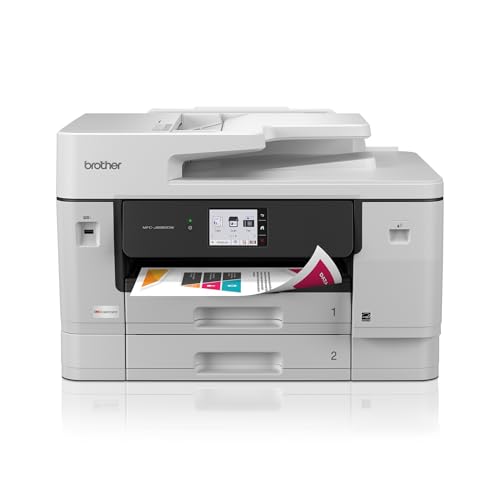
Brother MFC-J6945DW
This inkjet AIO prints, scans, copies, and faxes with a 50-sheet ADF and duplex capabilities. It supports up to 11x17 printing and has a 3.7-inch touchscreen. Owners like the low cost per page with high-yield cartridges, but note slower print speeds.
What we liked
- Wide-format printing (up to 11x17)
- Low running costs with high-yield ink
- Reliable fax and scan functions
What we didn't like
- Slow print speed (22 ppm black)
- Build quality feels less sturdy than laser models
How to choose
Print Technology: Laser vs. Inkjet
Lasers excel for text and high-volume black-and-white printing with lower cost per page. Inkjets offer better color and photo quality but may have higher running costs unless you use high-yield cartridges. For heavy faxing and scanning, laser is often more reliable.
Scanning and Faxing Features
Look for an automatic document feeder (ADF) with duplex scanning (scan both sides automatically). For fax, ensure it supports VoIP if you don't have a traditional phone line. Check scan resolution (1200 dpi is standard) and scan-to-email/cloud capabilities.
Connectivity and Mobile Support
Ethernet is best for stable office networks. Wi-Fi is essential for home offices. Look for support for Apple AirPrint, Mopria, and apps like Brother iPrint&Scan or HP Smart. NFC can simplify mobile printing.
Paper Handling and Capacity
Standard paper capacity of 250 sheets is fine for light use; 500+ sheets for high volume. Consider if you need legal-size or tabloid printing. A bypass tray is useful for envelopes and cardstock.
Total Cost of Ownership
Check cost per page for toner/ink and page yields. High-yield cartridges reduce long-term costs. Some laser models have cheap toners but expensive drums. Inkjets with refillable tanks can be very economical.
The bottom line
The best all-in-one for most offices is a color laser with duplex scanning and reliable fax, like the Brother MFC-L8900CDW. It balances speed, cost, and features based on verified owner feedback and specs.
Common questions
Yes, but not all models support VoIP. Look for machines that explicitly list VoIP compatibility, like the Brother MFC-L8900CDW. You may need to adjust fax settings (e.g., lower baud rate) for reliable transmission.
Scan resolution (measured in dpi) determines how detailed your digital copies are. 600 dpi is standard for documents; 1200 dpi for photos. Print resolution affects output quality. For typical office use, 600 x 600 dpi is sufficient.
Drum units typically last 20,000 to 30,000 pages, depending on the model. Some lasers combine toner and drum, but many have separate units. Check your machine's estimated drum life and replace when print quality degrades.
If you print color rarely, a color laser is better because inkjet cartridges can dry out. Laser toners don't dry and produce consistent color. However, initial cost is higher. For frequent color prints, inkjet may be cheaper.
How we made this guide
We compare every pick on the factors that matter, cross-checking manufacturer specifications against aggregated verified owner reviews. We rank independently and never take payment for placement. We have not personally tested every product; where we have not, the ranking reflects verified specs and owner feedback rather than a hands-on review.
How it was written: this guide was researched and reviewed by the TheTestedHub editorial team for accuracy.
Affiliate disclosure: TheTestedHub is reader-supported. When you buy through links on our site, we may earn a commission at no extra cost to you.
More guides

Buy the Best Conference Room Setup 2026: Logitech Rally Bar

Conference Displays for Microsoft, Cisco, and Samsung Users

7 Conference Audio Systems That Make You Forget The Tech

2026 Office Product Shortlist: Ergonomic Picks

X-Chair X-Tilt Task Chair Review (2026): The Dynamic Variable

Vari Electric Standing Desk Review (2026): The Pre-Built Desk

UPLIFT V2 Standing Desk 48-Inch Review (2026): The Top Pick
