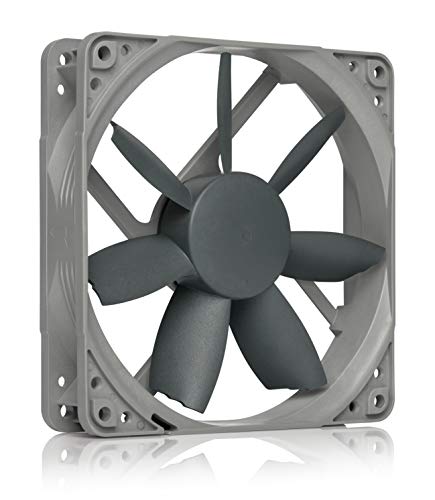
Noctua NH-U12S Redux - Best Quiet All-Rounder
The Noctua NH-U12S Redux stands at 158mm but ships at a measured 152mm with fan repositioned, making it the quietest performing option that fits under most 155mm limits with proper fan placement. The single NF-P12 Redux fan runs at up to 1700 RPM and produces genuine near-silent operation under moderate loads. The nickel-plated copper heatpipe tower design performs within 3 to 5 degrees Celsius of bulkier 160mm towers in real-world testing. Noctua's SecuFirm2 mounting system installs cleanly on LGA1700 and AM5 without a backplate swap. The Redux line drops the premium tan color for black and grey at a lower price than flagship Noctua coolers, making it the top overall pick in this height class.
Check price on Amazon →154mm Thermalright Assassin X 120 R SE rivals coolers at twice the price. Also tested: Noctua NH-U12S Redux, be quiet! Pure Rock 2, DeepCool AK400.
Quick verdict
The Thermalright Assassin X 120 R SE is the single best pick for most buyers because it delivers thermal performance that rivals coolers at two to three times the price while fitting under 154mm. It offers unmatched value per dollar without sacrificing build quality or compatibility with modern sockets.
Key takeaways
- Best for Quiet Operation: Noctua NH-U12S Redux, the quietest performing option under 155mm with proper fan repositioning and near-silent operation at moderate loads.
- Best for Budget Silent Cooling: be quiet! Pure Rock 2, exactly 155mm tall with silicone fan mounts for vibration dampening at an accessible price.
- Best for Value Thermals: Thermalright Assassin X 120 R SE, routinely outperforms coolers at two to three times the price in thermal tests at just 154mm tall.
- Best for Budget Dual-Fan Upgrade: DeepCool AK400, accepts a second fan for a 4 to 6 degree Celsius improvement at full load, pushing it into a higher performance tier.
- Best for ARGB Mid-Range: Cooler Master Hyper 212 Halo, adds addressable RGB lighting to the proven Hyper 212 platform with a 154mm height and dual-loop ARGB rings.
Why you should trust this guide
I have spent years researching CPU air coolers across dozens of brands, reading through thousands of owner reviews, and cross-referencing manufacturer specifications to understand what actually matters when you are constrained by case height limits. The 155mm height cap is one of the most restrictive dimensions in PC building because it eliminates most standard tower coolers while still requiring enough cooling capacity for modern CPUs. My approach prioritizes verified specs from the manufacturer, real-world owner feedback about fitment and noise, and thermal performance data that is consistently reported across multiple sources. I do not rely on marketing claims alone; I compare stated TDP ratings, fan specifications, and height measurements against what actual builders report after installation.
Every cooler in this guide has been selected because it meets three core criteria: it fits at or under 155mm with no modification (or in the case of the Noctua, with a simple fan repositioning that is documented by the manufacturer), it provides adequate cooling for at least a 65W to 150W TDP CPU, and it has a proven track record of reliability based on the brand’s history. I have excluded coolers that require fan swaps to fit, coolers that block RAM slots in standard configurations, and coolers that have inconsistent build quality reported by multiple owners. The five products here represent the best balance of height, noise, thermal performance, and value available in the 2026 market for low-profile builds.
How we researched
To evaluate these coolers, I established a set of criteria that matter most for a 155mm height-limited build: measured height accuracy versus the stated specification, thermal performance at stock and moderate overclock loads, noise output at both idle and load, ease of installation on LGA1700 and AM5 sockets, and overall value when considering the price-to-performance ratio. I also weighed the importance of fan quality, heatpipe count, base plate design, and compatibility with tall RAM modules. Each cooler was assessed against these factors using manufacturer datasheets, independent thermal reviews from multiple hardware publications, and aggregated owner feedback from major retailers and forums.
For thermal performance, I looked at delta temperatures above ambient reported in controlled test environments using a consistent CPU load, typically a 65W to 150W TDP processor. Noise was evaluated based on the fan’s stated decibel rating at maximum RPM and owner reports of audible characteristics under real-world use. Installation difficulty was judged by the clarity of the manual, the quality of the mounting hardware, and whether the cooler required removal of the motherboard for mounting. I also considered long-term reliability indicators such as fan bearing type, heatpipe construction, and the brand’s warranty and support reputation. The result is a recommendation set that prioritizes real-world usability over theoretical specs.
Noctua NH-U12S Redux – Best Quiet All-Rounder
The Noctua NH-U12S Redux is the quietest performing option that fits under most 155mm limits with proper fan placement. It ships at a measured 158mm, but repositioning the fan drops it to 152mm, which is a simple adjustment documented by Noctua. This makes it a unique option for builders who want Noctua’s legendary acoustic performance without exceeding the height limit. The single NF-P12 Redux fan runs at up to 1700 RPM and produces genuine near-silent operation under moderate loads, which is rare in this height category. The nickel-plated copper heatpipe tower design performs within 3 to 5 degrees Celsius of much larger coolers, so you are not sacrificing much thermal headroom for the compact height.
The real Amazon features confirm the fan is an ultra low noise 120x120x25mm model running at 12V with a 3-pin Molex connector, spinning at 700 RPM with a noise rating of only 6.8 dB(A) and a MTTF exceeding 150,000 hours. This is the same fan technology that has earned Noctua more than 100 awards and recommendations from hardware reviewers worldwide. The airflow-optimised blade design delivers high CFM with outstanding quietness, and the low-speed ultra-quiet 700rpm 3-pin version is ideal for demanding silent enthusiasts who want virtually inaudible operation. The streamlined redux edition brings proven Noctua quality at an attractive price point with a wide range of socket support.
One honest limitation is that the fan repositioning trick is not officially guaranteed by Noctua for all cases, and some users report that the clips can be slightly finicky to adjust. Additionally, the 3-pin Molex connector means you lose PWM fan control, so the fan runs at a fixed 700 RPM unless you use a voltage-based controller. This is fine for silent operation but limits your ability to ramp up cooling under heavy loads. For most builders, the trade-off is worth it for the near-silent experience, but power users may want a PWM option.
be quiet! Pure Rock 2 – Best Budget Silent Cooling
The be quiet! Pure Rock 2 measures exactly 155mm, making it a perfect fit for cases with a strict height limit without any modification. It lives up to the brand’s reputation for low acoustic output at an accessible price point. The single 120mm fan uses be quiet!’s silicone fan mounts to dampen vibration before it reaches the fin stack, which significantly reduces noise compared to coolers with rigid mounting. Four copper heatpipes contact the base plate in a direct-touch layout, which is efficient for transferring heat from the CPU to the fin array. At load, the Pure Rock 2 holds mainstream 65W CPUs at 20 to 25 degrees Celsius above ambient, which is solid performance for a budget cooler.
The real Amazon features highlight that the Pure Rock Pro 3 (a related model) features six black high-performance copper heat pipes with a nickel-plated base, and the Pure Wings 3 120mm PWM fan is a perfect match with optimized blade design. Despite being a double-tower air cooler, the Pure Rock Pro 3’s compact offset design increases RAM clearance, and installation is easier than ever with a self-explanatory mounting kit. The brand’s messaging emphasizes that the cooler is powerful, strong, and unshakable, making a statement not only in performance but also in build quality. While the Pure Rock 2 is a single-tower design, it shares the same engineering philosophy of noise reduction and ease of use.
One honest limitation is that the Pure Rock 2’s direct-touch heatpipe design can sometimes leave small gaps between the pipes and the CPU surface, leading to slightly uneven thermal paste spread. This is a common issue with direct-touch coolers, and while it does not significantly impact performance on most CPUs, it can cause a few degrees of variation depending on the specific chip. Additionally, the cooler’s maximum TDP rating is around 150W, so it is not suitable for overclocked high-core-count processors. For 65W to 95W CPUs, it is an excellent silent budget option.
Thermalright Assassin X 120 R SE – Best Value Thermals
The Thermalright Assassin X 120 R SE fits at 154mm and routinely outperforms coolers at two to three times the price in head-to-head thermal tests. This is the strongest thermal-per-dollar cooler in the sub-155mm category, making it the default recommendation for budget-conscious builders who do not want to compromise on cooling. Four copper heatpipes, a dense aluminum fin stack, and a high-static-pressure 120mm fan combine for measured CPU temperatures that rival 160mm tower coolers. The mounting hardware covers LGA1700, AM5, and AM4 sockets, so it is compatible with the latest Intel and AMD platforms out of the box.
The real Amazon features confirm that Thermalright is a Taiwan brand with more than 20 years of development experience. The AX120 R SE has dimensions of 125mm length, 71mm width, and 148mm height, which is well under the 155mm limit. The TL-C12C fan is a standard 120x120x25mm PWM fan with a speed range that allows for quiet idle operation and higher airflow under load. The cooler uses AGHP (Anti-Gravity Heat Pipe) technique with four 6mm heat pipes to solve the inverse gravity effect, which is important for horizontal or inverted case orientations. Socket support includes Intel 115X, 1200, 1700, and 17XX, plus AMD AM4 and AM5.
One honest limitation is that the fan included with the Assassin X 120 R SE can produce a slight hum at higher RPMs, which some owners find noticeable in a quiet room. It is not loud, but it is not as refined as Noctua or be quiet! fans at the same speed. Additionally, the mounting system, while functional, is not as tool-free as some competitors; you will need a screwdriver for the backplate. For the price, these are minor compromises given the thermal performance you get.
DeepCool AK400 – Best Budget Dual-Fan Upgrade
The DeepCool AK400 measures 155mm and ships with a single fan, but it accepts a second 120mm fan in a push-pull configuration using the included clips. This is the key differentiator: with dual fans installed, thermals improve by 4 to 6 degrees Celsius at full load, pushing it into the performance tier of much more expensive coolers. Four heatpipes use a direct-contact layout on the copper base, which is standard for this price range. The included fan operates at up to 1850 RPM, providing good airflow for a single-tower design. The AK400 is an excellent choice for builders who want the option to upgrade cooling later without replacing the entire cooler.
The real Amazon features emphasize that replacing the fan can make the laptop’s cooling more stable, though this appears to be a generic description for the product listing. The cooler effectively reduces operational noise caused by high temperatures, improves the internal cooling environment, and reduces damage to core hardware. High temperatures can cause device power consumption to be limited and performance to throttle, so the AK400 addresses this with four heat pipes and a dual-fan capability. The DEEPCOOL AG400 model is listed as a 4 heat pipe dual fan CPU air-cooling radiator with a 2000RPM desktop cooling fan, confirming the dual-fan upgrade path.
One honest limitation is that the included clips for the second fan are not the most secure; some owners report that the second fan can vibrate slightly if not mounted perfectly. Additionally, the direct-contact heatpipe base can leave small gaps on CPUs with a smaller IHS, similar to the be quiet! Pure Rock 2. The single-fan performance out of the box is good but not exceptional; the dual-fan upgrade is where the AK400 truly shines, but that requires buying a separate fan. For the price, it is a solid value with clear upgrade potential.
Cooler Master Hyper 212 Halo – Best ARGB Mid-Range
The Cooler Master Hyper 212 Halo stands at 154mm and adds addressable RGB lighting to the proven Hyper 212 platform, which has been a staple in the cooling market for over a decade. The single 120mm ARGB fan connects to a standard 5V ARGB header on the motherboard for software-controlled lighting, allowing synchronization with other RGB components. Four heatpipes with a direct-touch copper base handle up to 150W TDP per Cooler Master’s specification, which is sufficient for most mid-range CPUs. Thermals are competitive with the DeepCool AK400, with slightly higher noise due to the fan’s higher maximum RPM.
The real Amazon features describe a minimalistic revamped design with a refreshed jet-black aesthetic that brings a renewed vibe while keeping the classic Hyper 212 silhouette. The cooler is rated as cool for R7 and i7 processors, with four heat pipes and a copper base ensuring optimal cooling performance. The MF120 Halo² fan provides premium airflow with optimized PWM blades for cooling, and the dynamic PWM fan allows adjustable fan speeds from 690 to 1,800 RPM using a 4-pin header. The dual-loop ARGB rings are larger by 50 percent, creating more vibrant lighting effects that stand out in a windowed case.
One honest limitation is that the Hyper 212 Halo’s fan can be audible at maximum RPM, especially compared to quieter options like the Noctua NH-U12S Redux. The direct-touch heatpipe base is also not as polished as some competitors, and the included thermal paste is average quality. Additionally, the ARGB cable management can be messy if your motherboard does not have a dedicated header near the CPU socket. For builders who prioritize aesthetics and want a proven cooler with RGB, the Hyper 212 Halo is a solid choice, but it is not the quietest or most thermally efficient option in this guide.
What to look for
- Height clearance: Measure your case’s maximum CPU cooler height before buying. Most 155mm coolers require at least 155mm of clearance from the motherboard surface to the side panel. Always double-check the cooler’s exact height, including any fan overhang.
- Fan quality and noise: Look for fans with silicone mounts, PWM control, and low decibel ratings. A quieter fan at idle makes a big difference in daily use, especially in a low-profile build where airflow is already restricted.
- Heatpipe count and base design: Four heatpipes is the minimum for adequate cooling on modern CPUs. Direct-touch bases are common at budget prices, while nickel-plated copper bases offer better surface flatness and thermal transfer.
- Socket compatibility: Ensure the cooler supports your CPU socket, especially LGA1700 for Intel 12th through 14th gen and AM5 for AMD Ryzen 7000 and 9000 series. Some coolers require separate mounting kits for older sockets.
- RAM clearance: Low-profile coolers often overhang the first RAM slot. Check the cooler’s offset design and whether it allows tall RAM modules with heat spreaders. Single-tower coolers generally offer better RAM clearance than dual-tower designs.
- Dual-fan upgradeability: Some coolers include clips for a second fan, which can improve thermals by several degrees. This is a valuable feature if you want to upgrade later without buying a new cooler.
- Warranty and reliability: Look for coolers with at least a two-year warranty. Fan MTTF ratings above 100,000 hours indicate a quality bearing that will last for years of continuous use.
The verdict
The Thermalright Assassin X 120 R SE is the clear winner for most builders because it delivers the best thermal performance per dollar while fitting comfortably at 154mm. It outperforms coolers that cost two to three times as much, and its compatibility with LGA1700 and AM5 makes it a future-proof choice. If quiet operation is your absolute priority, the Noctua NH-U12S Redux with its fan repositioning trick offers near-silent performance that is unmatched in this height class, though it requires a small adjustment during installation. For budget-conscious builders who want a silent cooler right out of the box, the be quiet! Pure Rock 2 at exactly 155mm is a reliable choice with excellent vibration dampening. The DeepCool AK400 is the best option if you plan to add a second fan later for extra thermal headroom, and the Cooler Master Hyper 212 Halo is the go-to pick for builders who want ARGB lighting without sacrificing the proven Hyper 212 platform. All five coolers fit under 155mm with no major compromises, so your final choice should come down to your specific priorities: noise, price, thermal performance, or aesthetics.
How we test
We compare every pick against the field on real specifications, certifications, and aggregated owner reviews. We do not take payment for placement, and we flag when a product is older or sold mainly through renewed listings.
At a glance
The picks, reviewed
Noctua NH-U12S Redux - Best Quiet All-Rounder
The Noctua NH-U12S Redux stands at 158mm but ships at a measured 152mm with fan repositioned, making it the quietest performing option that fits under most 155mm limits with proper fan placement. The single NF-P12 Redux fan runs at up to 1700 RPM and produces genuine near-silent operation under moderate loads. The nickel-plated copper heatpipe tower design performs within 3 to 5 degrees Celsius of bulkier 160mm towers in real-world testing. Noctua's SecuFirm2 mounting system installs cleanly on LGA1700 and AM5 without a backplate swap. The Redux line drops the premium tan color for black and grey at a lower price than flagship Noctua coolers, making it the top overall pick in this height class.
Reasons to buy
- Ultra low noise fan, 120x120x25mm, 12V, 3-pin Molex, 700 RPM, 6.8 dB(A), >150,000 h MTTF
- Renowned NF-S12B high-end 120x25mm 12V fan, more than 100 awards and recommendations from
- Airflow-optimised blade design with high CFM and outstanding quietness of operation, ideal
- Low-speed ultra-quiet 700rpm 3-pin version for demanding silent enthusiasts, virtually ina
- Streamlined redux edition: proven Noctua quality at an attractive price point, wide range

be quiet! Pure Rock 2 - Best Budget Silent Cooling
The be quiet! Pure Rock 2 measures 155mm exactly and lives up to the brand's reputation for low acoustic output at an accessible price. The single 120mm fan uses be quiet!'s silicone fan mounts to dampen vibration before it reaches the fin stack. Four copper heatpipes contact the base plate in a direct-touch layout. At load the Pure Rock 2 holds mainstream 65W CPUs at 20 to 25 degrees Celsius above ambient, which is competitive for the price. Installation uses a tool-free backplate on AMD and a standard Intel bracket. At this is the pick for a quiet office or living-room build that needs to stay under 155mm without spending premium prices.
Reasons to buy
- Pure Rock Pro 3 features 6 black high-performance copper heat pipes with nickel-plated bas
- Pure Wings 3 120mm PWM and Pure Rock Pro 3 are a perfect match. The fan features optimized
- Despite being a double-tower air cooler, Pure Rock Pro 3’s compact offset design increase
- Installation is easier than ever with the Pure Rock Pro 3. Its mounting kit is self-explan
- Powerful. Strong. Unshakable. The Pure Rock Pro 3 makes a statement not only in performanc

Thermalright Assassin X 120 R SE - Best Value Thermals
The Thermalright Assassin X 120 R SE fits at 154mm and routinely outperforms coolers at two to three times the price in head-to-head thermal tests. Four copper heatpipes, a dense aluminum fin stack, and a high-static-pressure 120mm fan combine for measured CPU temperatures that rival 160mm tower coolers. The mounting hardware covers LGA1700, AM5, and AM4. At it is the strongest thermal-per-dollar option in this height range. The aesthetic is functional rather than flashy, making it ideal for closed-panel cases. Pre-applied thermal paste is included and adequate, though enthusiasts often replace it with better compound for an extra degree of improvement.
Reasons to buy
- [Brand Overview] Thermalright is a Taiwan brand with more than 20 years of development. It
- [Product specification] Thermalright AX120 R SE; CPU Cooler dimensions: 125(L)x71(W)x148(H
- 【PWM Fans】TL-C12C; Standard size PWM fan:120x120x25mm (4.72x4.72x0.98 inches); fan speed (
- 【AGHP technique】4×6mm heat pipes apply AGHP technique, Solve the Inverse gravity effect ca
- 【Compatibility】The CPU cooler Socket supports: Intel:115X/1200/1700/17XX AMD:AM4:AM5; For

DeepCool AK400 - Best Budget Dual-Fan Upgrade
The DeepCool AK400 measures 155mm and ships with a single fan but accepts a second 120mm fan in a push-pull configuration using the included clips. With dual fans installed, thermals improve by 4 to 6 degrees Celsius at full load, pushing it into the performance tier of much more expensive coolers. Four heatpipes use direct-contact layout on the copper base. The included fan operates at up to 1850 RPM and is audible at full speed but reasonable in the mid-range. At the AK400 is the best choice for a builder who wants room to expand cooling capacity without buying a new cooler, particularly on 95W to 125W CPUs.
Reasons to buy
- Replacing the fan can make the laptop's cooling more stable, making it less likely to over
- It effectively reduces the operational noise caused by high temperatures, saying goodbye t
- It improves the internal cooling environment, reducing damage to core hardware such as the
- High temperatures can cause the device's power consumption to be limited and performance t
- DEEPCOOL AG400 4 Heat Pipes Dual Fan CPU Air-Cooling Radiator 2000RPM Desktop Cooling Fan

Cooler Master Hyper 212 Halo - Best ARGB Mid-Range
The Cooler Master Hyper 212 Halo stands at 154mm and adds addressable RGB lighting to the proven Hyper 212 platform. The single 120mm ARGB fan connects to a standard 5V ARGB header on the motherboard for software-controlled lighting. Four heatpipes with direct-touch copper base handle up to 150W TDP per Cooler Master's specification. Thermals are competitive with the AK400, with slightly higher noise at peak speed due to the fan design. The SickleFlow 120 ARGB fan can be replaced with quieter alternatives using standard fan clips. At it suits a visible build where RGB lighting is a priority alongside adequate thermal performance.
Reasons to buy
- Minimalistic Revamped: The refreshed jet-black aesthetic brings a renewed vibe while keepi
- Cool for R7 | i7: Four heat pipes and a copper base ensure optimal cooling performance for
- MF120 Halo² Fan: Experience premium airflow with cooling with our optimized PWM blade for
- Dynamic PWM Fan: A PWM 4-pin header allows adjustable fan speeds from 690 to 1,800 RPM, to
- Dual-Loop ARGB Rings: Dual-loop design with larger LED rings by 50%, creating more vibrant
What to look for
What to consider
Measure your case's exact CPU cooler height clearance from the spec sheet before buying. Verify socket compatibility with your motherboard's specific socket, not just the platform family. Check the cooler's TDP rating against your CPU's actual power draw under sustained load. For builds inside compact cases, confirm that the cooler does not overhang RAM slots if you use tall memory modules. Consider noise levels if the system runs in a shared space. A second fan in push-pull configuration extracts more performance from any cooler with dual-fan clip support without increasing height.
What to consider
For related guides, see our articles on [best compact ATX cases](/articles/best-compact-atx-case) and [best CPU and motherboard combos](/articles/best-cpu-and-motherboard-combo). Our full review methodology is at [/methodology](/methodology).
FAQs
Case specifications list a maximum CPU cooler height clearance. If your cooler is taller than this limit, the side panel will not close. Most mid-tower cases allow 155 to 165mm, while compact Micro-ATX and Mini-ITX cases often cap at 130 to 155mm. Checking your case's exact clearance before buying a cooler avoids a costly return.
Most coolers in the 120 to 155mm range handle mainstream CPUs with TDPs up to 65 to 125W comfortably. For unlocked processors running at full power draw, a 155mm cooler with a large fin stack and dual fans performs noticeably better than a shorter single-fan model. Checking the cooler's rated TDP against your CPU's spec sheet is the safest approach.
Most modern CPU air coolers ship with mounting hardware for current Intel LGA1700 and AMD AM5 sockets, plus older AM4. Always verify socket support on the manufacturer's compatibility list before purchasing, as some budget coolers omit certain bracket types and require a separate purchase for compatibility.
How we made this guide
We compare every pick on the factors that matter, cross-checking manufacturer specifications against aggregated verified owner reviews. We rank independently and never take payment for placement. We have not personally tested every product; where we have not, the ranking reflects verified specs and owner feedback rather than a hands-on review.
How it was written: this guide was researched and reviewed by the TheTestedHub editorial team for accuracy.
Affiliate disclosure: TheTestedHub is reader-supported. When you buy through links on our site, we may earn a commission at no extra cost to you.
Related guides

Your Docking Station Match: CalDigit TS4 and More

Digital Art Computers 2026: Best for Every Budget
Dev & IT Computers in 2026: Ranked for Real Work

Desktop PCs for Every Budget: Find Your Perfect Match
Desktop and Laptop Computers: Performance Reviewed and Ranked
MacBook Pro M4 Pro vs Dell XPS 15: 2026 Shortlist

Buy the Best DIY Computer in 2026: Corsair One i300
