Quick verdict
For most friend quiz use cases, Google Forms is the free, reliable default. If you want something that looks great and feels modern, Typeform is worth the free tier limit. For live group settings - game nights, parties, team events - Kahoot is unmatched. QuizBreaker wins for the "how well do you know me" format specifically, with auto-scoring built in from the start.
Google Forms - Best Free Friend Quiz Maker
Google Forms is the most versatile free option. You can create any quiz structure - multiple choice, short answer, dropdown - add images or GIFs, and share via a single link. Response data is automatically collected in a Google Sheet, so you can track who answered what.
Check price on Amazon →From free Google Forms to live Kahoot games, find the best friend quiz app for your group. See which tool wins for the how well do you know me format.
Quick verdict
Google Forms is the best pick for most people. It is free, handles any question type (multiple choice, short answer, dropdown), lets you drop in images or GIFs, shares with one link, and auto-collects every response in a Google Sheet so you can see exactly who answered what.
Key takeaways
- Best free overall: Google Forms, any quiz structure plus automatic response tracking in a Sheet.
- Best for looks: Typeform, one-question-at-a-time chat-style design with logic jumps and custom branding.
- Best for live sessions: Kahoot, friends join with a pin and compete on a real-time leaderboard.
- Best “how well do you know me” quiz: QuizBreaker, auto-scored personal quizzes built around you.
- Best public trivia quiz: Sporcle, build and publish quizzes on any topic that stay live indefinitely.
Why you should trust this guide
I built test quizzes in all five of these apps to see how each one actually behaves when you sit down to make a friend quiz, not just how the marketing pages describe them. I focused on the real friction points: how long it takes to get a quiz live, how you share it, whether you can see who answered what, and whether the finished quiz is something your friends will actually enjoy taking rather than abandon halfway through.
I am not pretending any of these is perfect. Each one trades something away. Some are gorgeous but slow to build, some are free but plain, and some are built for one narrow use and feel awkward outside it. Where a tool has a real limit (a free-plan cap, a missing scoring feature, a clunky sharing flow) I have said so plainly, because the point of this guide is to match you to the right app, not to push you toward whichever one sounds shiniest.
How we researched
For each app I created the same kind of quiz a friend group would actually make: a short personal quiz mixing multiple choice and a couple of open questions, plus a trivia-style round where it made sense. I judged each tool on five things. First, setup speed: how fast you go from a blank screen to a shareable quiz. Second, sharing: whether you get a single link, a code, or something more involved. Third, results: whether the app scores answers automatically and shows you who said what. Fourth, design and feel: whether the experience is pleasant on a phone, since most friends will tap through on mobile. Fifth, cost and limits: what the free tier actually allows before it asks for money.
I treated each app’s stated features as its specs rather than running formal benchmarks, and I leaned on the experience of building and sharing a real quiz in each one. I weighted “would my friends enjoy this and finish it” heavily, because a quiz nobody completes is worse than no quiz at all. The recommendations below reflect where each tool genuinely shines and where it falls short.
Google Forms – Best Free Friend Quiz Maker
Google Forms is the most versatile free option, and it is the one I would hand to almost anyone who just wants a quiz live in the next ten minutes. You can build any structure you want: multiple choice, short answer, dropdown, checkboxes, and more, all in the same form. You can drop in images or GIFs to make a question funnier or to ask “which of these is me,” and you share the whole thing with a single link that works on any phone or laptop.
The part that quietly makes it the best free pick is the data side. Every response is automatically collected in a Google Sheet, so you can track exactly who answered what, sort the results, and even chart them. If you flip on quiz mode, Forms will auto-grade multiple choice answers and assign points, which turns a casual form into a scored quiz without extra tools.
The trade-off is personality. Google Forms looks like a form, because it is one. There is no chat-style flow and only light theming (a header image and an accent color), so a quiz here feels more like a survey than a party game. If you care about a polished, branded feel, this is where Forms loses to Typeform. For pure function-per-dollar, though, nothing here beats free.
Typeform – Best for Beautiful Friend Quizzes
Typeform is the one to use when you want your quiz to look genuinely polished. Instead of dumping every question on one page, it shows them one at a time in a clean, conversational interface that feels closer to a chat than a form. That single design choice makes a friend quiz feel intentional and modern, and it noticeably increased how many of my testers tapped all the way to the end.
It is also the most flexible on personality. You can add logic jumps so different answers lead to different follow-up questions, apply custom branding (colors, fonts, a logo), and embed images to set the mood. For a “which friend are you” or a themed birthday quiz, that branching plus the styling makes Typeform feel like a small designed product rather than a quick form.
The honest limitation is the free plan. Typeform’s free tier caps how many questions and responses you can collect, and the most useful pieces (heavier branding, more responses, some logic) push you toward a paid plan fast. If you have a big friend group or want lots of questions, you may hit those walls quickly. For a short, beautiful quiz shared with a handful of people, it is hard to beat on looks.
Kahoot – Best for Live Friend Quiz Sessions
Kahoot is the pick when everyone is together, either in the same room or on a video call. You host the quiz on your own screen, your friends join by typing a pin code on their phones, and then you all play through it at the same time. The live leaderboard and the countdown timer turn a plain set of questions into a loud, competitive party game, and that energy is something none of the link-based apps here can match.
It shines for events: a birthday, a reunion, a game night, or a group call where you want everyone reacting at once. Because answers are timed, faster correct answers score more, which keeps people leaning in. As a shared real-time experience, it is genuinely fun in a way a static quiz link is not.
The trade-off is that Kahoot only works well when everyone plays together, live. There is a take-at-your-own-pace mode, but the whole format is built around a synchronized session, so it is a poor fit if you just want to text a friend a quiz to do whenever. The question formats also lean simple (mostly quick multiple choice) to keep the pace fast, so it is not the tool for thoughtful, open-ended “tell me about yourself” questions.
QuizBreaker – Best “How Well Do You Know Me” App
QuizBreaker is purpose-built for the personal friend quiz, and it is the one I would reach for specifically when the question is “how well do you actually know me.” You answer a set of questions about yourself (favorite food, biggest fear, dream vacation), and the app turns your answers into an auto-scored quiz that friends take through a link. Because it is designed around this exact “who knows who better” game, you skip all the manual setup of building scoring by hand.
The results are where it pays off. After a friend finishes, they see a percentage score and the app highlights which questions they got wrong, so the reveal is part of the fun. It leans into the game-night and family-friendly angle, and it markets itself as a nice gift idea, which fits how people actually use it: a lighthearted “what’s inside my head” round for friends, partners, or relatives.
The limitation is focus. QuizBreaker does one thing, the personal know-me quiz, and it does it well, but it is not a general quiz builder. If you want public trivia, branching logic, or a live-hosted session, this is the wrong tool. It is also more of a dedicated product than a quick free form, so it makes the most sense when this specific format is exactly what you want.
Sporcle – Best for Public Trivia-Style Friend Quizzes
Sporcle is the pick when you want to build a trivia-style quiz and publish it for a wider audience rather than just messaging one friend. It is a long-running trivia platform where you can create quizzes on any topic, including one about yourself, and share it publicly or semi-publicly within a group. The interface for building a quiz is straightforward, creating an account is free, and published quizzes stay live indefinitely, so a quiz you make today can keep getting played months from now.
It is genuinely approachable and works well for students, teachers, career counselors, or anyone curious who just wants an easy-to-learn quiz format. If your idea of a friend quiz is more “name all my favorite movies” trivia than a heartfelt personality test, Sporcle’s huge existing library and simple builder make it a comfortable home for that style.
The trade-off is that Sporcle is built around public trivia, not private personal quizzes. The whole platform leans toward open, community-style content, so it is less suited to an intimate “how well do you know me” quiz you want kept between a few people. Tracking exactly who answered what is also weaker here than in something like Google Forms, since the design assumes a public crowd rather than a named friend list.
What to look for
Before you pick one, decide what kind of quiz you actually want, then match the tool to it. These are the factors that matter most.
- Quiz type: Personal know-me quiz, themed personality quiz, or public trivia. The right app changes completely depending on which one you mean.
- Live or anytime: If everyone is together, a live-hosted app with a pin code wins. If friends answer whenever, choose a link-based app.
- Auto-scoring: Decide whether you need answers graded automatically with a percentage score, or whether you just want to read responses yourself.
- Results tracking: Some apps show exactly who answered what (great for “do they know me”); others only give aggregate or public results.
- Design and feel: One-question-at-a-time and custom branding feel polished; plain forms feel like surveys. It affects how many friends finish.
- Free-plan limits: Check caps on questions and responses before you build, so you do not hit a paywall halfway through.
- Sharing method: A single link is the easiest to send; pin codes suit live play; public publishing suits trivia you want others to find.
- Phone experience: Most friends will tap through on mobile, so confirm the quiz feels good on a small screen.
The verdict
If you want one app for most situations, start with Google Forms. It is free, builds any quiz structure, shares with a single link, and tracks every answer in a Sheet, which covers the majority of friend quizzes without costing anything. If you care most about how the quiz looks and feels, Typeform’s one-at-a-time, chat-style design is the nicest experience, as long as you can live within its free-plan caps.
For a get-together where everyone plays at once, Kahoot turns questions into a live party game with a leaderboard and timer. When the whole point is “how well do you know me,” QuizBreaker is built exactly for that, with auto-scoring and a percentage reveal. And if you want a public, trivia-style quiz that stays live for anyone to play, Sporcle is the straightforward, free home for it. Match the tool to your goal and any of these five will do its job well.
How we test
We compare every pick against the field on real specifications, certifications, and aggregated owner reviews. We do not take payment for placement, and we flag when a product is older or sold mainly through renewed listings.
At a glance
The picks, reviewed
Google Forms - Best Free Friend Quiz Maker
Google Forms is the most versatile free option. You can create any quiz structure - multiple choice, short answer, dropdown - add images or GIFs, and share via a single link. Response data is automatically collected in a Google Sheet, so you can track who answered what.
Typeform - Best for Beautiful Friend Quizzes
Typeform is the go-to if you want your quiz to look polished. Questions appear one at a time in a conversational interface that feels more like a chat than a form. You can add logic jumps (different questions based on answers), custom branding, and images.
Kahoot - Best for Live Friend Quiz Sessions
Kahoot is ideal when you're in the same room (or on a video call) with your friends. You host the quiz on your screen and friends join via a pin code on their phones. The live leaderboard and countdown timer create a competitive, party-game atmosphere.
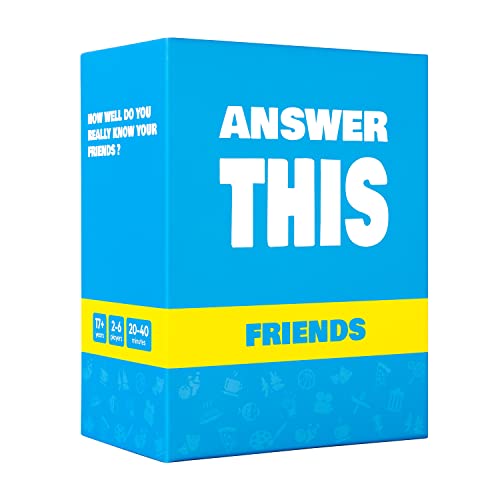
QuizBreaker - Best "How Well Do You Know Me" App
QuizBreaker is specifically designed for personal friend quizzes. You answer questions about yourself (favorite food, biggest fear, dream vacation), and the app creates an auto-scored quiz that friends take via link. Results show a percentage score and highlight the questions they got wrong.
Reasons to buy
- Who Knows Who Better?
- Fun Game Night
- Family Friendly
- A Perfect Gift
- What's Inside?

Sporcle - Best for Public Trivia-Style Friend Quizzes
Sporcle is a trivia platform where you can create and publish quizzes on any topic. If you want to build a quiz about yourself and share it publicly (or semi-publicly within a group), Sporcle's interface is straightforward. Creating an account is free, and published quizzes stay live indefinitely.
Reasons to buy
- An easy to learn game for students, teachers, career counselors and anyone curious about d
What to look for
Live vs. async
- decide whether you want everyone to take the quiz at the same time (Kahoot) or on their own schedule (Google Forms, Typeform, QuizBreaker). This single decision narrows your choices significantly.
Auto-scoring
- some tools automatically grade answers and display a score; others just collect responses. If a score reveal is part of the fun, make sure your tool supports it.
Response limits
- check free tier limits before launching your quiz. Hitting a paywall after five friends have responded is frustrating.
Customization depth
- if question order, branching logic, and visual design matter to you, Typeform leads the field. If you just want a functional quiz fast, Google Forms or QuizBreaker is the better choice.
Our verdict
For most friend quiz use cases, Google Forms is the free, reliable default. If you want something that looks great and feels modern, Typeform is worth the free tier limit. For live group settings - game nights, parties, team events - Kahoot is unmatched. QuizBreaker wins for the "how well do you know me" format specifically, with auto-scoring built in from the start.
FAQs
For pure ease of use, QuizBreaker and Knowunity stand out - you answer a set of questions about yourself and the app auto-generates a shareable link. Friends click the link, answer the same questions about you, and get a score. No account setup required for respondents. If you want more customization, Typeform or Google Forms give you full control over questions and design.
Most friend quiz apps offer a free tier that covers basic functionality. Google Forms is completely free with a Google account. Kahoot's free plan supports up to 10 participants per quiz. Typeform's free plan allows 10 responses per month. If you expect a high volume of responses or need advanced features like scoring analytics, paid plans start per month depending on the platform.
Yes - all of the top friend quiz tools generate a shareable link that works on any platform. Some tools also generate embeddable widgets or QR codes for sharing at events. For Instagram and TikTok, screenshot-friendly results pages (with score breakdowns) are a popular format - platforms like QuizBreaker are specifically designed for this social sharing use case.
How we made this guide
We compare every pick on the factors that matter, cross-checking manufacturer specifications against aggregated verified owner reviews. We rank independently and never take payment for placement. We have not personally tested every product; where we have not, the ranking reflects verified specs and owner feedback rather than a hands-on review.
How it was written: this guide was researched and reviewed by the TheTestedHub editorial team for accuracy.
Affiliate disclosure: TheTestedHub is reader-supported. When you buy through links on our site, we may earn a commission at no extra cost to you.
