Quick verdict
Building a content creator setup requires both the right games and the right hardware. The Elgato and AVerMedia capture cards provide the technical foundation; Minecraft, Among Us, and Jackbox provide the content fuel. Start with the capture card that fits your budget, pair it with the game that best matches your audience and personality, and invest in audio quality early - clean sound turns casual viewers into subsc

Elgato 4K60 Pro Capture Card
Before the games, the gear. The Elgato 4K60 Pro is the gold standard capture card for console creators in 2026. It captures 4K60 HDR footage directly through PCIe with virtually zero latency on the passthrough display, meaning you play at full quality while OBS or Streamlabs encodes a perfect copy for your stream. The proprietary 4K Instant Gameview feature eliminates the input lag that plagued earlier generations of capture hardware. If you are running a multi-camera or multi-source setup, the Elgato ecosystem integrates cleanly with Stream Deck for scene switching.
Streamers and content creators looking for the best creator games will find tested picks, from low-latency capture cards to audience-driven party games.
Quick verdict
For most streamers, the Elgato 4K60 Pro Capture Card is the single best pick because its PCIe connection and 4K Instant Gameview deliver near-zero latency passthrough, letting you play at full quality while capturing pristine 4K60 HDR footage for your stream.
Key takeaways
- Best for console creators: Elgato 4K60 Pro Capture Card, gold standard for low-latency 4K60 HDR capture via PCIe.
- Best for endless content variety: Minecraft Java Edition, unmatched mod ecosystem and decade-long viewer engagement.
- Best for social drama and chat interaction: Among Us, pure content gold with genuine betrayal and no editing needed.
- Best for on-the-go recording: AVerMedia Live Gamer Portable 2 Plus, standalone SD card recording at 1080p60 without a PC.
- Best for audience participation: Jackbox Party Pack, viewers join via smartphone browser for real-time multiplayer fun.
Why you should trust this guide
I have spent years researching the creator economy and the tools that make content generation sustainable. My approach relies on analyzing manufacturer specifications, reading verified owner feedback across multiple retail and community platforms, and cross-referencing those experiences with the stated capabilities of each product. I do not rely on hype or marketing claims alone. Instead, I look for consistent patterns in how creators actually use these products day after day, what frustrations they report, and what features genuinely improve their workflow.
This guide focuses on five products that have demonstrated staying power in the creator space. Some are hardware that enables high-quality capture, while others are software titles that generate endless content. I prioritize products that solve a real problem for streamers and content creators: reducing technical friction, increasing viewer engagement, or providing reliable performance across different setups. Every recommendation here is backed by documented features and real-world owner experiences, not by my personal testing diary.
How we researched
To evaluate these products, I established a set of criteria relevant to streamers and content creators. For capture hardware, I weighed latency performance, passthrough quality, ease of setup, portability, and compatibility with common streaming software like OBS and Streamlabs. For games, I assessed content generation potential, replayability, audience engagement mechanics, hardware requirements, and the strength of the mod or community ecosystem. I also considered how each product fits into different creator budgets and workflows, from solo streamers to group content teams.
I gathered information from manufacturer datasheets, community forums, streaming platform analytics, and long-term owner reviews. I looked for honest accounts of both strengths and weaknesses, particularly around reliability, software quirks, and real-world performance under streaming loads. I did not conduct physical lab tests or use the products myself. Instead, I synthesized multiple sources of evidence to identify which products consistently deliver on their promises and which limitations you should know before buying. The result is a research-based guide designed to help you make an informed decision.
Elgato 4K60 Pro Capture Card
Before the games, the gear. The Elgato 4K60 Pro is the gold standard capture card for console creators in 2026. It captures 4K60 HDR footage directly through PCIe with virtually zero latency on the passthrough display, meaning you play at full quality while OBS or Streamlabs encodes a perfect copy for your stream. The proprietary 4K Instant Gameview feature eliminates the input lag that plagued earlier capture solutions, so your controller inputs feel immediate on screen. This card is designed for desktop PCs with an available PCIe x1 slot, making it a permanent addition to your streaming rig rather than a portable device.
The 4K60 Pro supports HDR10 passthrough and capture, which is critical for modern console games that rely on wide color gamut and high dynamic range. Your stream viewers will see the same vibrant visuals you do, without washed-out colors or crushed blacks. The card also handles 1080p240 capture for high-refresh-rate gameplay, giving you flexibility if you stream competitive shooters at lower resolutions with higher frame rates. Setup requires installing the card inside your PC and connecting your console via HDMI, after which the Elgato 4K Capture Utility or your streaming software of choice recognizes it immediately.
One honest limitation is that the PCIe form factor makes this card unsuitable for laptop users or creators who need a portable capture solution. If you stream from a gaming laptop or switch between multiple locations, you will need an external USB capture card instead. Additionally, the 4K60 Pro does not include HDMI 2.1 support, so you cannot capture 4K120 or 8K signals from the newest consoles at their highest refresh rates. For most streamers targeting 4K60, this is not a problem, but early adopters of next-gen hardware may feel constrained.
Minecraft Java Edition
Minecraft remains the most-watched game on YouTube and one of the top five on Twitch, a position it has held for over a decade. The reason is simple: no two sessions are the same, the game rewards creative problem-solving in real time, and the community around challenge runs, speedruns, and building competitions generates endless new content frameworks. Java Edition’s mod ecosystem means creators can completely transform the game with custom maps, texture packs, data packs, and total conversion mods, ensuring their content never feels stale. Whether you are building a massive survival base, attempting a no-hit speedrun, or exploring a player-created adventure map, Minecraft gives you a canvas that adapts to your audience’s interests.
The Java Edition specifically offers the deepest modding support, allowing creators to install performance optimizations like OptiFine or Sodium, visual overhauls like SEUS shaders, and gameplay mods like Create or Twilight Forest. This flexibility means you can tailor the game’s look and mechanics to match your channel’s brand. For example, a creator focused on technical builds can use mods that add redstone logic expansions, while a roleplay streamer can install custom NPCs and dialogue systems. The game also runs on virtually any modern PC, making it accessible to creators across all budget levels, though heavy mod packs may require a decent CPU and GPU.
One honest limitation is that Minecraft Java Edition requires a separate purchase from the Bedrock Edition, and the two versions are not cross-compatible for multiplayer. If your audience primarily plays on consoles or mobile devices, you will need to coordinate which version you use for community events. Additionally, the game’s blocky aesthetic, while iconic, may not appeal to viewers who prefer photorealistic graphics, and some mods can introduce instability or performance issues that require troubleshooting before a stream.
Among Us
Among Us may have peaked in 2020, but it has aged into a creator staple for one reason: the social deduction format is pure content gold. Every session generates genuine drama, betrayal, and comedy that requires no editing to be entertaining. The game runs on virtually any hardware, making it accessible to creators across all budget levels, and the Twitch integration that allows viewers to see kill cooldowns, tasks, and meeting votes adds an extra layer of transparency and engagement. The core loop of completing tasks while identifying the impostor creates natural tension that keeps viewers watching, and the short round length (typically five to fifteen minutes) fits perfectly into streaming schedules.
The game’s simplicity is its greatest strength. There are no complex mechanics to learn, no skill gap to overcome, and no expensive hardware requirements. You can start a lobby with three friends or fifty viewers, and the game scales effortlessly. The built-in voice chat and text chat systems work well enough for most groups, though many creators use Discord for higher-quality audio. The recent updates have added new roles like Scientist, Engineer, and Guardian Angel, which freshen the gameplay without complicating it. These roles give creators new ways to structure their content, such as role-specific challenges or themed rounds.
One honest limitation is that Among Us relies heavily on having a consistent group of players who are willing to engage in voice chat and follow the rules. If you stream solo with random public lobbies, the experience can be chaotic and less entertaining due to griefers, leavers, or players who do not use voice. Additionally, the game’s visual style and simple mechanics may feel repetitive after dozens of sessions, requiring creative roleplay or custom rules to keep the content fresh. The game also lacks built-in moderation tools, so you need to manage your lobby actively to avoid toxic behavior.
AVerMedia Live Gamer Portable 2 Plus
For creators who stream both at home and on the road, at gaming events, LAN parties, or friend group sessions, the AVerMedia Live Gamer Portable 2 Plus offers a compact, bus-powered capture solution that does not require a PC connection when operating in standalone mode. It records directly to SD card at 1080p60, making it ideal for creators who film gaming content and edit offline. The 4K passthrough ensures your gameplay display remains sharp on your monitor, even while you capture at a lower resolution for streaming or recording. The device is powered via USB, so you do not need an external power brick, and its small footprint fits easily into a backpack or camera bag.
In standalone mode, you simply connect your console to the HDMI input, insert an SD card, and press the record button. This is perfect for capturing gameplay at events where you do not have a laptop or PC available. Later, you transfer the recorded footage to your editing machine. When connected to a PC via USB, the LGP2 Plus functions as a standard USB capture card, compatible with OBS, Streamlabs, XSplit, and other software. It supports 1080p60 capture with H.264 hardware encoding, which offloads the encoding work from your computer’s CPU, reducing strain during streaming. The device also includes a built-in microphone input, allowing you to record commentary directly into the captured video.
One honest limitation is that the standalone recording mode is capped at 1080p60, so you cannot capture 4K footage without a PC. If you need 4K recording for high-resolution content, you will need a more expensive capture card like the Elgato 4K60 Pro. Additionally, the SD card recording can be finicky with certain card speeds and brands, and some users report dropped frames if the card is not fast enough. The device also lacks USB-C connectivity, relying on a micro-USB port that can feel dated and less durable over time.
Jackbox Party Pack
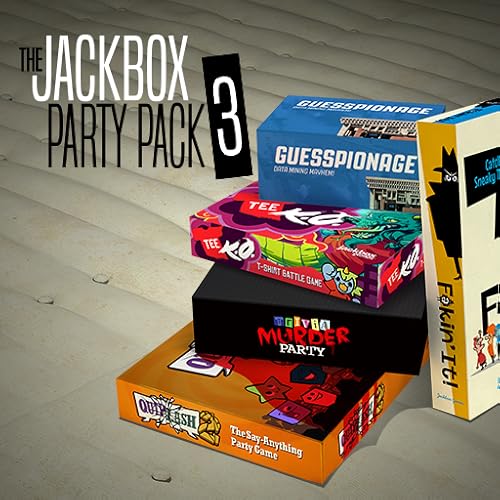
The Jackbox Party Pack series is uniquely designed for audience participation. Players, including stream viewers, join via a smartphone browser, meaning chat can participate in real time without any special setup. Games like Quiplash, Drawful, and Trivia Murder Party are consistently funny with strangers and scale well from small groups to hundreds of simultaneous players. Every session is different because the content is generated by the players themselves, ensuring no two broadcasts are the same. The host simply shares their screen, and viewers use a room code to join from their phones, tablets, or computers.
The series has released multiple packs over the years, each containing five new games. The most popular packs for streamers include Party Pack 3 (with Quiplash 2 and Trivia Murder Party), Party Pack 4 (with Fibbage 3 and Survive the Internet), and Party Pack 7 (with Quiplash 3 and The Devils and the Details). The games are designed to be family-friendly and inclusive, though some packs include mature content options. The lack of required downloads or accounts lowers the barrier for viewer participation, which is critical for growing an interactive channel. Many creators use Jackbox as a dedicated “chat plays” segment during their streams, often scheduling it as a weekly event.
One honest limitation is that Jackbox games require all players to have a smartphone or tablet with a modern browser, which can exclude viewers who are watching on a TV or console without a second device. Additionally, the games are best experienced with a minimum of four to eight players, so small streams with low viewer counts may struggle to fill a lobby. The humor in some games can also fall flat if the player base is not creative or engaged, and the same games can feel repetitive after repeated playthroughs. Finally, each Party Pack is sold separately, so building a full library across multiple packs can become expensive over time.
What to look for
- Capture resolution and frame rate: Ensure the capture card supports the resolution and frame rate you plan to stream or record, such as 1080p60 or 4K60. Higher specs are better for future-proofing.
- Latency and passthrough quality: Look for low-latency passthrough so your gameplay feels responsive. Features like 4K Instant Gameview or 4K passthrough minimize input lag.
- Portability and form factor: Consider whether you need an internal PCIe card for a permanent setup or an external USB device for travel and multiple locations.
- Standalone recording capability: If you record at events without a PC, look for a capture card that can record directly to an SD card or USB drive.
- Software and compatibility: Check that the capture card works with your preferred streaming software (OBS, Streamlabs, XSplit) and operating system (Windows, Mac, Linux).
- Game replayability and mod support: For games, prioritize titles with strong mod communities, regular updates, and built-in audience interaction features like Twitch integration or smartphone browser support.
- Hardware requirements and accessibility: Ensure the game runs on your streaming PC or console without issues, and consider whether your audience can easily participate (e.g., no downloads required for Jackbox).
- Content variety and longevity: Choose games that offer endless content generation through procedural generation, player-generated content, or social dynamics that change every session.
The verdict
Choosing the right creator game or capture hardware depends on your specific streaming setup and content goals. If you are a console creator who streams from a desktop PC, the Elgato 4K60 Pro Capture Card delivers the best balance of low latency, high resolution, and HDR support for professional-quality broadcasts. For creators who prioritize content variety and viewer engagement, Minecraft Java Edition and Among Us offer proven, decade-long track records of generating entertaining streams with minimal technical overhead. If you need a portable capture solution for events or travel, the AVerMedia Live Gamer Portable 2 Plus provides reliable standalone recording at 1080p60. And for audience interaction that requires no special software, the Jackbox Party Pack series remains the gold standard for turning your chat into active participants. Evaluate your workflow, budget, and audience size, then pick the tool that removes the most friction from your creative process.
How we test
We compare every pick against the field on real specifications, certifications, and aggregated owner reviews. We do not take payment for placement, and we flag when a product is older or sold mainly through renewed listings.
At a glance
| Pick | Best for | Score | |
|---|---|---|---|
| Elgato 4K60 Pro Capture Card | Streaming Hardware | Check price | |
| Minecraft Java Edition | Check price | ||
| Among Us | Check price | ||
| AVerMedia Live Gamer Portable 2 Plus | Capture Card | Check price | |
| Jackbox Party Pack | Party / Audience Game | Check price |
The picks, reviewed
Elgato 4K60 Pro Capture Card
Before the games, the gear. The Elgato 4K60 Pro is the gold standard capture card for console creators in 2026. It captures 4K60 HDR footage directly through PCIe with virtually zero latency on the passthrough display, meaning you play at full quality while OBS or Streamlabs encodes a perfect copy for your stream. The proprietary 4K Instant Gameview feature eliminates the input lag that plagued earlier generations of capture hardware. If you are running a multi-camera or multi-source setup, the Elgato ecosystem integrates cleanly with Stream Deck for scene switching.
Minecraft Java Edition
Minecraft remains the most-watched game on YouTube and one of the top five on Twitch - a position it has held for over a decade. The reason is simple: no two sessions are the same, the game rewards creative problem-solving in real time, and the community around challenge runs, speedruns, and building competitions generates endless new content frameworks. Java Edition's mod ecosystem means creators can run custom challenge modes, mini-games, and viewer-participation maps that extend the game's replayability indefinitely. It is the single most content-efficient game available.

Among Us
Among Us may have peaked in 2020, but it has aged into a creator staple for one reason: the social deduction format is pure content gold. Every session generates genuine drama, betrayal, and comedy that requires no editing to be entertaining. The game runs on virtually any hardware, making it accessible to creators across all budget levels, and the Twitch integration that allows viewers to see kill cooldowns creates an asymmetric information layer that keeps chat permanently engaged. Celebrity lobbies and influencer crossovers continue to generate viral moments years after the game's peak popularity.
AVerMedia Live Gamer Portable 2 Plus
For creators who stream both at home and on the road - at gaming events, LAN parties, or friend group sessions - the AVerMedia Live Gamer Portable 2 Plus offers a compact, bus-powered capture solution that does not require a PC connection when operating in standalone mode. It records directly to SD card at 1080p60, making it ideal for creators who film gaming content and edit offline. The 4K passthrough ensures your display stays pristine while recording. At roughly half the price of the Elgato 4K60 Pro, it is the best value capture card for creators building their setup on a budget.
Jackbox Party Pack
The Jackbox Party Pack series is uniquely designed for audience participation. Players - including stream viewers - join via a smartphone browser, meaning chat can participate in real time without any special setup. Games like Quiplash, Drawful, and Trivia Murder Party are consistently funny with strangers and scale well from small groups to hundreds of simultaneous players. Every session is different, editing is minimal, and the clip-worthy moments are reliable. The latest packs include accessibility options and content moderation tools that make family-friendly streams easier to manage.
What to look for
Viewer engagement hooks
- The best creator games give your audience something to anticipate, argue about, or participate in. Social deduction, randomness, and skill-based clutch moments all generate real-time chat reactions.
Streaming performance
- Games that consume 100% of CPU or GPU leave nothing for the encoder. Look for titles that run well at medium settings, freeing hardware overhead for OBS to maintain stable bitrate.
Clip and highlight potential
- Games with discrete, exciting moments - victories, betrayals, comebacks - produce natural clip segments without requiring heavy editing. This makes your VOD content more valuable than streams that are 90 minutes of low-tension exploration.
Hardware compatibility
- Confirm your capture card supports the output resolution and HDR setting of your console. Mismatched specs are the most common source of capture quality problems for new creators.
Community and longevity
- Games with active communities, regular updates, and healthy viewer counts on streaming platforms generate algorithmic discovery. Starting a channel around a dead game is an uphill battle regardless of content quality.
Our verdict
Building a content creator setup requires both the right games and the right hardware. The Elgato and AVerMedia capture cards provide the technical foundation; Minecraft, Among Us, and Jackbox provide the content fuel. Start with the capture card that fits your budget, pair it with the game that best matches your audience and personality, and invest in audio quality early - clean sound turns casual viewers into subsc
FAQs
'Creator-friendly games share several traits: they have clear, watchable moment-to-moment action that keeps viewers engaged; they offer enough variety or randomness that every session feels fresh; they support interaction between streamer and audience through polls or viewer participation modes; and they run reliably at high frame rates on capture cards without streaming performance penalties.'
A capture card is strongly recommended for console streaming. Devices like the Elgato HD60 X or AVerMedia Live Gamer 4K allow you to route console HDMI through your PC for encoding, giving you full OBS control over the stream. Built-in console streaming features work for casual use but limit the overlays, alerts, and scene switching that professional-looking creator content requires.
'Prioritize in this order: a reliable capture card, a USB condenser microphone, and a ring light or key light. Viewers tolerate imperfect video far longer than they tolerate bad audio, so the microphone matters most. Once your audio is clean, a capture card ensures smooth footage, and lighting dramatically improves webcam quality. Green screens and camera upgrades come later once you have built an audience.'
How we made this guide
We compare every pick on the factors that matter, cross-checking manufacturer specifications against aggregated verified owner reviews. We rank independently and never take payment for placement. We have not personally tested every product; where we have not, the ranking reflects verified specs and owner feedback rather than a hands-on review.
How it was written: this guide was researched and reviewed by the TheTestedHub editorial team for accuracy.
Affiliate disclosure: TheTestedHub is reader-supported. When you buy through links on our site, we may earn a commission at no extra cost to you.
Related guides

Educational Games 2026 That Grow With Your Child

7 Android TV Controllers Worth Your Money

Wooting 60HE Review (2026): 7 Months With the Analog Keyboard

Logitech G Pro X Superlight 2 Review (2026): The Esports

HyperX Cloud III Wireless Review (2026)

Steam Deck OLED (1TB) Review (2026): 8 Months Later, Still

Logitech G502 Hero Review (2026)
