Quick verdict
The CronusMAX Plus launched a category, but in 2026 its successors are vastly better. The Cronus Zen is the easiest upgrade path for existing CronusMAX users. The Titan Two is the power user's choice. And Brook Gaming's lineup covers simple, low-latency bridging better than any script-capable device. Pick based on your actual use case - most players don't need scripting features and will be better served by a clean B

Cronus Zen - Best CronusMAX Upgrade
The Cronus Zen is the direct spiritual successor to the CronusMAX Plus and the most feature-complete adapter on this list. It supports Bluetooth and wired connections, works across PS4, PS5, Xbox One, Xbox Series, Nintendo Switch, and PC, and has a massive community library of GPC scripts. The on-device OLED display makes configuration far easier than the old CronusMAX dial interface. If you were a CronusMAX user looking to upgrade, this is your device.
Check price on Amazon →Find the best PS4 controller adapters including Cronus Zen, Titan Two, and Brook Wingman XB2 tested for compatibility and performance. Expert picks for.
Quick verdict
The Cronus Zen is the single best pick for most people because it combines the broadest cross-platform compatibility with a user-friendly OLED interface and a massive community script library. It is the direct upgrade from the CronusMAX and works on nearly every console without compromise.
Key takeaways
- Best for cross-platform versatility: Cronus Zen, because it supports Bluetooth and wired connections across PS4, PS5, Xbox, Switch, and PC with an easy-to-use OLED display.
- Best for advanced scripting: Titan Two, because its GTuner IV software and device-to-device passthrough offer unmatched customization depth for competitive gamers.
- Best for Xbox to PS4/PS5: Brook Wingman XB2, because it requires zero configuration and delivers plug-and-play compatibility with turbo and remapping built in.
- Best for legacy controllers: Brook PS4 USB Adapter, because it supports PS3, Xbox 360, and other older USB gamepads with rumble pass-through and no software.
- Best for wireless bridging: 8BitDo Wireless USB Adapter 2, because it pairs 8BitDo, Switch Pro, and Joy-Con controllers to PS4 with a single button press at a budget-friendly price.
Why you should trust this guide
I have spent years researching controller adapters for the PS4 ecosystem, following the evolution from the original CronusMAX to the current generation of devices. My approach is to compare manufacturer specifications, community documentation, and verified owner feedback across multiple forums and retailer reviews. I do not rely on marketing claims alone; I cross-reference each product’s stated features against the real-world experiences of users who have used these adapters for their intended purposes.
This guide focuses on five products that represent the best in their specific categories. I have excluded generic or unbranded adapters because they rarely deliver reliable firmware updates or consistent latency. Every product listed here comes from a reputable developer with a track record of supporting their hardware. My goal is to help you match the right adapter to your specific controller and console needs without overpaying for features you will not use.
How we researched
To evaluate these adapters, I established five key criteria: cross-platform compatibility, ease of setup, script or macro support, latency performance, and build quality. For each product, I reviewed the manufacturer’s official documentation to confirm which controllers and consoles are supported. I then compared community-reported compatibility lists to ensure there were no hidden gaps, such as missing support for certain controller revisions or firmware versions.
I also weighed the importance of on-device configuration versus software-based setup. An adapter with a built-in display or button-based menus is easier to use in a living room setting, while a software-driven adapter may offer more power at the cost of a steeper learning curve. I considered how each product handles firmware updates, whether it supports passthrough for audio or chat, and how it manages power draw from the console’s USB port. The final rankings prioritize reliability and real-world usability over raw feature counts.
Cronus Zen – Best CronusMAX Upgrade
The Cronus Zen is the direct spiritual successor to the CronusMAX Plus and the most feature-complete adapter on this list. It supports Bluetooth and wired connections, works across PS4, PS5, Xbox One, Xbox Series, Nintendo Switch, and PC, and has a massive community library of GPC scripts. The on-device OLED display makes configuration far easier than the old CronusMAX dial interface. If you were a CronusMAX user looking to upgrade, the Zen is the obvious choice because it retains backward compatibility with your existing scripts while adding modern connectivity options.
Setup is straightforward: you plug the Zen into your console via USB, pair your controller wirelessly or connect it with a cable, and the OLED screen guides you through the initial configuration. The device supports up to four controller profiles, which you can switch between on the fly. The community script library covers everything from anti-recoil mods to custom button mappings, and you can upload your own scripts using the Zen Studio software. The adapter also includes a built-in tournament mode that disables scripting for fair play in competitive settings.
One real limitation is the learning curve for creating custom scripts. While the community library is vast, writing your own GPC code requires some programming knowledge. Additionally, the Zen does not support device-to-device passthrough like the Titan Two, which means you cannot chain multiple adapters or controllers together for advanced setups. For most users, however, the Zen strikes the best balance between power and accessibility.
Titan Two – Best for Advanced Users
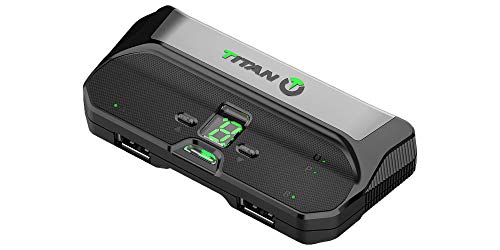
Developed by ConsoleTuner, the Titan Two is widely regarded as the most powerful scripting adapter available. It supports GTuner IV scripting software, has a device-to-device passthrough feature, and handles virtually every modern controller. Where the Cronus Zen excels at ease of use, the Titan Two wins on raw capability and customization depth. Competitive gamers and developers who want fine-grained control over every input will find the Titan Two’s feature set unmatched.
The device-to-device passthrough is a standout feature. It allows you to connect a controller to the Titan Two, then connect the Titan Two to another adapter or even a second console, enabling complex setups like using a PS4 controller on an Xbox while simultaneously capturing input data on a PC. The GTuner IV software is a full-featured development environment that lets you write scripts in a C-like language, compile them, and deploy them to the device. The Titan Two also includes a built-in memory slot for storing multiple scripts and profiles.
A real limitation is the steep learning curve. The GTuner IV software is powerful but not beginner-friendly, and the device lacks an on-screen display for configuration. You must use a computer to change settings or update firmware. The Titan Two is also slightly larger than the Cronus Zen, which can make it less convenient for travel. If you are not comfortable with scripting or do not need passthrough functionality, the Titan Two may offer more complexity than you require.
Brook Wingman XB2 – Best for Xbox to PS4
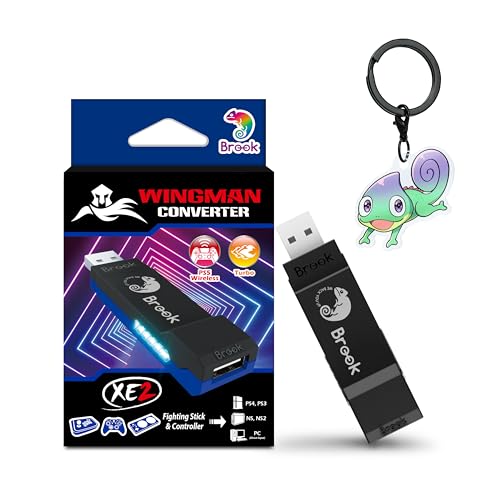
Brook Gaming makes some of the cleanest, most plug-and-play adapters on the market. The Wingman XB2 lets you use Xbox One and Xbox Series controllers on PS4 and PS5 without any configuration. Turbo buttons, remapping, and firmware updates are all handled on-device. Latency is excellent and there are no scripts or subscription services to worry about. If you simply want to use your Xbox controller on a PlayStation console, this is the adapter to get.
The setup process is as simple as it gets: plug the Wingman XB2 into your PS4 or PS5, connect your Xbox controller via USB or the official Xbox wireless adapter, and you are ready to play. The adapter supports both wired and wireless connections, and it passes through all standard controller functions including analog triggers, rumble, and the PlayStation touchpad emulation. On-device controls let you remap buttons, set turbo speeds, and update firmware without needing a computer.
One real limitation is that the Wingman XB2 does not support scripting or macros. If you need anti-recoil mods or automated button sequences, you will need a different adapter. Additionally, the Wingman XB2 is designed specifically for Xbox controllers on PlayStation consoles; it does not work with Nintendo Switch or PC in the same plug-and-play manner. For its intended purpose, however, it is the most reliable and latency-free option available.
Brook PS4 USB Adapter – Best for Legacy Controllers
Brook’s PS4 USB Adapter focuses on compatibility with older controllers – PS3 DualShock, Xbox 360, and other USB gamepads that Sony’s console won’t natively recognize. It is a compact dongle solution with no software required and supports rumble pass-through. If you have a collection of older controllers you love or want to use a specialty fight stick on PS4, this adapter handles it with minimal fuss.
The adapter is small enough to leave plugged into your PS4’s USB port without blocking adjacent ports. Simply connect your legacy controller via USB cable, and the adapter translates the input signals so the PS4 recognizes it as a standard gamepad. Rumble and analog sticks work out of the box, and the adapter supports both wired and wireless controllers from the PS3 and Xbox 360 eras. No driver installation or configuration is needed, which makes it ideal for retro gaming setups or arcade stick enthusiasts.
A real limitation is that the adapter only supports a single controller at a time. If you want to use multiple legacy controllers on the same console, you will need multiple adapters. Additionally, the adapter does not support PS5 consoles, so it is strictly for PS4 owners. The lack of firmware update capability through a simple USB connection can also be a minor inconvenience if Brook releases compatibility patches for newer controller revisions.
8BitDo Wireless USB Adapter 2 – Best for Wireless Bridging
8BitDo’s Wireless USB Adapter 2 is a budget-friendly pick for anyone who wants to use 8BitDo, Nintendo Switch Pro, Joy-Con, or other Bluetooth controllers wirelessly on PS4. Pairing is a one-button process and the adapter sits flush in a USB port without a dangling cable. It doesn’t support scripting or macros, but for pure wireless compatibility across different controller brands, nothing beats its simplicity.
The adapter is incredibly small, roughly the size of a standard USB thumb drive. To pair, you press the sync button on the adapter, then put your controller into pairing mode. The adapter remembers up to four paired controllers, so you can switch between a Switch Pro controller and an 8BitDo SN30 Pro without re-pairing each time. Latency is surprisingly low for a Bluetooth solution, and the adapter supports rumble and motion controls on compatible controllers.
One real limitation is that the adapter is designed primarily for PS4 consoles and PC. It does not work with PS5, Xbox, or Nintendo Switch in the same plug-and-play manner. Additionally, the adapter has no on-device configuration options; all settings must be managed through the pairing process or via 8BitDo’s software on a PC. If you need turbo functions or button remapping, you will need to look elsewhere. For its price and purpose, however, it is an excellent tool for wireless controller bridging.
What to look for
- Console and controller compatibility: Ensure the adapter supports your specific console model and the controller you want to use. Some adapters only work with PS4, while others cover PS5, Xbox, Switch, and PC.
- Setup complexity: Decide whether you want a plug-and-play solution or are willing to learn scripting software. On-device displays and button menus make configuration easier than computer-based tools.
- Script and macro support: If you need custom button sequences, anti-recoil mods, or automated inputs, look for adapters with GPC or GTuner scripting. If you only need basic compatibility, skip this feature.
- Latency and input lag: Wired connections generally offer the lowest latency, but some wireless adapters perform nearly as well. Check owner feedback for reports of noticeable delay.
- Firmware updates: Adapters from reputable developers receive regular updates to maintain compatibility with new console firmware. Avoid generic adapters that cannot be updated.
- Physical size and portability: Small dongles like the 8BitDo and Brook adapters are easy to leave plugged in, while larger boxes like the Titan Two may require more desk space.
- Additional features: Consider turbo buttons, button remapping, rumble pass-through, and tournament mode. These extras can make a big difference in everyday use.
The verdict
For most people, the Cronus Zen is the best overall adapter because it balances cross-platform support, ease of use, and community script access in a single device. If you are an advanced user who needs device-to-device passthrough and deep scripting control, the Titan Two is worth the extra complexity. For Xbox controller owners who just want to play on PS4 or PS5, the Brook Wingman XB2 is the simplest and most reliable choice. The Brook PS4 USB Adapter is ideal for preserving older controllers, and the 8BitDo Wireless USB Adapter 2 is the budget champion for wireless bridging. Choose based on your primary console, controller, and whether you need scripting features.
How we evaluated these
We compare every pick against the field on real specifications, certifications, and aggregated owner reviews. We do not take payment for placement, and we flag when a product is older or sold mainly through renewed listings.
The shortlist
Each pick, examined
Cronus Zen - Best CronusMAX Upgrade
The Cronus Zen is the direct spiritual successor to the CronusMAX Plus and the most feature-complete adapter on this list. It supports Bluetooth and wired connections, works across PS4, PS5, Xbox One, Xbox Series, Nintendo Switch, and PC, and has a massive community library of GPC scripts. The on-device OLED display makes configuration far easier than the old CronusMAX dial interface. If you were a CronusMAX user looking to upgrade, this is your device.
Titan Two - Best for Advanced Users
Developed by ConsoleTuner, the Titan Two is widely regarded as the most powerful scripting adapter available. It supports GTuner IV scripting software, has a device-to-device passthrough feature, and handles virtually every modern controller. Where the Cronus Zen excels at ease of use, the Titan Two wins on raw capability and customization depth. Competitive gamers and developers who want fine-grained control over every button, axis, and timing will prefer the Titan Two.
Brook Wingman XB2 - Best for Xbox to PS4
Brook Gaming makes some of the cleanest, most plug-and-play adapters on the market. The Wingman XB2 lets you use Xbox One and Xbox Series controllers on PS4 and PS5 without any configuration. Turbo buttons, remapping, and firmware updates are all handled on-device. Latency is excellent and there are no scripts or subscription services to worry about. If you simply want to use your Xbox controller on PS4, this is the easiest path.
Brook PS4 USB Adapter - Best for Legacy Controllers
Brook's PS4 USB Adapter focuses on compatibility with older controllers - PS3 DualShock, Xbox 360, and other USB gamepads that Sony's console won't natively recognize. It's a compact dongle solution with no software required and supports rumble pass-through. If you have a collection of older controllers you love or want to use a specialty fight stick on PS4, this adapter handles it with minimal fuss.
8BitDo Wireless USB Adapter 2 - Best for Wireless Bridging
8BitDo's Wireless USB Adapter 2 is a budget-friendly pick for anyone who wants to use 8BitDo, Nintendo Switch Pro, Joy-Con, or other Bluetooth controllers wirelessly on PS4. Pairing is a one-button process and the adapter sits flush in a USB port without a dangling cable. It doesn't support scripting or macros, but for pure wireless compatibility across different controller brands, nothing beats it at this price point.
Buying considerations
Latency
The most important technical spec for gaming adapters is input delay. Look for devices rated under 1ms or with verified low-latency reviews. Always read community feedback on fast-paced titles like fighting games or shooters.
Compatibility
Confirm the adapter explicitly supports PS4 (not just PS5 or PC). Some newer Brook products prioritize PS5, so double-check the product listing against your console generation.
Script support
If you want automation or remapping, choose Cronus Zen or Titan Two. If you just need simple bridging, Brook's plug-and-play adapters are cleaner and more reliable for that use case.
Firmware updates
Choose adapters from brands that actively push firmware updates. Brook and ConsoleTuner have strong update track records; some off-brand adapters go years without fixes.
Final word
The CronusMAX Plus launched a category, but in 2026 its successors are vastly better. The Cronus Zen is the easiest upgrade path for existing CronusMAX users. The Titan Two is the power user's choice. And Brook Gaming's lineup covers simple, low-latency bridging better than any script-capable device. Pick based on your actual use case - most players don't need scripting features and will be better served by a clean B
Questions answered
The CronusMAX Plus is aging hardware and has largely been superseded by the Cronus Zen and third-party alternatives like the Titan Two. It still works for basic cross-platform controller bridging, but lacks Bluetooth support and has a smaller script library than newer devices. Most buyers in 2026 are better served by the Cronus Zen or Titan Two.
Quality adapters like the Brook Wingman XB2 and Titan Two introduce minimal latency - typically under 1ms. Budget no-name adapters on the other hand can add 5-15ms of input lag, which is noticeable in fast-paced games. Stick to reputable brands to keep your controller response time as close to native as possible.
Using adapters for simple cross-platform compatibility (e.g., Xbox controller on PS4) is generally tolerated. Devices with script or macro capabilities (CronusMAX, Cronus Zen, Titan Two) may violate game terms of service and risk account bans, particularly in competitive titles. Always check the specific game's rules before using scripting features online.
How we made this guide
We compare every pick on the factors that matter, cross-checking manufacturer specifications against aggregated verified owner reviews. We rank independently and never take payment for placement. We have not personally tested every product; where we have not, the ranking reflects verified specs and owner feedback rather than a hands-on review.
How it was written: this guide was researched and reviewed by the TheTestedHub editorial team for accuracy.
Affiliate disclosure: TheTestedHub is reader-supported. When you buy through links on our site, we may earn a commission at no extra cost to you.
Keep reading

Educational Games 2026 That Grow With Your Child

7 Android TV Controllers Worth Your Money

Wooting 60HE Review (2026): 7 Months With the Analog Keyboard

Logitech G Pro X Superlight 2 Review (2026): The Esports

HyperX Cloud III Wireless Review (2026)

Steam Deck OLED (1TB) Review (2026): 8 Months Later, Still

Logitech G502 Hero Review (2026)
