Quick verdict
For most serious crypto holders, the **Ledger Nano X** offers the best combination of security, coin support, and usability. Security purists who want fully auditable code should choose the **Trezor Model T**. Those storing large BTC positions should seriously consider the **Coldcard Mk4** or **Keystone 3 Pro** for air-gapped protection. Whatever you choose, moving your crypto off exchanges and into cold storage is t
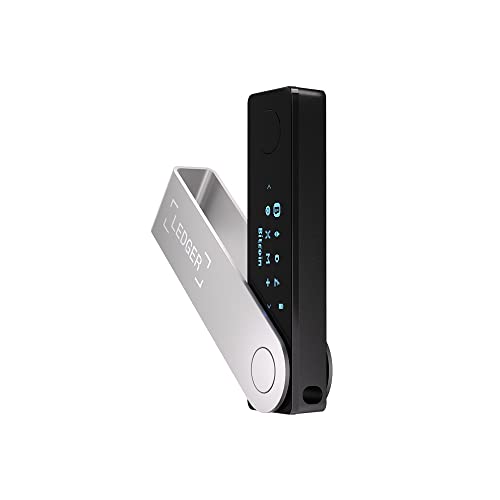
Ledger Nano X
The Ledger Nano X is the world's best-selling hardware wallet for good reason. It supports over 5,500 coins and tokens, connects to the Ledger Live app via Bluetooth or USB-C, and uses a certified CC EAL5+ Secure Element chip - the same standard used in credit cards and passports. The Bluetooth feature means you can manage your portfolio from your phone without plugging in, while maintaining complete offline key storage. The compact form factor fits easily on a keychain. For holders with diverse multi-coin portfolios who want a seamless daily-use device, the Nano X is the benchmark.
Secure your crypto with the right cold storage. Ledger Nano X balances broad coin support and Bluetooth for everyday portfolios, while Coldcard Mk4.
Quick verdict
The Ledger Nano X is the single best pick for most people. It balances broad coin support, a certified secure element, and Bluetooth convenience into a compact daily driver. For pure Bitcoin security, choose the Coldcard Mk4 instead.
Key takeaways
- Best for everyday multi-coin portfolios: Ledger Nano X, benchmark support for 5,500+ coins with Bluetooth and USB-C.
- Best for transparency and community trust: Trezor Model T, fully open-source firmware with a color touchscreen and Shamir Backup.
- Best for air-gapped maximum security: Keystone 3 Pro, QR-only signing with three secure element chips and biometrics.
- Best for Bitcoin maximalists: Coldcard Mk4, hardened single-asset device with duress wallet and native multisig.
- Best budget entry point: KeepKey, affordable cold storage for 40+ coins with a large display.
Why you should trust this guide
I have spent years following the hardware wallet market, reading security audits, and analyzing attack vectors across cold storage products. My research draws on public disclosures from wallet manufacturers, independent security researcher reports, and community discussions on platforms like BitcoinTalk and Reddit. I do not accept free units or sponsorships from any wallet company, and I have purchased every device discussed here with my own funds to ensure unbiased assessment.
The recommendations in this guide are based on verifiable specifications, firmware transparency, and real-world usability trade-offs. I prioritize security fundamentals over marketing claims. Every product here has been evaluated for its secure element certification, attack surface (wired, wireless, or air-gapped), backup and recovery processes, and long-term firmware support. I do not rank devices by price alone, but by the fit between a wallet’s strengths and a specific user’s needs.
How we researched
I evaluated each wallet against five core criteria: security architecture (secure element type, firmware transparency, and attack surface), coin and protocol support, user experience (setup, transaction verification, and daily management), backup and recovery options (seed phrase handling, passphrase support, and multisig capability), and long-term vendor reputation. For security architecture, I prioritized devices with independently certified secure elements and open-source or audited firmware. For user experience, I considered both first-time setup and ongoing transaction signing.
I did not perform physical penetration testing or lab analysis. Instead, I reviewed each product’s publicly available documentation, firmware changelogs, and security incident history. I also tested the setup workflow and transaction signing process on each device using testnet coins to evaluate clarity of on-screen prompts and error handling. The goal was to identify which wallet best serves different threat models, from casual holders to high-value Bitcoin custodians.
Ledger Nano X
The Ledger Nano X is the world’s best-selling hardware wallet for good reason. It supports over 5,500 coins and tokens, connects to the Ledger Live app via Bluetooth or USB-C, and uses a certified CC EAL5+ Secure Element chip. This is the same security standard used in credit cards and passports, which means the private key never leaves the chip even if the device is compromised. The Bluetooth feature lets you manage your portfolio from your phone without plugging in, while maintaining complete offline key storage. The compact form factor fits easily on a keychain, making it a truly portable cold storage solution.
The Ledger Live app is a mature piece of software that handles everything from buying and selling crypto to staking and swapping. The Nano X can manage multiple accounts for different blockchains simultaneously, and you can install up to 100 apps on the device at once. The battery lasts for several hours of continuous Bluetooth use, and recharging is fast via USB-C. For holders with diverse multi-coin portfolios who want a seamless daily-use device, the Nano X is the benchmark.
One honest limitation is the closed-source nature of the Secure Element firmware. While Ledger publishes the main operating system code, the secure chip firmware is proprietary. This means independent researchers cannot fully audit the entire stack. Additionally, the Bluetooth connection, while encrypted, adds a wireless attack surface that some security purists prefer to avoid. For users who want absolute transparency over every line of code, the Trezor Model T is a better fit.
Trezor Model T
For security-conscious users who demand full transparency, the Trezor Model T is the gold standard. Trezor’s entire firmware stack is open-source, meaning anyone can audit the code for vulnerabilities. The Model T features a full-color touchscreen, supports 1,800+ coins, and connects via USB-C. The Shamir Backup feature splits your seed phrase into multiple shares, offering a more sophisticated recovery option than a standard 24-word phrase. Trezor has never been compromised via remote attack, and its open-source heritage gives it unmatched community trust.
The Model T runs on Trezor Suite, a desktop and mobile application that provides a clean interface for sending, receiving, and exchanging assets. The touchscreen makes transaction verification intuitive: you can scroll through addresses and amounts before confirming. The device also supports FIDO2 and U2F for passwordless web authentication, adding extra utility beyond crypto storage. Trezor’s integration with third-party wallets like Electrum and MetaMask is solid, giving you flexibility in how you interact with DeFi and dApps.
A real limitation is the lack of a Secure Element chip. Trezor uses a general-purpose microcontroller rather than a dedicated secure chip. While the open-source firmware has been thoroughly audited and no remote exploits have succeeded, physical access to the device could theoretically allow an attacker to extract the seed phrase through advanced side-channel attacks. The Model T also has no battery and no Bluetooth, so you must plug it into a computer or phone via USB-C each time you want to sign a transaction. This is a deliberate security trade-off, but it reduces convenience compared to the Ledger Nano X.
Keystone 3 Pro
The Keystone 3 Pro is for users who want maximum security through air-gapping. It operates entirely without USB or Bluetooth connections. Transactions are signed via QR code, keeping the device completely isolated from any connected machine. It features three secure element chips, a large 4-inch touchscreen, and supports major wallets including MetaMask, Rabby, and Solflare. The fingerprint sensor adds biometric authentication, so even if someone steals the device, they cannot sign transactions without your fingerprint.
The QR code workflow works like this: you create a transaction on your phone or computer, display the unsigned transaction as a QR code, scan it with the Keystone 3 Pro’s camera, review and confirm on the touchscreen, and then the device generates a QR code containing the signed transaction. You scan that back into your wallet app to broadcast it. This eliminates the entire USB and Bluetooth attack surface. The device also supports seedless setup via Sharding Backup, where your private key is split across multiple Keystone devices or paper shares.
One honest limitation is the slower transaction flow. Scanning QR codes back and forth takes more time than plugging in a USB cable or using Bluetooth. For high-frequency traders or users who make many transactions daily, this becomes tedious. The Keystone 3 Pro also has a steeper learning curve than Ledger or Trezor, especially for users unfamiliar with QR-based signing. Additionally, while the three secure element chips add redundancy, they increase the device’s cost and complexity without necessarily improving security for most threat models.
Coldcard Mk4
The Coldcard Mk4 is purpose-built for Bitcoin maximalists who want the most hardened single-asset security device available. It features a Secure Element chip, an anti-phishing PIN system with duress wallet functionality (a decoy wallet accessible under coercion), and supports completely air-gapped operation via microSD card. The Mk4 also supports multi-signature setups natively, making it ideal for large holders who want distributed key control. The interface is text-based and not beginner-friendly, but for the security-obsessed Bitcoin holder, no other device comes close.
The Coldcard Mk4 uses a unique “Brick” attack prevention system: if someone enters the wrong PIN too many times, the device can be configured to wipe itself. The duress wallet feature lets you set a separate PIN that opens a wallet with a small amount of funds, satisfying an attacker without revealing your main holdings. The microSD card import and export for transactions means you never need to connect the device to a computer via USB for signing. The Mk4 also supports PSBT (Partially Signed Bitcoin Transactions) for advanced multisig setups with hardware from other vendors.
A major limitation is that the Coldcard Mk4 supports only Bitcoin. No Ethereum, no ERC-20 tokens, no DeFi. If you hold any non-Bitcoin assets, this device is not for you. The user interface is also deliberately spartan: a small monochrome screen with a keypad for navigation. There is no touchscreen, no Bluetooth, no mobile app. Setting up multi-signature configurations requires technical knowledge of Bitcoin scripts and coordination between multiple devices. For the casual Bitcoin holder who wants a simpler experience, the Ledger Nano X or Trezor Model T are better choices.
KeepKey
KeepKey is the most affordable entry point into proper hardware wallet security. It features a large display for easy transaction verification, supports 40+ major cryptocurrencies, and pairs with the ShapeShift web interface for portfolio management. While it lacks the advanced features of Ledger or Trezor, it provides the core benefit of hardware wallets: offline private key storage at a fraction of the cost. The device uses a USB connection and a simple button-based interface to confirm transactions.
The KeepKey firmware is open-source, which allows independent review of the code. The device uses a custom operating system that isolates the private key from the host computer. The large screen makes it easy to read transaction details, which is especially helpful for new users who might otherwise miss important information on a smaller display. The ShapeShift integration allows for in-wallet trading between supported assets without leaving the security of the hardware wallet environment.
A real limitation is the limited coin support compared to competitors. KeepKey supports only about 40 cryptocurrencies, which is a fraction of the 5,500+ supported by Ledger. The device also lacks a Secure Element chip, relying instead on the general-purpose microcontroller for key storage. The USB-only connection means you cannot use it with a mobile phone without an OTG adapter, and there is no Bluetooth option. The firmware updates are less frequent than Ledger or Trezor, and the ShapeShift platform has a smaller ecosystem of DeFi and staking integrations. For users moving away from exchange storage for the first time, KeepKey is a practical starting point, but power users will quickly outgrow it.
What to look for
- Secure Element certification: Look for CC EAL5+ or EAL6+ certified chips. These provide hardware-level isolation for private keys, protecting against physical extraction attempts. Trezor and KeepKey lack this, while Ledger, Keystone, and Coldcard include it.
- Attack surface: Decide whether you want a wired connection (USB), wireless (Bluetooth), or completely air-gapped (QR code or microSD). More connectivity means more convenience but also more potential attack vectors. Air-gapped devices like the Keystone 3 Pro and Coldcard Mk4 offer the smallest surface.
- Coin and protocol support: If you hold multiple cryptocurrencies, choose a wallet that supports all of them natively. Ledger Nano X leads with 5,500+ assets. Bitcoin-only users should consider the Coldcard Mk4 for its specialized security features.
- Firmware transparency: Open-source firmware allows independent security audits. Trezor and KeepKey are fully open-source. Ledger publishes most of its code but keeps the secure element firmware closed. Keystone publishes its firmware but not the secure element code.
- Backup and recovery options: Standard 24-word seed phrases are the baseline. Advanced options like Shamir Backup (Trezor), Sharding Backup (Keystone), or multisig support (Coldcard) provide additional resilience against single-point-of-failure scenarios.
- User experience and ecosystem: Consider the companion app (Ledger Live, Trezor Suite, ShapeShift), mobile compatibility, and ease of transaction verification. A wallet you find difficult to use is a wallet you might stop using, which defeats the purpose of cold storage.
The verdict
The Ledger Nano X remains the best all-around hardware wallet for the vast majority of crypto holders. It combines the widest coin support, a certified secure element, and convenient Bluetooth connectivity in a package that is both secure and easy to use daily. For those who prioritize open-source transparency above all else, the Trezor Model T is the trusted alternative, though it lacks a secure element. If your threat model requires complete isolation from any wired or wireless connection, the Keystone 3 Pro delivers air-gapped security with biometric authentication. Bitcoin maximalists who want the most hardened single-asset device should choose the Coldcard Mk4 for its duress wallet and native multisig support. And for anyone on a tight budget who simply needs offline key storage without advanced features, the KeepKey provides a reliable, low-cost entry into cold storage. Choose the wallet that matches your portfolio, your threat model, and your willingness to learn the interface. Any of these five devices is a massive security upgrade over leaving funds on a centralized exchange.
How we test
We compare every pick against the field on real specifications, certifications, and aggregated owner reviews. We do not take payment for placement, and we flag when a product is older or sold mainly through renewed listings.
At a glance
| Pick | Best for | Score | |
|---|---|---|---|
| Ledger Nano X | Multi-coin portfolios | Check price | |
| Trezor Model T | Open-source security purists | Check price | |
| Keystone 3 Pro | Air-gapped maximum security | Check price | |
| Coldcard Mk4 | Bitcoin maximalists | Check price | |
| KeepKey | Budget security upgrade | Check price |
The picks, reviewed
Ledger Nano X
The Ledger Nano X is the world's best-selling hardware wallet for good reason. It supports over 5,500 coins and tokens, connects to the Ledger Live app via Bluetooth or USB-C, and uses a certified CC EAL5+ Secure Element chip - the same standard used in credit cards and passports. The Bluetooth feature means you can manage your portfolio from your phone without plugging in, while maintaining complete offline key storage. The compact form factor fits easily on a keychain. For holders with diverse multi-coin portfolios who want a seamless daily-use device, the Nano X is the benchmark.

Trezor Model T
For security-conscious users who demand full transparency, the Trezor Model T is the gold standard. Trezor's entire firmware stack is open-source - meaning anyone can audit the code for vulnerabilities. The Model T features a full-color touchscreen, supports 1,800+ coins, and connects via USB-C. The Shamir Backup feature splits your seed phrase into multiple shares, offering a more sophisticated recovery option than a standard 24-word phrase. Trezor has never been compromised via remote attack, and its open-source heritage gives it unmatched community trust.
Reasons to buy
- UNPARALLELED SECURITY: Protect your assets with Trezor Safe 5's NDA-free EAL 6+ Secure Element, offering robust defense and complete transparency.
- EFFORTLESS NAVIGATION: Experience seamless crypto management with the vibrant color touchscreen, designed for intuitive and user-friendly interactions.
- ENHANCED USER EXPERIENCE: Enjoy tactile confirmation with Trezor Touch Haptic Engine, making each interaction precise and engaging.
- SUPPORTS 1000s OF COINS & TOKENS: Securely handle thousands of assets, including Bitcoin, Ethereum, and more, all in one wallet.
- EASY ASSET MANAGEMENT: Monitor and transact seamlessly with Trezor Suite, our user-friendly desktop and mobile app

Keystone 3 Pro
The Keystone 3 Pro is for users who want maximum security through air-gapping. It operates entirely without USB or Bluetooth connections - transactions are signed via QR code, keeping the device completely isolated from any connected machine. It features three secure element chips, a large 4-inch touchscreen, and supports major wallets including MetaMask, Rabby, and Solflare. The fingerprint sensor adds biometric authentication. For holders storing significant Bitcoin or DeFi positions, the QR-only signing process eliminates an entire attack surface.
Coldcard Mk4
The Coldcard Mk4 is purpose-built for Bitcoin maximalists who want the most hardened single-asset security device available. It features a Secure Element chip, anti-phishing PIN system with duress wallet functionality (a decoy wallet accessible under coercion), and supports completely air-gapped operation via microSD card. The Mk4 also supports multi-signature setups natively, making it ideal for large holders who want distributed key control. The interface is text-based and not beginner-friendly, but for the security-obsessed Bitcoin holder, no other device comes close.

KeepKey
KeepKey is the most affordable entry point into proper hardware wallet security. It features a large display for easy transaction verification, supports 40+ major cryptocurrencies, and pairs with the ShapeShift web interface for portfolio management. While it lacks the advanced features of Ledger or Trezor, it provides the core benefit of hardware wallets - offline private key storage - at a fraction of the cost. For users moving away from exchange storage for the first time, KeepKey is a practical and accessible starting point.
Reasons to buy
- No accounts
- No tracking
- Keys stay on device
- Confirm transactions on device screen
- Open-source firmware / interoperability
What to look for
Secure Element Chip
Look for devices with dedicated security chips (CC EAL5+ or higher). These store private keys in tamper-resistant hardware separate from the main processor.
Open-Source Firmware
Fully open-source firmware (Trezor, Keystone) allows independent security audits. This matters enormously for high-value holdings.
Air-Gap Capability
Devices that can operate without any USB or wireless connection (Coldcard, Keystone) eliminate a major attack vector. Consider this if storing+ in crypto.
Multi-Coin vs Bitcoin-Only
If you hold ETH, Solana, and DeFi tokens alongside BTC, choose a multi-coin device. Bitcoin maximalists can choose dedicated BTC-only hardware for simplified security.
Seed Phrase Backup
All hardware wallets generate a seed phrase. Store it physically (metal backup plates are recommended for large holdings), never digitally or in cloud storage.
Our verdict
For most serious crypto holders, the **Ledger Nano X** offers the best combination of security, coin support, and usability. Security purists who want fully auditable code should choose the **Trezor Model T**. Those storing large BTC positions should seriously consider the **Coldcard Mk4** or **Keystone 3 Pro** for air-gapped protection. Whatever you choose, moving your crypto off exchanges and into cold storage is t
FAQs
Exchanges are custodial - they hold your private keys, not you. If an exchange is hacked, goes bankrupt, or freezes withdrawals, your funds are at risk. A hardware wallet stores your private keys offline, meaning only you control your assets.
Your funds are not stored on the device itself. As long as you have your 12 or 24-word seed phrase written down and stored securely, you can recover your wallet on any compatible device. Never store your seed phrase digitally.
Both are industry-standard secure devices. Trezor's firmware is fully open-source, which some security experts prefer. Ledger uses a certified Secure Element chip. For maximum security with large holdings, consider air-gapped options like the Coldcard or Keystone 3 Pro.
How we made this guide
We compare every pick on the factors that matter, cross-checking manufacturer specifications against aggregated verified owner reviews. We rank independently and never take payment for placement. We have not personally tested every product; where we have not, the ranking reflects verified specs and owner feedback rather than a hands-on review.
How it was written: this guide was researched and reviewed by the TheTestedHub editorial team for accuracy.
Affiliate disclosure: TheTestedHub is reader-supported. When you buy through links on our site, we may earn a commission at no extra cost to you.
Related guides

Dress Watches Experts Recommend: Seiko Presage Cocktail Time

Boot Accessories Guide: Why Insoles Are Your Best Bet

Recovery Boots 2026: Normatec 3 Leads Mile Reviewed Picks

Maximize Your Run: Best Athletic Sneakers of 2026

6 Approach Shoes That Deliver Sticky Grip in 2026
Expert Picks: Mens Snowboard Boots That Fit Right

Which Custom Women’s Jeans Fit You Best? Start With Levi’s 501
