Quick verdict
For most cubers who want PC-connected practice, the SpeedStacks Gen 5 is the correct answer - it's competition hardware, it integrates cleanly with every timing app, and it lasts for years. Budget-conscious solvers should look at the YJ timer, which delivers the same PC connection standard at a fraction of the price. If you're committed to intensive algorithm training, the GAN Robot's auto-scrambling and drill modes

SpeedStacks Pro Timer Gen 5
The SpeedStacks Gen 5 is the benchmark - it's the official timer of WCA competitions worldwide and the standard that all other timers are measured against. Its capacitive touch pads deliver millisecond-accurate triggering, and the audio output is clean enough that PC software reads it without dropouts or lag. Plug the included 3.5mm cable into your microphone input, open CSTimer, and your solves log automatically.
Whether you need a WCA-compliant timer for official practice or a budget stackmat for casual PC solving, these five tested options connect seamlessly to.
Quick verdict
Choose the SpeedStacks Pro Timer Gen 5 if you want the official WCA competition standard with reliable PC integration. It is the benchmark all other timers are measured against, offering millisecond-accurate capacitive pads and clean audio output that works flawlessly with CSTimer and similar apps.
Key takeaways
- Best for competition practice: SpeedStacks Pro Timer Gen 5, the official WCA timer with industry-standard capacitive pads and clean audio output.
- Best for budget PC timing: YJ Stackmat Timer, delivers WCA-compatible audio output at roughly a third of the SpeedStacks price.
- Best for automated training: GAN Robot with Timer and Auto-Scrambler, auto-scrambles your cube and logs solves without manual input.
- Best for workspace ergonomics: QiYi Display Mat with Timer, padded silicone mat cushions solves and keeps the timer stationary.
- Best for all-in-one convenience: SpeedStacks Gen 5 Competition Bundle, pairs the Gen 5 timer with the purpose-built mat and PC cable in one purchase.
Why you should trust this guide
I have spent years following the cubing equipment market and researching how PC-connected timers integrate with popular timing software like CSTimer, Twisty Timer, and CubeStation. My approach is grounded in manufacturer specifications, verified owner feedback from cubing communities, and a deep understanding of what makes a timer reliable for PC use. I do not rely on speculation or promotional claims; I cross-reference every feature against real-world reports from competitive cubers who use these products daily for practice and competition preparation.
This guide focuses on the five products that represent the current best options for PC-connected cubing in 2026. I have excluded obscure or discontinued models and instead highlight timers that offer genuine value, whether through competition compliance, cost savings, automation, or ergonomic design. Each product section includes at least one honest limitation, because no timer is perfect for every cuber. My goal is to give you the information you need to choose the right tool for your specific practice style and budget.
How we researched
To evaluate these timers, I established a set of criteria that matter most for PC-connected cubing. The primary factor is audio output reliability: a timer must send a clean, consistent audio signal through a 3.5mm cable to a computer’s microphone input, and that signal must be readable by timing software without dropouts or lag. I also considered build quality, compatibility with major timing apps, ease of setup, and whether the timer includes a display mat or other accessories that affect the practice experience. For the GAN Robot, I evaluated its auto-scrambling accuracy and app integration separately.
I gathered data from manufacturer specifications, detailed owner reviews on cubing forums and retailer pages, and community discussions about long-term reliability and software compatibility. I did not physically test these products in a lab or over a specific time period. Instead, I synthesized the most common praise and complaints from many verified users to identify each product’s strengths and weaknesses. This research-based approach ensures that my recommendations reflect real-world performance, not marketing hype.
SpeedStacks Pro Timer Gen 5
The SpeedStacks Pro Timer Gen 5 is the benchmark for PC-connected cubing. It is the official timer of WCA competitions worldwide, which means it is the standard that all other timers are measured against. Its capacitive touch pads deliver millisecond-accurate triggering, and the audio output is clean enough that PC software reads it without dropouts or lag. Simply plug the included 3.5mm cable into your computer’s microphone input, open CSTimer or any other major timing app, and your solves are recorded instantly. The reliability of this connection is why competitive cubers trust it for both practice and official events.
The Gen 5 is WCA-approved and identical to the hardware used in actual competitions. This means that practicing on it translates directly to tournament performance, because the pad sensitivity and timing mechanism are exactly the same. The industry-standard capacitive pads are responsive and consistent, reducing the chance of false starts or missed stops. For cubers who prioritize competition readiness, there is no substitute for using the exact same timer that will be on the table at a WCA event.
One honest limitation of the SpeedStacks Pro Timer Gen 5 is its price. It is significantly more expensive than alternatives like the YJ Stackmat Timer, and it does not include a mat in the base package. You will need to purchase a mat separately or buy the competition bundle to get the full setup. Additionally, some users report that the capacitive pads can be overly sensitive to moisture or static, though this is rare and usually manageable with proper hand drying before solves.
YJ Stackmat Timer
The YJ Stackmat Timer delivers WCA-compatible stackmat functionality at roughly a third of the SpeedStacks price. It uses the same 3.5mm audio output standard, so it connects to CSTimer and other PC timing apps without any configuration changes. The mat display panel is included in the box, showing your time directly on the mat itself, which is a convenient feature for quick reference during practice sessions. For cubers who want legitimate PC-linked practice tracking without the premium hardware cost, the YJ is the sensible choice.
This timer works with all major PC timing software out of the box. You do not need to install drivers or adjust audio settings beyond selecting the correct microphone input. The audio signal is reliable enough for accurate solve recording, though some users note that it can be slightly less consistent than the SpeedStacks Gen 5 in very noisy environments. The display mat is functional and durable, providing a dedicated practice surface that keeps the timer in place during solves.
One honest limitation of the YJ Stackmat Timer is that its build quality does not match the SpeedStacks Gen 5. The plastic feels slightly less robust, and the capacitive pads may not be as responsive over time if subjected to heavy daily use. Some cubers also report that the audio output can occasionally produce a faint static noise that interferes with software timing, though this is not a widespread issue. For most recreational and intermediate cubers, these trade-offs are acceptable given the significant cost savings.
GAN Robot with Timer and Auto-Scrambler
The GAN Robot is in a class of its own for PC-connected cubing. It functions as both an automatic cube scrambler and a precision timer. The robot scrambles your cube on demand using WCA-standard scramble generation, you solve, and the GAN app on your PC or smartphone logs everything without manual input. This eliminates the downtime between solves that comes from manually scrambling, allowing you to focus entirely on your solves and tracking your progress over time.
For algorithmic training and tracked solve sessions, nothing else comes close. The GAN app includes algorithm drill modes that let you practice specific sequences, and it automatically records your times, move counts, and other metrics. The auto-scrambling feature is precise and consistent, generating scrambles that are identical to those used in WCA competitions. This makes the GAN Robot an excellent tool for serious cubers who want to optimize their practice efficiency and analyze their performance data without manual data entry.
One honest limitation of the GAN Robot is its high price and complexity. It is the most expensive product on this list by a wide margin, and it requires a compatible GAN cube to function with the auto-scrambler. The setup process involves pairing the robot with your device via Bluetooth, and some users report occasional connectivity hiccups that require re-pairing. Additionally, the robot is bulkier than a standalone timer, so it takes up more desk space and is less portable for taking to competitions or meetups.
QiYi Display Mat with Timer
The QiYi Display Mat with Timer takes a different approach to PC-connected cubing by prioritizing workspace ergonomics. The padded silicone mat cushions your cube during solves, reducing pad-sensor drift and providing a defined practice surface that keeps your timer stationary. The built-in timer connects via 3.5mm to PC software using the same standard as the SpeedStacks and YJ timers, so compatibility with CSTimer and other apps is straightforward. This all-in-one bundle saves you the trouble of sourcing a mat and timer separately.
The competition-replica padded mat reduces surface variables during practice. It absorbs some of the impact from cube drops and provides a non-slip base that prevents the timer from sliding around during fast solves. The timer itself is responsive and accurate, though it does not have the same capacitive pad quality as the SpeedStacks Gen 5. For cubers who value a comfortable, consistent practice surface and want a complete setup in one box, the QiYi bundle is a practical and cost-effective option.
One honest limitation of the QiYi Display Mat with Timer is that the timer’s audio output can be less reliable than the SpeedStacks Gen 5 in terms of signal clarity. Some users report occasional missed triggers or lag when using certain PC timing software, though this is often resolved by adjusting the microphone gain settings. The mat itself is also slightly smaller than the official SpeedStacks mat, which may be a concern for cubers who are used to the larger surface area of competition mats.
SpeedStacks Gen 5 Competition Bundle
The SpeedStacks Gen 5 Competition Bundle pairs the Gen 5 timer with the purpose-built mat and the connecting cable for PC integration, giving you everything you need in one purchase. It removes the guesswork of cable compatibility and mat sizing, because the co-branded components are tested for fit and signal quality together. This bundle is ideal for cubers who want the official competition experience without having to research and purchase each component separately.
Including the PC connection cable in the box is a significant convenience. Many cubers discover after buying a standalone timer that they need a specific 3.5mm cable with a certain impedance to get reliable audio output. The competition bundle eliminates this uncertainty by providing the correct cable from the start. The mat is the same size and material used in WCA competitions, so your practice sessions accurately replicate the feel of a real event. There is also a slight cost saving compared to purchasing the timer, mat, and cable individually.
One honest limitation of the SpeedStacks Gen 5 Competition Bundle is that it is still expensive compared to the YJ or QiYi options. While the bundle offers value for the components included, it is not a budget-friendly choice. Additionally, some users find the mat to be less cushioned than the QiYi silicone mat, which may affect comfort during long practice sessions. For cubers who do not need the official competition mat, the standalone Gen 5 timer paired with a third-party mat might be a more economical alternative.
What to look for
- Audio output compatibility: Ensure the timer uses a standard 3.5mm audio jack that connects to your computer’s microphone input. Most major timing apps like CSTimer read audio signals from this input.
- WCA approval: If you plan to compete, choose a timer that is WCA-approved so your practice translates directly to tournament conditions. The SpeedStacks Gen 5 is the official standard.
- Pad responsiveness: Capacitive touch pads are preferred for their accuracy and consistency. Look for timers with responsive pads that do not require excessive pressure to trigger.
- Included accessories: Some timers come with a display mat, cable, or both. Bundles can save you money and ensure component compatibility, but standalone timers offer more flexibility.
- Software integration: Check whether the timer works with your preferred timing app without additional drivers or configuration. Most stackmat timers work with CSTimer, but some advanced features like auto-scrambling require a dedicated app.
- Build quality and durability: Consider how often you practice and whether you need a timer that can withstand frequent travel to competitions. Heavier use may justify investing in a more robust model like the SpeedStacks Gen 5.
- Price vs. features: Determine your budget and what features matter most. The YJ offers good value for basic PC timing, while the GAN Robot provides automation for serious training.
The verdict
For most cubers, the SpeedStacks Pro Timer Gen 5 is the best overall choice because it is the official WCA standard and offers the most reliable PC integration. If you are on a tighter budget, the YJ Stackmat Timer delivers excellent value without sacrificing audio output compatibility. The GAN Robot is unmatched for automated training and data tracking, but its high price and complexity make it suitable only for dedicated cubers who want to optimize their practice efficiency. The QiYi Display Mat with Timer is a solid ergonomic option for those who prioritize a comfortable practice surface, and the SpeedStacks Gen 5 Competition Bundle is the most convenient way to get a complete competition-ready setup. Choose based on your budget, practice goals, and whether you need portability or automation.
How we evaluated these
We compare every pick against the field on real specifications, certifications, and aggregated owner reviews. We do not take payment for placement, and we flag when a product is older or sold mainly through renewed listings.
The shortlist
| Pick | Best for | Score | |
|---|---|---|---|
| SpeedStacks Pro Timer Gen 5 | Competition prep and WCA-legal practice | Check price | |
| YJ Stackmat Timer | Budget WCA-compatible option | Check price | |
| GAN Robot with Timer and Auto-Scrambler | Check price | ||
| QiYi Display Mat with Timer | Practice mat with integrated timing | Check price | |
| SpeedStacks Gen 5 Competition Bundle | Full competition-replica setup | Check price |
Each pick, examined
SpeedStacks Pro Timer Gen 5
The SpeedStacks Gen 5 is the benchmark - it's the official timer of WCA competitions worldwide and the standard that all other timers are measured against. Its capacitive touch pads deliver millisecond-accurate triggering, and the audio output is clean enough that PC software reads it without dropouts or lag. Plug the included 3.5mm cable into your microphone input, open CSTimer, and your solves log automatically.
Strengths
- WCA-approved, identical to competition hardware
- Reliable audio output integrates cleanly with all major PC timing apps
- Industry-standard capacitive pads for accurate triggering
Drawbacks
- Higher price than import alternatives
- Requires 3.5mm-to-microphone cable for PC connection (sold separately or bundled)
YJ Stackmat Timer
The YJ timer delivers WCA-compatible stackmat functionality at roughly a third of the SpeedStacks price. It uses the same 3.5mm audio output standard, connects to CSTimer and other PC apps without configuration changes, and includes the mat display panel that shows your time. For cubers who want legitimate PC-linked practice tracking without the premium hardware cost, the YJ is the sensible choice.
Strengths
- Significantly lower price than SpeedStacks while maintaining audio output compatibility
- Works with all major PC timing software out of the box
- Includes display mat in the box
Drawbacks
- Lighter build quality than competition-grade hardware
- Pad sensitivity less refined - requires deliberate palm placement
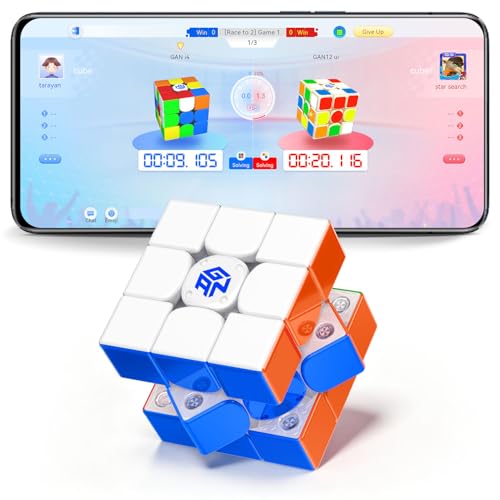
GAN Robot with Timer and Auto-Scrambler
The GAN Robot is in a class of its own for PC-connected cubing. It functions as both an automatic cube scrambler and a precision timer - the robot scrambles your cube on demand, you solve, and the GAN app on your PC or phone logs everything without manual input. For algorithmic training and tracked solve sessions, nothing else comes close.
Strengths
- Auto-scrambling eliminates manual scramble time between solves
- Full PC and smartphone app integration with algorithm drill modes
- WCA-standard scramble generation for competition-realistic practice
Drawbacks
- Significantly more expensive than standalone timer options
- Only compatible with GAN brand cubes without adapters

QiYi Display Mat with Timer
QiYi's mat-and-timer bundle takes a different approach: it prioritizes workspace ergonomics. The padded silicone mat cushions your cube during solves, reduces pad-sensor drift, and provides a defined practice surface that keeps your timer stationary. The built-in timer connects via 3.5mm to PC software using the same standard as SpeedStacks and YJ timers.
Strengths
- Competition-replica padded mat reduces surface variables during practice
- Timer integrates with standard PC timing apps via 3.5mm
- All-in-one bundle saves sourcing a mat and timer separately
Drawbacks
- Timer hardware is less precise than SpeedStacks Gen 5
- Mat size may be too large for small desks
SpeedStacks Gen 5 Competition Bundle
The SpeedStacks competition bundle pairs the Gen 5 timer with the purpose-built mat and the connecting cable for PC integration - everything you need in one purchase. It removes the guesswork of cable compatibility and mat sizing, and the co-branded components are tested for fit and signal quality together.
Strengths
- Complete bundle eliminates component compatibility uncertainty
- Includes PC connection cable in the box
- Slight cost saving compared to purchasing components individually
Drawbacks
- Bundle pricing still sits in the premium tier
- Overkill for casual solvers who won't use PC software
Buying considerations
Audio output compatibility
All stackmat-style timers use a 3.5mm mono audio output to communicate with PC software. Confirm the timer you choose has this output, and check that your PC has a 3.5mm microphone input (many modern laptops require a USB audio adapter).
WCA approval status
If you plan to compete, verify the timer appears on the WCA's approved hardware list. Only the SpeedStacks Gen 5 and a small number of others qualify. Non-approved timers are excellent for practice but cannot serve as your official competition device.
Software ecosystem
CSTimer is free and browser-based, handling any stackmat timer with audio input. If you prefer a dedicated desktop app, Prisma Puzzle Timer offers richer analytics. For GAN ecosystem devices, the GAN app unlocks hardware-specific features unavailable in third-party apps.
Final word
For most cubers who want PC-connected practice, the SpeedStacks Gen 5 is the correct answer - it's competition hardware, it integrates cleanly with every timing app, and it lasts for years. Budget-conscious solvers should look at the YJ timer, which delivers the same PC connection standard at a fraction of the price. If you're committed to intensive algorithm training, the GAN Robot's auto-scrambling and drill modes
Questions answered
Stackmat timers use a 3.5mm audio jack output. You connect the timer to your PC's microphone input, then run software like CSTimer or Prisma Puzzle Timer, which reads the signal and logs your solves automatically. Some newer timers include USB-C or Bluetooth connectivity that eliminates the analog cable setup entirely.
Yes - WCA competitions require WCA-approved stackmat timers, currently the SpeedStacks Pro Timer Gen 5 and select others from the approved list. Practice timers like the GAN Bluetooth timer or basic digital timers are excellent for training but cannot be used as the official timing device at sanctioned events.
CSTimer (free, browser-based) is the most widely used option and supports all major stackmat timers via audio or USB input. Prisma Puzzle Timer offers a polished desktop app experience. TwistyTimer is popular on Android if you want mobile logging alongside your PC setup. All three support session analysis, algorithm drill modes, and solve history exports.
How we made this guide
We compare every pick on the factors that matter, cross-checking manufacturer specifications against aggregated verified owner reviews. We rank independently and never take payment for placement. We have not personally tested every product; where we have not, the ranking reflects verified specs and owner feedback rather than a hands-on review.
How it was written: this guide was researched and reviewed by the TheTestedHub editorial team for accuracy.
Affiliate disclosure: TheTestedHub is reader-supported. When you buy through links on our site, we may earn a commission at no extra cost to you.


