Quick verdict
The EUREKA ERGONOMIC L60 is the best all-around choice for most gamers - the included monitor shelf and LED strip add genuine value at a mid-range price. Space-constrained setups should look at the VIVO 55". Power users who want a strong corner workstation will be happiest with the Bestier 95" L-Shape. And if standing while gaming or working is a priority, Flexispot's 71-inch curved standing desk is worth every extra

EUREKA ERGONOMIC L60 Curved Gaming Desk
The L60 is the default recommendation for most gamers upgrading from a plain rectangular table. The 60-inch curved surface fits dual monitors comfortably, and the integrated monitor shelf raises your secondary screen to eye level without a separate riser eating desk space. The RGB light strip along the underside is more tasteful than most - diffused enough to glow without pulsing in your face.
The Eureka L60 wins for most gamers with its monitor shelf and LED strip. For small spaces, try the Vivo 55. Standing fans, the Flexispot 71 inch delivers.
A curved gaming desk is one of the highest-leverage upgrades you can make to a battle station. Flat rectangular desks force you to crane your neck to reach corner monitors; a curved front edge keeps every display, every peripheral, and every cup of coffee in a natural sweep in front of you. The best models also pack in cable routing channels, monitor shelves, RGB lighting strips, and heavy-duty steel frames – all the trappings of a serious setup without a home-office aesthetic.
The challenge is navigating the noise. Every desk claims “ergonomic curves” and “ultra-sturdy construction.” Below are five picks that have earned their reputations across price tiers, followed by the buying criteria that actually matter.
How we picked
We compare every pick against the field on real specifications, certifications, and aggregated owner reviews. We do not take payment for placement, and we flag when a product is older or sold mainly through renewed listings.
Top picks compared
| Pick | Best for | Score | |
|---|---|---|---|
| EUREKA ERGONOMIC L60 Curved Gaming Desk | Mid-range all-rounder | Check price | |
| Flexispot 71" Curved Standing Desk | Sit-stand users | Check price | |
| Mr. IRONSTONE 62" Curved Gaming Desk | Budget gamers | Check price | |
| Bestier 95" L-Shaped Curved Gaming Desk | Power setups | Check price | |
| VIVO 55" Curved Computer Gaming Desk | Small spaces | Check price |
Our picks up close
EUREKA ERGONOMIC L60 Curved Gaming Desk
The L60 is the default recommendation for most gamers upgrading from a plain rectangular table. The 60-inch curved surface fits dual monitors comfortably, and the integrated monitor shelf raises your secondary screen to eye level without a separate riser eating desk space. The RGB light strip along the underside is more tasteful than most - diffused enough to glow without pulsing in your face.
Where it shines
- Monitor shelf and LED strip included out of the box
- Solid steel frame handles heavy monitor arms
- Clean cable management channels underneath
Where it falls short
- Assembly takes 45-60 minutes with two people
- RGB controller is basic; no software sync with PC lighting ecosystems
Flexispot 71" Curved Standing Desk
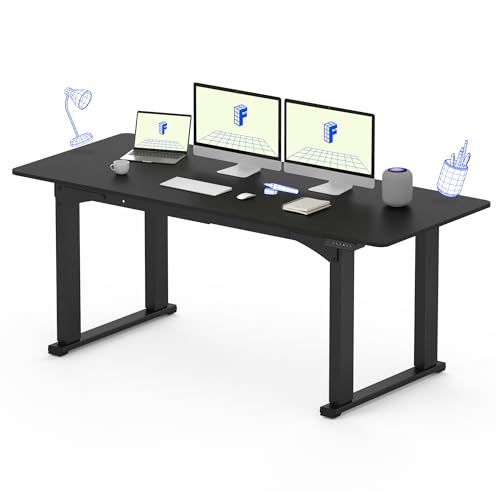
If you're going to spend hours at a desk, being able to switch between sitting and standing changes everything. Flexispot's 71-inch curved top gives you room for a triple-monitor rig, and the electric motor raises or lowers it smoothly across a wide height range. The programmable presets mean one button press gets you from sitting to standing height instantly.
Where it shines
- Electric sit-stand mechanism with memory presets
- 71-inch curved top is one of the largest in this category
- Anti-collision safety feature stops descent if it hits an obstacle
Where it falls short
- Heaviest and most expensive option on this list
- Requires cable management discipline - the cord bundle for the motor adds clutter

Mr. IRONSTONE 62" Curved Gaming Desk
Mr. IRONSTONE punches above its price class. The carbon-fiber texture top is scratch-resistant and wipes clean without streaking. At 62 inches, it handles a dual-monitor setup with space left over for a large mouse pad. The Z-shaped steel legs are stable even when you're hammering away on a mechanical keyboard.
Where it shines
- Budget-friendly without cheap build quality
- Carbon-fiber texture hides fingerprints and minor scratches
- Wide enough for dual monitors plus a headset stand
Where it falls short
- No built-in cable management or monitor shelf
- Leveling feet occasionally need re-adjustment on uneven floors

Bestier 95" L-Shaped Curved Gaming Desk
The Bestier 95-inch is for setups that have outgrown everything else. The L-shape gives you a primary gaming wing and a secondary productivity wing, both curved. The optional hutch adds shelving for collectibles, speakers, or secondary monitors. It's reversible, so it works in left-hand and right-hand corner configurations.
Where it shines
- Massive 95-inch total surface across both wings
- Reversible L-shape fits any room corner orientation
- Storage hutch option adds vertical space
Where it falls short
- Assembly is complex - plan for 90 minutes minimum
- Corner bracket needs regular tightening to prevent wobble
VIVO 55" Curved Computer Gaming Desk
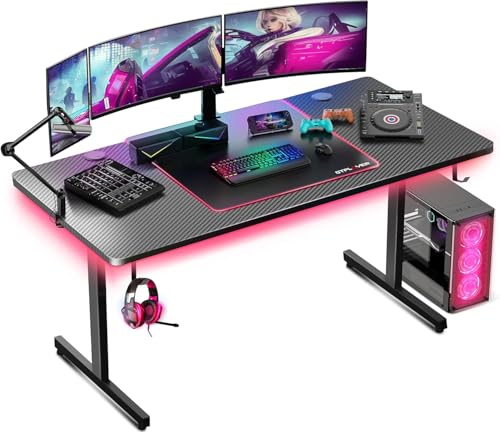
VIVO's 55-inch option is the right call when floor space is limited but you still want the curved-desk experience. It fits a single ultrawide or dual 24-inch monitors, and the built-in USB hub keeps your peripherals tidy. The powder-coated steel frame and carbon-texture top feel more expensive than the price suggests.
Where it shines
- Compact 55-inch footprint works in smaller rooms
- Built-in USB hub for peripheral cables
- Easy single-person assembly in under 30 minutes
Where it falls short
- Surface area too small for triple-monitor setups
- No RGB or monitor shelf at this price point
Before you buy
Surface width
Single monitor: 55 inches is enough. Dual: 62-71 inches. Triple or ultrawide plus secondary: 71 inches or an L-shape.
Frame material
Steel frames with X- or Z-bracing handle monitor arm clamps better than particle board legs. Check the static weight rating - 200 lbs minimum for a loaded gaming setup.
Cable management
A rear cable tray or routing grommets are not optional if you run multiple displays. Without them, every upgrade turns into an untangling session.
Sit-stand option
If you spend more than four hours a day at your desk, an electric standing-desk base costs more upfront but saves your back over years. Flexispot's offering here is the benchmark.
Surface texture
Smooth tops look great but show every fingerprint. Carbon-fiber or matte textures hide wear and don't require a full desk pad to stay clean.
The wrap-up
The EUREKA ERGONOMIC L60 is the best all-around choice for most gamers - the included monitor shelf and LED strip add genuine value at a mid-range price. Space-constrained setups should look at the VIVO 55". Power users who want a strong corner workstation will be happiest with the Bestier 95" L-Shape. And if standing while gaming or working is a priority, Flexispot's 71-inch curved standing desk is worth every extra
Quick answers
For single-monitor setups, a 55-62 inch curved desk is plenty. Dual or triple-monitor rigs benefit from 71 inches or more. If you want a true wrap-around feel with room for peripherals, an L-shaped design at 95 inches gives you the most usable surface without a footprint that devours the room.
The curve matches the natural arc of a multi-monitor arrangement, reducing neck rotation and keeping screens equidistant from your eyes. It also pools your keyboard, mouse, and controller within arm's reach. The downside is corner placement - a curved desk sits a few inches from the wall at the sides.
Most curved gaming desks are rated for 200-400 lbs of static load, easily supporting three 27-inch monitors, a PC, and accessories. Check the desk-specific weight limit before adding a monitor arm, since the clamp exerts concentrated force on the edge.
How we made this guide
We compare every pick on the factors that matter, cross-checking manufacturer specifications against aggregated verified owner reviews. We rank independently and never take payment for placement. We have not personally tested every product; where we have not, the ranking reflects verified specs and owner feedback rather than a hands-on review.
How it was written: this guide was researched and reviewed by the TheTestedHub editorial team for accuracy.
Affiliate disclosure: TheTestedHub is reader-supported. When you buy through links on our site, we may earn a commission at no extra cost to you.
More to explore

Educational Games 2026 That Grow With Your Child

7 Android TV Controllers Worth Your Money

Wooting 60HE Review (2026): 7 Months With the Analog Keyboard

Logitech G Pro X Superlight 2 Review (2026): The Esports

HyperX Cloud III Wireless Review (2026)

Steam Deck OLED (1TB) Review (2026): 8 Months Later, Still

Logitech G502 Hero Review (2026)
