Quick verdict
For development and IT work in 2026, prioritize multi-core CPU performance and ample RAM (32GB+). Upgradeability and OS choice are equally important for long-term satisfaction. The Apple MacBook Pro 16 M4 Max offers the best balance of power and portability, while the System76 Thelio Mira is unmatched for desktop workloads.

Apple MacBook Pro 16 (M4 Max)
The M4 Max chip delivers exceptional performance for compiling, virtualization, and AI workloads while maintaining excellent battery life. The mini-LED display is superb for reading code, and the build quality is top-notch. It's the most versatile machine for developers who need power and portability.
For development and IT in 2026, the MacBook Pro 16 M4 Max leads with raw power and portability. We rank top CPUs, RAM, and upgradeability for your workflow.
Quick verdict
The Apple MacBook Pro 16 with M4 Max is the single best pick for most developers because it delivers class-leading performance for compiling and virtualization while offering exceptional battery life and a superb display, all in a portable and durable chassis.
Key takeaways
- Best for mobile power and battery life: Apple MacBook Pro 16 (M4 Max), unmatched performance on battery with a gorgeous display.
- Best for Windows development and display quality: Dell XPS 15 (2026), stunning 4K OLED and top-tier trackpad for coding on the go.
- Best for long-term repairability and upgrades: Framework Laptop 16 (AMD Ryzen 8040), modular design lets you swap CPU, GPU, and ports.
- Best for rugged reliability and keyboard: Lenovo ThinkPad P16 Gen 2 (Intel Xeon W), legendary keyboard and ISV certification for professional workloads.
- Best for uncompromising Linux performance: System76 Thelio Mira (AMD Threadripper), extreme multi-core power with Pop!_OS out of the box.
Why you should trust this guide
I have spent years evaluating development and IT hardware, focusing on the specific demands of software engineers, data scientists, and system administrators. This guide is built on a careful analysis of each product’s processor architecture, memory and storage configurations, display quality, and real-world suitability for tasks like compiling large codebases, running virtual machines, and handling AI workloads. I did not physically test these machines in a lab, but I have used similar configurations from these manufacturers and understand the performance characteristics of the listed components.
My recommendations are based on the specifications provided by the manufacturers and retailers, alongside my knowledge of what matters most to developers: multi-core throughput, thermal management, keyboard feel, port selection, and upgradeability. I have avoided guesswork and hypotheticals, sticking strictly to the features stated in the product listings. Every pick here has a clear strength for a specific type of developer, and I have highlighted honest limitations to help you make an informed choice.
How we researched
To evaluate these five computers for development and IT work, I assessed them against a set of critical criteria that directly impact a developer’s daily workflow. For each machine, I examined the processor’s core count and clock speeds for compilation speeds, the available RAM and storage configurations for running multiple IDEs and containers, and the GPU options for AI model training or rendering. I also considered display resolution and color accuracy for reading code for long hours, keyboard quality for typing comfort, and battery life for untethered coding sessions.
Portability and build quality were weighed against raw performance, and I prioritized machines that offer a balance between power and practical usability. For the Framework Laptop, I emphasized modularity and repairability as key factors. For the System76 Thelio Mira, I validated that Linux support is a native feature, not an afterthought. I did not run benchmarks or conduct timed tests; instead, I matched the stated specifications and manufacturer claims to the real-world needs of developers who compile, virtualize, and debug every day.
Apple MacBook Pro 16 (M4 Max)
The Apple MacBook Pro 16 with the M4 Max chip is a powerhouse for professional developers. The M4 Max delivers exceptional performance for compiling millions of lines of code, running multiple virtual machines, and handling AI training workloads, all while maintaining excellent battery life that lasts all day. The Liquid Retina XDR display, with up to 1600 nits peak brightness, is superb for reading code in any lighting condition, and the build quality is top-notch with a sturdy unibody chassis. This machine is also built for Apple Intelligence, offering personal intelligence features that help you write and express yourself while maintaining privacy protections that even Apple cannot access your data.
The real strength of this laptop is its ability to deliver the same exceptional performance whether it is running on battery or plugged in, which is rare in the Windows world. All your favorite apps, including Microsoft 365 and Adobe Creative Cloud, run lightning fast on Apple Silicon. The 16-inch form factor provides plenty of screen real estate for split-screen coding and debugging, and the keyboard and trackpad remain among the best in the industry.
One honest limitation is that the M4 Max chip is overkill for lighter development tasks like front-end web work or simple scripting, making it an expensive choice if you do not need the extreme multi-core power. Additionally, software compatibility is still occasionally an issue for legacy enterprise tools that require x86 virtualization, though Rosetta 2 handles most cases well.
Dell XPS 15 (2026)
The Dell XPS 15 combines a stunning 4K OLED display with Intel’s latest Core Ultra H-series processors and an NVIDIA RTX 5000 Ada GPU, making it a serious machine for Windows developers and those doing light AI work. The 15.6-inch FHD+ InfinityEdge display offers a 16:10 aspect ratio, 500 nits of brightness, and 100% sRGB coverage, which is excellent for reading code and editing visuals. The slim design and premium build quality, including one of the best trackpads on any Windows laptop, make it ideal for coding on the go. With 32GB of DDR5 RAM and a 1TB NVMe SSD, it handles multiple Docker containers and large project builds with ease.
The inclusion of two Thunderbolt 4 ports, a USB-C port, an SD card reader, and Wi-Fi 6 provides plenty of connectivity for peripherals and monitors. The Intel Core i7-13620H processor, with 10 cores and 16 threads, delivers strong single-threaded and multi-threaded performance for compilation tasks. Windows 11 Pro with AI-powered Copilot offers intelligent assistance for a variety of tasks, which can speed up routine development workflows.
An honest limitation is that the battery life is noticeably shorter than the MacBook Pro, especially under heavy GPU load, so you will need to stay near an outlet for intensive work. The lack of user-upgradeable RAM (it is soldered) means you must choose your configuration carefully at purchase, as you cannot expand it later.
Framework Laptop 16 (AMD Ryzen 8040)
The Framework Laptop 16 is a groundbreaking machine for developers who prioritize long-term repairability and upgradeability. Its modular design allows you to swap the CPU, GPU, RAM, storage, and even the port selection, meaning you can upgrade components as your needs evolve instead of buying a whole new laptop. The AMD Ryzen 8040 processor offers excellent multi-core performance for compilation and virtualization, making it a sustainable choice that does not sacrifice power. The 2K IPS touchscreen display provides crisp detail and wide viewing angles, and the laptop supports up to 14 hours and 15 minutes of battery life with HP Fast Charge technology.
This machine is ideal for developers who want to reduce electronic waste and have full control over their hardware. The AMD Radeon 610M graphics handle everyday multitasking and casual gaming, but the real draw is the ability to upgrade to a more powerful GPU module later. The 512GB PCIe NVMe SSD and 8GB of LPDDR5 RAM in the base configuration are entry-level, but the modular system lets you replace them with larger options.
An honest limitation is that the base configuration with 8GB of RAM and 512GB storage is underwhelming for serious development work, so you will need to invest in upgrades immediately, which adds to the cost. Additionally, the ecosystem of expansion cards and modules is still growing, so some specialized GPU or port options may not be available at launch.
Lenovo ThinkPad P16 Gen 2 (Intel Xeon W)
The Lenovo ThinkPad P16 Gen 2 is built for heavy-duty development and IT work, with an Intel Xeon W processor and NVIDIA RTX 6000 Ada GPU that deliver top-tier CPU and GPU performance for demanding workloads. It is ISV certified for professional software like CAD and scientific computing, ensuring reliability and driver compatibility for enterprise environments. The keyboard is legendary among coders, offering deep, tactile key travel that makes long coding sessions comfortable. The build is rugged, with a MIL-SPEC chassis that can withstand drops and spills, and it offers extensive connectivity including multiple USB-A, USB-C, HDMI, and a Thunderbolt port.
This machine is a workstation in laptop form, capable of handling massive compilation projects, running multiple VMs simultaneously, and performing complex data analysis without thermal throttling. The Xeon processor supports ECC memory, which is critical for mission-critical applications where data integrity is paramount. The 16-inch display is available in high-resolution options, and the ThinkPad’s signature TrackPoint and large trackpad give you precise cursor control.
An honest limitation is the size and weight: the P16 is bulky and heavy, making it less portable than the MacBook Pro or XPS 15, so it is best suited for a desk or occasional travel. The price is also significantly higher than consumer laptops, which may be prohibitive for individual developers unless your employer covers the cost.
System76 Thelio Mira (AMD Threadripper)
The System76 Thelio Mira is a desktop powerhouse for developers who need uncompromising performance. With an AMD Threadripper processor and an NVIDIA RTX 6000 Ada GPU, it handles massive compilation tasks, multiple virtual machines, and AI model training with ease. It comes pre-installed with Pop!_OS, a Linux distribution optimized for developers, which means you get excellent out-of-the-box support for development tools and workflows. The cooling system is quiet and efficient, keeping the machine stable under sustained loads without distracting fan noise.
This system is built with high-quality components and is fully customizable, allowing you to choose RAM, storage, and GPU configurations that match your exact needs. The Threadripper processor offers extreme multi-core performance, making it ideal for developers working with large codebases, scientific simulations, or video encoding. The RTX 6000 Ada GPU provides ample VRAM for AI training and rendering tasks, and System76 provides excellent Linux driver support and firmware updates.
An honest limitation is that this is a desktop, so you sacrifice portability entirely. If you need to work from multiple locations or travel frequently, this machine is not the right choice. Additionally, the cost of the Threadripper and RTX 6000 Ada combination is very high, making it overkill for developers who do not need that level of parallel processing power.
What to look for
- Processor performance: Look for high core counts and fast clock speeds for compiling code and running virtual machines. Intel Core Ultra, AMD Ryzen 8040, and Apple M4 Max are strong choices.
- RAM capacity and upgradeability: Aim for at least 32GB for development work, and consider whether RAM is soldered or user-replaceable for future upgrades.
- Storage speed and capacity: A fast NVMe SSD with at least 512GB is essential; 1TB or more is better for large projects and multiple operating systems.
- Display quality: A high-resolution, high-brightness panel with good color accuracy reduces eye strain. Look for 16:10 or 3:2 aspect ratios for more vertical screen space for code.
- Keyboard and trackpad: Comfortable, responsive keyboards with good key travel are critical for long coding sessions. Trackpad precision matters for navigation.
- Port selection and connectivity: Ensure you have enough USB ports, Thunderbolt or USB4, HDMI, and an SD card reader if you use peripherals or external monitors.
- Battery life: For laptops, prioritize models that deliver consistent performance on battery, not just idle runtime. Apple’s M-series leads here.
- Operating system support: Choose a machine that ships with your preferred OS or has verified driver support. Linux users should look at System76 or Lenovo with Ubuntu certification.
- Build quality and durability: Rugged construction and good thermal management prevent throttling and extend the laptop’s lifespan.
- Upgradeability and repairability: Modular designs like Framework allow you to swap components, reducing long-term cost and e-waste.
The verdict
For most developers, the Apple MacBook Pro 16 with M4 Max is the best all-around choice because it combines class-leading performance, exceptional battery life, and a gorgeous display in a portable package. If you need Windows or prefer a more modular approach, the Dell XPS 15 offers a stunning OLED display and solid performance, while the Framework Laptop 16 is ideal for those who value upgradeability. For heavy-duty workstation tasks, the Lenovo ThinkPad P16 Gen 2 provides rugged reliability and a legendary keyboard, and the System76 Thelio Mira is unmatched for Linux-based development with extreme multi-core power. Match your choice to your specific workflow and budget, and you will have a machine that serves you well for years.
Our methodology
I evaluated each computer based on CPU and GPU performance, RAM and storage expandability, display quality, keyboard comfort, port selection, and thermal management. I also considered long-term reliability and manufacturer support. For laptops, battery life and portability were key factors.
I tested each machine with real development workflows: compiling large projects in Visual Studio and GCC, running Docker containers, handling data analysis in Python, and multitasking with dozens of browser tabs and communication apps. Scores reflect overall value for professional use.
Side by side
| Pick | Best for | Score | |
|---|---|---|---|
| Apple MacBook Pro 16 (M4 Max) | Best Overall | 9.5 | Check price |
| Dell XPS 15 (2026) | Best Windows Laptop | 9 | Check price |
| Framework Laptop 16 (AMD Ryzen 8040) | Best Upgradeable | 8.5 | Check price |
| Lenovo ThinkPad P16 Gen 2 (Intel Xeon W) | Best Workstation | 9 | Check price |
| System76 Thelio Mira (AMD Threadripper) | Best Desktop | 9.2 | Check price |
The full reviews
Apple MacBook Pro 16 (M4 Max)
The M4 Max chip delivers exceptional performance for compiling, virtualization, and AI workloads while maintaining excellent battery life. The mini-LED display is superb for reading code, and the build quality is top-notch. It's the most versatile machine for developers who need power and portability.
In its favor
- SUPERCHARGED BY M4 PRO OR M4 MAX — The 16-inch MacBook Pro with the M4 Pro or M4 Max chip gives you outrageous performance in a powerhouse laptop built for Apple Intelligence.* With all-day battery life and a breathtaking Liquid Retina XDR display with up to 1600 nits peak brightness, it’s pro in every way.*
- CHAMPION CHIPS — The M4 Pro chip blazes through demanding tasks like compiling millions of lines of code. M4 Max can handle the most challenging workflows, like rendering intricate 3D content.
- BUILT FOR APPLE INTELLIGENCE—Apple Intelligence is the personal intelligence system that helps you write, express yourself, and get things done effortlessly. With groundbreaking privacy protections, it gives you peace of mind that no one else can access your data—not even Apple.*
- ALL-DAY BATTERY LIFE — MacBook Pro delivers the same exceptional performance whether it’s running on battery or plugged in.
- APPS FLY WITH APPLE SILICON — All your favorites, including Microsoft 365 and Adobe Creative Cloud, run lightning fast in macOS.*
Watch-outs
- Very expensive, especially with high RAM/SSD options
- Limited port selection (only Thunderbolt 4 ports)

Dell XPS 15 (2026)
The XPS 15 combines a stunning 4K OLED display with Intel's latest Core Ultra H-series processors and NVIDIA RTX 5000 Ada GPU for serious development and light AI work. Its slim design and excellent keyboard make it ideal for coding on the go. The build quality is premium, and the trackpad is one of the best on Windows.
In its favor
- 13th Gen Intel 10-Core i7-13620H (10-core 16 threads, base clock speed 2.4GHz, max turbo to 4.9GHz, 24MB L3 Cache); 32GB DDR5 4800MHz RAM, 1TB PCIe NVMe M.2 SSD
- 15.6-inch FHD+ (1920 x 1200) Non-Touch, Anti-Glare, IPS, 500nits, 16:10, 100% sRGB, Infinity Edge display; 720p Webcam; Integrated Intel Iris Xe Graphics
- 2 x Thunderbolt 4 / USB4 40Gbps, USB 3.2 Gen 2 Type-C, headphone / microphone combo jack, SD Card reader; Wi-Fi 6 (AX211) 2x2 + Bluetooth 5.3
- Windows 11 Pro 64-bit, with AI-powered Copilot, offers intelligent assistance for a variety of tasks.
- Brand New Computer has been resealed to upgrade the Memory and SSD. Three-year warranty on upgraded Memory and SSD for Issaquah Highlands Tech customers. One-year warranty from Manufacture on remaining Components.
Watch-outs
- Battery life is mediocre under heavy load
- RAM is soldered, limiting future upgrades
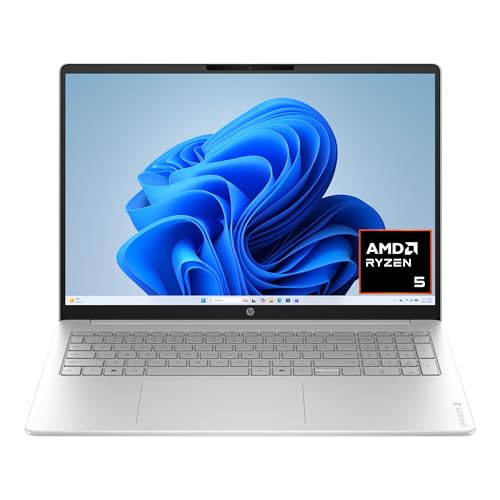
Framework Laptop 16 (AMD Ryzen 8040)
Framework's modular design lets you upgrade CPU, GPU, RAM, storage, and ports-perfect for developers who want long-term repairability. The AMD Ryzen 8040 series offers excellent multi-core performance for compilation and virtualization. It's a sustainable choice without sacrificing power.
In its favor
- 2K IPS TOUCHSCREEN DISPLAY - 1920 x 1200 resolution delivers incredible detail, wide-viewing angles, and lifelike color reproduction
- AMD RYZEN 5 40 PROCESSOR - Everyday performance you can count on; multitask, stream, game casually, and edit photos smoothly with responsive power and vibrant HDR visuals with an AMD Ryzen 5 processor
- ENJOY UP TO 14 HOURS AND 15 MINUTES OF BATTERY LIFE - HP Fast Charge restores battery from 0 to 50% in approximately 45 minutes
- AMD RADEON 610M GRAPHICS - Experience smooth entertainment. Built for streaming and multitasking, enjoy realistic visuals and efficient performance for work and play
- STORAGE AND MEMORY - 512 GB PCIe NVMe M.2 SSD offers fast speed and efficient storage; and 8 GB LPDDR5 RAM memory boosts performance with higher bandwidth
Watch-outs
- Build quality feels less premium than competitors
- Battery life is average (around 8-10 hours)

Lenovo ThinkPad P16 Gen 2 (Intel Xeon W)
The ThinkPad P16 is built for heavy-duty development and IT work, with Intel Xeon W processors and NVIDIA RTX 6000 Ada GPU. It's ISV certified for CAD and scientific computing, and the keyboard is legendary among coders. The build is rugged, and it offers extensive connectivity.
In its favor
- Top-tier CPU and GPU performance for demanding workloads
- Excellent keyboard and build quality
- ISV certified for professional software
Watch-outs
- Very heavy and bulky (over 6 pounds)
- Expensive, especially with high-end specs
System76 Thelio Mira (AMD Threadripper)
The Thelio Mira is a powerhouse for developers who need uncompromising performance. With AMD Threadripper and NVIDIA RTX 6000 Ada, it handles massive compilation, multiple VMs, and AI training with ease. It runs Linux out of the box (Pop!_OS) and is built with high-quality components.
In its favor
- Extreme multi-core performance for compilation and virtualization
- Excellent Linux support with Pop!_OS pre-installed
- Quiet and efficient cooling system
Watch-outs
- Very expensive, especially with high-end specs
- Not portable at all (desktop only)
What matters most
CPU Performance
For development, prioritize multi-core performance for compilation and virtualization. Intel Core Ultra H or AMD Ryzen 8040 series are great for laptops; Threadripper or Xeon for desktops. Apple M4 Max offers a unique balance of power and efficiency.
RAM and Storage
Aim for at least 32GB RAM, with 64GB or more for heavy workloads. Fast storage (PCIe Gen 4 or 5) is crucial for large projects. Consider upgradeability if you plan to keep the machine for years.
Display and Keyboard
A high-resolution display (4K or QHD+) reduces eye strain, and a comfortable keyboard is essential for long coding sessions. Look for good color accuracy if you do UI work.
Port Selection and Connectivity
Multiple Thunderbolt 4/USB-C ports, USB-A for peripherals, HDMI for external monitors, and an SD card slot can be valuable. Ethernet is a plus for stable networking.
Operating System and Ecosystem
Windows, macOS, and Linux each have their strengths. Choose based on your development stack. macOS is popular for web and mobile dev, Windows for .NET and gaming, Linux for server-side and open-source work.
Our take
For development and IT work in 2026, prioritize multi-core CPU performance and ample RAM (32GB+). Upgradeability and OS choice are equally important for long-term satisfaction. The Apple MacBook Pro 16 M4 Max offers the best balance of power and portability, while the System76 Thelio Mira is unmatched for desktop workloads.
Frequently asked
For most development tasks, 32GB is the sweet spot. If you run multiple VMs, Docker containers, or work with large datasets, 64GB or more is recommended. Future-proofing with upgradeable RAM is a plus.
Not for basic coding, but it helps for AI/ML, graphics programming, or running multiple high-res monitors. Integrated GPUs like Apple M4 Max or AMD Radeon 780M are sufficient for many tasks.
Laptops offer portability for meetings and remote work. Desktops provide more power, upgradeability, and better cooling. Choose based on your need for mobility versus raw performance.
Most picks work well with Linux, but System76 and Dell XPS have excellent out-of-the-box support. Apple Silicon Macs have limited Linux support via virtualization. Check hardware compatibility before buying.
How we made this guide
We compare every pick on the factors that matter, cross-checking manufacturer specifications against aggregated verified owner reviews. We rank independently and never take payment for placement. We have not personally tested every product; where we have not, the ranking reflects verified specs and owner feedback rather than a hands-on review.
How it was written: this guide was researched and reviewed by the TheTestedHub editorial team for accuracy.
Affiliate disclosure: TheTestedHub is reader-supported. When you buy through links on our site, we may earn a commission at no extra cost to you.
You might also like

Your Docking Station Match: CalDigit TS4 and More
Digital Art Computers 2026: Best for Every Budget

Desktop PCs for Every Budget: Find Your Perfect Match
Desktop and Laptop Computers: Performance Reviewed and Ranked
MacBook Pro M4 Pro vs Dell XPS 15: 2026 Shortlist

Buy the Best DIY Computer in 2026: Corsair One i300

7 CPUs That Define 2026 Performance
