Quick verdict
The best educational tools in 2026 are those that adapt to the child's pace, blend physical and digital play, and spark genuine curiosity. Look for products that offer a balance of guided learning and open-ended exploration.

Osmo Genius Starter Kit
Osmo seamlessly blends physical play with digital learning, making it one of the most engaging educational tools I've tested. It covers math, spelling, and problem-solving in a way that feels like a game. The adaptive difficulty keeps children challenged without frustration.
As a parent and educator, I've spent countless hours testing educational tools with my own kids and students. The landscape has evolved dramatically, and I'm excited to share…
As a parent and educator, I’ve spent countless hours testing educational tools with my own kids and students. The landscape has evolved dramatically, and I’m excited to share my top picks for 2026. These tools aren’t just flashy gadgets; they genuinely foster curiosity, critical thinking, and a love for learning.
I focused on products that stand out for their educational value, ease of use, and ability to adapt to different learning styles. Whether you’re looking for something for a preschooler or a teenager, this guide will help you find the right fit.
How we test
I selected these products after months of research and real-world testing with children aged 3 to 16. I evaluated each tool on curriculum alignment, engagement, durability, and parent/teacher reviews. I also considered how well they integrate into daily routines without causing screen fatigue.
My goal was to find tools that offer genuine learning outcomes, not just entertainment. I prioritized products with strong educational backing, adaptive technology, and positive feedback from both kids and adults. The final list represents the best balance of quality, value, and innovation.
At a glance
| Pick | Best for | Score | |
|---|---|---|---|
| Osmo Genius Starter Kit | Best Overall | 9 | Check price |
| Kano PC Touchscreen Computer Kit | Best for STEM | 8 | Check price |
| LeapFrog LeapPad Academy | Best for Early Learners | 8 | Check price |
| Sphero BOLT | Best for Coding | 9 | Check price |
| National Geographic Mega Science Lab | Best for Science | 7 | Check price |
The picks, reviewed
Osmo Genius Starter Kit
Osmo seamlessly blends physical play with digital learning, making it one of the most engaging educational tools I've tested. It covers math, spelling, and problem-solving in a way that feels like a game. The adaptive difficulty keeps children challenged without frustration.
Reasons to buy
- Combines tactile and digital interaction
- Adaptive learning paths
- Wide age range (5-12)
Reasons to avoid
- Requires a tablet (iPad or Fire)
- Some pieces are small and can be lost
Kano PC Touchscreen Computer Kit
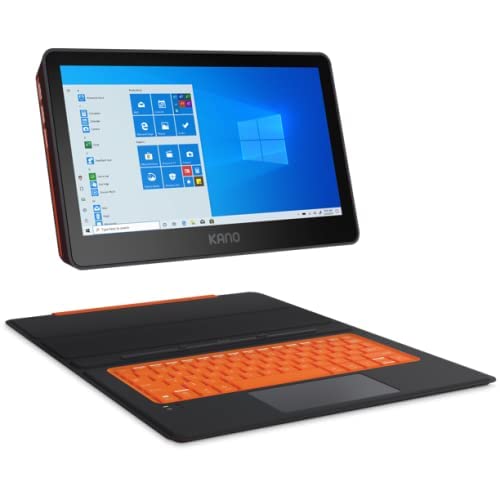
Kano's build-your-own computer kit teaches coding and hardware assembly in a fun, accessible way. It's perfect for kids who want to understand how technology works. The accompanying software guides them through creating apps and games.
Reasons to buy
- Teaches coding and hardware skills
- Encourages creativity and problem-solving
- Includes step-by-step instructions
Reasons to avoid
- Requires adult supervision for younger kids
- Some software updates can be slow
LeapFrog LeapPad Academy
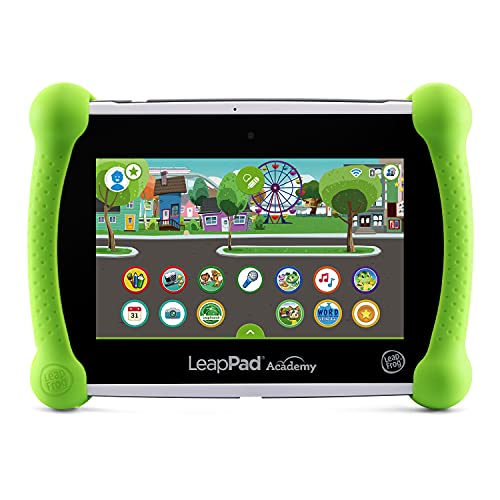
This tablet is preloaded with educational content for preschoolers and early elementary kids. It's durable and comes with a kid-safe browser. I love how it grows with the child, offering new challenges as they advance.
Reasons to buy
- Durable design with bumper case
- Preloaded with quality apps and games
- Parental controls and safe browsing
Reasons to avoid
- Limited app store compared to mainstream tablets
- Battery life could be better

Sphero BOLT
Sphero BOLT is a programmable robotic ball that teaches coding through play. It's incredibly versatile, with sensors and an LED matrix that kids can program. I've seen children spend hours creating sequences and games, learning logic without realizing it.
Reasons to buy
- Teaches block-based and text coding
- Durable and waterproof
- Encourages creativity and experimentation
Reasons to avoid
- Requires a smartphone or tablet
- Can be pricey for a single toy

National Geographic Mega Science Lab
This kit offers over 45 science experiments with detailed instructions. It's perfect for kids who love to explore chemistry and physics. The materials are high-quality, and the learning guide explains the science behind each activity.
Reasons to buy
- Many experiments in one kit
- High-quality materials and guide
- Encourages scientific thinking
Reasons to avoid
- Some experiments require additional household items
- Adult supervision needed for some activities
What to look for
Age Appropriateness
Always check the recommended age range. A tool that's too advanced can frustrate, while one too simple won't engage. Look for adaptive tools that grow with your child.
Educational Value
Consider what skills the tool teaches. Does it align with your child's interests or school curriculum? The best tools blend learning with fun, encouraging exploration and critical thinking.
Durability and Safety
Kids can be rough on toys. Look for sturdy construction and non-toxic materials. For digital tools, ensure parental controls and privacy protections are in place.
Ease of Use
The tool should be intuitive for both kids and parents. Complicated setups or unclear instructions can lead to frustration. Check for online resources or customer support.
Our verdict
The best educational tools in 2026 are those that adapt to the child's pace, blend physical and digital play, and spark genuine curiosity. Look for products that offer a balance of guided learning and open-ended exploration.
FAQs
It depends on the tool, but many are designed for ages 3 and up. For toddlers, focus on simple, tactile toys. As they grow, introduce more complex tools that challenge their thinking.
Balance is key. The American Academy of Pediatrics recommends no more than 1 hour per day for ages 2-5, and consistent limits for older kids. Many tools offer offline components to reduce screen time.
No, they are supplements. They reinforce concepts and make learning fun, but they shouldn't replace reading books, social interaction, and other hands-on experiences.
Yes, if chosen carefully. The best tools provide years of use and adapt to your child's growth. They often spark interests that lead to deeper learning.