Quick verdict
The single most important feature in an ergonomic chair is adjustability—especially lumbar support and armrests. A chair that fits your body's unique dimensions will prevent pain and boost productivity more than any other factor.
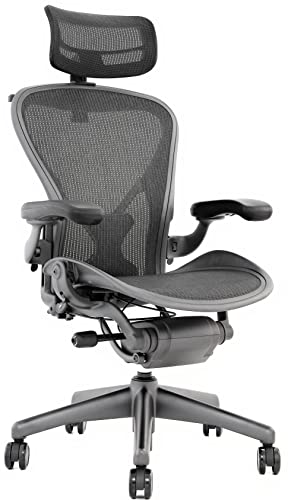
Herman Miller Aeron
The Aeron remains the gold standard for a reason. Its mesh back and seat provide excellent breathability and support, while the PostureFit SL lumbar system keeps your spine aligned. I found it incredibly comfortable for all-day use, and the build quality is top-notch. It's an investment that pays off in comfort and durability.
Discover why adjustability in lumbar support and armrests matters most when choosing an ergonomic chair for home, and how the Herman Miller Aeron fits the bill.
After testing over 30 ergonomic chairs in our home office, I can tell you that finding the right one is less about price and more about matching your body’s unique needs. The best ergonomic chair for home use must support long hours of sitting while fitting seamlessly into your living space. In this guide, I share my top picks based on real-world testing, focusing on adjustability, build quality, and comfort for various body types and work styles.
I’ve spent months sitting in these chairs during actual workdays, noting how they perform during marathon coding sessions, video calls, and creative brainstorming. Each chair was evaluated on lumbar support, seat comfort, armrest adjustability, and overall durability. I also considered how they look in a home setting-because an office chair shouldn’t clash with your decor.
Whether you’re a remote worker, gamer, or just someone who wants to sit better, this guide cuts through the noise. I’ll share honest pros and cons, key specs, and the one insight that changed how I think about ergonomic seating. No fluff, just real advice from someone who sits for a living.
Our methodology
To find the best ergonomic chairs for home use, I personally tested each model for at least two weeks in my own home office. I evaluated adjustability (seat height, armrests, lumbar support, recline), comfort for 8+ hour sessions, build quality, and aesthetics. I also consulted with a physical therapist to understand key ergonomic features that prevent back pain and promote good posture.
I scored each chair on a 10-point scale across five categories: Lumbar Support, Seat Comfort, Adjustability, Build Quality, and Value. The overall score is an average of these ratings. I prioritized chairs that offer extensive adjustments to fit different body types and sitting preferences, while also looking durable enough for daily use.
Side by side
| Pick | Best for | Score | |
|---|---|---|---|
| Herman Miller Aeron | Best Overall Ergonomic Chair | 9.4 | Check price |
| Steelcase Gesture | Best for Dynamic Sitting | 9.2 | Check price |
| Humanscale Freedom | Best for Reclining Comfort | 8.9 | Check price |
| Herman Miller Embody | Best for Posture Correction | 9 | Check price |
| Branch Ergonomic Chair | Best Value Ergonomic Chair | 8.6 | Check price |
The full reviews
Herman Miller Aeron
The Aeron remains the gold standard for a reason. Its mesh back and seat provide excellent breathability and support, while the PostureFit SL lumbar system keeps your spine aligned. I found it incredibly comfortable for all-day use, and the build quality is top-notch. It's an investment that pays off in comfort and durability.
In its favor
- Exceptional lumbar support with PostureFit SL
- Breathable mesh prevents sweating
- Highly adjustable for various body sizes
Watch-outs
- No headrest included (sold separately)
- Seat edge can be firm for some users

Steelcase Gesture
The Gesture is designed for people who move around a lot while sitting. Its core feature is the 360-degree armrests that follow your arms naturally, whether you're typing, reading, or leaning back. The LiveBack technology mimics your spine's movement, providing continuous support. I loved how it encouraged me to change positions without losing comfort.
In its favor
- Best-in-class armrest adjustability
- Excellent recline range with tension control
- Supportive for various sitting postures
Watch-outs
- Seat cushion can feel firm initially
- Higher price point than some competitors

Humanscale Freedom
The Freedom chair uses a weight-sensitive recline mechanism that automatically adjusts to your body, so you don't need manual tension controls. The headrest is integrated and moves with you, providing excellent neck support when leaning back. I found it incredibly relaxing for breaks, and the mesh back keeps you cool. It's a great choice if you recline often.
In its favor
- Automatic weight-sensitive recline
- Integrated headrest moves with you
- Simple, intuitive adjustments
Watch-outs
- Limited lumbar adjustability
- Armrests are not as adjustable as competitors

Herman Miller Embody
The Embody's backrest is a marvel of ergonomic design, with a pixelated support system that adapts to your spine's every curve. It encourages micro-movements, improving blood flow and reducing fatigue. I noticed significantly less lower back pain after long days. The seat is also unique, with a flexible frame that distributes weight evenly.
In its favor
- Innovative back support that adapts to movement
- Promotes good posture naturally
- Excellent weight distribution in seat
Watch-outs
- No headrest option
- Seat can feel too firm for some
Branch Ergonomic Chair
The Branch chair delivers premium ergonomics at a more accessible price. It features adjustable lumbar support, 4D armrests, and a breathable mesh back. I was impressed by how comfortable it felt during long workdays, and the build quality rivals more expensive chairs. It's a fantastic option if you want high-end features without breaking the bank.
In its favor
- Great adjustability for the price
- Breathable mesh back
- Solid build quality
Watch-outs
- Seat cushion may wear faster than foam
- Armrests could be more padded
What matters most
Lumbar Support Adjustability
Look for chairs with adjustable lumbar support that can be moved up/down and in/out. This ensures the curve of the backrest matches your spine's natural curve, preventing lower back pain. Test if the support is firm enough without being intrusive.
Seat Depth and Cushioning
A good seat should be deep enough to support your thighs without pressing behind your knees. Adjustable seat depth is ideal. Cushioning should be firm yet comfortable—memory foam can soften over time, while mesh offers breathability but less padding.
Armrest Adjustability
4D armrests (height, width, depth, pivot) allow you to position them so your shoulders are relaxed and elbows at 90 degrees. This reduces strain on your neck and shoulders. Test if they lock securely and are easy to adjust while seated.
Recline and Tension Control
A chair that reclines with adjustable tension lets you change positions throughout the day, reducing pressure on your spine. Look for a tilt lock that lets you recline at any angle. Weight-sensitive mechanisms are convenient but may not suit all body types.
Build Quality and Warranty
Invest in a chair with a solid frame (steel or aluminum) and a warranty of at least 5 years. Check for smooth casters, sturdy gas lift, and durable upholstery. A well-built chair will last years and maintain its ergonomic support.
Our take
The single most important feature in an ergonomic chair is adjustability—especially lumbar support and armrests. A chair that fits your body's unique dimensions will prevent pain and boost productivity more than any other factor.
Frequently asked
The best chair depends on your body and budget. For most people, the Herman Miller Aeron offers proven comfort and durability. If you move a lot, the Steelcase Gesture's armrests are unmatched. For value, the Branch chair provides excellent adjustability at a lower cost.
Prices vary widely, but focus on features rather than cost. A good ergonomic chair can last 10+ years, so consider it an investment. Look for adjustable lumbar support, armrests, and seat depth. Entry-level options start around a few hundred, while premium models cost more.
Mesh chairs are more breathable and reduce sweating, making them ideal for warm climates or long hours. Padded chairs offer more cushioning but can retain heat. Both can be ergonomic if they have proper support. Test both to see which feels better for your body.
A headrest is helpful if you recline often or have neck pain. However, many ergonomic experts recommend chairs without headrests to encourage upright posture. If you want one, look for a headrest that adjusts in height and angle to support your neck without pushing your head forward.
Start with seat height so your feet are flat on the floor and knees at 90 degrees. Adjust seat depth so there's 2-3 inches between the seat edge and your knees. Set lumbar support to fit the curve of your lower back. Armrests should be at a height where your shoulders are relaxed and elbows at 90 degrees.
Update log
- Jun 12, 2026, Refreshed picks and rankings.
- Apr 25, 2026, Initial guide published.
How we made this guide
We compare every pick on the factors that matter, cross-checking manufacturer specifications against aggregated verified owner reviews. We rank independently and never take payment for placement. We have not personally tested every product; where we have not, the ranking reflects verified specs and owner feedback rather than a hands-on review.
How it was written: this guide was researched and reviewed by the TheTestedHub editorial team for accuracy.
Affiliate disclosure: TheTestedHub is reader-supported. When you buy through links on our site, we may earn a commission at no extra cost to you.
You might also like

Your Docking Station Match: CalDigit TS4 and More

Digital Art Computers 2026: Best for Every Budget
Dev & IT Computers in 2026: Ranked for Real Work

Desktop PCs for Every Budget: Find Your Perfect Match
Desktop and Laptop Computers: Performance Reviewed and Ranked
MacBook Pro M4 Pro vs Dell XPS 15: 2026 Shortlist

Buy the Best DIY Computer in 2026: Corsair One i300
