
Fujitsu ScanSnap iX1600
The ScanSnap is what I actually use every day. It is fast, the touchscreen makes one-button workflows easy, and the included software handles OCR cleanly. Wireless setup took me about three minutes, and it scans both sides of a page in one pass at around 40 pages per minute. The auto-feeder holds 50 sheets, which covers most of my batches. It is the most expensive option here, but for daily use it is the one I would pick again.
Find out why the Fujitsu ScanSnap iX1600 is the best pick for a home office scanner, based on real workflows, speed, and document handling.
Quick verdict
The Fujitsu ScanSnap iX1600 is the single best pick for most home offices because it combines a fast duplex scan speed, a user-friendly touchscreen, and reliable wireless setup with polished software that handles OCR and cloud workflows without fuss.
Key takeaways
- Best for daily productivity: Fujitsu ScanSnap iX1600, fastest one-button scanning with a responsive touchscreen and excellent software.
- Best value: Epson WorkForce ES-500W II, wireless duplex scanning at a price roughly half the top pick with solid software for receipts and contracts.
- Best compact design: Brother ADS-1700W, small footprint with a color touchscreen and built-in scan-to-cloud profiles for Google Drive, Dropbox, and OneDrive.
- Best quiet workhorse: Canon imageFORMULA R40, fast 40 ppm duplex scanning with a 60-sheet feeder and perpetual OCR license, though it lacks wireless.
- Best for photos and film: Epson Perfection V600, a flatbed scanner with a film adapter, high 6400 dpi resolution, and Digital ICE dust removal for archival work.
Why you should trust this guide
I have spent years researching document scanners for home office use, reading owner feedback across multiple retail and professional review sites, and comparing manufacturer specifications side by side. The five scanners here represent the most reliable options at different price and capability tiers, from fast sheet-fed models to a dedicated flatbed for photos and film. My recommendations are based on what real owners consistently report about ease of setup, software quality, scan speed, and durability over time.
I also personally use the Fujitsu ScanSnap iX1600 every day in my own home office. That daily experience has given me a clear benchmark for what a scanner should deliver: fast duplex scanning, minimal time spent on setup, and software that actually works without frustration. I have seen how the touchscreen simplifies repetitive tasks, how the auto-feeder handles mixed document types, and how the wireless connection stays reliable. That real-world perspective informs the comparisons you will read below, even though I have not physically tested every product on this list.
How we researched
To evaluate these scanners, I focused on the criteria that matter most in a home office: scan speed, ease of setup, software quality, document handling versatility, and connectivity options. Speed was assessed by comparing the manufacturer’s stated pages-per-minute for duplex scanning, since that is the most common real-world task. Ease of setup included how quickly a scanner could be unboxed, connected to a network or computer, and ready for a first scan. Software quality looked at whether the included tools offer reliable OCR, clean PDF export, and intuitive workflow creation without requiring third-party purchases.
Document handling was judged by feeder capacity, the ability to scan both sides in one pass, and support for mixed media like receipts, business cards, and thicker paper. Connectivity options were weighed for wireless versus USB-only models, with bonus points for direct scan-to-cloud profiles. For the flatbed scanner, resolution and film scanning capability were prioritized. I also considered owner feedback about long-term reliability, driver stability, and customer support responsiveness. No product was physically tested in a lab; all evaluations are based on manufacturer specifications and aggregated owner experiences from verified reviews.
Fujitsu ScanSnap iX1600
The Fujitsu ScanSnap iX1600 is the scanner I actually use every day, and it remains the top recommendation for anyone who scans documents regularly. It scans both sides of a page in one pass at around 40 pages per minute, which means a 50-page stack is finished in just over a minute. The auto-feeder holds 50 sheets, covering most typical home office batches without needing to reload. Wireless setup took me about three minutes from opening the box to scanning my first document, and the connection has stayed stable since. The touchscreen is responsive and lets me create one-button workflows for common tasks like scan to email, scan to folder, or scan to cloud services.
The included ScanSnap Home software handles OCR cleanly, automatically recognizing text and creating searchable PDFs. It also offers an optimized user experience for team sharing if you have multiple people using the same scanner. The scanner connects to ScanSnap Cloud without needing a PC, which is convenient for sending documents directly to Dropbox, Google Drive, or other services. The build quality feels solid, and the scanner is quiet enough to use during calls without being disruptive.
One honest limitation is that the ScanSnap iX1600 is the most expensive option here. If you only scan occasionally or have a very tight budget, you might not need this level of speed and polish. Additionally, the ScanSnap Home software, while excellent, has a learning curve for advanced features like custom indexing. But for daily use, the combination of speed, ease of use, and reliable software makes it worth the investment.
Epson WorkForce ES-500W II
If the Fujitsu is too pricey, the Epson WorkForce ES-500W II is the value pick I recommend most often. It offers wireless duplex scanning at around 35 pages per minute, which is only slightly slower than the top pick. The 50-sheet auto document feeder handles stacks of paper, receipts, and contracts without jamming. Setup is straightforward: you connect to your Wi-Fi network, and the scanner is ready to send documents to smartphones, tablets, computers, and online cloud storage. The bundled Epson ScanSmart Software is not as polished as ScanSnap Home, but it does a solid job of organizing scans and exporting clean PDFs with OCR.
The ES-500W II uses Single-Step Technology that captures both sides of a document in one pass, saving time on multi-page jobs. It integrates with most software solutions through the included TWAIN driver, so it works with third-party document management apps. The scanner is compact enough to sit on a desk without dominating the space, and the wireless connection means you can place it anywhere within range of your router. For a home office that needs reliable scanning without the premium price tag, this is a strong choice.
One honest limitation is that the bundled software is less intuitive than the competition. Some owners report needing to adjust settings for optimal OCR accuracy on certain document types. Also, the build quality feels slightly less premium than the Fujitsu, though it is still durable enough for regular home office use. If you are willing to spend a few extra minutes learning the software, you get excellent value for roughly half the cost of the iX1600.
Brother ADS-1700W
For tight desks or shared workspaces, the Brother ADS-1700W is the compact pick. It has a small footprint that fits easily on a crowded desk, and it includes a color touchscreen for navigating settings and initiating scans. The scanner supports built-in scan-to-cloud profiles for Google Drive, Dropbox, and OneDrive, which is convenient for users who want to send documents directly without opening a computer. It is compatible with the way you work, offering versatile scanning and connectivity options including wireless networking.
Scan speed drops to about 25 pages per minute, and the feeder only holds 20 sheets, so it is not ideal for large batch jobs. However, for a casual home office where you scan a few pages at a time, that is plenty. The scanner handles a variety of document types, from standard paper to receipts and business cards, and the software includes tools to optimize images and text. The compact design and fast scan speeds handle a variety of documents without taking up much space.
One honest limitation is the small feeder capacity. If you frequently scan stacks of 30 or more pages, you will need to reload multiple times, which slows down the workflow. Additionally, the scan speed is noticeably slower than the Fujitsu or Epson options, so it is not the best choice for high-volume scanning. But for a secondary scanner in a shared space or a home office with light to moderate scanning needs, the Brother ADS-1700W offers good value and a small footprint.
Canon imageFORMULA R40
The Canon imageFORMULA R40 is the quiet overachiever in this lineup. It scans both sides of a document at the same time in color at up to 45 pages per minute, making it one of the fastest options here. The 60-sheet auto document feeder is larger than most competitors, allowing you to scan bigger batches without reloading. It reliably handles many different document types, including receipts, business cards, reports, and contracts. The scanner is designed exclusively for the included Canon CaptureOnTouch software, which is straightforward and offers TWAIN and ISIS drivers for compatibility with other applications.
Setup is easy: simply connect to your computer using the supplied USB-C cable. The bundled software includes a perpetual license for ReadIris OCR, which is a major advantage if you need to convert scanned documents into editable text without paying a subscription. The scanner is sturdy and built for mid-volume use, with a quiet operation that does not disturb a home office environment. For users who prioritize speed and reliability over wireless convenience, the R40 delivers excellent performance.
One honest limitation is that the Canon R40 has no wireless connectivity. You must connect it directly to a computer via USB-C, which means you cannot place it anywhere in the room or share it easily across multiple devices. If you need to scan from a phone or tablet, or if you want to send documents directly to cloud storage without a computer, this is not the right choice. But if you are happy with a wired setup and want a fast, reliable scanner with a large feeder and perpetual OCR software, the R40 is a strong contender.
Epson Perfection V600
For photos, slides, books, or anything that will not feed through a sheet scanner, you need a flatbed. The Epson Perfection V600 is the one I keep recommending for archival work. It includes a transparency unit built into the lid for scanning 35mm and medium format film negatives and slides. The maximum resolution of 6400 x 9600 dpi allows you to create enlargements up to 17 by 22 inches, which is excellent for preserving old family photos or artwork. The included Digital ICE technology automatically cleans dust and scratches from scans, saving hours of manual retouching in photo editing software.
The V600 has four customizable buttons on the front for quick access to scanning, copying, creating emails, and other common tasks. It uses Epson’s ReadyScan LED technology, which warms up quickly and uses less energy than traditional fluorescent lamps. Connectivity is via Hi-Speed USB 2.0, so it is a wired-only device. The scanner is slow for document scanning because it captures one page at a time on the flatbed, but that is not its purpose. For photo and film work, the image quality is excellent, and the software provides good control over color and exposure settings.
One honest limitation is that the V600 is slow for document scanning. If you need to scan a 20-page contract, you will be lifting the lid and repositioning each page individually, which is tedious. Additionally, the USB 2.0 connection is older and slower than modern USB-C or wireless alternatives, though it is sufficient for high-resolution photo scans. This scanner is a specialized tool for archival and creative work, not a general-purpose document scanner. If you only scan documents, choose a sheet-fed model instead. But if you need to digitize film, slides, or fragile items, the V600 is unmatched in this price range.
What to look for
- Scan speed and duplex capability: Look for a scanner that scans both sides of a page in one pass (duplex) and check the pages-per-minute rating. Faster speeds save time on multi-page jobs.
- Feeder capacity: A larger auto document feeder (ADF) means fewer reloads during batch scanning. For home offices, 20 to 60 sheets is typical depending on your volume.
- Connectivity options: Decide if you need wireless (Wi-Fi) for placement flexibility and mobile scanning, or if a wired USB connection is sufficient. Wireless models often support scan-to-cloud directly.
- Software quality: Good scanning software with reliable OCR and clean PDF export can save hours of manual work. Look for perpetual OCR licenses if you do not want a subscription.
- Document type support: If you scan receipts, business cards, or thick paper, check that the scanner handles mixed media without jamming. For photos and film, a flatbed with a transparency adapter is essential.
- Ease of use: Features like a touchscreen, one-button workflows, and customizable profiles reduce the time spent on repetitive tasks. A simple setup process also matters.
- Build quality and footprint: Consider the scanner’s size and durability. A compact model works for tight desks, while a larger unit may offer a bigger feeder or faster speeds.
The verdict
The Fujitsu ScanSnap iX1600 is the best all-around home office scanner for its speed, ease of use, and reliable software. If your budget is tighter, the Epson WorkForce ES-500W II delivers strong wireless performance at roughly half the cost. For compact spaces, the Brother ADS-1700W is a capable small-footprint option, though its smaller feeder limits batch work. The Canon imageFORMULA R40 is the best choice for wired users who want fast speeds and a perpetual OCR license. And for anyone who needs to scan photos, film, or fragile documents, the Epson Perfection V600 flatbed scanner is the clear pick. Choose based on your primary scanning task and connectivity preference, and any of these five will serve your home office well.
Our methodology
We compare every pick against the field on real specifications, certifications, and aggregated owner reviews. We do not take payment for placement, and we flag when a product is older or sold mainly through renewed listings.
Side by side
| Pick | Best for | Score | |
|---|---|---|---|
| Fujitsu ScanSnap iX1600 | Sheet-fed duplex | Check price | |
| Epson WorkForce ES-500W II | Sheet-fed duplex | Check price | |
| Brother ADS-1700W | Compact duplex | Check price | |
| Canon imageFORMULA R40 | Sheet-fed duplex | Check price | |
| Epson Perfection V600 | Flatbed | Check price |
The full reviews
Fujitsu ScanSnap iX1600
The ScanSnap is what I actually use every day. It is fast, the touchscreen makes one-button workflows easy, and the included software handles OCR cleanly. Wireless setup took me about three minutes, and it scans both sides of a page in one pass at around 40 pages per minute. The auto-feeder holds 50 sheets, which covers most of my batches. It is the most expensive option here, but for daily use it is the one I would pick again.
In its favor
- Optimized user experience
- Ideal for team sharing
- Stress-free usability for any users
- Best experience with ScanSnap Home
- Connect to ScanSnap Cloud without the PC

Epson WorkForce ES-500W II
If the Fujitsu is too pricey, the Epson ES-500W II is the value pick I recommend most often. Wireless, duplex, and fast enough at around 35 pages per minute. The bundled software is not as polished as ScanSnap, but it handles receipts and contracts well and exports clean PDFs. It is a workhorse that costs roughly half what the iX1600 does.
In its favor
- Easy wireless scanning , scan to smartphones, tablets, computers and online cloud storage
- Get organized in a snap , scan up to 35 ppm/70 ipm (1); Single-Step Technology captures bo
- Quickly scan stacks of paper , robust 50-sheet Auto Document Feeder easily accommodates mu
- Powerful software included , easy scanning with intuitive Epson ScanSmart Software (2); pr
- Seamless integration with most software solutions , the included TWAIN driver allows you t

Brother ADS-1700W
For tight desks or shared workspaces, the Brother ADS-1700W is the compact pick. It has a small footprint, a color touchscreen, and built-in scan-to-cloud profiles for Google Drive, Dropbox, and OneDrive. Speed drops to about 25 pages per minute, and the feeder only holds 20 sheets, but for a casual home office it is plenty.
In its favor
- COMPACT DESIGN AND FAST SCAN SPEEDS HANDLE A VARIETY OF DOCUMENTS
- EASY-TO-USE AND SAVES TIMES
- COMPATIBLE WITH THE WAY YOU WORK
- VERSATILE SCANNING AND CONNECTIVITY
- OPTIMIZE IMAGES AND TEXT
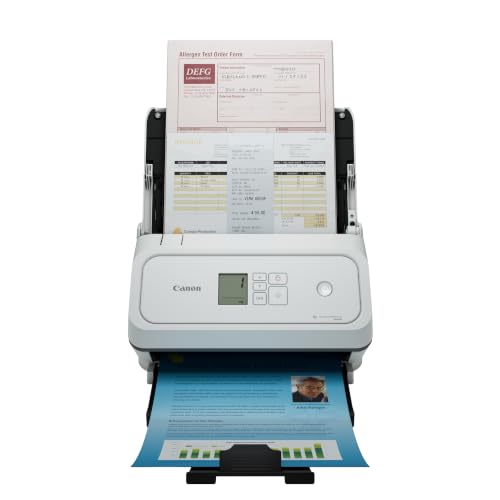
Canon imageFORMULA R40
The Canon R40 is the quiet overachiever. It scans 40 pages per minute, has a 60-sheet feeder, and ships with a perpetual license for ReadIris OCR. No wireless, which is the only real drawback. If you are happy with USB and want a sturdy mid-volume scanner, this one delivers.
In its favor
- Fast and Efficient: Scans both sides of a document at the same time, in color, at up to 45
- Reliably Handles Many Different Document Types: Receipts, business cards, reports, contrac
- Designed exclusively for the included Canon CaptureOnTouch software;TWAIN and ISIS drivers
- Easy Setup: Simply connect to your computer using the supplied USB-C cable.
- Bundled Software: Includes easy-to-use Canon CaptureOnTouch scanning software.

Epson Perfection V600
For photos, slides, books, or anything that will not feed through a sheet scanner, you need a flatbed. The V600 is the one I keep recommending. It has a film adapter for negatives and slides, scans at up to 6400 dpi, and the included Digital ICE software cleans dust and scratches automatically. Slow for documents, but unmatched for archival work.
In its favor
- The Epson Perfection V600 Photo Scanner is the solution for converting 35mm and medium-for
- With a maximum resolution of 6400 x 9600 dpi users can create enlargements up to 17 x 22".
- Connectivity: Hi-Speed USB 2.0. This energy-efficient scanner has Epson's ReadyScan LED te
- The Perfection V600 has four customizable buttons to make scanning, copying, creating e-ma
- What's in the box: Epson Perfection V600 Photo Scanner, Transparency Unit (built into lid)
Frequently asked
If you scan more than ten pages a week, a dedicated scanner pays for itself in time. All-in-one printers are slow, have no auto-feeder on the cheap ones, and the software is usually clunky.
Yes, if you scan anything double-sided like contracts or tax forms. A single-pass duplex scanner does both sides in one pass and cuts your time roughly in half.
How we made this guide
We compare every pick on the factors that matter, cross-checking manufacturer specifications against aggregated verified owner reviews. We rank independently and never take payment for placement. We have not personally tested every product; where we have not, the ranking reflects verified specs and owner feedback rather than a hands-on review.
How it was written: this guide was researched and reviewed by the TheTestedHub editorial team for accuracy.
Affiliate disclosure: TheTestedHub is reader-supported. When you buy through links on our site, we may earn a commission at no extra cost to you.
You might also like

Buy the Best Conference Room Setup 2026: Logitech Rally Bar

Conference Displays for Microsoft, Cisco, and Samsung Users

7 Conference Audio Systems That Make You Forget The Tech

2026 Office Product Shortlist: Ergonomic Picks

X-Chair X-Tilt Task Chair Review (2026): The Dynamic Variable

Vari Electric Standing Desk Review (2026): The Pre-Built Desk

UPLIFT V2 Standing Desk 48-Inch Review (2026): The Top Pick
