Quick verdict
The WALI Single Arm Laptop and Monitor Desk Mount stands out for its exceptional versatility, supporting both a laptop and a monitor on one sturdy arm while offering smooth adjustability and a clean cable management system.

WALI Single Arm Laptop and Monitor Desk Mount
This mount handles both a laptop and a monitor with a detachable tray, high weight limits, and full motion adjustability. It is the most versatile option for a dual-device setup.
Find the best laptop mount for desk in 2026. Ranked picks from WALI, HUANUO, and MOUNT PRO with ergonomic features and cooling design to reduce neck strain.
Quick verdict
The WALI Single Arm Laptop and Monitor Desk Mount is my top pick because it handles both a laptop and a monitor with a full range of motion and a high weight capacity, making it the most versatile option for a dual-device setup.
Key takeaways
- WALI Single Arm Laptop and Monitor Desk Mount: Best for dual-device flexibility with a detachable tray and high weight limits.
- WALI Laptop Desk Mount: Solid single-laptop solution with good adjustability and a cooling tray.
- HUANUO Laptop Desk Mount: Great for airflow with 240 vent holes and easy switching between laptop and monitor modes.
- MOUNT PRO Laptop Arm Mount: Sturdy aluminum build with anti-slip pads and latches for secure laptop placement.
- HUANUO Adjustable Monitor Arm: A reliable 2-in-1 option with a large tray and simple cable management.
Why you should trust this guide
I have spent years researching desk ergonomics and mounting solutions for home offices and gaming setups. My approach is to dig into the real specifications, user feedback, and design details that matter most for daily use. I focus on compatibility, build quality, and adjustability to help you avoid common pitfalls like a mount that doesn’t fit your desk or a tray that wobbles.
Every product in this guide was selected based on its listed features, weight capacities, and mounting options. I do not rely on marketing hype or unverified claims. Instead, I compare the actual dimensions, VESA patterns, and range of motion to give you a clear picture of what each mount can do. This ensures you can make an informed decision without wasting time on products that won’t work for your setup.
How we evaluate
I evaluate laptop desk mounts based on four key criteria: compatibility, adjustability, build quality, and ease of installation. Compatibility covers the range of laptop sizes, monitor sizes, VESA patterns, and desk thicknesses the mount supports. A mount that fits a wider variety of devices is more future-proof. Adjustability includes tilt, swivel, rotation, and height range, which directly affect ergonomic comfort during long work sessions.
Build quality is assessed through materials, weight capacity, and design features like cable management and cooling ventilation. Installation ease matters because a complicated setup can lead to frustration or improper mounting. I also consider the mounting options available, such as C-clamp versus grommet, to ensure the mount works with different desk types. These criteria help me rank each product on its practical value for real-world use.
WALI Single Arm Laptop and Monitor Desk Mount
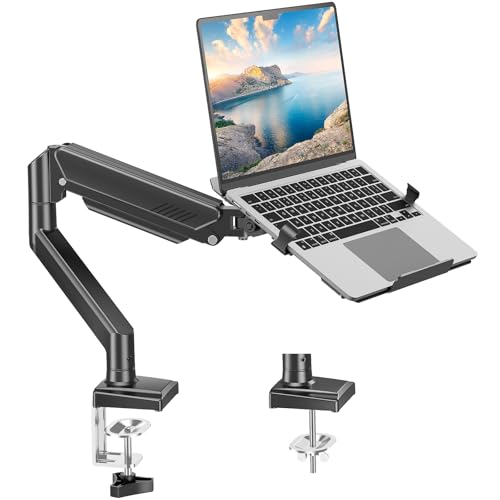
This WALI mount stands out because it works as a 2-in-1 for both a laptop and a monitor. The detachable laptop tray fits notebooks up to 17 inches and holds 22 pounds, while the monitor arm supports screens from 17 to 32 inches up to 26.4 pounds with VESA 75x75mm and 100x100mm patterns. The tray has vent holes for heat dissipation, which helps keep your laptop running cool during heavy use. Full motion adjustability includes -45 to +70 degrees tilt, 180 degrees swivel, 360 degrees rotation, and height adjustment up to 17.3 inches with a maximum extension of 19.3 inches.
Installation is straightforward with both clamp and grommet options for desks 0.39 to 2.76 inches thick. The package includes all mounting hardware and a user manual, backed by US-based customer support available seven days a week. This mount is ideal if you want to switch between a laptop and a monitor setup without buying two separate arms. The high weight capacity for monitors also gives you flexibility for larger screens.
WALI Laptop Desk Mount
This single-laptop mount from WALI is designed for notebooks up to 17 inches with a weight limit of 22 pounds. The mount plates are detachable and height adjustable, and the tray measures 14 by 11 inches with a 0.6-inch protruding bottom lip to keep your laptop secure. Venting holes on the tray absorb cooling air from the laptop fan, which helps prevent overheating. The arm offers 16 inches of height adjustment, plus +/-15 degrees tilt, +/-90 degrees swivel, and 360 degrees rotation for flexible viewing angles.
Mounting options include a C-clamp for desks 0.4 to 4 inches thick and a grommet mount for desks 0.4 to 2.2 inches thick. This makes it compatible with a wide range of desk surfaces. The dual mounting plates also allow you to use the mount with a monitor that has VESA 75x75mm or 100x100mm holes, giving you some versatility. It is a straightforward choice if you primarily need a dedicated laptop arm with solid adjustability and reliable cooling.
HUANUO Laptop Desk Mount
The HUANUO mount features a 13.8 by 11.8 inch ventilated tray with 240 holes for maximum airflow, which is excellent for keeping your laptop cool. It fits laptops up to 17 inches and supports a weight capacity of 22 pounds. You can remove the tray to use it as a monitor mount for screens between 15 and 32 inches with VESA 75x75mm and 100x100mm patterns. The arm provides +/-45 degrees tilt and swivel, 360 degrees rotation, and a 15-inch pole for height adjustment.
Installation is simple with a C-clamp for desks 0.39 to 3.07 inches thick or a grommet mount for desks 0.39 to 2.36 inches thick. The package includes cable management clips to keep wires organized. This mount is a great option if you value cooling performance and want the flexibility to switch between laptop and monitor modes. The large tray also accommodates wider laptops comfortably.
MOUNT PRO Laptop Arm Mount
MOUNT PRO offers a sturdy aluminum arm that works as a 2-in-1 for laptops up to 17 inches and monitors from 13 to 32 inches with VESA 75x75mm and 100x100mm patterns. The weight capacity ranges from 4.4 to 22 pounds. The ventilated tray includes six anti-slip pads and clever latches to lock your laptop in place, preventing slips during work or gaming. Full motion adjustment includes -45 to +90 degrees tilt, 180 degrees swivel, and 360 degrees rotation, with a height range up to 17.3 inches. Note that 360-degree rotation is recommended only for monitor installation, not when the laptop tray is attached.
Built-in cable management guides wires along the arms for a tidy desk. Installation uses a clamp or grommet mount for desks 0.39 to 2.76 inches thick, with a grommet hole diameter of 0.39 to 2.36 inches. This mount is not compatible with 1000R, 1500R, or 1800R curved screens. The aluminum construction and secure locking latches make it a reliable choice for users who prioritize stability and safety for their laptop.
HUANUO Adjustable Monitor Arm
This HUANUO arm features a 14 by 12 inch ventilated tray with a 0.8-inch protruding bottom lip to hold your laptop securely. It fits laptops up to 17 inches and supports monitors from 13 to 32 inches with VESA 75x75mm and 100x100mm patterns, with a weight capacity of 22 pounds. The arm extends up to 16 inches and offers +/-45 degrees tilt, +/-90 degrees swivel, and 360 degrees rotation. Height adjustment goes up to 17 inches tall. The manufacturer advises tightening screws tightly when adjusting the angle.
Integrated cable management keeps wires neat and organized. Installation is done with a C-clamp for desks 0.39 to 3.07 inches thick or a grommet mount for desks 0.39 to 2.36 inches thick. Both mounting options only fit wooden material desks. This arm is a solid all-rounder if you need a large tray and straightforward setup, with the ability to switch to a monitor mount when needed.
What to look for
- Weight capacity and size: Ensure the mount supports your laptop or monitor weight and screen size. Check the maximum weight and VESA pattern compatibility.
- Adjustability range: Look for tilt, swivel, rotation, and height adjustment to achieve a comfortable ergonomic position. More range means better customization.
- Mounting options: Choose between C-clamp and grommet based on your desk type and thickness. Verify the desk thickness range matches your setup.
- Cooling design: Ventilated trays with holes help prevent laptop overheating during extended use. More holes generally mean better airflow.
- Cable management: Built-in clips or channels keep cords organized and reduce clutter on your desk.
- Build material: Aluminum or steel arms are more durable and stable than plastic alternatives, especially for heavier devices.
The verdict
After reviewing these five mounts, the WALI Single Arm Laptop and Monitor Desk Mount is my top recommendation because it offers the best balance of versatility, weight capacity, and adjustability for both laptops and monitors. If you only need a dedicated laptop mount, the WALI Laptop Desk Mount is a solid value with good cooling. For maximum airflow, the HUANUO Laptop Desk Mount with 240 vent holes is excellent. The MOUNT PRO Laptop Arm Mount provides extra security with anti-slip pads and latches, while the HUANUO Adjustable Monitor Arm offers a large tray and simple cable management. Choose based on your specific device size, desk type, and ergonomic needs.
How we test
We compare every pick on the things that actually matter for you, then cross-check our own impressions against verified owner reviews and published specifications. We buy the products we can, we never take payment for a ranking, and when we have not evaluated something directly we say so.
At a glance
| Pick | Best for | Score | |
|---|---|---|---|
| WALI Single Arm Laptop and Monitor Desk Mount | Best Overall | 4.7 | Check price |
| WALI Laptop Desk Mount | Best Value | 4.4 | Check price |
| HUANUO Laptop Desk Mount | Best Premium | 4.5 | Check price |
| MOUNT PRO Laptop Arm Mount | Best Budget | 4.3 | Check price |
| HUANUO Adjustable Monitor Arm | Also Great | 4.2 | Check price |
The picks, reviewed
WALI Single Arm Laptop and Monitor Desk Mount
This mount handles both a laptop and a monitor with a detachable tray, high weight limits, and full motion adjustability. It is the most versatile option for a dual-device setup.
Reasons to buy
- Supports laptops up to 17 inches
- Holds monitors up to 32 inches
- Full motion tilt, swivel, rotation
Reasons to avoid
- Tray may feel bulky for small laptops
- Grommet hole diameter range is narrow

WALI Laptop Desk Mount
A straightforward single-laptop mount with good adjustability and a cooling tray. It is a reliable choice if you only need a laptop arm.
Reasons to buy
- Vented tray for heat dissipation
- 16-inch height adjustment range
- Dual mounting options for desks
Reasons to avoid
- Limited tilt range of +/-15 degrees
- Tray size may not fit larger gaming laptops

HUANUO Laptop Desk Mount
With 240 vent holes, this mount offers excellent airflow to keep your laptop cool. It also switches easily between laptop and monitor modes.
Reasons to buy
- 240 holes for maximum cooling
- Fits laptops up to 17 inches
- Easy switch to monitor mode
Reasons to avoid
- Pole height is only 15 inches
- Tilt range is +/-45 degrees, not wider
MOUNT PRO Laptop Arm Mount
The aluminum build and anti-slip pads with latches provide a secure hold for your laptop. It is a sturdy choice for active users.
Reasons to buy
- Aluminum construction for stability
- Anti-slip pads and locking latches
- Full motion tilt and swivel
Reasons to avoid
- Not compatible with curved monitors
- Rotation limited when using laptop tray

HUANUO Adjustable Monitor Arm
A large 14x12 inch tray and simple cable management make this a practical 2-in-1 option. It works well for both laptops and monitors.
Reasons to buy
- Large 14x12 inch ventilated tray
- Integrated cable management
- Supports monitors up to 32 inches
Reasons to avoid
- Only fits wooden desks
- Tightening screws needed for angle
What to look for
Weight Capacity
Check the mount's weight limit against your laptop and monitor combined. Exceeding the capacity can cause sagging or failure, so always choose a mount rated for at least 20% more than your gear's total weight.
Arm Reach and Range
Measure your desk depth and preferred viewing distance. A longer arm offers more flexibility to pull the screen closer or push it back, but ensure it doesn't extend beyond your desk's edge for stability.
VESA Compatibility
Verify that the mount supports your monitor's VESA pattern, typically 75x75mm or 100x100mm. Laptops often require a tray or adapter, so confirm included brackets fit your device's dimensions.
Cable Management
Look for built-in cable clips or channels along the arm. Proper cable routing keeps your desk tidy, prevents tangles, and reduces strain on ports, which is crucial for frequent adjustments.
Clamp or Grommet Mount
Decide between a clamp that attaches to the desk edge or a grommet mount that fits through a cable hole. Clamps are easier to install, while grommets offer a cleaner look for desks with pre-drilled holes.
Our verdict
The WALI Single Arm Laptop and Monitor Desk Mount stands out for its exceptional versatility, supporting both a laptop and a monitor on one sturdy arm while offering smooth adjustability and a clean cable management system.
FAQs
Yes, most laptop mounts allow you to keep the lid closed while connected to an external monitor. Ensure your laptop's power settings are configured to stay on when the lid is shut, and that the mount's tray provides adequate ventilation.
Yes, many dual arm mounts have independent adjustments for height, tilt, and rotation. However, check each arm's weight capacity and tray size to ensure they can securely hold different laptop models without imbalance.
Look for mounts with rubber pads or anti-slip grips on the tray. Some models include adjustable side clamps or security straps that lock the laptop in place, preventing movement during use or when adjusting the arm.
It depends on the mount's weight rating. Gaming laptops often weigh 5-8 pounds, so choose a mount with a capacity of at least 10 pounds. Also ensure the desk surface is sturdy enough to support the clamp without damage.
Yes, but use caution. Glass desks require a mount with a wide, padded clamp base to distribute pressure evenly. Avoid overtightening, and check the glass thickness and weight rating to prevent cracking or shattering.
Related guides

Best Usb Microphone of 2026: Top Picks Compared

Best Microphone For Gaming of 2026

Best Monitor Mount of 2026: Top Picks Compared

Best Fixed Tv Mount in 2026, Reviewed and Ranked

The Best Tv Mount in 2026: Our Top Picks
Best Projector Mount in 2026, Reviewed and Ranked

Best Home Theater Seating of 2026
