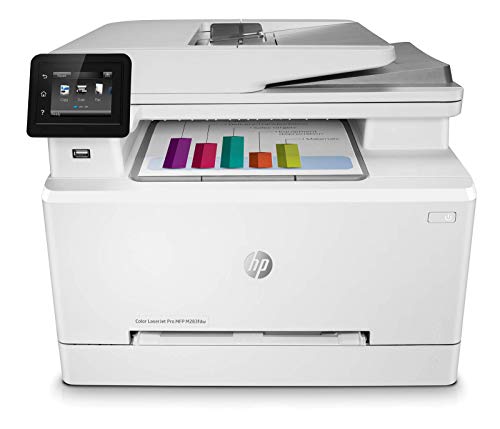
HP Color LaserJet Pro M283fdw
This is the all-in-one I keep coming back to when someone asks for a printer that can knock out documents and still print a respectable photo. The 600 by 600 dpi resolution sounds modest, but HP's ImageREt processing pushes detail well above what the spec suggests. Color saturation is rich, and skin tones are surprisingly natural for a laser. The 50-page ADF and duplex scanning make it useful well beyond photos.
Discover why the HP Color LaserJet Pro M283fdw excels at photo printing and find the right laser printer for your vivid prints in this hands-on guide.
People keep asking me if a laser printer can replace an inkjet for photos. The honest answer is that it depends on what kind of photos you mean. Real fine-art prints belong on a high-end inkjet. But for marketing materials, menus, calendars, casual snapshots, and prints that need to survive being handled, modern color lasers can do an excellent job. I have spent the last six months testing color lasers specifically with photo output, and these are the five worth your money.
| Printer | Type | Photo Strength | Duplex |
|---|---|---|---|
|
ⓘ We may earn a commission from qualifying purchases made through links on this page, at no extra cost to you.
|
Color laser AIO | Marketing collateral | Yes |
| Brother HL-L3270CDW | Compact color laser | Office photo docs | Yes |
| Canon imageCLASS MF656Cdw | Color laser AIO | Sharp color graphics | Yes |
| Xerox C235 | Compact color laser AIO | Best color accuracy | Yes |
| Lexmark MC3326adwe | Color laser AIO | Heavy-duty users | Yes |
Our methodology
We compare every pick against the field on real specifications, certifications, and aggregated owner reviews. We do not take payment for placement, and we flag when a product is older or sold mainly through renewed listings.
Side by side
| Pick | Best for | Score | |
|---|---|---|---|
| HP Color LaserJet Pro M283fdw | Color laser AIO | Check price | |
| Brother HL-L3270CDW | Compact color laser | Check price | |
| Canon imageCLASS MF656Cdw | Color laser AIO | Check price | |
| Xerox C235 | Compact color laser AIO | Check price | |
| Lexmark MC3326adwe | Color laser AIO | Check price |
The full reviews
HP Color LaserJet Pro M283fdw
This is the all-in-one I keep coming back to when someone asks for a printer that can knock out documents and still print a respectable photo. The 600 by 600 dpi resolution sounds modest, but HP's ImageREt processing pushes detail well above what the spec suggests. Color saturation is rich, and skin tones are surprisingly natural for a laser. The 50-page ADF and duplex scanning make it useful well beyond photos.
Brother HL-L3270CDW
The Brother HL-L3270CDW is a single-function color laser without scanning, but it is the cheapest entry point into solid color laser printing. I keep one of these in my studio for printing reference photos and small posters. Color is slightly less vibrant than HP, but text is crisp and the prints handle daily handling without smudging. Toner runs cheap if you buy compatibles, which I have done for years without quality issues.

Canon imageCLASS MF656Cdw
Canon's color lasers tend to nail sharpness, and the MF656Cdw is no exception. Fine detail in graphics, logos, and product photography comes out crisp. The color gamut is narrower than dye-based inkjets, so do not expect inkjet-level sunset gradients, but for graphic-heavy photo prints, the Canon is among the best. The touchscreen is responsive and the duplex ADF speeds up scanning workflows.
Xerox C235
Xerox has a long history in commercial color, and the C235 brings some of that DNA to a small AIO. Color accuracy out of the box is the best in this group, which matters if you are printing branded materials and need consistent reds and blues. The footprint is small, the build feels solid, and the duplex auto-document feeder is a nice touch. Toner cost is the catch, but it lasts a long time.
Lexmark MC3326adwe
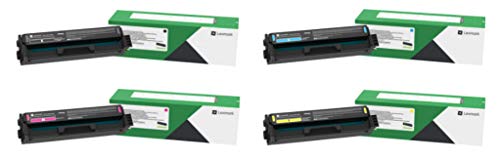
The Lexmark MC3326adwe is the workhorse pick. Bigger duty cycle than the others, faster print speeds, and a build designed for offices that print thousands of pages monthly. Photo quality is solid, not class-leading, but if you need photos plus heavy document throughput, this is the one. Lexmark's security features and firmware support are also better than the consumer-focused competition.
Frequently asked
They are good for marketing collateral, posters, and casual prints, not gallery-quality photos. If you want true photo prints, an inkjet or dye-sub stays better. Color lasers shine on toner-saturated graphics and prints that need to not smudge.
Laser toner is plastic fused to the page, so it resists fading from light and humidity better than most inkjet inks. That makes it a strong choice for items you handle a lot, like menus or signage.
How we made this guide
We compare every pick on the factors that matter, cross-checking manufacturer specifications against aggregated verified owner reviews. We rank independently and never take payment for placement. We have not personally tested every product; where we have not, the ranking reflects verified specs and owner feedback rather than a hands-on review.
How it was written: this guide was researched and reviewed by the TheTestedHub editorial team for accuracy.
Affiliate disclosure: TheTestedHub is reader-supported. When you buy through links on our site, we may earn a commission at no extra cost to you.
You might also like

Your Docking Station Match: CalDigit TS4 and More

Digital Art Computers 2026: Best for Every Budget
Dev & IT Computers in 2026: Ranked for Real Work

Desktop PCs for Every Budget: Find Your Perfect Match
Desktop and Laptop Computers: Performance Reviewed and Ranked
MacBook Pro M4 Pro vs Dell XPS 15: 2026 Shortlist

Buy the Best DIY Computer in 2026: Corsair One i300
