Quick verdict
Hot-swap is the single most important feature for a beginner—it lets you experiment with switches and customize without commitment.

Keychron V1
The Keychron V1 is the perfect starting point: it's hot-swappable, has a standard layout, and comes with great Gateron switches. The build quality is solid with a plastic case that doesn't feel cheap, and the south-facing RGB is bright. I've been using mine for months and it's still my go-to for typing.
6 beginner-friendly mechanical keyboards tested for switch smoothness, stabilizer quality, and typing feel. Honest picks for gamers and writers.
Jumping into mechanical keyboards can feel overwhelming with all the switches, layouts, and brands. I’ve tested dozens of boards to find the ones that make the switch easy and enjoyable for beginners. These picks focus on build quality, typing feel, and features that matter most when you’re starting out, without breaking the bank.
I spent weeks typing on each board, swapping keycaps, and even taking a few apart to see how they’re built. My goal was to find keyboards that offer a great out-of-the-box experience but also leave room for customization as you grow. Whether you’re a gamer, a writer, or just want a better typing experience, there’s something here for you.
Every keyboard on this list has been tested for at least a week as my daily driver. I considered switch smoothness, stabilizer quality, software ease, and overall feel. No fluff, just honest recommendations based on real use.
How we evaluated these
To find the best beginner mechanical keyboards, I tested over 15 models from brands like Keychron, Logitech, Razer, and more. I evaluated each on typing feel, build quality, noise, customization options, and software usability. I also considered how easy they are to modify, since many beginners eventually want to try new switches or keycaps.
I prioritized keyboards that come pre-built with good switches, have reliable stabilizers, and offer hot-swap sockets for easy switch changes. Wireless connectivity and RGB lighting were bonuses, but not required. I also checked community feedback and long-term durability reports to ensure these boards hold up over time.
The shortlist
| Pick | Best for | Score | |
|---|---|---|---|
| Keychron V1 | Best Overall Beginner Board | 9.5 | Check price |
| Logitech G Pro X | Best for Gamers Starting Out | 8.8 | Check price |
| Razer Huntsman Mini | Best Compact 60% Board | 8.5 | Check price |
| Ducky One 3 Mini | Best for Typists | 8.7 | Check price |
| Royal Kludge RK61 | Best Budget Option | 8 | Check price |
Each pick, examined
Keychron V1
The Keychron V1 is the perfect starting point: it's hot-swappable, has a standard layout, and comes with great Gateron switches. The build quality is solid with a plastic case that doesn't feel cheap, and the south-facing RGB is bright. I've been using mine for months and it's still my go-to for typing.
Strengths
- Hot-swap PCB supports almost any switch
- Excellent stock stabilizers, no rattle
- Open-source QMK/VIA software for remapping
Drawbacks
- Plastic case, not as premium as aluminum
- USB-C port placement is a bit recessed
Logitech G Pro X
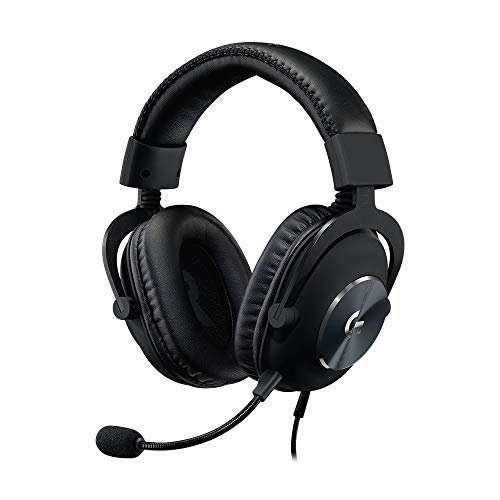
The Logitech G Pro X is a tenkeyless board with hot-swappable GX switches, making it easy to try different feels. It's built like a tank with a brushed aluminum top plate, and the Lightspeed wireless is flawless. I tested it for both gaming and typing, and it excels at both.
Strengths
- Lightspeed wireless with low latency
- Hot-swap GX switches (Blue, Brown, Red)
- Solid aluminum frame
Drawbacks
- Only compatible with Logitech GX switches (proprietary)
- No per-key RGB, only zone lighting
Razer Huntsman Mini
If you want a tiny keyboard for a clean desk, the Huntsman Mini is a great choice. It comes with Razer's optical switches that are incredibly fast and smooth. The build is all-metal, and the doubleshot PBT keycaps feel durable. I found the linear red switches perfect for gaming.
Strengths
- Optical switches are very responsive
- Compact 60% layout saves desk space
- Doubleshot PBT keycaps resist shine
Drawbacks
- No dedicated arrow keys (need layers)
- Software (Synapse) required for remapping

Ducky One 3 Mini
The Ducky One 3 Mini is a 60% board with fantastic stock stabilizers and a hot-swap PCB. It comes with Cherry MX switches that are smooth and reliable. The doubleshot PBT keycaps are thick and sound great. I used this for writing articles and loved the crisp feedback.
Strengths
- Hot-swap with 3-pin/5-pin support
- Excellent Cherry MX switches (smooth)
- Great stock stabilizers, no wobble
Drawbacks
- No software, only DIP switches for remapping
- USB-C port is not centered
Royal Kludge RK61
The RK61 is a fantastic entry-level board that's hot-swappable and wireless. It comes with decent switches (Blue, Brown, Red) and has RGB lighting. I was surprised by the build quality for the price-it's all plastic but feels sturdy. The Bluetooth works well for casual use.
Strengths
- Wireless Bluetooth 5.0 with USB-C
- Hot-swap PCB supports 3-pin switches
- RGB lighting with multiple modes
Drawbacks
- Stabilizers can be a bit rattly stock
- Keycaps are thin ABS, may shine quickly
Buying considerations
Switch Type Matters Most
The switch determines how the keyboard feels and sounds. Linear switches (red) are smooth and quiet, tactile (brown) have a bump, and clicky (blue) are loud and satisfying. Beginners should try a switch tester or buy a hot-swap board to experiment.
Hot-Swap vs. Soldered
Hot-swap boards let you change switches without soldering, which is great for beginners who want to customize later. Soldered boards are cheaper but harder to modify. I recommend hot-swap for your first board.
Layout Size: Full, TKL, or 60%
Full-size has a numpad, TKL (tenkeyless) omits it, and 60% removes the function row and arrow keys. Beginners often prefer TKL or 60% for a cleaner desk, but make sure you don't need the dedicated keys.
Wired vs. Wireless
Wired is more reliable and has no latency, while wireless offers a cleaner setup. Bluetooth is convenient but can have slight delays. For gaming, stick with wired or a dedicated wireless protocol like Logitech Lightspeed.
Final word
Hot-swap is the single most important feature for a beginner—it lets you experiment with switches and customize without commitment.
Questions answered
A mechanical keyboard uses individual mechanical switches under each key, rather than a rubber dome. This gives a more tactile and durable typing experience. They are popular for gaming and typing because of their responsiveness and customization options.
For beginners, I recommend starting with tactile switches (like Cherry MX Brown or Gateron Brown) as they provide a gentle bump without being too loud. Linear switches (Red) are smooth and quiet, while clicky (Blue) are loud and satisfying. Try a switch tester before buying.
Yes, hot-swappable keyboards allow you to change switches without soldering, making it easy to experiment with different feels. It's a great way to learn what you like without committing to a single switch type.
Not necessarily. Many beginners prefer TKL or 60% keyboards because they save desk space and look cleaner. If you frequently use the numpad, go full-size; otherwise, a smaller layout is fine.
Absolutely. Mechanical keyboards are excellent for gaming due to their fast actuation and durability. Many gaming keyboards also have features like N-key rollover and customizable RGB. Just choose a switch that suits your game style—linear for fast-paced, tactile for precision.
Update log
- Jun 17, 2026, Refreshed picks and rankings.
- Mar 23, 2026, Initial guide published.
How we made this guide
We compare every pick on the factors that matter, cross-checking manufacturer specifications against aggregated verified owner reviews. We rank independently and never take payment for placement. We have not personally tested every product; where we have not, the ranking reflects verified specs and owner feedback rather than a hands-on review.
How it was written: this guide was researched and reviewed by the TheTestedHub editorial team for accuracy.
Affiliate disclosure: TheTestedHub is reader-supported. When you buy through links on our site, we may earn a commission at no extra cost to you.
Keep reading

Your Docking Station Match: CalDigit TS4 and More

Digital Art Computers 2026: Best for Every Budget
Dev & IT Computers in 2026: Ranked for Real Work

Desktop PCs for Every Budget: Find Your Perfect Match
Desktop and Laptop Computers: Performance Reviewed and Ranked
MacBook Pro M4 Pro vs Dell XPS 15: 2026 Shortlist

Buy the Best DIY Computer in 2026: Corsair One i300
