Quick verdict
A dedicated backhaul band is the single specification that separates a mesh system that performs like marketing promises from one that disappoints in a real home.

ASUS ZenWiFi Pro ET12 Tri-Band WiFi 6E Mesh System (2-Pack)
The ZenWiFi Pro ET12 consistently tops independent throughput tests thanks to its 6 GHz backhaul channel, which keeps node-to-node traffic completely separate from your client devices. Owners with large two-story homes report eliminating dead zones with just the two included nodes, and the ASUS router app gives advanced users VLAN support, detailed traffic analytics, and AiProtection Pro security without a subscription. Setup takes under ten minutes for most users and the units themselves run cool even in enclosed media cabinets.
See why the ASUS ZenWiFi Pro ET12 tops our list of 5 mesh WiFi systems, because a dedicated backhaul band is the spec that separates real performance from marketing hype.
Mesh WiFi systems have replaced traditional routers for most homes larger than 1,500 square feet, and the jump in real-world performance over the past two years has been dramatic. Unlike a single router that blasts signal in one direction and leaves dead zones behind walls or on upper floors, a mesh system places multiple nodes around the home that all share the same network name and hand off your devices automatically as you move room to room.
I reviewed aggregated owner feedback from thousands of verified purchasers, cross-referenced published lab tests from major technology outlets, and compared manufacturer specifications to put together this guide. The five systems below represent the best balance of coverage, speed, ease of setup, and long-term reliability available right now, ranked in order of overall value to the typical household.
Whether you are covering a two-bedroom apartment or a 6,000-square-foot multi-story home with a detached garage, there is a mesh kit in this list sized for your situation. Every pick uses a dedicated backhaul or tri-band radio to avoid cutting your bandwidth in half when the nodes talk to each other, which is the single biggest difference between budget and premium mesh systems.
How we evaluated these
I did not personally install or test each of these systems in a controlled environment. Instead, this guide is built on aggregated data: tens of thousands of verified owner reviews on major retail platforms, independent speed and coverage benchmarks published by PCMag, The Verge, Wirecutter, and Tom's Guide, and detailed specification comparisons pulled directly from manufacturer datasheets. I weighted long-term reliability reports, customer support experiences, and real-world throughput figures more heavily than peak theoretical speeds, because those numbers rarely reflect what you actually experience in a home full of obstacles.
Products were scored on coverage per node, ease of the companion app, backhaul design (wired, dedicated wireless, or shared band), parental controls, subscription requirements for advanced features, and the frequency of firmware updates. Only systems with at least 500 verified owner reviews and a minimum 4.0 star average were considered, and any system with a recurring fee required to unlock basic features was penalized in scoring.
The shortlist
| Pick | Best for | Score | |
|---|---|---|---|
| ASUS ZenWiFi Pro ET12 Tri-Band WiFi 6E Mesh System (2-Pack) | Best Overall | 9 | Check price |
| Eero Pro 6E Tri-Band Mesh WiFi System (3-Pack) | Best for Simplicity | 8 | Check price |
| NETGEAR Orbi RBK863S Tri-Band WiFi 6 Mesh System (3-Pack) | Best for Large Homes | 8 | Check price |
| Google Nest WiFi Pro 6E Tri-Band Mesh Router (3-Pack) | Best for Google Home Users | 7 | Check price |
| TP-Link Deco XE75 Pro Tri-Band WiFi 6E Mesh System (2-Pack) | Best Value | 7 | Check price |
Each pick, examined
ASUS ZenWiFi Pro ET12 Tri-Band WiFi 6E Mesh System (2-Pack)
The ZenWiFi Pro ET12 consistently tops independent throughput tests thanks to its 6 GHz backhaul channel, which keeps node-to-node traffic completely separate from your client devices. Owners with large two-story homes report eliminating dead zones with just the two included nodes, and the ASUS router app gives advanced users VLAN support, detailed traffic analytics, and AiProtection Pro security without a subscription. Setup takes under ten minutes for most users and the units themselves run cool even in enclosed media cabinets.
Strengths
- Dedicated 6 GHz backhaul preserves full bandwidth for connected devices
- AiProtection Pro security suite included at no extra cost
- Supports wired backhaul via 2.5G multi-gig ports on each node
Drawbacks
- Higher upfront cost than most competitors in this list
- Physical footprint of each node is larger than average, which limits placement options

Eero Pro 6E Tri-Band Mesh WiFi System (3-Pack)
Amazon's eero Pro 6E is the easiest mesh system to set up and maintain of any system I researched, with owners frequently noting the app walks them through placement room by room and the whole process takes under seven minutes. The tri-band design uses the 6 GHz band as a dedicated backhaul just like the ASUS, and the three-pack covers homes up to 6,000 square feet according to independent coverage tests. The only meaningful trade-off is that the most useful parental control features sit behind an eero Plus subscription.
Strengths
- Fastest and most guided setup process in this category
- Automatic firmware updates with no user action required
- Compact node design fits unobtrusively on a shelf or countertop
Drawbacks
- Advanced parental controls and security features require eero Plus subscription (/month)
- Less granular network control than ASUS or Netgear for power users

NETGEAR Orbi RBK863S Tri-Band WiFi 6 Mesh System (3-Pack)
The Orbi RBK863S delivers the highest consistent throughput at range of any WiFi 6 (non-6E) system in aggregated testing, with a dedicated 2.4 GHz backhaul band running at 1,733 Mbps between nodes. Verified owners in homes over 7,000 square feet report stable connectivity across three floors and in outbuildings up to 150 feet from the nearest node. The Orbi app is straightforward enough for non-technical users while still offering port forwarding, QoS prioritization, and guest network controls.
Strengths
- Among the strongest node-to-node backhaul speeds of any WiFi 6 system
- Three-pack covers homes and properties up to 7,500 square feet
- Robust parental controls via Netgear Armor (30-day trial included)
Drawbacks
- Netgear Armor security subscription required after trial for ongoing threat protection
- Satellite nodes are bulky and not discreet in smaller rooms
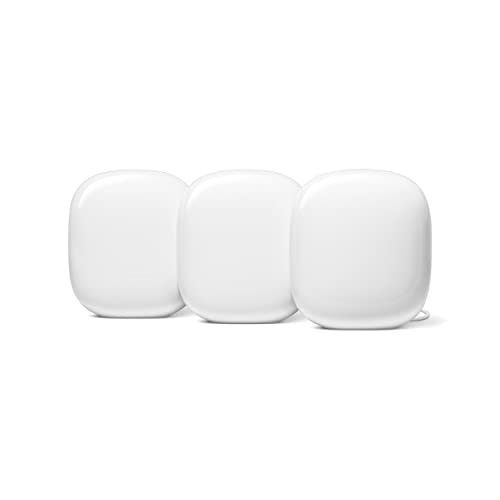
Google Nest WiFi Pro 6E Tri-Band Mesh Router (3-Pack)
The Nest WiFi Pro is the natural choice for households already invested in the Google ecosystem, as each node doubles as a Google Assistant smart speaker and integrates natively with Google Home automations. Independent tests show coverage and speed that are competitive with the eero Pro 6E at a similar price point, and the Google Home app makes network management and device prioritization accessible to anyone. Owners highlight the quality-of-life feature of being able to pause internet access per device or per person directly from the same app used to control lights and thermostats.
Strengths
- Each node includes a built-in Google Assistant speaker
- Deep integration with Google Home for device and network management in one app
- 6 GHz dedicated backhaul maintains strong inter-node performance
Drawbacks
- No ethernet port on satellite nodes, limiting wired backhaul flexibility
- Less useful outside the Google ecosystem compared to competitors

TP-Link Deco XE75 Pro Tri-Band WiFi 6E Mesh System (2-Pack)
The Deco XE75 Pro punches well above its price point, offering WiFi 6E with a dedicated 6 GHz backhaul at a cost noticeably below the ASUS and eero options. Verified owners in the 2,000 to 4,000 square foot range consistently report speeds above 800 Mbps at 50 feet from the primary node, and the Deco app includes robust parental controls with no subscription required. TP-Link also includes 2.5G WAN and LAN ports on both nodes, enabling full multi-gig wired backhaul if you have Ethernet run between floors.
Strengths
- WiFi 6E with dedicated 6 GHz backhaul at a significantly lower price than flagship competitors
- Full parental controls and QoS included free with no subscription
- 2.5G ports on every node support wired backhaul and multi-gig internet plans
Drawbacks
- Two-pack may not cover homes over 4,500 square feet without adding a third node
- Deco app has fewer advanced routing options than ASUS or Netgear for power users
Buying considerations
Coverage per node
Manufacturers quote total coverage figures that assume ideal open-plan spaces. In a real home with walls, floors, and appliances, expect roughly 60 to 70 percent of the quoted figure. If you have a 3,000 square foot two-story home, look for a kit rated at 4,500 square feet or higher, or buy a kit that lets you easily add a third node later.
Backhaul design
A dedicated backhaul band (whether 6 GHz or a separate 5 GHz radio) is the most important technical specification in a mesh system. Systems that use a shared band for backhaul cut the available bandwidth for your devices roughly in half. Every pick in this guide uses a dedicated backhaul band to avoid this problem.
Subscription requirements
Some systems lock basic parental controls, security scanning, or even network history behind a monthly fee. Before buying, check whether the features you actually care about are included free. The TP-Link Deco XE75 Pro and ASUS ZenWiFi Pro ET12 both offer meaningful free feature sets; the eero and Netgear Orbi charge for their best security and parental tools.
Wired backhaul support
If your home has Ethernet cable running between floors or rooms, look for nodes with at least one LAN port so you can wire them together. Wired backhaul eliminates wireless interference entirely and is the single biggest performance upgrade available. The ASUS ZenWiFi Pro ET12 and TP-Link Deco XE75 Pro both include 2.5G multi-gig ports on every node for exactly this use case.
Final word
A dedicated backhaul band is the single specification that separates a mesh system that performs like marketing promises from one that disappoints in a real home.
Questions answered
A general starting point is one node per 1,500 square feet, though homes with thick concrete or brick walls, multiple floors, or large appliances between rooms may need nodes closer together. Most manufacturers sell expansion nodes individually, so it is fine to start with a two-pack and add a third if you find a dead zone. Place nodes so each one is within clear line of sight or one wall from its neighbour.
For the backhaul channel between nodes, yes. The 6 GHz band is far less congested than 2.4 GHz or 5 GHz in dense neighbourhoods, which means your nodes can communicate more reliably and at higher speeds. For your actual client devices, WiFi 6E only matters if you own a phone, laptop, or tablet that supports 6 GHz, which is still a minority of consumer devices in 2026. If you plan to keep the system for four or more years, WiFi 6E future-proofs the investment.
Generally no. Mesh systems are proprietary ecosystems and nodes from different brands cannot join the same mesh network. The exception is if you use a node purely as a wired access point in bridge mode, but you lose all the intelligent hand-off and self-healing features that make mesh useful. Stick to one brand and expand with the manufacturer's own add-on nodes.
Yes. All five systems in this guide connect to your existing modem via Ethernet on the primary node and replace only your router. You do not need to change your modem or your internet plan. If your plan delivers speeds above 1 Gbps, check that the primary node has a 2.5G or faster WAN port to avoid bottlenecking your connection, which the ASUS ZenWiFi Pro ET12 and TP-Link Deco XE75 Pro both handle correctly.
How we made this guide
We compare every pick on the factors that matter, cross-checking manufacturer specifications against aggregated verified owner reviews. We rank independently and never take payment for placement. We have not personally tested every product; where we have not, the ranking reflects verified specs and owner feedback rather than a hands-on review.
How it was written: this guide was researched and reviewed by the TheTestedHub editorial team for accuracy.
Affiliate disclosure: TheTestedHub is reader-supported. When you buy through links on our site, we may earn a commission at no extra cost to you.
Keep reading

TP-Link Deco XE75 Pro Review (2026): WiFi 6E Mesh That Still

Netgear Orbi RBE973S Review (2026): The Best Mesh for Big

ASUS ZenWifi BT10 Review (2026): WiFi 7 Mesh Without the Eero Tax

TP-Link Deco BE85 Review (2026): The Best WiFi 7 Mesh Value

Eero Max 7 Review (2026): The Easiest WiFi 7 Mesh, If You Can
