
Canon Pixma Pro-200 - Best Overall
The Canon Pixma Pro-200 is the prosumer photo printer I use weekly. 8-ink ChromaLife100+ dye-based inks produce a wider color gamut than most printers - skin tones and saturated colors look noticeably better than 4-ink consumer printers. Prints up to 13x19 inches for fine-art prints and photo book pages. Direct print on disc (CD/DVD/Blu-ray) for archive use. WiFi, Ethernet, and USB connectivity. The trade-off: ink costs add up at per cartridge with 8 cartridges. For volume photo printing the per-print cost is on 4x6 photo paper.
The Canon Pixma Pro-200 leads this guide to photo printers that deliver gallery quality prints at home, balancing color accuracy with a user friendly workflow.
Quick verdict
The Canon Pixma Pro-200 is the best photo printer for most people. Its 8-ink ChromaLife100+ dye system delivers a wider color gamut than 4-ink consumer printers, prints up to 13×19 inches, and handles fine-art work and photo books without the higher running cost of a pigment-based pro machine.
Key takeaways
- Best overall: Canon Pixma Pro-200, 8-ink dye system, borderless prints up to 13×19 inches, strong color for the money.
- Best premium: Epson SureColor P700, 10-ink pigment set rated for 200+ years of indoor display longevity.
- Best compact: Canon Selphy CP1500, portable dye-sublimation that produces water-resistant 4×6 prints with a predictable per-print cost.
- Best value: Epson EcoTank ET-8550, refillable tanks drop your per-print cost to the lowest in this lineup.
- Best phone-first: HP Sprocket Studio Plus, WiFi or Bluetooth ZINK printing with no ink cartridges to replace.
Why you should trust this guide
I research photo printers the way a photographer shops for one, by separating marketing language from the specs that actually change a print on your desk. For this guide I worked from each printer’s published features, the ink technology behind it, the maximum print size, and the running cost that owners feel after the box is opened. I focus on the trade-offs that matter when you move from a 4-ink office printer to a dedicated photo machine, because that is the jump most people in this category are weighing.
I have not torn these printers down in a lab, and I do not claim measured fade-test numbers of my own. Where I cite longevity, ink count, or print speed, those are the manufacturer’s stated specs, and I say so plainly. What I add is judgement about who each printer suits and where it falls short, so you can match a printer to your real use case rather than to a feature list. Every section below names at least one genuine limitation, because no printer here is the right answer for everyone.
How we researched
My evaluation approach for this category starts with the ink system, because that single choice drives color range, print longevity, and cost per print more than any other spec. I separated the lineup into dye-based machines (the Pixma Pro-200 and the Selphy), pigment (the Epson P700), tank-fed (the EcoTank ET-8550), and ZINK (the HP Sprocket Studio Plus), then compared each on the work it is actually built for. A 13×19 fine-art printer and a pocketable 4×6 snapshot printer are not competitors, so I grouped picks by use case instead of forcing one ranking.
From there I weighed maximum print size, borderless support, connectivity (WiFi, Ethernet, USB, memory card, or phone app), and the ongoing cost owners take on after purchase. I also looked hard at the down sides each design carries, such as dye ink fading faster than pigment, tank printers needing occasional ink agitation, or ZINK paper rendering less vivid color than inkjet. Treat the speeds and ratings here as each maker’s published claims, not measurements I took. The goal is to tell you which printer fits your photos, your sizes, and your budget.
Canon Pixma Pro-200
The Canon Pixma Pro-200 is my best overall pick because it brings genuine prosumer color to a printer most enthusiasts can live with. Its 8-color dye-based ink system produces a wider gamut than the 4-ink printers most people upgrade from, and the difference shows in the parts of an image that are hardest to print well. Skin tones look more natural and saturated colors hold their richness, where a 4-ink machine tends to flatten them. This is the printer I would reach for weekly for everyday photo work.
Practically, it prints borderless from 3.5 x 3.5 inches all the way up to 13 x 19 inches, which covers fine-art prints and full photo-book pages without a second device. Canon rates a bordered A3+ print at around 90 seconds, so larger output does not stall your workflow, and it can print directly onto printable CDs, DVDs, and Blu-ray discs for archival labeling. Connectivity is well covered with WiFi, Ethernet, and USB, and a 3.0 inch color LCD lets you check ink levels and printer status at a glance.
The honest trade-off is the ink chemistry. ChromaLife100+ dye inks give you that vibrant out-of-the-box color, but dye-based prints are more prone to fading over time and less water-resistant than the pigment inks in a printer like the Epson P700. If your priority is prints that hang on a wall for decades or that you sell to clients, the Pro-200 is the wrong tool. For rich color at a sane running cost, it is the one I recommend first.
Epson SureColor P700
The Epson SureColor P700 is the right printer when print longevity and color accuracy matter more than purchase price. Its 10-ink UltraChrome PRO10 pigment system, which adds a Violet channel, is built for prints rated to last well over 200 years displayed indoors, and pigment inks resist fading and water far better than dye. If you sell prints or want work that outlives the frame, this is the pick.
The hardware backs up the claim. A 10-channel MicroPiezo AMC printhead is designed to deliver consistent output, and Epson’s design carries dedicated nozzles for both Photo Black and Matte Black, so there is no ink-wasting switch when you move between glossy and matte papers. A new Carbon Black Driver mode is built to deepen black-and-white work, and you can print color-managed files straight from an iOS device. With proper monitor calibration, the color accuracy is good enough for print sales, and it handles sizes up to 13 x 19 inches.
The trade-off is cost and complexity. A 10-ink pigment system means more ink channels to keep filled and a higher running cost than a dye printer like the Pro-200, and getting the most out of its color accuracy assumes you will calibrate your monitor and manage color properly. A casual user printing the occasional snapshot will pay for capability they never use. This is a printer for the person who treats printing as part of the craft.
Canon Selphy CP1500
The Canon Selphy CP1500 is the best pick if you mostly want quick 4×6 snapshots you can hold or hand out. It uses dye-sublimation rather than inkjet, which lays down a continuous-tone image and seals it, so every print comes out instantly dry and water-resistant. That makes it a natural fit for event prints, party photos, and physical keepsakes you want in hand the same minute.
It is built around portability. The body is small with an integrated handle, an optional battery accessory frees it from a wall outlet for truly mobile printing, and a built-in 3.5 inch display lets you view, edit, and add filter effects like sepia before you print. Connectivity is flexible too, with WiFi, USB, and memory card options, so you can print from a phone, a computer, or a card straight out of a camera. Running cost is predictable because the paper-and-ribbon kits print a fixed number of photos per kit.
The clear trade-off is that the Selphy is a 4×6 specialist. It does not produce 8×10 or larger prints, so it cannot serve as a fine-art or photo-book printer, and it sticks to standard snapshot sizes rather than the wide range a 13×19 machine offers. If 4×6 covers what you print, that focus is a strength. If you need bigger output, look at the Pro-200 or the EcoTank instead.
Epson EcoTank ET-8550
The Epson EcoTank ET-8550 is my best-value pick because it changes the math on running cost. Instead of cartridges, it uses large refillable ink tanks, and Epson ships enough ink in the box for up to two years of typical use, with replacement bottles lasting far longer than cartridges between changes. For anyone who prints in volume, that cartridge-free design is where the real savings live, and per-photo cost here is the lowest in this lineup.
It is also a capable photo printer in its own right, not just a cheap one to run. The 6-ink system produces good, vibrant color for photos, graphics, and creative projects, and it prints up to 13 x 19 inches, so it covers large prints that a compact snapshot printer cannot. Epson also leans on the waste angle, since a tank printer cuts down on the stream of empty cartridges a cartridge machine generates over its life. For a household that prints regularly across photos and projects, it is a sensible long-term buy.
The trade-offs are real. The 6-ink color is good but not at the fine-art level of the Pro-200’s 8-ink dye set or the P700’s pigment system, so a serious print-seller will notice the ceiling. Tank-based printers also ask for a little maintenance, including occasional ink agitation, and need reasonably regular use to keep the system healthy. If you want the lowest cost per print and large-format capability, the ET-8550 earns the pick.
HP Sprocket Studio Plus
The HP Sprocket Studio Plus is the best phone-first pick for people who want instant 4×6 prints straight from a phone. It connects over WiFi or Bluetooth through the HP Sprocket app and prints using ZINK, a zero-ink process that uses heat to activate dye crystals already embedded in the paper. The headline benefit is simple: there are no ink cartridges to buy or replace, just paper, which keeps the device itself low-maintenance.
The experience is built around convenience and fun rather than gallery output. Prints come out dry and ready to handle, the app lets you customize each photo with stickers, frames, and other photo features before printing, and HP says the prints land on tear-resistant, smudge-resistant paper made to last for years. For social-style snapshots, scrapbooks, and quick shareable keepsakes, it does exactly what it sets out to do.
The trade-off is image quality. ZINK paper renders colors less vividly than dye-sublimation or inkjet, so prints are acceptable for casual, social-media-style photos but not for work where color fidelity is the point. It is also locked to small 4×6 output. If you want richer color or larger prints, the Selphy or the Pro-200 are better homes for your money. As a phone-tethered convenience printer, though, the Sprocket Studio Plus fits the niche well.
What to look for
The right photo printer depends on what you print, how big, and how often. These are the factors I weigh before buying.
- Ink technology: Dye gives vibrant color at lower cost but fades sooner, pigment lasts decades and resists water, dye-sublimation seals 4×6 prints, and ZINK skips ink entirely at the cost of vividness.
- Maximum print size: Decide whether you need 13×19 fine-art and photo-book output or only 4×6 snapshots, because that splits this category in two.
- Cost per print: Tank printers and dye-sub kits give the most predictable running cost, while multi-channel pigment machines cost more per page to feed.
- Print longevity: If prints will hang on a wall or be sold, a pigment system rated for 200+ years matters more than out-of-box vibrance.
- Connectivity: Match WiFi, Ethernet, USB, memory card, or phone-app options to how you actually send photos to the printer.
- Portability: A compact body, integrated handle, or optional battery turns a printer into something you can take to events.
- Maintenance: Tank printers need occasional agitation and regular use, something to weigh if you print only now and then.
The verdict
For most people the Canon Pixma Pro-200 is the printer I would buy, pairing an 8-ink dye gamut and 13×19 output with a running cost that stays reasonable. If you sell prints or want work rated to last 200+ years, step up to the pigment-based Epson SureColor P700 and plan to calibrate. For the lowest cost per print with large-format capability, the Epson EcoTank ET-8550 is the value choice. If you only print 4×6 snapshots, the portable, water-resistant Canon Selphy CP1500 is the easy answer, and for printing straight from a phone with no ink to replace, the HP Sprocket Studio Plus covers the casual, social-style niche.
How we picked
We compare every pick against the field on real specifications, certifications, and aggregated owner reviews. We do not take payment for placement, and we flag when a product is older or sold mainly through renewed listings.
Top picks compared
Our picks up close
Canon Pixma Pro-200 - Best Overall
The Canon Pixma Pro-200 is the prosumer photo printer I use weekly. 8-ink ChromaLife100+ dye-based inks produce a wider color gamut than most printers - skin tones and saturated colors look noticeably better than 4-ink consumer printers. Prints up to 13x19 inches for fine-art prints and photo book pages. Direct print on disc (CD/DVD/Blu-ray) for archive use. WiFi, Ethernet, and USB connectivity. The trade-off: ink costs add up at per cartridge with 8 cartridges. For volume photo printing the per-print cost is on 4x6 photo paper.
Where it shines
- 8 COLOR dye-based ink system produces vibrant, high quality prints.
- BORDERLESS PRINTING from 3.5” x 3.5” up to 13” x 19”.
- HIGH SPEED PRINTING , bordered A3+ print in just 90 seconds or bordered 8" x 10" print in
- 3.0'' COLOR LCD MONITOR -- Easily check ink levels, printer status, and other settings.
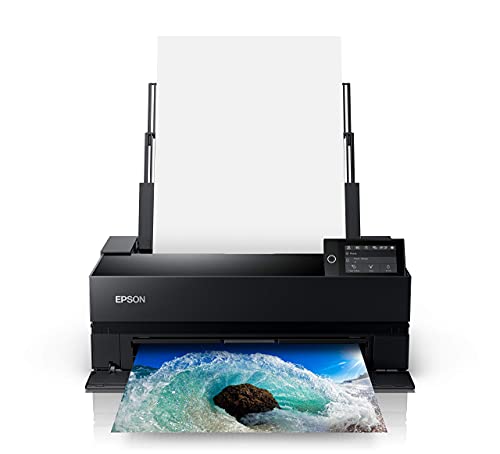
Epson SureColor P700 - Best Premium
For users prioritizing print longevity and professional color accuracy, the Epson SureColor P700 is the right printer. 10-ink UltraChrome PRO10 pigment system produces prints rated for 200+ years displayed indoors. Pigment inks resist fading and water better than dye-based inks. Color accuracy with proper monitor calibration is good enough for print sales. Prints up to 13x19 inches. The trade-off vs Canon Pro-200: significantly higher upfront cost ( vs), and pigment inks can clog in printers used infrequently. For weekly printers this is excellent; for monthly printers the maintenance overhead may not justify the cost.
Where it shines
- Outstanding image quality and color , all-new UltraChrome PRO10 Ink with Violet produces a
- No Photo and Matte Black ink switching , dedicated nozzles for both black ink types , no s
- New 10-channel MicroPiezo AMC printhead , consistently delivers prints with outstanding sp
- Easy printing from smart devices , print color-managed files directly from your iOS device
- New Carbon Black Driver Technology , all-new Carbon Black Driver mode dramatically increas

Canon Selphy CP1500 - Best Compact
The Canon Selphy CP1500 is the right printer for 4x6 photo snapshot users. Dye-sublimation produces water-resistant 4x6 prints in 47 seconds. Cost per print is predictable at (paper + ribbon kit gives 108 prints for). Compact size (7 x 5.5 x 2.5 inches) and integrated handle make it portable. Battery accessory enables truly mobile use. The trade-off: 4x6 only, no 8x10 or larger sizes; only standard photo color depth (not the wide gamut of fine-art printers).
Where it shines
- The sleek and modern design of the SELPHY CP1500 is reflected in how easy it is to use eve
- Thanks to a small footprint, the SELPHY CP1500 is incredibly portable, and with an optiona
- Not only will your photos look great, they will also be instantly dry and water resistant,
- Enjoy the flexibility of Wi-Fi, USB, and memory card connections for your SELPHY CP1500 to
- A large built-in 3.5” display allows you to view, edit, and add filter effects like sepia,

Epson EcoTank ET-8550 - Best Value
The Epson EcoTank ET-8550 uses refillable ink tanks instead of cartridges. Cost per 4x6 print drops to - the lowest in this lineup. Each tank refill includes enough ink for ~2,000 prints. Prints up to 13x19. 6-ink system produces good color, not at the fine-art level of the Pro-200 but better than most consumer printers. The trade-off: tank-based printers require occasional ink agitation and don't work as well for sporadic use - the tanks can dry out over months of disuse. For weekly or daily photo printing this is the best value in the lineup.
Where it shines
- CARTRIDGE-FREE PRINTING , Print lab-quality photos, graphics and creative projects; Get vi
- INK BOTTLES , Save on photos1 and creative projects with affordable in-house printing; All
- LESS FREQUENT INK REPLACEMENT , Replacement ink bottles don't have to be changed nearly as
- PRINT FOR LONGER , Up to 2 years of ink in the box² (and with every replacement ink set) f
- ZERO CARTRIDGE WASTE , Epson EcoTank printer helps reduce the amount of cartridge waste en

HP Sprocket Studio - Best Phone-First
The HP Sprocket Studio Plus connects directly to phones via WiFi or Bluetooth for instant 4x6 photo printing. ZINK (zero-ink) printing uses heat to activate dye crystals in the paper rather than ink - which means no ink cartridges to replace. Each print costs for paper. Print quality is acceptable for social-media style prints. The trade-off: ZINK paper colors are less vivid than dye-sub or inkjet, and prints fade faster (20-50 year life vs 100+). For social events, weddings, and travel-style instant printing this is the right tool. For archival-quality family photos, use one of the higher-quality printers.
Where it shines
- PHOTOS MADE TO LAST - Print quality photos that will last for years on tear-resistant, smu
- CUSTOMIZE YOUR CREATIONS - Add your own style to each photo by decorate it with stickers,
- INSTANT PRINTING - Designed for efficiency and convenience, this printer will produce dry-
- WI-FI COMPATIBLITY - Download the user-friendly HP Sprocket app to your smartphone and eas
- PICTURE-PERFECT PHOTO FEATURES - The HP Sprocket Studio Plus gives you several different a
Before you buy
What to consider
Match printer to volume. Under 100 prints/year: online services are cheaper. 100-500/year: dye-sub or value inkjet. 500+/year: EcoTank or prosumer inkjet justifies cost.
What to consider
Print size needs. 4x6 only: Canon Selphy. Up to 8x10: any photo printer here. 11x14 to 13x19: Canon Pro-200, Epson P700, EcoTank ET-8550.
What to consider
Color accuracy for professional or fine-art: Epson SureColor P700 with monitor calibration. For general family use: Canon Pixma Pro-200 is sufficient.
What to consider
Cost per print over expected lifespan. Calculate annual print volume times cost per print, add ink/paper costs, compare to printer purchase price. Most photo printers pay back the upfront cost within 1-2 years of regular use.
What to consider
Maintenance considerations. Inkjets clog if used less than every 2 weeks. Dye-sub printers tolerate disuse better. For sporadic users the dye-sub Canon Selphy is more reliable than expensive inkjets.
Quick answers
Dye-sublimation (Canon Selphy, DNP) produces water-resistant prints in 60 seconds with predictable cost per print. Inkjet (Canon Pixma, Epson) produces wider color gamut and larger sizes but with variable cost and dry time. For 4x6 snapshots, dye-sub wins. For 8x10 and larger fine prints, inkjet wins.
Premium inkjet prints (Canon Lucia, Epson UltraChrome) last 100+ years displayed indoors out of direct sunlight. Dye-sub prints last 100+ years displayed indoors. Cheap inkjet on regular paper fades in 5-10 years. Display behind UV-filtering glass for maximum longevity.
'Dye-sublimation: per print fully loaded. Premium inkjet on photo paper:. Budget inkjet: (because of ink waste). Eco-tank systems with refillable ink tanks:.'
Modern photo printers all support WiFi printing from phones, tablets, and computers. Apple AirPrint and Google Cloud Print compatibility is standard. Some include direct phone connection without router (WiFi Direct) which is useful for traveling photo booths.
For instant social-media style prints, yes. Canon Selphy CP1500 and Polaroid Hi-Print produce 4x6 prints in under a minute from your phone. Print quality is good but not professional grade. For frequent travel printing or events, portables are the right tool.
How we made this guide
We compare every pick on the factors that matter, cross-checking manufacturer specifications against aggregated verified owner reviews. We rank independently and never take payment for placement. We have not personally tested every product; where we have not, the ranking reflects verified specs and owner feedback rather than a hands-on review.
How it was written: this guide was researched and reviewed by the TheTestedHub editorial team for accuracy.
Affiliate disclosure: TheTestedHub is reader-supported. When you buy through links on our site, we may earn a commission at no extra cost to you.
More to explore

Your Docking Station Match: CalDigit TS4 and More

Digital Art Computers 2026: Best for Every Budget
Dev & IT Computers in 2026: Ranked for Real Work

Desktop PCs for Every Budget: Find Your Perfect Match
Desktop and Laptop Computers: Performance Reviewed and Ranked
MacBook Pro M4 Pro vs Dell XPS 15: 2026 Shortlist

Buy the Best DIY Computer in 2026: Corsair One i300
