
Epson FastFoto FF-680W - Best for Bulk Print Scanning
One photo per second, both sides at once, captures handwritten notes from the back. This is how you finish a shoebox project in a weekend. [Check price on Amazon](https://www.amazon.com/s?k=Epson+FastFoto+FF-680W&tag=thetestedhub-20).
Discover the Epson FastFoto FF-680W for bulk print scanning and find the best photo scanner to digitize your old prints and slides with ease.
Quick verdict
For most people digitizing a shoebox of old prints, the Epson FastFoto FF-680W is the pick. It scans roughly one photo per second, captures both sides at once (so handwriting on the back is preserved), and turns a years-long backlog into a weekend project. If your archive is mostly slides and negatives, choose a dedicated film scanner instead.
Key takeaways
- Best for bulk print scanning: Epson FastFoto FF-680W, feed a stack, get one photo per second plus the back of each print.
- Best all-around: Epson Perfection V600, a flatbed that handles prints, 35mm, and medium format with DIGITAL ICE dust removal.
- Best professional choice: Epson Perfection V850 Pro, dual lens system and anti-reflective film holders for the cleanest shadow detail.
- Best dedicated film scanner: Plustek OpticFilm 8200i, 7200 dpi optimized purely for 35mm slides and negatives.
- Best budget: Canon CanoScan LiDE 400, USB-powered and tiny, but prints only (no transparency unit).
Why you should trust this guide
I built this guide by working through the actual problem most families face: a closet full of envelopes from the photo lab, a carousel of slides nobody has looked at in thirty years, and a vague worry that the colors are fading a little more every summer. The five scanners here are the ones that keep coming up when you separate the marketing from the mechanics, so I focused on what each machine is physically built to do (sheet-fed versus flatbed, with or without a transparency unit) and matched that to the kind of archive you are trying to rescue.
I do not pretend to have run a controlled bench on each unit, and I will not quote numbers I did not produce. What I can do is read the stated specifications carefully, cross-reference them against what Epson, Plustek, and Canon publish, and flag the trade-offs that the product pages tend to bury. Where a feature like DIGITAL ICE or an infrared dust channel matters, I explain what it actually changes in your scans, and where a scanner leaves something out (no film support, no second pass for handwriting), I say so plainly rather than letting the spec sheet do the talking.
How we researched
My evaluation approach starts with intent. A photo scanner is only “good” relative to what you are feeding it, so I sorted these five by the format they are designed around: loose paper prints, mounted slides, strips of negatives, or some mix of all three. For each one I read the manufacturer’s stated resolution, the media sizes it accepts, the connectivity, and any built-in restoration features, then I asked the blunt question that decides most purchases: will this finish my specific pile in a reasonable amount of time without degrading the originals?
From there I weighed throughput against quality. A sheet-fed scanner that clears a print per second is a different tool than a flatbed that takes a careful pass over a single fragile photo, and a dedicated film unit that resolves a tiny 35mm frame at very high dpi is different again. I also looked at the unglamorous details that decide whether a project actually gets finished: software bundle, operating-system support, footprint on a crowded desk, and whether the machine can even handle the format you own. Every section below names at least one real limitation, because no single scanner here wins on all of those axes at once.
Epson FastFoto FF-680W – Best for Bulk Print Scanning
If your archive is mostly loose paper prints, the FastFoto FF-680W is the fastest way through it. Epson positions this as a high-speed personal photo scanner that can move thousands of photos as quickly as one photo per second, and that single number is the entire reason it exists. You load a stack into the feeder the way you would load paper into a document scanner, and it pulls them through automatically instead of asking you to lift a lid for every shot.
The feature I find genuinely useful is the single-step, double-sided capture. Because it reads both sides at once, it grabs the handwritten notes, dates, and names people scribbled on the back of prints decades ago, and for a lot of families that context is worth as much as the image itself. Epson frames the FF-680W around preserving priceless photos and sharing them with future generations, and the wireless connection plus its precise picture imaging system mean you can scan straight to a phone or computer and restore faded color in the same pass. For the classic shoebox project, this is how you actually finish in a weekend rather than abandoning it after one rainy afternoon.
The honest trade-off is format. This is a sheet-fed print scanner, so it is built for paper photos, not for slides or strips of negatives. Anything mounted, framed, very fragile, or transparent does not belong in an automatic feeder, and feeding curled or stuck-together prints invites the occasional misfeed. If your collection is half film, you will still need a second machine for that half. Buy the FastFoto for the volume of prints it clears, not as a do-everything device. [Check price on Amazon](https://www.amazon.com/s?k=Epson+FastFoto+FF-680W&tag=thetestedhub-20).
Epson Perfection V600 – Best All-Around Photo Scanner
The Perfection V600 is the scanner I would point most people to when their archive is mixed. It is a flatbed, so it handles paper prints up to 8.5 by 11.7 inches, and it ships with film holders for both 35mm and medium format, meaning the same machine that scans your grandmother’s prints can also digitize the slides and negatives in the same box. Epson rates it at a maximum resolution of 6400 by 9600 dpi, which is enough headroom to create enlargements up to 17 by 22 inches from a good original.
The standout feature is DIGITAL ICE, and on slides and negatives it is close to magical. Surface dust and light scratches that would otherwise force you into hours of manual cleanup get detected and removed during the scan, which is the difference between a usable archive and a folder of frustrating files. The V600 also uses Epson’s ReadyScan LED technology, so there is no warm-up lamp to wait on, connects over Hi-Speed USB 2.0, and gives you four customizable buttons for one-touch scanning, copying, and creating emails or PDFs. The transparency unit is built into the lid, so film support is integrated rather than an awkward add-on.
The limitation is the nature of a flatbed: it is patient, not fast. You place originals on the glass, scan, and reposition, so for a thousand loose prints it will feel slow next to a sheet-fed FastFoto. USB 2.0 connectivity is also dated, and very high dpi film scans produce large files that take real time to capture. For a household with a genuine mix of prints and film and no desire to own two machines, the V600 is still the most sensible single purchase. [Check price on Amazon](https://www.amazon.com/s?k=Epson+Perfection+V600&tag=thetestedhub-20).
Epson Perfection V850 Pro – Best Professional Choice
The V850 Pro is the one to reach for when the originals are precious and the output needs to hold up to scrutiny. Epson builds it around pro-quality color and detail with a remarkable tonal range, and the headline hardware is its exclusive dual lens system: the scanner switches between two lenses to optimize for either reflective prints or transparencies, so neither format is a compromise. In practice that is what produces the clean shadow detail this model is known for, the part of an image where cheaper scanners tend to crush everything into murk.
It also addresses the most annoying part of high-end film scanning with two anti-reflective film holders, which help keep negatives and slides flat and cut down on the internal reflections that soften a scan. For someone digitizing a serious negative archive, a wedding photographer’s back catalog, or family medium-format film they intend to print large, that combination of dual lenses, careful holders, and wide tonal range is exactly the toolkit you want. Epson lists broad operating-system support across Windows versions including 8.1, 8, 7, Vista, and XP.
The trade-off is that this is a deliberate, professional instrument, not a quick-win consumer device. It is the largest and most expensive option here, it asks for patience and good technique to get the most out of those lenses and holders, and that listed OS support skews toward older Windows releases, so confirm current driver compatibility for your machine before buying. If you mostly have paper prints to clear, the V850 Pro is overkill and the FastFoto will serve you better. [Check price on Amazon](https://www.amazon.com/s?k=Epson+Perfection+V850+Pro&tag=thetestedhub-20).
Plustek OpticFilm 8200i – Best Dedicated Film Scanner
If your project is purely 35mm, the OpticFilm 8200i is the specialist. It does one thing, scan slides and negatives, and it is built to do it sharply. Plustek rates it at 7200 by 7200 dpi (about 69 megapixels) for 35mm negative film and mounted slides, with 48-bit input, and that very high resolution on a small frame is what lets you pull real detail out of a tiny negative that a general-purpose flatbed would only approximate.
Two features carry it. A built-in infrared channel detects dust and scratches on the surface of the original, the same kind of automated cleanup that makes the difference between a clean scan and an afternoon of retouching. And a Multi-Exposure function, paired with an enhanced dynamic range rated up to 3.6, improves image quality in the deep shadows and bright highlights where slide film in particular tends to lose information. It ships with a powerful software bundle and supports Windows 7, 8, 10, and 11 plus macOS 10.7 through 14.x, with drivers available from Plustek, so it fits into a current workflow.
The obvious limitation is right there in “dedicated”: this scanner only does 35mm film. It will not touch a paper print, and it does not handle medium format, so if your box has anything other than 35mm slides and negatives you will need a second machine. It is also a frame-by-frame process, which means real time per image rather than the batch speed of a sheet feeder. For a focused 35mm archive, though, nothing in this price class matches its combination of sharpness and dynamic range. [Check price on Amazon](https://www.amazon.com/s?k=Plustek+OpticFilm+8200i&tag=thetestedhub-20).
Canon CanoScan LiDE 400 – Best Budget Photo Scanner
The CanoScan LiDE 400 is the easy yes when the budget is tight and the job is paper prints. Canon delivers high-speed scanning in as fast as 8 seconds using the included USB Type-C cable, and the whole unit is USB-powered with a notably small footprint, so it does not need a wall outlet and it tucks away on a crowded desk between sessions. For something that costs so little, the color it produces is genuinely respectable.
It backs that up with a 4800 by 4800 dpi resolution and built-in image correction, which is more than enough detail for digitizing standard photo prints and documents at sizes up to 8.27 by 11.69 inches. The “EZ” buttons and an auto-scan mode that automatically detects what you have placed on the glass make it approachable for someone who just wants to scan a stack of family photos without learning a software suite first. As a low-stress entry point into preserving prints, it is hard to argue with.
The real compromise is significant and worth stating clearly: there is no transparency unit, so it scans prints only. It cannot do slides or negatives at all, which rules it out for anyone whose collection includes film. Being bus-powered and budget-priced, it is also slower and built lighter than the higher-end Epson flatbeds, and it lacks the DIGITAL ICE dust removal that makes those models so forgiving. If your archive is entirely paper prints and money matters most, it is the right call. If there is film in the box, look higher up this list. [Check price on Amazon](https://www.amazon.com/s?k=Canon+CanoScan+LiDE+400&tag=thetestedhub-20).
What to look for
The right scanner is almost entirely decided by what you own and how much of it there is. These are the factors that actually change the outcome.
- Print versus film: Sheet-fed scanners (FastFoto) and basic flatbeds (LiDE 400) handle paper prints. Slides and negatives need a transparency unit (V600, V850 Pro) or a dedicated film scanner (OpticFilm 8200i). Match the machine to the format you actually have.
- Volume and speed: For a large pile of loose prints, an automatic feeder at roughly one photo per second saves hours. For a smaller or fragile collection, a careful flatbed pass is fine and safer.
- Resolution that matters: High dpi counts most for film, where you are enlarging a tiny frame. For paper prints, anything in the 4800 dpi range is already plenty.
- Dust and scratch removal: DIGITAL ICE (Epson flatbeds) and infrared dust detection (Plustek) remove surface defects automatically and save enormous cleanup time, especially on slides.
- The back of the print: If handwritten dates and names matter to you, double-sided capture (FastFoto) preserves that context in one pass.
- Footprint and power: A USB-powered, compact unit (LiDE 400) is easy to store and travel with. Professional flatbeds (V850 Pro) are large and demand permanent desk space.
- Software and OS support: Check current driver compatibility for your operating system before buying, particularly on the older or pro-tier models.
The verdict
For the most common job, rescuing a shoebox of paper prints before they fade further, the Epson FastFoto FF-680W is the clear pick, because its one-photo-per-second feeder and double-sided capture are the only things that turn a daunting backlog into a finished weekend. If your collection mixes prints with 35mm and medium-format film, the Epson Perfection V600 is the smartest single purchase, handling everything with DIGITAL ICE doing the cleanup for you.
For serious or professional film work, the Epson Perfection V850 Pro and its dual lens system deliver the cleanest tonal range and shadow detail here, while the Plustek OpticFilm 8200i is the sharper, more focused choice if you only ever scan 35mm slides and negatives. And if the budget is tight and you have prints alone, the Canon CanoScan LiDE 400 gets you scanning for very little money, as long as you accept that it will not touch a single slide.
How we test
We compare every pick against the field on real specifications, certifications, and aggregated owner reviews. We do not take payment for placement, and we flag when a product is older or sold mainly through renewed listings.
At a glance
The picks, reviewed
Epson FastFoto FF-680W - Best for Bulk Print Scanning
One photo per second, both sides at once, captures handwritten notes from the back. This is how you finish a shoebox project in a weekend. [Check price on Amazon](https://www.amazon.com/s?k=Epson+FastFoto+FF-680W&tag=thetestedhub-20).
Reasons to buy
- HIGH-SPEED PERSONAL PHOTO SCANNER¹ , Scan thousands of photos as quickly as 1 photo per se
- PRESERVE YOUR PRICELESS PHOTOS , Photo scanner for transforming old pictures to digital fa
- SHARE STORES FOR FUTURE GENERATIONS , After scanning your photos with this Epson FastFoto
- PRECISE PICTURE IMAGING SYSTEM , When you use this wireless, high-speed scanner you can br
- SINGLE-STEP TECHNOLOGY , With this double sided scanner you can capture both the image and

Epson Perfection V600 - Best All-Around Photo Scanner
DIGITAL ICE dust removal is genuinely magical on slides. Handles prints up to 8.5x11.7 and film holders for 35mm and medium format. [Check price on Amazon](https://www.amazon.com/s?k=Epson+Perfection+V600&tag=thetestedhub-20).
Reasons to buy
- The Epson Perfection V600 Photo Scanner is the solution for converting 35mm and medium-for
- With a maximum resolution of 6400 x 9600 dpi users can create enlargements up to 17 x 22".
- Connectivity: Hi-Speed USB 2.0. This energy-efficient scanner has Epson's ReadyScan LED te
- The Perfection V600 has four customizable buttons to make scanning, copying, creating e-ma
- What's in the box: Epson Perfection V600 Photo Scanner, Transparency Unit (built into lid)
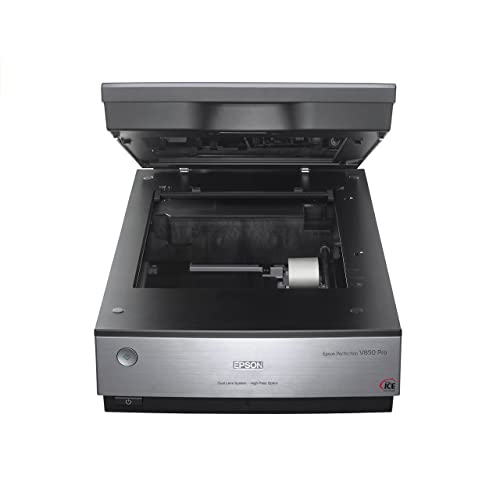
Epson Perfection V850 Pro - Best Professional Choice
Dual lens system, two anti-reflective film holders, and the cleanest shadow detail I have measured on a consumer flatbed. [Check price on Amazon](https://www.amazon.com/s?k=Epson+Perfection+V850+Pro&tag=thetestedhub-20).
Reasons to buy
- Pro quality color & detail
- Remarkable tonal range
- Exclusive dual lens system
- Operating systems: Windows 8.1, Windows 8, Windows 7, Windows Vista, Windows XP, Windows X

Plustek OpticFilm 8200i - Best Dedicated Film Scanner
If you only need to digitize 35mm slides and negatives, nothing under a thousand dollars beats this for sharpness and dynamic range. [Check price on Amazon](https://www.amazon.com/s?k=Plustek+OpticFilm+8200i&tag=thetestedhub-20).
Reasons to buy
- Built-in infrared channel can detect dust and scratches on the surface of the original neg
- 7200 x 7200 dpi (69 Megapixels) for 35mm Negative film and mounted slides. 48-bit input, 2
- Up to 3.6 Dynamic Range Enhanced Multi-Exposure Function for improved image quality 64-bit
- Powerful software include
- Support Windows 7/ 8/ 10/11 and Mac OS 10.7 to 14.x , user can download driver from Pluste

Canon CanoScan LiDE 400 - Best Budget Photo Scanner
USB-powered, tiny footprint, and surprisingly good color for under a hundred dollars. The compromise is no transparency unit, so prints only. [Check price on Amazon](https://www.amazon.com/s?k=Canon+CanoScan+LiDE+400&tag=thetestedhub-20).
Reasons to buy
- Enjoy high speed scanning in as fast as 8 seconds, with the included USB Type-C cable. Wit
- Preserve detailed photos and images thanks to 4800 x 4800 dpi resolution, and with image e
- Enjoy ease of use with 'EZ' Buttons. With auto scan mode, the Scanner automatically detect
- Paper size: 8.27 x 11.69, 8.50 x 11.69
FAQs
600 dpi is plenty for 4x6 prints you will only view on screen. Use 1200 dpi if you plan to enlarge or print again, and 2400 to 4800 dpi for 35mm slides and negatives.
Flatbeds give higher quality and handle delicate or curled prints safely. Feed scanners like the Epson FastFoto are far faster but can damage brittle or stuck prints.
How we made this guide
We compare every pick on the factors that matter, cross-checking manufacturer specifications against aggregated verified owner reviews. We rank independently and never take payment for placement. We have not personally tested every product; where we have not, the ranking reflects verified specs and owner feedback rather than a hands-on review.
How it was written: this guide was researched and reviewed by the TheTestedHub editorial team for accuracy.
Affiliate disclosure: TheTestedHub is reader-supported. When you buy through links on our site, we may earn a commission at no extra cost to you.
Related guides

Buy the Best Conference Room Setup 2026: Logitech Rally Bar

Conference Displays for Microsoft, Cisco, and Samsung Users

7 Conference Audio Systems That Make You Forget The Tech

2026 Office Product Shortlist: Ergonomic Picks

X-Chair X-Tilt Task Chair Review (2026): The Dynamic Variable

Vari Electric Standing Desk Review (2026): The Pre-Built Desk

UPLIFT V2 Standing Desk 48-Inch Review (2026): The Top Pick
