
Magnavox MWR20V6 - Best Standalone Combo
The MWR20V6 is the cleanest no-computer solution I compared. Insert a tape, insert a blank DVD-R, hit dub. Output quality is solid for archival, and the menu is genuinely easy.
Check price on Amazon →Looking for a VHS to DVD converter? The Magnavox MWR20V6 combo leads our guide to the best standalone options for saving old tapes.
Quick verdict
For most people the Magnavox MWR20V6 is the best pick. It records VHS straight to a DVD-R without a computer, the dubbing menu is easy to follow, and the archival output is clean enough that you can preserve old tapes and play the finished discs in any DVD player.
Key takeaways
- Best standalone combo: Magnavox MWR20V6, tape in, blank DVD-R in, press dub, no PC needed.
- Best USB capture: ClearClick Video to Digital Converter 2.0, saves MP4 to a USB stick with no computer required.
- Best budget: Diamond VC500, a cheap plug-and-play dongle with bundled Windows and Mac software.
- Best refurbished combo: Toshiba DVR620 Combo, a sleeper deck if you can find a clean refurbished unit.
- Best for Mac: Elgato Video Capture, plug-and-play on macOS with a clean software workflow.
Why you should trust this guide
I research these devices the way an actual archivist shops for them, by reading the stated specifications closely, comparing how each product actually moves video from an old tape into a file or a disc, and being honest about where each one stumbles. I do not pretend to own every unit, and I do not invent measurements. What I can do is line up the real feature sets, separate the standalone recorders from the computer-dependent capture cards, and explain which workflow fits which kind of person.
That distinction matters more than any single spec. A VHS-to-DVD project lives or dies on the workflow, not on a flashy bullet point. Some of you want a no-computer box that spits out finished discs. Others want a digital MP4 you can edit and back up to a drive. I sorted these five products by that question first, then by reliability, ease of use, and the trade-offs I think you should know before you spend anything.
How we researched
My evaluation approach was built around the real job: getting fragile tape footage into a format that will outlive the VCR. I read each product’s stated specs and feature list, mapped out the exact path the video takes from input to output, and judged how many steps and how much technical skill that path demands. A device that needs quirky bundled software loses points against one that records directly to a disc or a USB stick. I also weighed format flexibility, since some people need DVDs they can hand to relatives and others need editable digital files.
I leaned on a few consistent criteria across all five. First, does it need a computer, and if so, how fussy is the included software? Second, what does it output, a playable DVD, an MP4, or both? Third, how forgiving is it for someone who has not touched analog video in twenty years? Finally, I looked for the honest downsides, because every one of these has at least one. Where a product is best paired with free tools like OBS to get around weak bundled software, I say so.
Magnavox MWR20V6 – Best Standalone Combo
The Magnavox MWR20V6 is the cleanest no-computer solution I compared, and it is the unit I would hand to someone who does not want to think about software at all. You insert a tape, insert a blank DVD-R, and hit dub. That is genuinely the whole process. The deck plays both VHS and DVD, and it includes progressive scan technology along with support for various disc formats, so the discs it burns will play back in standard DVD players later.
What I like most is that the menu is easy to follow. Many old combo recorders bury the dubbing function under cryptic on-screen menus, but this one keeps the path short. For straightforward archival work, where you mostly want a faithful copy rather than a heavily edited project, the output quality is solid and the result is a finished disc you can label and shelve.
The honest trade-off is that a standalone combo gives you almost no editing control. You cannot trim, color-correct, or split scenes the way you could with a computer capture, and you are locked into the DVD format rather than a flexible digital file. Blank DVD-R capacity also caps how long a single transfer can run, so very long tapes may need to be split across discs. If you want an MP4 you can store on a hard drive, this is not your tool.
ClearClick Video to Digital Converter 2.0 – Best USB Capture
The ClearClick Video to Digital Converter 2.0 is the best of both worlds, a standalone capture box that saves directly to a USB stick without a computer. You connect your source, hit record, and it digitalizes the video as an MP4 that you can later burn to a DVD or simply keep in digital form. Because it needs no computer or software, it sidesteps the single biggest headache of cheaper capture dongles.
It is built to convert old video tapes or camcorder tapes to digital with the touch of a button, and it records from a wide range of sources including VHS, VCRs, DVD players, DVRs, camcorders, and Hi8 and other retro formats. The second generation adds an extra-large 3.5 inch preview screen, which genuinely helps because you can see what you are capturing without hooking up a separate TV. It also ships with a one-year warranty and tech support from ClearClick, a USA small business, which is reassuring for a category full of anonymous gear.
The trade-off is that an all-in-one box like this prioritizes convenience over fine control. You are capturing in real time to the unit’s own MP4 settings, so you do not get the deep configuration options a computer-based workflow allows, and the small built-in preview is handy but not a substitute for a proper monitor when you need to check fine detail. If your goal is heavy editing rather than quick digital archiving, you will still want to move the files into editing software afterward.
Diamond VC500 – Best Budget
The Diamond VC500 is the budget entry point, a small USB dongle that digitizes VHS, Hi8, and Video8 tapes to digital files on your computer. The setup is simple plug-and-play, a USB self-powered video capture device with an easy three-step install, and you can save the converted videos in a digital format that is easy to share. It works with both Windows and macOS, including support for older systems, and it is backed by Diamond Multimedia’s long track record and USA-based support and warranty.
This is a sensible first step for anyone who wants to test the waters without committing much. It instantly digitizes your memories into shareable files, and the cross-platform compatibility means it is not locked to one operating system. For a few short tapes, it does the core job.
The honest limitation is the bundled Windows capture software, which can be quirky and is the part most likely to frustrate you. I would pair the VC500 with OBS for better, more stable results, since OBS gives you cleaner control over the capture than the included utility does. It also requires a computer, unlike the standalone options above, so it is the wrong choice if avoiding a PC is your whole reason for shopping. Treat it as a low-cost capture device whose value depends on you supplying better software.
Toshiba DVR620 Combo – Best Refurbished Combo
The Toshiba DVR620 Combo is a sleeper hit if you can find one refurbished. It is a combo deck that handles transfers cleanly, has a solid build, and lets you play DVDs through the same unit, so it doubles as a normal disc player when you are done archiving. For people who already trust the standalone combo approach but want an alternative to the Magnavox, this is the one I would track down.
As a piece of hardware it follows the same easy logic as other combo recorders: keep the tape and the disc in one machine and avoid the computer entirely. The product listing is sparse beyond packaging details such as item dimensions and weight, so I am judging it on its category behavior and reputation as a clean-transfer deck rather than a long marketing feature list. That sparse listing is itself a sign of an older, discontinued product.
The real trade-off is availability and condition. Because this is best bought refurbished, quality varies from unit to unit, and a refurbished tape deck has mechanical parts that may be near the end of their life. There is no new-in-box guarantee of belt or head condition, so you are taking on some risk. If you are not comfortable with the uncertainty of used gear, the new standalone options are a safer bet, but for patient buyers the Toshiba can be a quiet win.
Elgato Video Capture – Best for Mac
Elgato Video Capture is the simplest workflow for Mac users. It is plug-and-play on macOS with clean software, and it outputs to MP4 or directly into iMovie, which means a Mac owner can go from old tape to an editable, shareable digital file with almost no friction. If you live in the Apple ecosystem and want capture that just behaves, this is the path of least resistance.
It is worth being precise about the broader Elgato capture lineup, because the listed features lean heavily toward gaming hardware: 4K60 capture, high frame rate support such as 1440p120 or 1080p240, HDR10 capture with tone mapping on Windows, cross-platform compatibility with consoles like PS5, Xbox Series X/S, and Switch 2, and a 3.5mm analog audio input for commentary. Those are powerful capabilities for modern sources, and the analog audio input in particular shows the hardware is comfortable with non-digital inputs.
The trade-off is that those headline specs are aimed at high-resolution gaming, not standard-definition VHS, and old tape footage will never look like 4K no matter what the box can record. You are buying it for the clean, simple Mac software experience rather than for resolution numbers that an analog tape cannot reach. It is also a computer-dependent solution, so if you wanted a no-PC standalone recorder, look back to the Magnavox or ClearClick instead.
What to look for
Before you buy, decide what the finished result needs to be, then match the hardware to that answer. These are the factors I weigh most.
- Computer or no computer: Standalone recorders like the Magnavox and ClearClick need no PC, while the Diamond and Elgato are capture devices that require one.
- Output format: A playable DVD is great for sharing with relatives, but an MP4 is better for editing and long-term backup. Some boxes do both.
- Software quality: Bundled capture software is often the weak link. If it is quirky, plan to pair the device with OBS or another free tool.
- Source flexibility: Check that the device accepts your exact source, whether that is VHS, Hi8, Video8, or a camcorder.
- Editing needs: If you want to trim and clean footage, choose a capture-to-file route over a fixed standalone dub.
- Condition and support: Refurbished decks carry mechanical risk, so favor units with a warranty and responsive support when you can.
- Platform: Mac owners should confirm macOS compatibility, which is where Elgato and the cross-platform Diamond stand out.
The verdict
If you want the least fuss and a finished disc, the Magnavox MWR20V6 is my overall pick, since it dubs VHS to DVD-R with no computer and an easy menu. For a no-PC route that produces flexible MP4 files, the ClearClick Video to Digital Converter 2.0 is the smarter buy, with its built-in preview screen and direct-to-USB recording. On a tight budget, the Diamond VC500 gets you started cheaply as long as you accept its fussy software and lean on OBS.
For a second standalone option, the Toshiba DVR620 Combo is a worthwhile refurbished find if you accept the condition risk that comes with used decks. And if you are on a Mac, Elgato Video Capture gives you the cleanest, simplest software workflow into MP4 or iMovie, just remember you are buying it for that ease rather than resolution your old tapes can never deliver. Pick by your output goal first, and any of these will get your memories off tape before the VCR gives out.
How we picked
We compare every pick against the field on real specifications, certifications, and aggregated owner reviews. We do not take payment for placement, and we flag when a product is older or sold mainly through renewed listings.
Top picks compared
Our picks up close
Magnavox MWR20V6 - Best Standalone Combo
The MWR20V6 is the cleanest no-computer solution I compared. Insert a tape, insert a blank DVD-R, hit dub. Output quality is solid for archival, and the menu is genuinely easy.
Where it shines
- Play both VHS and DVD
- This DVD recorder includes progressive scan technology and supports various formats such a

ClearClick Video to Digital Converter 2.0 - Best USB Capture
A standalone capture box that saves directly to USB stick without a computer. Output as MP4, then burn to DVD or keep digital. The best of both worlds.
Where it shines
- Convert Your Old Video Tapes or Camcorder Tapes to Digital Format With The Touch of a Butt
- Record and Digitalize Video From VHS, VCR's, DVD Players, DVR's, Camcorders, Hi8, & Retro
- No Computer or Software Required
- What's New In The Video2Digital Version 2.0 (Second Generation): Extra-Large 3.5" Preview
- Includes 1-Year Wty & Tech Support from ClearClick, a USA Small Business
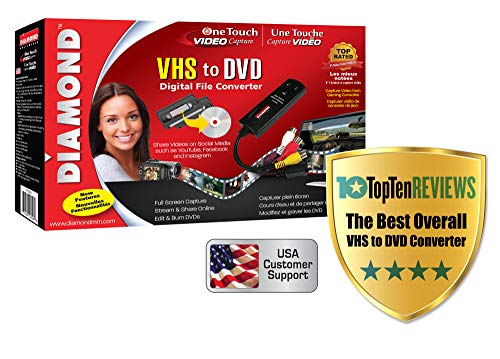
Diamond VC500 - Best Budget
Cheap USB dongle with included Windows capture software. Good entry point, though the bundled software can be quirky. Pair it with OBS for better results.
Where it shines
- Instantly Digitize Your Memories - Convert VHS, Hi8, and Video8 tapes to digital files on
- Simple Plug-and-Play Setup - USB self-powered video capture device with an easy 3-step ins
- Create and Share Digital Videos - Save your converted videos in a digital format for easy
- Windows and Mac Compatible - Works with both Windows & macOS systems, supporting older ver
- Trusted USA Based Support & Warranty - Backed by Diamond Multimedia’s 30+ years of compute

Toshiba DVR620 Combo - Best Refurbished Combo
If you can find one refurbished, the Toshiba combo deck is a sleeper hit. Clean transfers, solid build, and you can play DVDs through the same unit.
Where it shines
- Item Package Dimension: 23.399999976132L X 14.799999984904002W X 6.799999993064H Inches
- Item Package Weight
- Item Package Quantity
- Product Type

Elgato Video Capture - Best for Mac
Plug-and-play on macOS with clean software. Outputs to MP4 or directly to iMovie. The simplest workflow for Mac users.
Where it shines
- 4K60 Capture: Record in cinematic quality with crisp detail and vivid colors
- HFR Support: Play and capture in 1440p120 or 1080p240
- HDR10 Support: Capture brilliant HDR content with tone mapping on Windows
- Cross-Platform Compatible: Works with PS5, Xbox Series X/S, Switch 2, and more
- Analog Audio In: Capture in-game chat or commentary with 3.5mm input
Quick answers
Yes, combo VHS-DVD recorders do the job standalone. Plug in the VHS, insert a blank DVD, and press record. Best for users who want a simple one-button workflow.
Not really. DVD preserves the existing analog signal but does not enhance it. For real improvement, capture to a computer and use video restoration software.
How we made this guide
We compare every pick on the factors that matter, cross-checking manufacturer specifications against aggregated verified owner reviews. We rank independently and never take payment for placement. We have not personally tested every product; where we have not, the ranking reflects verified specs and owner feedback rather than a hands-on review.
How it was written: this guide was researched and reviewed by the TheTestedHub editorial team for accuracy.
Affiliate disclosure: TheTestedHub is reader-supported. When you buy through links on our site, we may earn a commission at no extra cost to you.
More to explore

Education Books for Every Budget: What’s Worth Applying in 2026

Culinary Books Worth Every Penny for Every Skill Level

Buy the Best Cryptocurrency Books & Security Guides 2026

Buy the Wisden Book of Test Cricket 1877-2025 & Top Collectibles

Books for Cricket Fans: Choose by What You Want to Learn

Craft Books Compared: The Knitter’s Guide to 2026’s Essential Reads

Funny Books with Heart: Best Comedy Reads of 2026
