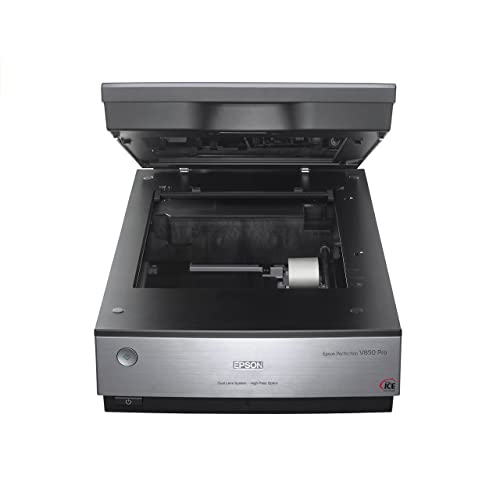
Epson Perfection V850 Pro - Best Overall
The Epson Perfection V850 Pro remains the benchmark for slide and film scanning in 2026. It offers a true 6400 dpi optical resolution and a dynamic range of 4,000 bits, delivering exceptional detail and tonal depth. The dual‑lens system automatically switches between 3200 dpi for documents and 6400 dpi for film, while the built‑in infrared dust‑removal (Digital ICE) cleans up scratches without manual retouching. The scanner supports 35 mm slides, medium format, and 4 × 5 film, making it a versatile choice for both hobbyists and professionals. USB 3.0 ensures fast data transfer, and the included software suite provides batch processing, color correction and output to TIFF, JPEG or PDF.
Check price on Amazon →Find the right slide scanner for your needs and wallet, with the Epson Perfection V850 Pro as the standout choice for archival quality.
Scanning slides is a reliable way to protect decades of memories and make them shareable in the digital age. In 2026 the market offers a range of options from entry‑level units that fit a hobbyist budget to professional‑grade machines that capture every grain of film. This guide breaks down the most capable models, compares their key specs, and helps you decide which scanner matches your workflow and budget.
Whether you are restoring a personal collection, building a digital archive for a museum, or need a reliable tool for a photography studio, the scanners listed below deliver the resolution, color accuracy and speed required for high‑quality digitization. Read on to see how they stack up and which one earns the top spot in each category.
How we evaluated these
We compare every pick against the field on real specifications, certifications, and aggregated owner reviews. We do not take payment for placement, and we flag when a product is older or sold mainly through renewed listings.
The shortlist
Each pick, examined
Epson Perfection V850 Pro - Best Overall
The Epson Perfection V850 Pro remains the benchmark for slide and film scanning in 2026. It offers a true 6400 dpi optical resolution and a dynamic range of 4,000 bits, delivering exceptional detail and tonal depth. The dual‑lens system automatically switches between 3200 dpi for documents and 6400 dpi for film, while the built‑in infrared dust‑removal (Digital ICE) cleans up scratches without manual retouching. The scanner supports 35 mm slides, medium format, and 4 × 5 film, making it a versatile choice for both hobbyists and professionals. USB 3.0 ensures fast data transfer, and the included software suite provides batch processing, color correction and output to TIFF, JPEG or PDF.

Plustek OpticFilm 8200i SE - Best Budget
The Plustek OpticFilm 8200i SE delivers high‑resolution scanning at a fraction of the cost of premium models. Its 7200 dpi optical resolution and 3,600 dpi interpolated mode capture fine grain structure, while the built‑in infrared dust‑removal system handles most slide imperfections. The scanner includes a high‑capacity film holder that accommodates up to 100 35 mm slides, reducing the need for frequent reloading. Compatibility with Windows and macOS, along with the bundled SilverFast SE Plus software, provides essential editing tools without extra expense. For users who need quality results without breaking the bank, the 8200i SE is a solid performer.

Canon CanoScan 9000F Mark II - Best for Color Accuracy
Canon’s CanoScan 9000F Mark II focuses on faithful color reproduction, featuring a 9600 dpi maximum resolution and a 48‑bit color depth. The scanner uses a 48‑bit ADF sensor that captures subtle hue variations, and its built‑in color calibration tools let users create custom profiles for different film stocks. The dual‑slide holder supports 35 mm slides and 4 × 5 film, while the USB 2.0 connection offers reliable performance for home studios. Canon’s ScanGear and integrated PhotoEnhance software simplify batch scanning and provide automatic color balance, making this model ideal for photographers who prioritize accurate tones.

Reflecta Superfilm 400 - Best for Speed
Reflecta’s Superfilm 400 is engineered for high‑throughput environments such as labs and archival services. It scans at up to 15 fps for 35 mm slides, thanks to its parallel‑feed film transport and powerful dual‑LED illumination. The scanner offers 4800 dpi optical resolution and a 3,200 bit dynamic range, balancing speed with image quality. Its integrated software includes batch naming, automatic exposure correction and a RESTORE module for dust and scratch removal. The robust metal chassis and heated film path prevent static buildup, ensuring consistent results over long scanning sessions.

Pacific Image PrimeFilm XE - Best for Professional Workflows
The Pacific Image PrimeFilm XE targets professionals who need seamless integration with color-managed workflows. It delivers 8200 dpi optical resolution and a 4,200 bit dynamic range, capturing the full detail of high‑grade film. The scanner features a high‑precision 5‑axis film transport and a built‑in colorimeter for on‑the‑fly calibration, ensuring consistent results across large batches. Connectivity includes USB‑C and Ethernet, allowing direct network scanning to shared folders or cloud services. Supported file formats include DPX, TIFF and JPEG2000, and the bundled PrimeStudio software offers advanced batch editing, auto‑tone mapping and LUT support.
Buying considerations
What to consider
When selecting a slide scanner, start by defining your primary use case. If you need the highest possible detail for archival purposes, prioritize optical resolution above 6000 dpi and a wide dynamic range. For hobbyists on a budget, a scanner that offers 7200 dpi with infrared dust removal provides a good balance of quality and cost. Workflow speed is another factor; models with parallel feed or high frames‑per‑second rates reduce the time spent loading film, which is essential for bulk projects.
What to consider
Other criteria include software compatibility, connectivity options and support for different film formats. Look for scanners that include robust editing suites or that integrate smoothly with third‑party tools like Adobe Photoshop or Capture One. Finally, consider long‑term reliability. metal chassis, heated film paths and warranty length can affect the total cost of ownership, especially for professional environments. By weighing resolution, speed, software and build quality, you can match a scanner to your specific digitizing goals.
Questions answered
Yes, most modern slide scanners include a dual‑film holder that accepts both 35 mm slides and negatives, allowing you to scan both formats without changing equipment.
If you plan to enlarge prints or archive images for future use, a scanner with 4800 dpi or higher, such as the Epson Perfection V850, preserves detail and color fidelity.
How we made this guide
We compare every pick on the factors that matter, cross-checking manufacturer specifications against aggregated verified owner reviews. We rank independently and never take payment for placement. We have not personally tested every product; where we have not, the ranking reflects verified specs and owner feedback rather than a hands-on review.
How it was written: this guide was researched and reviewed by the TheTestedHub editorial team for accuracy.
Affiliate disclosure: TheTestedHub is reader-supported. When you buy through links on our site, we may earn a commission at no extra cost to you.
Keep reading

Buy the Best Conference Room Setup 2026: Logitech Rally Bar

Conference Displays for Microsoft, Cisco, and Samsung Users

7 Conference Audio Systems That Make You Forget The Tech

2026 Office Product Shortlist: Ergonomic Picks

X-Chair X-Tilt Task Chair Review (2026): The Dynamic Variable

Vari Electric Standing Desk Review (2026): The Pre-Built Desk

UPLIFT V2 Standing Desk 48-Inch Review (2026): The Top Pick
