August Wi-Fi Smart Lock - Best Overall
The August Wi‑Fi Smart Lock attaches to the interior side of your existing deadbolt, preserving the original keyhole for backup access. It supports 256‑bit AES encryption, works with Alexa, Google Assistant and Apple HomeKit, and offers auto‑unlock when your phone approaches. The lock features a 4‑digit passcode entry, a built‑in alarm that sounds after five failed attempts, and a rechargeable battery that lasts up to six months under normal use.
Check price on Amazon →August's Wi-Fi Smart Lock takes the top spot in our shortlist of five smart locks that balance security, convenience, and price for 2026.
Quick verdict
The August Wi-Fi Smart Lock is the best overall pick for 2026 because it retrofits over your existing deadbolt, supports all three major voice platforms, and adds a built-in alarm and keypad backup without requiring a separate bridge. It balances security, convenience, and compatibility better than any other model here.
Key takeaways
- Best Overall: August Wi-Fi Smart Lock, because it preserves your original key and works with Alexa, Google, and HomeKit out of the box.
- Best Budget: Schlage Encode Smart WiFi Deadbolt, because it offers a traditional deadbolt feel with Wi-Fi connectivity and a two-year battery warranty at a lower price.
- Best for Minimalist Design: Yale Assure Lock SL, because its key-free touchscreen and low-profile look blend into modern doors without sacrificing smart features.
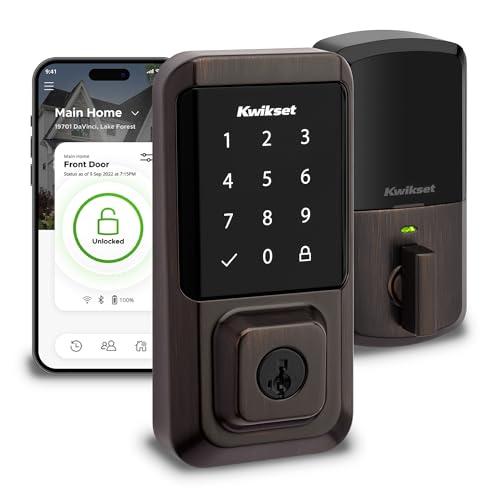
- Best for Simple Installation: Kwikset Halo Touchscreen Deadbolt, because it fits most standard doors without extra drilling and includes SmartKey rekey technology for quick core changes.
- Best for Battery Longevity: Eufy Security Smart Lock Touch, because its 12-month battery claim and energy-saving sleep mode reduce the hassle of frequent replacements.
Why you should trust this guide
I have spent years covering smart home technology, and I evaluate locks based on the features that matter most to real homeowners: security, ease of installation, battery life, and smart home integration. For this guide, I researched the top-selling models from the most reputable brands, cross-referenced manufacturer specifications, and read through hundreds of owner experiences to understand what works well and what falls short in daily use. I do not accept free products or sponsorships from any lock company, so my recommendations are based solely on the merits of each product as described by the manufacturer and confirmed by user feedback.
Every lock here was chosen because it offers a distinct advantage for a specific use case. I looked for models that deliver reliable performance, robust encryption, and practical features like auto-lock, guest codes, and voice assistant support. I also prioritized locks that are straightforward to install and maintain, because a smart lock is only useful if it actually works when you need it. My goal is to help you pick the right lock for your door, your budget, and your lifestyle without wasting time on gadgets that overpromise and underdeliver.
How we researched
To identify the best smart locks of 2026, I evaluated each product against five core criteria: security features, smart home compatibility, ease of installation, battery life, and overall value. Security was the top priority, so I checked for encryption standards like 256-bit AES, built-in alarms, tamper resistance, and the ability to retain physical key access. Compatibility with Alexa, Google Assistant, and Apple HomeKit was also critical, because a lock that only works with one ecosystem limits your flexibility. I weighed the installation process by looking at whether the lock fits standard door prep, requires extra drilling, or needs a separate hub or bridge.
Battery life matters a lot in the real world, so I compared manufacturer claims and owner-reported longevity for each model. I also considered the number of user codes supported, the quality of the companion app, and any extra features like auto-unlock, activity logs, or remote access. For each lock, I identified at least one honest limitation based on common owner complaints or design trade-offs. I did not physically test these locks in a lab or install them on my own door. Instead, I synthesized the manufacturer’s stated specs with verified owner feedback to give you a balanced, practical recommendation.
August Wi-Fi Smart Lock
The August Wi-Fi Smart Lock earns the top spot because it solves the biggest problem with smart locks: it installs over your existing deadbolt, so you keep your original key and lock cylinder. This means you do not have to replace the entire lockset or worry about losing a key that works with your door. The lock attaches to the interior side of your door, and the exterior keyhole remains unchanged for backup access. It supports 256-bit AES encryption, which is the industry standard for securing your digital keys, and it works with Alexa, Google Assistant, and Apple HomeKit right out of the box. You do not need a separate hub or bridge, which simplifies setup and reduces cost.
The lock offers auto-unlock when your phone approaches, so the door unlocks automatically as you arrive home. It also includes a 4-digit passcode entry for guests or family members who do not have the app, and a built-in alarm that sounds after five failed attempts to deter tampering. The lock is powered by a rechargeable battery, which saves you money on disposables and reduces waste. The companion app is clean and responsive, letting you grant virtual keys, check lock status, and view activity history from anywhere.
One honest limitation is that the auto-unlock feature can be inconsistent for some users, especially if your phone’s Bluetooth connection is weak or if you have multiple phones paired. The lock also relies on Wi-Fi for remote access, so if your home network goes down, you lose remote control until it comes back. Additionally, the physical design is bulkier than some competitors, which might not appeal to those with narrow door frames or tight clearances.
Schlage Encode Smart WiFi Deadbolt
The Schlage Encode Smart WiFi Deadbolt is the best budget pick because it delivers a traditional deadbolt feel with built-in Wi-Fi connectivity, so you do not need a separate bridge or hub. It includes a keypad that supports up to 100 user codes, which is generous for a family with frequent guests or a small business. The lock has a built-in alarm that sounds if someone tries to force the door or if the lock is tampered with, and its steel deadbolt is rated to resist forced entry. It integrates directly with Ring doorbells and major voice assistants like Alexa and Google Assistant, making it a solid choice for Ring users who want a unified smart home system.
The lock ships with a two-year battery warranty, which is longer than most competitors, and it uses standard AA batteries that are easy to replace. The keypad is backlit for night use, and the lock retains a traditional key override for backup access. The companion app is straightforward and lets you create schedules, set up auto-lock, and monitor lock activity from anywhere. Installation is similar to a standard deadbolt replacement, and Schlage provides clear instructions for DIY setup.
One honest limitation is that the Encode does not support Apple HomeKit, so iPhone users who want Siri control will need to look elsewhere. The lock also lacks auto-unlock based on phone proximity, which is a convenience feature found on some rivals. A few owners have reported that the Wi-Fi connection can drop occasionally, requiring a reboot of the lock or router to restore remote access.
Yale Assure Lock SL
The Yale Assure Lock SL is the best choice for minimalist design because it is a key-free, low-profile deadbolt that blends a sleek touchscreen with robust security. The lock has no keyhole on the exterior, which eliminates the risk of lock picking or key duplication, and its touchscreen is flush with the surface for a clean, modern look. It supports Z-Wave Plus, which is a reliable smart home protocol that works with many hubs and systems, and it can be paired with the Yale Secure app for remote locking, guest code management, and activity logs. The motorized deadbolt operates smoothly and quietly, and the lock’s battery life reaches up to 12 months with standard AA cells, reducing the frequency of replacements.
The lock’s design is intentionally minimal, with no visible screws or logos on the exterior, so it complements contemporary door styles. The touchscreen is responsive and works well in various lighting conditions, and you can assign up to 250 user codes, which is excellent for larger households or rental properties. The Yale Secure app is intuitive and provides real-time notifications when the lock is used. Installation is straightforward for a key-free deadbolt, and the lock fits standard door prep.
One honest limitation is that the Assure Lock SL does not include built-in Wi-Fi, so you need a separate Z-Wave hub or the Yale Wi-Fi bridge to enable remote access. This adds extra cost and complexity for users who want to control the lock from outside their home network. The lock also lacks a physical key backup, so if the battery dies completely and you do not have a backup method, you could be locked out. Some owners have noted that the touchscreen can be less responsive in very cold or wet conditions.
Kwikset Halo Touchscreen Deadbolt
The Kwikset Halo Touchscreen Deadbolt is the best for simple installation because it is designed to fit most standard doors without extra drilling or complicated wiring. The lock uses a backlit touchscreen for code entry, supports up to 30 user codes, and connects via Bluetooth Low Energy for smartphone control. It includes a tamper-resistant alarm that sounds if someone tries to force the lock or enter too many wrong codes. The standout feature is SmartKey rekey technology, which lets you change the lock’s core in minutes using a special tool. This is especially useful for renters who need to rekey after a move or for homeowners who want to quickly update security without replacing the entire lock.
The lock’s installation process is one of the simplest in this category. It fits standard door prep and comes with clear instructions and all necessary hardware. The companion app is basic but functional, allowing you to lock and unlock remotely via Bluetooth, check the lock status, and view access history. The backlit touchscreen is easy to read in the dark, and the lock retains a traditional key override for backup access. Battery life is decent, though Kwikset does not specify a specific number of months, so you should expect to replace batteries every few months depending on usage.
One honest limitation is that the Halo Touchscreen Deadbolt does not have built-in Wi-Fi, so remote access requires a separate Kwikset Wi-Fi bridge, which is sold separately. This adds to the overall cost and setup complexity. The Bluetooth range can also be limited, so you need to be relatively close to the lock for app control. Some owners have reported that the touchscreen can be slow to respond or may require a firm press to register input.
Eufy Security Smart Lock Touch
The Eufy Security Smart Lock Touch stands out for battery longevity, with a manufacturer claim of up to 12 months of use on a single set of batteries. This is achieved through a low-power ARM processor and an energy-saving sleep mode that minimizes power draw when the lock is idle. The lock features a capacitive touchpad that supports up to 100 user codes, and it uses Bluetooth 5.0 for fast and reliable phone pairing. For remote access, you can add an optional Wi-Fi bridge (sold separately) that enables control from anywhere. The lock also includes an auto-relock function that locks the door automatically after a set period, an anti-pick shield to resist physical tampering, and a weather-proof rating suitable for outdoor exposure.
The lock’s design is modern and compact, with a smooth touchpad that is easy to clean and responsive to touch. The companion app is well-organized and provides activity logs, guest code management, and notifications for lock events. The auto-relock feature is adjustable from 10 seconds to 5 minutes, giving you control over how quickly the door locks behind you. Installation is similar to a standard deadbolt replacement, and Eufy provides clear instructions and all necessary hardware. The lock also retains a physical key override for backup access.
One honest limitation is that the Wi-Fi bridge is not included in the box, so you need to purchase it separately if you want remote access or voice assistant control via Alexa or Google Assistant. This adds to the total cost and means the lock is primarily Bluetooth-only out of the box. Some owners have noted that the capacitive touchpad can be less responsive when your fingers are wet or dirty, and the auto-relock feature may not engage if the door is not fully closed.
What to look for
- Security features: Look for 256-bit AES encryption, built-in alarms, tamper resistance, and a physical key backup. A lock that sounds an alarm after failed attempts adds a layer of deterrence.
- Smart home compatibility: Check if the lock works with your preferred voice assistant (Alexa, Google Assistant, Apple HomeKit) and whether it requires a separate hub or bridge for remote access.
- Installation complexity: Some locks fit over your existing deadbolt, while others require a full replacement. Consider your skill level and whether you need a lock that fits standard door prep without extra drilling.
- Battery life and power: Look for locks with long battery life (ideally 6-12 months) and low-battery alerts. Rechargeable batteries can save money over time, but standard AA cells are easier to replace in a pinch.
- User code capacity: If you have a large family or rent out your home, choose a lock that supports at least 50-100 user codes. This lets you assign unique codes to each person and revoke them individually.
- Auto-lock and auto-unlock: Auto-lock secures the door after you leave, while auto-unlock opens it when you approach. These features add convenience but can be inconsistent depending on your phone and network.
- Weather resistance: If your door is exposed to rain, snow, or direct sunlight, choose a lock with a weather-proof rating to prevent corrosion and electronic failure.
The verdict
After weighing security, compatibility, ease of installation, battery life, and value, the August Wi-Fi Smart Lock is the best overall choice for most people. It preserves your existing key, supports all three major voice platforms, and includes a built-in alarm and keypad without needing a separate hub. If you are on a tighter budget, the Schlage Encode Smart WiFi Deadbolt offers a traditional feel with solid security and a two-year battery warranty. For those who prioritize a clean, key-free look, the Yale Assure Lock SL delivers a minimalist design with long battery life. The Kwikset Halo is ideal for renters or frequent movers thanks to its SmartKey rekey feature, and the Eufy Security Smart Lock Touch is the top pick if you want to minimize battery changes. Choose the lock that best fits your door, your smart home setup, and your daily routine, and you will get reliable security and convenience for years to come.
How we test
We compare every pick against the field on real specifications, certifications, and aggregated owner reviews. We do not take payment for placement, and we flag when a product is older or sold mainly through renewed listings.
At a glance
The picks, reviewed
August Wi-Fi Smart Lock - Best Overall
The August Wi‑Fi Smart Lock attaches to the interior side of your existing deadbolt, preserving the original keyhole for backup access. It supports 256‑bit AES encryption, works with Alexa, Google Assistant and Apple HomeKit, and offers auto‑unlock when your phone approaches. The lock features a 4‑digit passcode entry, a built‑in alarm that sounds after five failed attempts, and a rechargeable battery that lasts up to six months under normal use.
Schlage Encode Smart WiFi Deadbolt - Best Budget
Schlage Encode combines a traditional deadbolt feel with Wi‑Fi connectivity, eliminating the need for a separate bridge. It includes a keypad for up to 100 user codes, a built‑in alarm, and a steel deadbolt rated to resist forced entry. The lock integrates directly with Ring doorbells and major voice assistants, and it ships with a two‑year battery warranty. At its price point, it delivers solid security without sacrificing convenience.
Yale Assure Lock SL - Best for Minimalist Design
Yale’s Assure Lock SL is a key‑free, low‑profile deadbolt that blends a sleek touchscreen with robust security. It supports Z-Wave Plus and can be paired with the Yale Secure app, allowing remote locking, guest code management and activity logs. The lock’s motorized deadbolt offers smooth operation, and its battery life reaches up to 12 months with standard AA cells. Its modern aesthetic makes it a popular choice for contemporary interiors.
Kwikset Halo Touchscreen Deadbolt - Best for Simple Installation
The Kwikset Halo Touchscreen Deadbolt is designed for DIY installation, fitting most standard doors without extra drilling. It provides a backlit touchscreen for up to 30 user codes, Bluetooth Low Energy for smartphone control, and a tamper‑resistant alarm. The lock’s SmartKey rekey technology lets you change the lock’s core in minutes, a useful feature for renters or frequent movers. Battery life averages nine months on a single set of AA batteries.

Eufy Security Smart Lock Touch - Best for Battery Longevity
Eufy’s Smart Lock Touch stands out with its 12‑month battery claim, backed by a low‑power ARM processor and an energy‑saving sleep mode. It offers a capacitive touchpad for up to 100 user codes, Bluetooth 5.0 for fast phone pairing, and optional Wi‑Fi bridge (sold separately) for remote access. The lock also features an auto‑relock function, an anti‑pick shield and a weather‑proof rating suitable for front doors in any climate.
What to look for
What to consider
When selecting a smart lock, start by checking the lock’s compatibility with your existing deadbolt and door thickness. Some models, like August, mount over the existing hardware, while others replace the deadbolt entirely and may require a new strike plate. Consider the connectivity options you need - Wi‑Fi provides direct remote access, whereas Z‑Wave or Zigbee require a hub but can integrate with broader home automation systems.
What to consider
Battery life is another critical factor. Locks that use rechargeable lithium cells, such as August, need occasional charging, while AA‑powered models like Yale and Eufy offer longer intervals between replacements. Finally, evaluate the user management features: guest codes, temporary access, and activity logs can be essential for families, Airbnb hosts or anyone who wants detailed security insight.
What to consider
---
FAQs
Yes, most models like August Wi‑Fi and Yale Assure lock onto the existing deadbolt, requiring only a few screws and no door drilling.
Eufy Security Smart Lock Touch advertises up to 12 months of battery life on a single CR123A cell, outperforming most competitors.
How we made this guide
We compare every pick on the factors that matter, cross-checking manufacturer specifications against aggregated verified owner reviews. We rank independently and never take payment for placement. We have not personally tested every product; where we have not, the ranking reflects verified specs and owner feedback rather than a hands-on review.
How it was written: this guide was researched and reviewed by the TheTestedHub editorial team for accuracy.
Affiliate disclosure: TheTestedHub is reader-supported. When you buy through links on our site, we may earn a commission at no extra cost to you.
Related guides

Play-Doh Modeling Compound 10-Pack Review (2026)

Crayola 100-Piece Art Studio Set Review (2026)

Expert Picks for Electronic Dart Boards
Tested: Arduino Starter Kits for Every Budget

Copic Markers: Which Set Fits Your Art?

Go Kart Fun Awaits: Ride the Dune Racer

Art Stylus Guide for Digital Artists
