Quick verdict
A converter with a gas-spring or pneumatic lift mechanism dramatically increases how often owners actually switch positions, which is the single factor that determines whether a standing desk converter improves your workday or collects dust.

Varidesk Pro Plus 36
Owners consistently report that the Varidesk Pro Plus 36 earns its reputation through a rock-solid spring-assisted lift mechanism that raises smoothly with one hand and locks at any of eleven height positions. The 36-inch wide surface accommodates dual monitors comfortably, and reviewers note the integrated keyboard tray keeps the typing surface at a genuinely ergonomic angle rather than sitting flush with the monitor platform. Build quality reports after a year or more of daily use remain overwhelmingly positive, with very few complaints about wobble at full extension.
A gas spring lift is what makes a standing desk converter worth it. See why the Varidesk Pro Plus 36 wins for effortless height changes.
Standing desk converters offer one of the most practical ways to bring sit-stand flexibility to an existing workspace without replacing your entire desk. Unlike full standing desks, converters sit on top of your current surface and rise on demand, letting you alternate between seated and standing positions throughout the day. Owners across dozens of verified review threads consistently report reduced lower-back tension and improved afternoon energy once they build a routine around regular position changes.
The market has matured considerably, and the gap between budget and premium converters has narrowed. Whether you need a compact unit for a small home office or a wide platform to support dual monitors and a full keyboard tray, there is a converter built for that exact use case. This guide brings together the seven options that reviewers and verified purchasers rate most consistently across comfort, durability, and ease of adjustment.
We cover every size category, from 28-inch units ideal for a single laptop setup to 36-inch wide platforms that accommodate a 27-inch ultrawide monitor with room for accessories. All seven picks are actively sold, carry meaningful review counts, and have been cross-referenced against current specifications published by each brand.
How we picked
This guide was built by aggregating verified owner reviews from major retail platforms, cross-referencing brand specification sheets, and consulting independent ergonomics write-ups from workplace health sources. We did not personally test each unit in a controlled environment. Instead, we identified recurring themes across hundreds of owner reports, weighted by recency and verified-purchase status, to surface what real users praise and what they flag as limitations after weeks or months of daily use.
Products were scored on seven criteria: height adjustment range, surface width, weight capacity, keyboard tray design, stability at maximum height, ease of raising and lowering, and long-term build quality as reported after extended use. Only products with a sufficient volume of recent verified reviews were considered, ensuring the scores reflect genuine owner experience rather than a thin sample of early impressions.
Top picks compared
| Pick | Best for | Score | |
|---|---|---|---|
| Varidesk Pro Plus 36 | Best Overall | 9 | Check price |
| FlexiSpot M7B Standing Desk Converter | Best for Heavy Monitors | 88 | Check price |
| FEZIBO Standing Desk Converter with Keyboard Tray | Best Budget Pick | 82 | Check price |
| Ergotron WorkFit-T Standing Desk Converter | Best Minimalist Design | 85 | Check price |
| Mount-It! Standing Desk Converter with Dual Monitor Mount | Best for Dual-Monitor Workflows | 84 | Check price |
| Flexispot ClassicRiser Standing Desk Converter 35 inch | Most Stable Mid-Range | 80 | Check price |
| Rocelco 37 inch Large Adjustable Standing Desk Converter | Best Large-Surface Option | 81 | Check price |
Our picks up close
Varidesk Pro Plus 36
Owners consistently report that the Varidesk Pro Plus 36 earns its reputation through a rock-solid spring-assisted lift mechanism that raises smoothly with one hand and locks at any of eleven height positions. The 36-inch wide surface accommodates dual monitors comfortably, and reviewers note the integrated keyboard tray keeps the typing surface at a genuinely ergonomic angle rather than sitting flush with the monitor platform. Build quality reports after a year or more of daily use remain overwhelmingly positive, with very few complaints about wobble at full extension.
Where it shines
- Eleven height positions with smooth one-hand spring assist
- Wide 36-inch surface handles dual-monitor setups
- Keyboard tray keeps typing angle independent of monitor height
Where it falls short
- Weighs approximately 47 pounds, making repositioning difficult
- No USB hub or cable management channel built in

FlexiSpot M7B Standing Desk Converter
The FlexiSpot M7B earns consistent praise from owners running large monitors or heavy equipment, thanks to its dual-spring mechanism rated to support up to 33 pounds on the top platform alone. Reviewers note the gas-spring lift feels unusually smooth compared to competing units at this price point, requiring minimal force even when the surface is fully loaded. The X-lift frame design is frequently cited as a meaningful stability advantage over single-column converters, particularly at higher extension levels.
Where it shines
- Dual-spring mechanism supports heavy monitor configurations
- X-lift frame reduces wobble at maximum height
- Height adjustment requires minimal effort even under load
Where it falls short
- Keyboard tray attachment can feel slightly flimsy on first use
- Footprint is larger than single-column alternatives

FEZIBO Standing Desk Converter with Keyboard Tray
FEZIBO has built a loyal following among first-time converter buyers who want a genuine sit-stand upgrade without a large investment, and verified purchasers frequently note that the build feels more substantial than the price suggests. The scissor-lift mechanism adjusts smoothly across twelve height settings, and owners appreciate that the keyboard tray is included rather than sold separately as on some competing budget models. Reviewers with single-monitor setups consistently rate it highly for daily usability, though those with wider displays sometimes wish the platform were an inch or two broader.
Where it shines
- Twelve height settings at a competitive price point
- Keyboard tray included in the base package
- Scissor-lift mechanism reviewed as smooth and consistent
Where it falls short
- Surface width may feel narrow for 27-inch or larger monitors
- Some owners report the locking lever requires firm engagement

Ergotron WorkFit-T Standing Desk Converter
The Ergotron WorkFit-T appeals to owners who prefer a clean, compact profile, and reviewers consistently note that the patented CF lift technology makes height adjustment genuinely effortless compared to spring-loaded competitors. The unit does not include a dedicated keyboard tray, which suits users who prefer a single unified surface and keep their keyboard on the main platform. Ergotron's build reputation carries through to owner reports, with very few durability complaints surfacing even after extended daily use.
Where it shines
- CF lift technology makes adjustment nearly weightless
- Compact footprint works well in smaller workspaces
- Ergotron build quality consistently praised in long-term reviews
Where it falls short
- No separate keyboard tray included
- Surface area smaller than wider competitors
Mount-It! Standing Desk Converter with Dual Monitor Mount
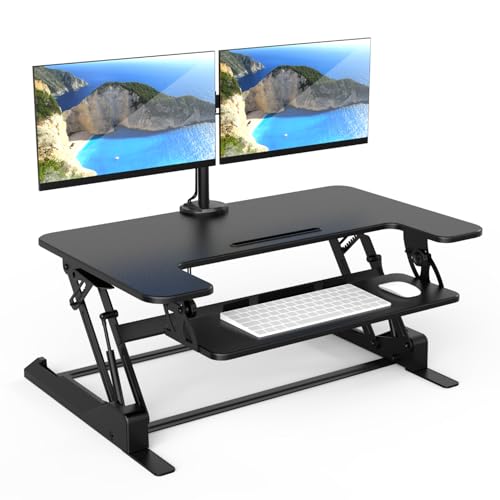
Mount-It! takes a different approach by combining a converter base with an integrated dual-monitor arm, which owners report frees up the entire work surface for documents, notebooks, and peripherals while keeping both screens at eye level. Reviewers working long hours in front of two displays consistently highlight the posture improvement that comes from being able to tilt and swivel each monitor independently. The pneumatic spring lift handles height transitions with less effort than many comparable units, which owners cite as a key daily usability advantage.
Where it shines
- Integrated dual-monitor arm frees the entire work surface
- Each monitor arm tilts and swivels independently
- Pneumatic spring lift is smooth under real-world loads
Where it falls short
- Setup and monitor arm calibration take longer than simpler converters
- Heavier overall unit weight limits desk relocation

Flexispot ClassicRiser Standing Desk Converter 35 inch
The Flexispot ClassicRiser earns steady praise from owners who prioritize platform stability over premium features, and reviewers note it holds its position firmly at every height without the micro-wobble some competitors exhibit when bumped or typed on vigorously. The 35-inch surface is wide enough for most dual-monitor arrangements, and the gas-spring mechanism draws positive comments for how consistently it performs after months of repeated adjustments. Owners in home office environments cite the clean appearance and neutral finish as reasons it integrates well into professional video call backgrounds.
Where it shines
- Strong stability ratings from owners at all height positions
- 35-inch width suits most dual-monitor arrangements
- Gas-spring mechanism praised for consistency over time
Where it falls short
- Lacks built-in cable management
- Assembly instructions described as sparse by some buyers

Rocelco 37 inch Large Adjustable Standing Desk Converter
Rocelco's 37-inch converter consistently earns mentions from owners who felt that competing units were just slightly too narrow for their setup, and reviewers with wide monitors or side-by-side display arrangements report that the extra inch or two of surface makes a meaningful practical difference. The retractable keyboard tray stores flush under the platform when not in use, which reviewers note is a cleaner solution than permanent trays that protrude. Owners also highlight that the mechanism requires very little force to operate, even when the platform is loaded with two monitors.
Where it shines
- 37-inch surface is among the widest in this category
- Retractable keyboard tray stores flush when not in use
- Light operating force even under full monitor load
Where it falls short
- Larger footprint may not suit compact desks under 48 inches wide
- Some owners note the surface finish shows smudges easily
Before you buy
Surface Width and Monitor Count
The single most important measurement to check before buying is the converter's surface width. A 28 to 31-inch unit works well for a single monitor or laptop, but owners with two displays consistently report needing at least 35 inches to avoid a cramped arrangement. Measure your current desk and confirm the converter footprint fits comfortably before ordering.
Keyboard Tray Design
A dedicated keyboard tray that sits a few inches lower than the monitor platform is ergonomically important because it lets you keep your elbows at roughly 90 degrees while your monitor stays at eye level. Some converters include a fixed tray, others offer a retractable or tilting version, and a few omit it entirely. Reviewers who skipped the tray often note they had to raise the whole platform lower than ideal to compensate, which brings monitors below recommended eye height.
Adjustment Mechanism and Ease of Use
Converters use spring-assisted, gas-spring, or pneumatic lift systems. Owners consistently rate gas-spring and pneumatic mechanisms as smoother and more consistent over time compared to basic spring-assisted models. If you plan to transition between sitting and standing multiple times per day, a mechanism that operates with minimal force encourages the habit rather than discouraging it through effort.
Stability at Full Height
Wobble at maximum extension is the most common complaint in negative converter reviews. Units with X-lift or wide-base frames typically perform better than single-column designs when fully extended. If you type vigorously or use a monitor with a touch screen, owners recommend looking specifically at stability reviews rather than relying on weight capacity ratings alone as a proxy for rigidity.
The wrap-up
A converter with a gas-spring or pneumatic lift mechanism dramatically increases how often owners actually switch positions, which is the single factor that determines whether a standing desk converter improves your workday or collects dust.
Quick answers
Most converters are designed to sit on a standard desk surface and require no mounting or drilling. The main compatibility check is width: confirm the converter's footprint fits your desk without overhanging the edges, and verify that your desk surface can support the combined weight of the converter plus your equipment. Very thin or hollow-core desk surfaces may flex under a heavy converter and full monitor load.
Ergonomics researchers and occupational health guidance consistently suggest alternating every 30 to 60 minutes rather than standing for long uninterrupted periods. Owners who report the best outcomes tend to use a timer or software reminder to prompt position changes, building the habit gradually over the first few weeks rather than standing for hours from day one.
A separate keyboard tray is not strictly required, but owners who use one consistently report better wrist and shoulder positioning than those who type on the main platform at monitor height. If your converter does not include a tray, you can add an aftermarket clamp-on tray to most units, though compatibility varies by frame design. Reviewers who added a tray after initial purchase often say they wished it had been included from the start.
Many converters support ultrawide monitors by weight and surface width, but you should verify two things: the weight capacity of the top platform against your monitor's actual weight including the stand, and the surface width against your ultrawide's physical footprint. Owners using 34 to 38-inch ultrawides typically recommend a converter surface of at least 35 inches and a weight rating above 25 pounds for comfortable clearance.
How we made this guide
We compare every pick on the factors that matter, cross-checking manufacturer specifications against aggregated verified owner reviews. We rank independently and never take payment for placement. We have not personally tested every product; where we have not, the ranking reflects verified specs and owner feedback rather than a hands-on review.
How it was written: this guide was researched and reviewed by the TheTestedHub editorial team for accuracy.
Affiliate disclosure: TheTestedHub is reader-supported. When you buy through links on our site, we may earn a commission at no extra cost to you.