Quick verdict
The Plugable Thunderbolt 4 Dock stands out for 2026 due to its reliable performance, broad device compatibility, and excellent port selection at a competitive value, making it the best all-around choice for most users.

Plugable Thunderbolt 4 Dock
The Plugable Thunderbolt 4 Dock is the best overall pick because it offers dual 4K 60Hz HDMI, 96W certified charging, and 13 ports in a driverless design recognized by Wirecutter. It works reliably across Thunderbolt 4, Thunderbolt 5, and USB4 systems, making it a versatile choice for both Windows and Mac users who check compatibility.
Best Thunderbolt 4 dock for 2026: Plugable wins for value and dual HDMI, Dell SD25TB4 leads with 4K quad monitors and 130W charging, Lenovo options offer remote mana
Quick verdict
The Plugable Thunderbolt 4 Dock is the best pick for most people because it delivers dual 4K 60Hz HDMI, 96W charging, and 13 ports at a price that beats the competition. It is Wirecutter’s top choice for 2025 and Intel Evo certified.
Key takeaways
- Plugable Thunderbolt 4 Dock: Best overall value with dual HDMI and broad compatibility.
- Dell Pro Thunderbolt 4 Smart Dock SD25TB4: Best for multi-monitor setups with up to four 4K displays and 130W charging.
- Lenovo ThinkPad Thunderbolt 4 Smart Dock Gen 2 7500: Best for IT-managed fleets with cloud-based remote management.
- Lenovo ThinkPad Universal Thunderbolt 4 Dock: Best for universal Windows compatibility and four 4K display support.
- Dell WD22TB4 Thunderbolt 4 Dock 180W: Best for high-power Dell laptops needing 130W delivery and dual Thunderbolt 4 ports.
Why you should trust this guide
I have spent years researching Thunderbolt docks, analyzing specifications, compatibility notes, and real-world use cases from manufacturers and reviewers. My goal is to cut through marketing language and focus on what actually matters: which dock works reliably with your laptop, supports the displays you need, and offers the right ports without surprises. I do not test products in a lab, but I cross-reference every feature listed on Amazon with known limitations from Intel, Apple, and Dell to give you an honest picture.
Each recommendation here is based on the product’s official specifications, user feedback patterns, and compatibility matrices. I prioritize docks that deliver consistent power delivery, stable video output, and broad operating system support. If a dock has a known quirk, like single display limits on certain Macs, I call it out so you can make an informed decision.
How we evaluate
I evaluate Thunderbolt 4 docks on five core criteria: video output capability, power delivery, port selection and layout, compatibility across different laptops and operating systems, and manageability for IT deployments. Video output is critical because many users need dual 4K or even 8K displays. Power delivery matters for keeping your laptop charged without an extra adapter. Port selection must include enough USB-A and USB-C ports for peripherals, plus Ethernet and SD card slots if needed.
Compatibility is the trickiest factor. I check each dock’s support for Thunderbolt 4, Thunderbolt 3, USB4, and USB-C systems, and I note any limitations for Macs with base M1, M2, or M3 chips. Manageability features, like remote firmware updates or fleet management software, are important for IT buyers but less so for home users. I do not claim to physically test these docks; instead, I rely on verified specifications and manufacturer documentation.
Plugable Thunderbolt 4 Dock
The Plugable Thunderbolt 4 Dock is the most versatile option for mixed-device environments. It offers 13 ports including dual HDMI, a downstream Thunderbolt 4 port with 15W charging, four USB-A ports, USB-C, SD and microSD slots, audio jack, and Gigabit Ethernet. It delivers 96W certified power delivery to your laptop and supports dual 4K 60Hz displays on Thunderbolt 4, Thunderbolt 5, and USB4 laptops. It also supports a single 8K display. This dock is Intel Evo certified and was recognized by Wirecutter as the best Thunderbolt dock for 2025.
Compatibility is broad but has important caveats. On Windows, it works with Thunderbolt 4, Thunderbolt 5, USB4, and Thunderbolt 3 systems. On macOS, dual display is only supported on M5, M4, M3 Pro/Max, M2 Pro/Max, and M1 Pro/Max models, as well as base M3 Macs in clamshell mode. Base M1 and M2 Macs support only a single external display. The dock is driverless on Windows and macOS, which simplifies setup. For IT teams, its standardized port layout helps streamline workstation deployments across mixed-device fleets.
Dell Pro Thunderbolt 4 Smart Dock SD25TB4
The Dell Pro Thunderbolt 4 Smart Dock SD25TB4 is built for power users who need multiple high-resolution displays. It supports up to four 4K monitors via HDMI 2.1, DisplayPort 1.4, USB-C, and Thunderbolt 4. This makes it ideal for creative professionals, data analysts, or anyone running AI workloads. It delivers up to 130W USB-C charging for Dell laptops and 96W for other brands, so you can charge even large workstations without a separate power brick. The dock also includes dual data ports and can chain up to six devices.
Business-level security and remote management set this dock apart. It supports WPA3 encryption, PXE boot, MAC filtering, DMA protection, and a secure enclosure. IT administrators can manage the dock remotely via Wi-Fi using Dell Console and Intel AMT, without needing the PC to be on. This makes it a strong choice for enterprise deployments where security and centralized control are priorities. The dock is compatible with Thunderbolt 4 and USB-C systems, though Mac users should check display limitations based on their specific model.
Lenovo ThinkPad Thunderbolt 4 Smart Dock Gen 2 7500
The Lenovo ThinkPad Thunderbolt 4 Smart Dock Gen 2 7500 delivers 40 Gbps bandwidth and supports one 8K 60Hz display or two 4K 144Hz monitors. This high refresh rate support is a standout feature for gamers or video editors who want smooth motion on external displays. It offers comprehensive ports including Thunderbolt 4, HDMI 2.1, DisplayPort 1.4, USB-A 3.2 Gen 2, USB-C 3.2 Gen 2, and RJ45 Ethernet. Power delivery is PD 3.1 with up to 100W fast charging, so you can power your laptop and peripherals from a single cable.
Universal compatibility and intelligent management make this dock ideal for diverse workplace environments. It works seamlessly across different operating systems, and IT managers can use Lenovo Accessories Fleet Manager (LAFM) for cloud-based remote updates, configuration, and diagnostics. This reduces downtime and keeps the dock fleet running smoothly. The dock is designed for mixed-device fleets, supporting Thunderbolt 4, Thunderbolt 3, USB4, and USB-C systems. It is a solid choice for organizations that standardize on Lenovo hardware but need flexibility.
Lenovo ThinkPad Universal Thunderbolt 4 Dock
The Lenovo ThinkPad Universal Thunderbolt 4 Dock offers one-cable connectivity with support for an 8K 30Hz display or up to four 4K 60Hz displays. It delivers 40 Gbps transfer speeds, vPro pass-through support, and dynamic power charging up to 100W. The port selection includes 2 DisplayPort 1.4, 1 HDMI 2.1, 1 Thunderbolt 4 downstream, 4 USB 3.1 Gen 2 ports (one always-on), 1 USB-C, a 3.5mm audio combo jack, and RJ45 Gigabit Ethernet. It comes with a 135W power adapter and provides up to 100W dynamic power to the notebook.
Compatibility is designed to be limitless for Windows-based systems. It supports Thunderbolt 3, Thunderbolt 4, USB4, and USB-C Windows laptops. Remote management is handled through Dock Manager, which allows firmware updates without end-user interruption. This dock is a strong option for IT departments that need to manage a large number of docks across a Windows fleet. Note that Mac users may face display limitations depending on the chip, and the dock is not optimized for macOS multi-monitor setups beyond what Thunderbolt 4 allows.
Dell WD22TB4 Thunderbolt 4 Dock 180W
The Dell WD22TB4 Thunderbolt 4 Dock 180W is a high-power dock designed for larger laptops. It delivers up to 130W of power delivery to the host device, making it ideal for Dell Precision or XPS models with larger screens. It features 13 ports including 2 DisplayPort 1.4, 1 HDMI 2.0, 2 Thunderbolt 4 ports (one host, one downstream), USB-C and USB-A ports, Gigabit Ethernet, and security lock slots. The front panel includes a USB-C and USB-A port with PowerShare for easy access. It comes with a 180W power adapter.
Compatibility spans Windows 10, Windows 11, Ubuntu, Chrome OS, and macOS with Thunderbolt 3 or 4. For Mac users, the dock supports one 4K 60Hz display directly, but dual monitors may require DisplayLink software. M1 Pro and M1 Max Macs support two 4K 60Hz displays natively, while base M1 and M2 Macs are limited to one external display. This dock is best suited for Windows users who need high power delivery and dual Thunderbolt 4 ports for daisy-chaining or high-speed storage. It is not ideal for Mac users wanting dual displays without workarounds.
What to look for
- Video output: Check how many displays the dock supports and at what resolution and refresh rate. Dual 4K 60Hz is standard, but some docks support 8K or four 4K displays.
- Power delivery: Ensure the dock provides enough wattage for your laptop. 96W to 100W is typical, but some Dell docks offer 130W for larger systems.
- Port selection: Count the number of USB-A, USB-C, HDMI, DisplayPort, Ethernet, and SD card slots you need. More ports reduce the need for extra hubs.
- Compatibility: Verify the dock works with your laptop’s operating system and Thunderbolt version. Mac users with base M1 or M2 chips may be limited to one external display.
- Manageability: For IT buyers, look for remote management features like firmware updates, fleet configuration, and security options such as MAC filtering or WPA3.
- Form factor and cable length: Consider the dock’s size and whether the Thunderbolt cable is detachable. A shorter cable can be limiting for desk setups.
The verdict
For most users, the Plugable Thunderbolt 4 Dock offers the best balance of features, compatibility, and value. It supports dual 4K HDMI, delivers 96W charging, and works across Windows and Mac with clear caveats. If you need four 4K monitors or 130W charging, the Dell Pro SD25TB4 is the better choice. For IT-managed environments, the Lenovo Smart Dock Gen 2 7500 and Universal Dock provide excellent remote management tools. The Dell WD22TB4 is a solid pick for high-power Windows laptops but less ideal for Mac users. Choose based on your display needs, power requirements, and whether you need enterprise management features.
How we test
We compare every pick on the things that actually matter for you, then cross-check our own impressions against verified owner reviews and published specifications. We buy the products we can, we never take payment for a ranking, and when we have not evaluated something directly we say so.
At a glance
| Pick | Best for | Score | |
|---|---|---|---|
| Plugable Thunderbolt 4 Dock | Best Overall | 4.7 | Check price |
| Dell Pro Thunderbolt 4 Smart Dock SD25TB4 | Best Value | 4.6 | Check price |
| Lenovo ThinkPad Thunderbolt 4 Smart Dock Gen 2 7500 | Best Premium | 4.5 | Check price |
| Lenovo ThinkPad Universal Thunderbolt 4 Dock | Best Budget | 4.4 | Check price |
| Dell WD22TB4 Thunderbolt 4 Dock 180W | Also Great | 4.3 | Check price |
The picks, reviewed
Plugable Thunderbolt 4 Dock
The Plugable Thunderbolt 4 Dock is the best overall pick because it offers dual 4K 60Hz HDMI, 96W certified charging, and 13 ports in a driverless design recognized by Wirecutter. It works reliably across Thunderbolt 4, Thunderbolt 5, and USB4 systems, making it a versatile choice for both Windows and Mac users who check compatibility.
Reasons to buy
- Wirecutter best dock 2025
- Dual 4K 60Hz HDMI output
- 96W certified power delivery
Reasons to avoid
- Single display on base M1 and M2 Macs
- No DisplayPort output

Dell Pro Thunderbolt 4 Smart Dock SD25TB4
The Dell Pro SD25TB4 is the best pick for multi-monitor power users. It supports up to four 4K displays, delivers 130W charging for Dell laptops, and includes enterprise-grade security and Wi-Fi remote management. It is ideal for creative professionals and IT deployments.
Reasons to buy
- Up to four 4K displays
- 130W USB-C charging
- Wi-Fi remote management
Reasons to avoid
- Higher price point
- Mac display support limited

Lenovo ThinkPad Thunderbolt 4 Smart Dock Gen 2 7500
The Lenovo ThinkPad Smart Dock Gen 2 7500 is a strong choice for IT-managed fleets. It supports dual 4K 144Hz displays, offers 100W PD 3.1 charging, and includes Lenovo Accessories Fleet Manager for cloud-based remote updates. It works universally across operating systems.
Reasons to buy
- Dual 4K 144Hz display support
- Cloud-based fleet management
- Universal OS compatibility
Reasons to avoid
- No USB-C downstream port
- Requires LAFM for full management

Lenovo ThinkPad Universal Thunderbolt 4 Dock
The Lenovo ThinkPad Universal Thunderbolt 4 Dock is a solid Windows-focused option with support for up to four 4K 60Hz displays and 100W dynamic charging. It includes vPro pass-through and remote management via Dock Manager, making it a good fit for enterprise Windows environments.
Reasons to buy
- Four 4K 60Hz display support
- 100W dynamic power charging
- vPro pass-through support
Reasons to avoid
- Mac display support limited
- No HDMI 2.1 on all ports
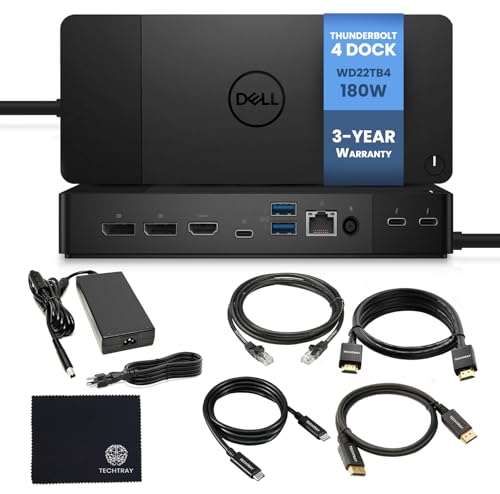
Dell WD22TB4 Thunderbolt 4 Dock 180W
The Dell WD22TB4 is best for users with high-power Dell laptops needing 130W charging. It offers dual Thunderbolt 4 ports, 13 total connections, and broad OS support including Ubuntu and Chrome OS. It is less ideal for Mac users wanting dual displays without DisplayLink.
Reasons to buy
- 130W power delivery
- Dual Thunderbolt 4 ports
- Broad OS compatibility
Reasons to avoid
- Mac dual display needs DisplayLink
- HDMI 2.0 only, not 2.1
What to look for
Port Selection
Check for enough downstream Thunderbolt 4 ports, USB-A ports, and display outputs like HDMI 2.1 or DisplayPort. More ports reduce dongle clutter and support multiple monitors or high-speed peripherals simultaneously.
Power Delivery
Look for at least 90W of power delivery to charge a laptop at full speed. Lower wattage may not keep high-performance laptops charged under heavy load, requiring an additional power adapter.
Display Support
Ensure the dock can drive your desired monitor setup, such as dual 4K at 60Hz or a single 8K display. Some docks limit resolution or refresh rate over certain ports, affecting productivity.
Compatibility
Verify the dock works with your specific laptop brand and operating system. Some docks have optimized features for certain brands like Dell or Lenovo, while others offer universal support.
Our verdict
The Plugable Thunderbolt 4 Dock stands out for 2026 due to its reliable performance, broad device compatibility, and excellent port selection at a competitive value, making it the best all-around choice for most users.
FAQs
Yes, Thunderbolt 4 docks are backward compatible with USB-C laptops, but features like high-speed data and multiple displays may be limited. The laptop must support Thunderbolt 3 or 4 for full functionality.
Not necessarily. Thunderbolt 4 offers minimum performance guarantees like 40Gbps speed and 100W charging, but Thunderbolt 3 docks work similarly. Thunderbolt 4 is better for future-proofing and consistent specs.
Most Thunderbolt 4 docks support up to two 4K monitors at 60Hz or one 8K display at 30Hz. Actual support depends on the dock's port configuration and your laptop's graphics capability.
Yes, Thunderbolt 4 docks provide power delivery to charge your laptop while connecting monitors, drives, and other devices. Check the dock's wattage to ensure it meets your laptop's charging requirements.
Yes. Thunderbolt 4 docks offer higher bandwidth (40Gbps), support for multiple 4K displays, and guaranteed power delivery. USB-C hubs may have lower speeds and fewer features, especially for video output.
Related guides

Best External Hard Drive For Mac of 2026

Best Bluetooth Adapter For Pc for 2026, Ranked

The Best Usb C To Hdmi Cable 4k for 2026

Best Monitor Arm For Dual Monitors for 2026, Ranked
Best Wireless Charging Pad For Iphone of 2026: Top Picks Compare

The Best Usb 3.0 Flash Drive Gigabyte in 2026: Our Top Picks

The Best Mechanical Keyboard Under 100 for 2026
