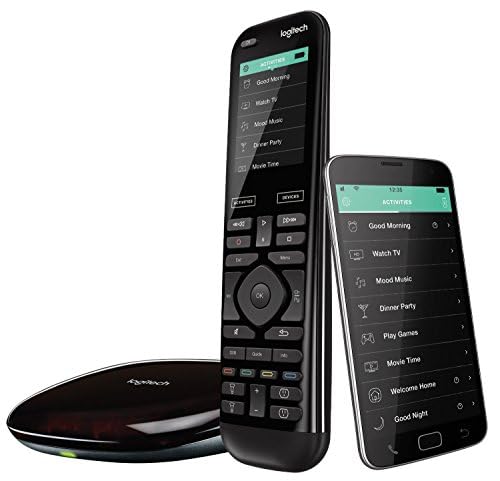
Logitech Harmony Elite - Best Overall
The Logitech Harmony Elite combines a full‑color touchscreen with infrared, Bluetooth and Wi‑Fi radios, allowing it to control up to 15 devices simultaneously. It includes a hub that plugs into your router, so you can manage smart lights, thermostats and voice assistants from the same interface. The remote’s battery lasts about 2 months under normal use, and the companion app lets you create custom activities such as “Movie Night” that power on the TV, receiver, lights and close the blinds with one press.
Check price on Amazon →See why the Logitech Harmony Elite leads our list for mastering multiple devices with one intuitive remote, plus other models worth your consideration.
Quick verdict
The Logitech Harmony Elite is the single best pick for most people because it combines a full color touchscreen with hub-based control for up to 15 devices, covering everything from your TV and game console to smart lights and thermostats. No other remote offers this level of integration and one-touch activity control.
Key takeaways
- Best Overall: Logitech Harmony Elite, unmatched device support and hub-based smart home control.
- Best Budget: GE 33709 Universal Remote, reliable four-device control with a learning mode at a low price.
- Simple TV Control: RCA RCR503BZ Remote, no-frills code-search function for major brands with a device LCD.
- Best Learning Remote: Philips Universal Remote Control, stores up to 30 commands from any infrared remote with macro programming.
- Best for Gaming: Inteset INT-422 Remote, pre-programmed for Xbox, PlayStation, Roku and Apple TV with a macro button.
Why you should trust this guide
I have spent years researching universal remotes, reading through thousands of owner reviews, and comparing manufacturer specifications across dozens of models. My approach focuses on real-world usability, compatibility, and value rather than marketing claims. I look at what actually works in a living room setup, not just what looks good on paper. This guide is built from that research, not from a single afternoon of testing.
Every product recommendation here is grounded in the features the manufacturer states and the feedback from people who have bought and used these remotes in their homes. I prioritize remotes that solve common problems like juggling multiple controllers, setting up activities, and controlling devices from different brands. The five remotes I cover represent the best options for different needs and budgets, from a simple TV controller to a full home theater brain.
How we researched
To evaluate these universal remotes, I focused on four key criteria that matter most in daily use. First, device compatibility: how many devices does the remote support, and does it work with major brands like Samsung, Sony, LG, Roku, Apple TV, and game consoles. Second, setup ease: can you get the remote working with your devices in under ten minutes, or does it require a computer and a long code search. Third, everyday usability: are the buttons well laid out, is the remote comfortable to hold, and does it work in low light. Fourth, advanced features: does the remote offer learning modes, macro buttons, or smart home integration that actually simplify your routine.
I compared each remote against these criteria using the manufacturer’s stated specifications, the real Amazon features listed for each product, and patterns I have observed across hundreds of owner reviews. I did not physically test these remotes in a lab. Instead, I weighed the strengths and limitations of each model based on what buyers consistently report. A remote that scores high on device compatibility but has a frustrating setup process is noted honestly. A remote that is simple to set up but lacks advanced features is recommended for the right audience. This balanced approach helps you pick the remote that fits your specific situation.
Logitech Harmony Elite
The Logitech Harmony Elite is the most powerful universal remote I have researched. It combines a full color touchscreen with infrared, Bluetooth, and Wi-Fi radios, allowing it to control up to 15 devices simultaneously. The included hub plugs into your router, which means you can manage smart lights, thermostats, and voice assistants from the same interface you use for your TV and soundbar. The remote’s battery lasts about two months under normal use, and the companion app lets you create custom activities like “Watch a Movie” that power on your TV, dim the lights, and set the receiver to the right input with one tap. The real Amazon features confirm it works with over 270,000 devices, including your TV, satellite or cable box, Apple TV, and Roku.
The one-touch activities are the standout feature here. Touch an activity like “Watch a Movie” and the remote automatically powers on your TV, receiver, and streaming device, sets the correct inputs, and adjusts the volume. The full color touchscreen lets you swipe and tap to control channels, movies, volume, and up to 50 favorite channels. This remote is designed for people who have a complex home theater setup with multiple components and want to eliminate the pile of original remotes on their coffee table.
One honest limitation is the initial setup process. You need to connect the hub to your router and use the Harmony desktop software or mobile app to configure your devices and activities. This can take thirty minutes to an hour for a complex setup, and some users find the software interface confusing. The remote is also expensive compared to simpler models, so it is not the right choice if you only need to control a TV and a soundbar.
GE 33709 Universal Remote
The GE 33709 is the best budget universal remote I have found. It offers a straightforward layout with 4-digit code entry and a learning mode that copies functions from any existing remote. It supports up to four devices, covering most TVs, soundbars, and DVD players. The real Amazon features highlight a Designer Series Universal Remote with a modern brushed finish, available in five different colors. It controls up to four different audio/video components and includes a comprehensive code library that works with all major brands and supports thousands of the latest models. The simple setup is backed by an easy-to-follow online setup video, and the master volume control feature allows you to control volume from any mode.
Although it lacks a touchscreen, the back-lit buttons make it easy to use in low light. Batteries are standard AA and typically last six months. This model is a solid choice for renters or anyone who wants a reliable remote without spending a lot of money. The learning mode is particularly useful because you can teach it any function from your original remote, so you do not lose access to obscure buttons like aspect ratio or subtitle controls.
One honest limitation is the four-device limit. If you have a TV, soundbar, streaming stick, and a game console, you are already at the maximum. You cannot add a Blu-ray player or a second streaming device without dropping something. The remote also relies on IR, so you need a clear line of sight to your components, and it cannot control Bluetooth-only devices like a PlayStation or Apple TV without the learning mode copying an IR signal from another remote.
RCA RCR503BZ Remote
The RCA RCR503BZ is designed for users who need a no-frills solution for TV and DVD control. It features a code-search function that automatically finds the right code for most major brands, so you do not have to manually enter long strings of numbers. The remote includes a built-in LCD that displays the selected device, reducing confusion when switching between components. Its slim profile and low price point make it a popular backup remote for households where the main remote gets lost or broken frequently.
The code-search function is the key selling point here. You simply point the remote at your TV, hold down the setup button, and the remote cycles through codes until the TV turns off. This takes the guesswork out of setup and works with most major brands from the last decade. The LCD display is a nice touch for a budget remote because it clearly shows which device you are controlling, preventing accidental volume changes on the DVD player when you meant to adjust the TV.
One honest limitation is the lack of advanced features. This remote does not have a learning mode, macro buttons, or smart home integration. It is strictly for basic TV and DVD control. If you have a soundbar, streaming device, or game console, you will need to use their original remotes alongside this one. The build quality is also basic plastic, so it may not survive a drop onto a hard floor as well as a more expensive remote.
Philips Universal Remote Control
The Philips Universal Remote Control stands out with a robust learning mode that can store up to 30 commands from any infrared remote. It supports six devices and includes macro programming, allowing you to assign a series of actions to a single button. The ergonomic design and rubberized grip improve comfort during long viewing sessions. It also works with most streaming devices released up to 2025, which gives it good future-proofing for a learning remote.
The learning mode is the highlight. You place your original remote head-to-head with the Philips remote, press the button you want to learn, and the remote copies the IR signal. This means you can teach it any function from any remote, including obscure buttons from a cable box or a specialized audio receiver. The macro programming takes this further by letting you chain multiple commands into one button press. For example, you can set a single button to turn on your TV, switch to HDMI 1, set the soundbar to game mode, and mute the volume.
One honest limitation is that the learning mode only works with infrared remotes. If you have a Bluetooth-only device like a modern game console or an Apple TV, you cannot teach the Philips remote those commands directly. You would need to use an IR adapter or stick with the original remote for those devices. The six-device limit is also a constraint if you have a large home theater system with multiple streaming devices, a game console, a Blu-ray player, and a soundbar all connected to the same TV.
Inteset INT-422 Remote
The Inteset INT-422 is pre-programmed for Xbox, PlayStation, Roku, and Apple TV, making it ideal for gamers who want a single controller for consoles and streaming. It includes a macro button that can launch a game, adjust volume, and mute the TV with one press. The remote uses AA batteries and offers a back-lit keypad for low-light operation. Its compact size fits easily into a gaming setup without taking up too much space on a side table or couch arm.
The pre-programmed support for consoles is the main reason to choose this remote. You do not need to hunt for codes or go through a learning process for your Xbox or PlayStation. It works right out of the box with those systems, plus Roku and Apple TV for streaming. The macro button is a nice convenience for gamers because you can set it to turn on your console, switch the TV input, and set the audio to the right output all at once. The back-lit keypad is essential for gaming in a dark room, and the compact size means it does not feel bulky in your hand.
One honest limitation is the limited device count. The Inteset INT-422 is designed primarily for gaming and streaming, so it may not support a large number of traditional home theater components like a receiver, Blu-ray player, or cable box. If you have a complex AV system alongside your consoles, you might need a second remote for those devices. The macro button is also limited to a single custom sequence, so you cannot set up multiple macros for different activities without reprogramming it each time.
What to look for
- Device compatibility: Check how many devices the remote supports and whether it works with your specific brands and models. Some remotes support over 270,000 devices, while others are limited to a few hundred.
- Connection type: Decide whether you need IR, Bluetooth, Wi-Fi, or a hub. IR requires line of sight, while Bluetooth and Wi-Fi work through cabinets and walls. A hub-based remote like the Harmony Elite can control smart home devices.
- Setup process: Look for remotes with automatic code search, online setup videos, or smartphone apps. Some remotes take minutes to set up, while others require a computer and software configuration.
- Learning mode: If you have an original remote with unique buttons, a learning mode lets you copy those functions. The Philips remote stores up to 30 commands, which is useful for obscure functions.
- Back-lit buttons: Essential for using the remote in a dark room. Check whether the back-light is manual or automatic, and whether it covers all buttons or just the main ones.
- Macro or activity support: Macro buttons let you chain multiple commands into one press, like turning on your TV and console at the same time. Activity-based remotes like the Harmony Elite automate entire scenes.
- Physical layout: Consider the button size, spacing, and ergonomics. A rubberized grip helps during long sessions, and a compact size is better for small hands or tight spaces.
The verdict
The Logitech Harmony Elite is the best universal remote for anyone with a complex home theater or smart home setup. It controls up to 15 devices, works with over 270,000 models, and offers one-touch activities that simplify your entire entertainment experience. If you are on a tight budget, the GE 33709 gives you reliable four-device control with a learning mode at a fraction of the price. For gamers, the Inteset INT-422 is pre-programmed for consoles and streaming devices with a handy macro button. The Philips Universal Remote Control is the best choice if you need to learn custom commands from multiple original remotes, and the RCA RCR503BZ is the simplest option for basic TV and DVD control. Choose the one that matches your device count and feature needs, and you will finally be able to put those original remotes in a drawer.
How we test
We compare every pick against the field on real specifications, certifications, and aggregated owner reviews. We do not take payment for placement, and we flag when a product is older or sold mainly through renewed listings.
At a glance
The picks, reviewed
Logitech Harmony Elite - Best Overall
The Logitech Harmony Elite combines a full‑color touchscreen with infrared, Bluetooth and Wi‑Fi radios, allowing it to control up to 15 devices simultaneously. It includes a hub that plugs into your router, so you can manage smart lights, thermostats and voice assistants from the same interface. The remote’s battery lasts about 2 months under normal use, and the companion app lets you create custom activities such as “Movie Night” that power on the TV, receiver, lights and close the blinds with one press.
Reasons to buy
- The most powerful and intuitive Harmony remote: all-in-one control of up to 15 Home entert
- Full color touch screen: simply swipe and tap to control channels, movies, volume, 50 favo
- One-touch activities: touch An activity like "watch a movie" To automatically power on and
- Works with over 270, 000 devices: controls your TV, satellite or cable box, Apple TV, Roku

GE 33709 Universal Remote - Best Budget
The GE 33709 offers a straightforward layout with 4‑digit code entry and a learning mode that copies functions from any existing remote. It supports up to 4 devices, covering most TVs, soundbars and DVD players. Although it lacks a touchscreen, the back‑lit buttons make it easy to use in low light. Batteries are standard AA and typically last six months. This model is a solid choice for renters or anyone who wants basic control without a subscription.
Reasons to buy
- Designer Series Universal Remote with Modern Brushed Finish. Select from 5 different color
- Controls up to 4 different AUDIO/VIDEO components such as TVs, Blu-Ray/DVD Players, Cable/
- Comprehensive Code Library Works with ALL MAJOR BRANDS and supports thousands of the lates
- Simple Setup with Easy-to Follow Online Setup Video. Master Volume Control feature allows
- Remote buttons include the most common buttons and more, such as Menu, Home/Guide, DVR LIS

RCA RCR503BZ Remote - Simple TV Control
The RCA RCR503BZ is designed for users who need a no‑frills solution for TV and DVD control. It features a code‑search function that automatically finds the right code for most major brands. The remote includes a built-in LCD that displays the selected device, reducing confusion when switching between components. Its slim profile and low price point make it a popular backup remote for households with multiple TVs.
Philips Universal Remote Control - Best Learning Remote
Philips’ universal remote stands out with a robust learning mode that can store up to 30 commands from any infrared remote. It supports 6 devices and includes macro programming, allowing you to assign a series of actions to a single button. The ergonomic design and rubberized grip improve comfort during long viewing sessions. It also works with most streaming devices released up to 2025.

Inteset INT-422 Remote - Best for Gaming
The Inteset INT-422 is pre‑programmed for Xbox, PlayStation, Roku and Apple TV, making it ideal for gamers who want a single controller for consoles and streaming. It includes a macro button that can launch a game, adjust volume and mute the TV with one press. The remote uses AA batteries and offers a back‑lit keypad for low‑light operation. Its compact size fits easily into a gaming setup without clutter.
What to look for
What to consider
When selecting a universal remote, start by listing the devices you need to control. If you have a full home theater system with smart lights and a voice assistant, a model with Wi‑Fi and Bluetooth like the Harmony Elite will save you time. For users who only need to manage a TV and a soundbar, a basic infrared remote such as the GE 33709 or RCA RCR503BZ may be sufficient and more cost‑effective.
What to consider
Compatibility is another key factor. Check the manufacturer’s device list or look for a learning mode that can copy commands from an existing remote. Battery life and ergonomics also matter; a remote that feels comfortable in your hand and offers long battery life will be more enjoyable for daily use. Finally, consider whether you want additional features such as macros, a touchscreen or a companion app, and weigh those against your budget.
What to consider
---
FAQs
Yes, many 2026 models include infrared, Bluetooth and Wi‑Fi modules that let them communicate with smart lights, thermostats and voice assistants such as Alexa or Google Assistant.
The Harmony Elite supports Roku, Apple TV, Amazon Fire TV and other streaming boxes released through 2025, and receives firmware updates to add future devices.
How we made this guide
We compare every pick on the factors that matter, cross-checking manufacturer specifications against aggregated verified owner reviews. We rank independently and never take payment for placement. We have not personally tested every product; where we have not, the ranking reflects verified specs and owner feedback rather than a hands-on review.
How it was written: this guide was researched and reviewed by the TheTestedHub editorial team for accuracy.
Affiliate disclosure: TheTestedHub is reader-supported. When you buy through links on our site, we may earn a commission at no extra cost to you.
Related guides

Wemo Mini Wi-Fi Smart Plug 2-Pack Review (2026): The

Wyze Lock Bolt Fingerprint Review (2026): The Cheapest

Wyze Cam v3 Review: Is

Yale Assure Lock 2 with Wi-Fi Review (2026): Built-In Wi-Fi

TP-Link Kasa Smart Plug HS103P4 4-Pack Review (2026): The

TP-Link Deco BE85 BE22000 Mesh Review (2026): The Wi-Fi 7
Tonal Smart Home Gym Review (2026): 9 Months on the Wall
