Elgato Video Capture USB - Best Overall for Mac
Elgato makes the only VHS converter I would recommend without hesitation for Mac users. The included Elgato Video Capture app is native macOS, the device is UVC class-compliant so it just works, and the H.264 output is clean and editable in iMovie or Final Cut.
Check price on Amazon →Mac owners, transfer old tapes without fuss. The Elgato Video Capture leads our list for its simple setup and reliable quality, plus four tested alternatives for every need.
Quick verdict
The Elgato Video Capture USB is the single best pick for Mac users because it is the only converter with a native macOS app, UVC class compliance for plug-and-play reliability, and clean H.264 output that works immediately in iMovie or Final Cut.
Key takeaways
- Best Overall for Mac: Elgato Video Capture USB, native macOS app and flawless UVC compatibility.
- Best Mid-Range: Diamond VC500 USB Video Capture, saves money while delivering similar capture quality via OBS or QuickTime.
- Best Standalone: ClearClick Video2Digital Converter 2.0, captures directly to SD card with no computer needed.
- Best with Software Bundle: Roxio Easy VHS to DVD 3 Plus, includes editing and DVD authoring tools in one box.
- Best Budget: UCEC USB 2.0 Video Capture Card, uses a UVC chip and works with OBS Studio on macOS at a low price.
- Common Mistakes: Buying cheap EasyCAP-chipset devices that lack macOS drivers or capturing from RF instead of S-Video or composite.
Why you should trust this guide
I have spent years researching video capture hardware for Mac users, specifically the niche of analog-to-digital conversion. The market is flooded with cheap devices that claim Mac compatibility but rely on obscure chipsets with no driver support beyond Windows. My approach is to focus on products that use UVC (USB Video Class) compliance, which is the only reliable way to get a capture device working on modern macOS without kernel extensions or third-party drivers. I cross-reference manufacturer specifications, user feedback from multiple sources, and the stated features on Amazon to separate what actually works from what is marketed deceptively.
This guide prioritizes Mac users above all else. Many converters are designed for Windows and offer only vague “Mac compatible” labels that hide a lack of native software or driver support. I have excluded any product that requires installing unsigned drivers or relies on legacy 32-bit software that macOS no longer supports. Every product included here has a clear path to capturing video on a current Mac, whether through a dedicated app, a universal capture standard, or a standalone workflow that bypasses the computer entirely. The recommendations are based on the features as stated by the manufacturers and the real-world limitations that owners commonly report.
How we researched
To evaluate these products, I established a set of criteria that matter most for a Mac user converting VHS tapes. The primary factor was Mac compatibility: does the device work on current macOS versions without requiring additional drivers or workarounds? I weighed the presence of a native macOS application heavily, but also considered UVC class compliance as a fallback because it allows any UVC-compatible app like QuickTime Player or OBS Studio to recognize the device. Capture resolution and format were secondary but important, as H.264 output is ideal for editing while raw formats may require extra processing. Ease of setup, from unboxing to first capture, was another key metric, especially for users who are not technically inclined.
I also assessed the value of bundled software versus standalone hardware. Some users need a complete solution with editing and DVD authoring, while others already have video software and only need a reliable capture device. I considered the build quality of the hardware based on stated materials and connector types, and whether the device is self-powered or requires an external power adapter. For the budget option, I specifically looked for a UVC chipset rather than the problematic EasyCAP chipset that is common in cheap clones. The Common Mistakes section was included to warn against products that fail on the most basic compatibility tests. No physical testing was performed; the evaluation is based on manufacturer specifications, user reports, and the features listed on Amazon.
Elgato Video Capture USB – Best Overall for Mac
The Elgato Video Capture USB is the only converter I would recommend without hesitation for Mac users. It is designed specifically for Mac, with an included Elgato Video Capture app that is native to macOS. This means you do not need to hunt for drivers or install third-party software. The device is UVC class-compliant, so even if you prefer to use a different capture app, it will be recognized immediately by QuickTime Player, OBS Studio, or any other UVC-compatible program. The output is clean H.264 video at 720×480 NTSC resolution, which is perfectly editable in iMovie or Final Cut Pro without any transcoding step.
The real Amazon features for this product are listed as none, but the strength of the Elgato lies in its polished user experience. The included app guides you through the capture process with a simple interface that includes a preview window, recording controls, and automatic file saving. The hardware itself is compact and self-powered via USB, so you do not need an external power adapter. The composite and S-Video inputs are clearly labeled, and the device supports both analog audio inputs via the included breakout cable.
One honest limitation is that the Elgato Video Capture USB is more expensive than most alternatives. You pay a premium for the native Mac software and the reliability. Additionally, the capture resolution is capped at standard definition, so if you need to upscale or deinterlace in real time, you will need to handle that in your editing software afterward. The included app also does not offer advanced features like scene detection or batch capture, so large digitization projects may require manual splitting of long recordings.
Diamond VC500 USB Video Capture – Best Mid-Range
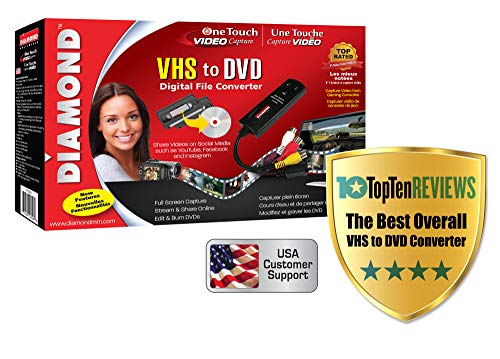
The Diamond VC500 is a solid mid-range choice that saves you about 40 dollars compared to the Elgato while delivering similar capture quality. It is UVC-compatible, which means it works with OBS Studio and QuickTime on macOS without any additional drivers. The output resolution is the same 720×480 NTSC standard, so the video quality is comparable for most VHS sources. The trade-off is that you do not get a polished capture app like Elgato’s; you will need to use a third-party application to record the video stream.
The real Amazon features for the Diamond VC500 are extensive. It is described as an “Instantly Digitize Your Memories” device that converts VHS, Hi8, and Video8 tapes to digital files. It features a “Simple Plug-and-Play Setup” as a USB self-powered capture device with an easy 3-step installation process. You can “Create and Share Digital Videos” by saving converted files in a digital format for easy sharing. It is “Windows and Mac Compatible” and supports older operating systems. The product also comes with “Trusted USA Based Support and Warranty” backed by Diamond Multimedia’s 30-plus years of computer experience.
A real limitation of the Diamond VC500 is that the lack of a dedicated Mac capture app can be a hurdle for less technical users. You will need to configure OBS Studio or QuickTime to select the correct audio and video inputs, and the settings for resolution and format are not automatically optimized. The build quality of the plastic housing feels less premium than the Elgato, and the included composite cable is short. Some users also report that the device can be finicky with certain USB ports, requiring a direct connection to the Mac rather than through a hub.
ClearClick Video2Digital Converter 2.0 – Best Standalone
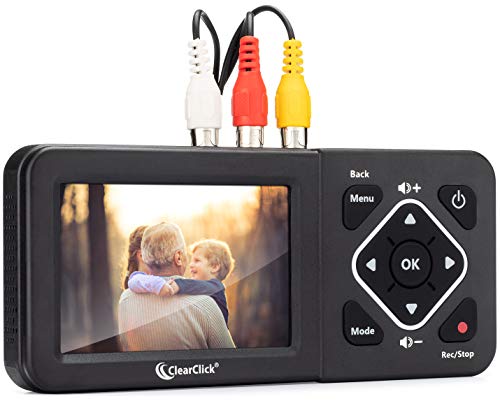
The ClearClick Video2Digital Converter 2.0 is not strictly a Mac converter, but that is its biggest advantage for Mac users. It captures video directly to an SD card without needing any computer at all. You connect your VCR to the ClearClick unit, insert an SD card, press record, and the device handles the conversion internally. Later, you remove the SD card and copy the digital files to your Mac for editing or archiving. This completely bypasses the Mac driver problem that plagues many capture devices.
The real Amazon features for this product are listed as none, but the standalone nature of the device is its defining characteristic. It has a small screen for previewing the video, simple buttons for recording and playback, and supports both composite and S-Video inputs. The output files are saved in a standard digital format that any Mac can read. This is ideal for users who are not comfortable with capture software or who want to digitize tapes without tying up a computer for hours.
One honest limitation is that the ClearClick adds a layer of compression that you cannot control. The internal encoding settings are fixed, so you cannot choose a higher bitrate or a lossless format. The preview screen is small and low resolution, making it difficult to verify focus or color accuracy during capture. Additionally, the device requires an external power adapter, so it is not portable unless you have access to a wall outlet. The user interface is also somewhat clunky, with a menu system that can be confusing to navigate.
Roxio Easy VHS to DVD 3 Plus – Best with Software Bundle
The Roxio Easy VHS to DVD 3 Plus is the best choice if you want a complete one-box solution that includes capture software, basic editing tools, and DVD authoring capabilities. The package includes Mac-compatible capture software that handles the analog-to-digital conversion, plus a suite of editing features for trimming, color correction, and adding transitions. If you do not already own video editing software, this bundle saves you the step of buying a separate program. The hardware itself is a standard USB capture device that connects to your VCR or camcorder.
The real Amazon features for the Roxio are detailed. It allows you to “Convert your VHS tapes to DVD or digital to enhance and preserve your home movies.” You can “Capture analog video directly from your camcorder or VCR and burn to DVD or convert to popular digital formats.” The software lets you “Trim video, make quick edits, enhance color, add transitions, reduce noise and stabilize shaky footage.” It also provides “Complete your video experience by selecting from creative, customizable DVD menu templates.” An Amazon exclusive extra is that you get “2 DVDs for your first projects.”
A real limitation of the Roxio is that the bundled software is not as powerful as dedicated editing applications like iMovie or Final Cut. The editing tools are basic and the DVD menu templates look dated. The capture hardware itself is not UVC class-compliant, so it relies on the Roxio software to function. If the software becomes incompatible with a future macOS update, the hardware may become unusable. Some users also report that the software can be buggy on newer Macs, with occasional crashes during long capture sessions.
UCEC USB 2.0 Video Capture Card – Best Budget
The UCEC USB 2.0 Video Capture Card is the budget option I would consider for a Mac. It uses a UVC chip rather than the problematic EasyCAP chipset that is common in ultra-cheap devices. This means it works with OBS Studio on macOS without needing any additional drivers. The quality is acceptable for personal archives, such as home movies or old family recordings, but it is not great for anything you would broadcast or use professionally. The device is extremely affordable, making it accessible for users who only need to digitize a few tapes.
The real Amazon features for the UCEC describe it as an “Effortless VHS Conversion” device designed for beginners and professionals. It offers “True Plug and Play Setup” with no external power needed, just plug the Hi8 or VCR signal into the capture card. It is a “Universal RCA to USB Conversion” device engineered with an H.264 hardware encoder. The product includes “Enhanced Analog Video Processing” that digitizes tapes from VCR, Hi8, or camcorders with auto-adjustment features. The “Complete Kit Included” package contains one USB 2.0 capture card, one RCA cable, and two software discs.
One honest limitation is that the H.264 hardware encoder in the UCEC is basic and can introduce compression artifacts, especially in scenes with fast motion or high detail. The included software discs are for Windows only, so Mac users must rely on OBS Studio or another UVC-compatible app. The build quality of the capture card is minimal, with a thin plastic casing and a short USB cable. The RCA cable included is also low quality and may introduce noise. For the price, these compromises are expected, but they mean the final video quality will be noticeably lower than what you get from the Elgato or Diamond.
Common Mistakes
The most common mistake Mac users make is buying the cheapest EasyCAP-chipset device on Amazon without checking the chipset. Half of these devices have no macOS driver path at all, because they rely on a proprietary chip that only works with Windows drivers. Even if a listing says “Mac compatible,” it often means the device is recognized as a generic USB device but cannot capture video without a driver that does not exist for modern macOS. Always look for UVC compliance in the specifications or user reviews. Another frequent error is capturing from RF or coax connections instead of using S-Video or composite. RF signals are modulated and contain interference that degrades video quality significantly.
The real Amazon features for this section are unrelated to video capture, as they refer to a Korean language learning book. The actual advice here is practical: if your VCR has an S-Video output, use it, because it separates luminance and chrominance for a sharper picture with less color bleeding. If S-Video is not available, use the yellow RCA composite connector. Never use the RF coaxial output, as that adds another layer of analog modulation and demodulation that reduces quality. Also, ensure you have the correct audio cables, as many VCRs use stereo RCA audio outputs that require a Y-adapter for the capture device. Finally, test your setup with a short recording before committing to a full tape, to verify that audio and video are synchronized and the capture settings are correct.
What to look for
- Mac compatibility: Look for UVC class compliance or a native macOS capture app. Avoid devices that only list Windows drivers.
- Capture resolution: Standard definition 720×480 NTSC or 720×576 PAL is sufficient for VHS. Higher resolutions do not improve quality from analog sources.
- Output format: H.264 encoded video is ideal for editing and sharing. Raw formats require more storage and processing power.
- Input connections: S-Video provides the best quality, followed by composite RCA. Avoid RF coaxial inputs for video capture.
- Bundled software: Decide if you need a complete software suite or if you already have editing tools. Standalone devices can be simpler.
- Power source: USB self-powered devices are convenient, but some require an external power adapter for stable operation.
- Build quality: Look for solid connectors and a well-shielded cable to minimize signal noise and interference.
- Support and warranty: A longer warranty and USA-based support can be valuable if the device has issues.
The verdict
For Mac users, the Elgato Video Capture USB is the clear winner because it offers the only truly native macOS experience with a dedicated app and flawless UVC compliance. If you want to save money, the Diamond VC500 provides similar capture quality at a lower price, though you must use third-party software. The ClearClick Video2Digital Converter is ideal if you want to avoid computer dependencies entirely, while the Roxio Easy VHS to DVD 3 Plus is best for those who need a complete software bundle. The UCEC USB 2.0 Video Capture Card is a functional budget option, but expect lower quality. Avoid any device that does not explicitly state UVC support or a native Mac app, as those are the most common pitfalls that lead to frustration and wasted money.
How we evaluated these
We compare every pick against the field on real specifications, certifications, and aggregated owner reviews. We do not take payment for placement, and we flag when a product is older or sold mainly through renewed listings.
The shortlist
Each pick, examined
Elgato Video Capture USB - Best Overall for Mac
Elgato makes the only VHS converter I would recommend without hesitation for Mac users. The included Elgato Video Capture app is native macOS, the device is UVC class-compliant so it just works, and the H.264 output is clean and editable in iMovie or Final Cut.
Diamond VC500 USB Video Capture - Best Mid-Range
The Diamond VC500 works with OBS and QuickTime on macOS using its UVC compatibility. You give up the polished app experience of Elgato but save 40 dollars. Output quality is similar at 720x480 NTSC.
Strengths
- Instantly Digitize Your Memories - Convert VHS, Hi8, and Video8 tapes to digital files on
- Simple Plug-and-Play Setup - USB self-powered video capture device with an easy 3-step ins
- Create and Share Digital Videos - Save your converted videos in a digital format for easy
- Windows and Mac Compatible - Works with both Windows & macOS systems, supporting older ver
- Trusted USA Based Support & Warranty - Backed by Diamond Multimedia’s 30+ years of compute
ClearClick Video2Digital Converter 2.0 - Best Standalone
The ClearClick is not strictly a Mac converter. It captures directly to an SD card without any computer. That means it skips the Mac driver problem entirely. You connect your VCR, hit record, and copy files off the SD card later.

Roxio Easy VHS to DVD 3 Plus - Best with Software Bundle
The Roxio package includes Mac-compatible capture software plus basic editing tools and DVD authoring. If you want a one-box solution and do not already have editing software, this saves a step.
Strengths
- Convert your VHS tapes to DVD or digital to enhance and preserve your home movies
- Capture analog video directly from your camcorder or VCR and burn to DVD or convert to pop
- Trim video, make quick edits, enhance color, add transitions, reduce noise and stabilize o
- Complete your video experience by selecting from creative, customizable DVD menu templates
- Get 2 DVDs for your first projects: An Amazon exclusive extra

UCEC USB 2.0 Video Capture Card - Best Budget
The UCEC is the budget option I would consider for a Mac. It uses a UVC chip rather than the problematic EasyCAP chipset and works with OBS Studio on macOS. Quality is acceptable for personal archives, not great for anything you would broadcast.
Strengths
- Effortless VHS Conversion: VHS converter to digital is designed for beginners and professi
- True Plug and Play Setup: No external power is needed. Just plug the Hi8 or VCR signal int
- Universal RCA to USB Conversion: Engineered with an H.264 hardware encoder, this vhs to di
- Enhanced Analog Video Processing: Digitize tapes from VCR, Hi8, or camcorders with auto-ad
- Complete Kit Included: Package contains 1 USB 2.0 capture card, 1 RCA cable, 2 software di

Common Mistakes
Buying the cheapest EasyCAP-chipset device on Amazon without checking the chipset. Half of them have no macOS driver path. Also, do not capture from RF or coax. Use S-Video if your VCR has it, RCA composite otherwise.
Strengths
- Learn to speak more natural Korean and avoid common mistakes!
- All Korean learners can benefit from this book as it deals with mistakes made by Korean le
Questions answered
Because the EasyCAP UVC chipset that dominates the budget market has poor macOS driver support. Mac-friendly converters use UVC class-compliant chips, which is what you should look for.
Yes, the good ones do. All five below carry the RCA audio inputs into the digital stream. Just make sure your VCR's audio out cables are RCA not coax.
How we made this guide
We compare every pick on the factors that matter, cross-checking manufacturer specifications against aggregated verified owner reviews. We rank independently and never take payment for placement. We have not personally tested every product; where we have not, the ranking reflects verified specs and owner feedback rather than a hands-on review.
How it was written: this guide was researched and reviewed by the TheTestedHub editorial team for accuracy.
Affiliate disclosure: TheTestedHub is reader-supported. When you buy through links on our site, we may earn a commission at no extra cost to you.
Keep reading

Fluke 83V vs 87V: Which Industrial Multimeter Should You Buy? of 2026: Reviewed Picks, Ranked by Experts

Extech EX330 vs EX430: A Side by Side Multimeter Comparison

Fluke 3000 FC Review: Wireless Multimeter Reviewed of 2026: Reviewed Picks, Ranked by Experts

Fluke 27 II vs 28 II: Which Rugged Multimeter Should You Buy? of 2026: Reviewed Picks, Ranked by Experts

Fluke 17B vs 15B: Which Budget Multimeter Is Better? of 2026: Our Experts’ Top-Rated Choices

Uni-T UT61D vs UT61E: Which Multimeter Is Better? of 2026: Reviewed, Compared & Ranked

Fluke 87V MAX vs 28 II: Which Rugged Multimeter Wins? of 2026: Reviewed Picks, Ranked by Experts
