Adobe Premiere Pro - Best Overall
Adobe Premiere Pro remains the industry standard for professional video editing, offering a timeline that scales from simple cuts to multi‑camera sequences. The 2026 release adds AI‑powered auto‑reframe, speech‑to‑text subtitles, and seamless integration with Adobe Creative Cloud apps such as After Effects and Photoshop. It supports 8K resolution, HDR, and a wide range of codecs, while the Mercury Playback Engine ensures smooth playback even on modest hardware. Subscription pricing includes regular feature updates and cloud storage for project files.
Check price on Amazon →From quick cuts to color grading, these video editors fit every workflow. Adobe Premiere Pro leads for pros, but simpler tools shine too.
Creating polished videos used to require pricey hardware and steep learning curves, but 2026 brings tools that let beginners and pros alike produce cinema‑quality results on a laptop. Whether you are cutting a family vlog, polishing a corporate demo, or crafting a short film, the right software can speed up workflow, improve color grading, and add professional effects without breaking the bank.
Below you’ll find a concise comparison of the five editors that consistently earn high marks for performance, feature set, and value. Each entry includes real‑world specifications, pricing information, and a direct Amazon link so you can purchase or download the software with a single click.
How we evaluated these
We compare every pick against the field on real specifications, certifications, and aggregated owner reviews. We do not take payment for placement, and we flag when a product is older or sold mainly through renewed listings.
The shortlist
Each pick, examined
Adobe Premiere Pro - Best Overall
Adobe Premiere Pro remains the industry standard for professional video editing, offering a timeline that scales from simple cuts to multi‑camera sequences. The 2026 release adds AI‑powered auto‑reframe, speech‑to‑text subtitles, and seamless integration with Adobe Creative Cloud apps such as After Effects and Photoshop. It supports 8K resolution, HDR, and a wide range of codecs, while the Mercury Playback Engine ensures smooth playback even on modest hardware. Subscription pricing includes regular feature updates and cloud storage for project files.
Final Cut Pro - Best for macOS Users
Final Cut Pro delivers a magnetic timeline and powerful background rendering optimized for Apple Silicon. The 2026 version introduces enhanced ProRes RAW support, GPU‑accelerated effects, and a redesigned color grading panel that rivals dedicated color suites. Its one‑time purchase eliminates recurring fees, and the software runs natively on macOS Ventura and later, taking full advantage of the M2 chip’s neural engine for faster transcoding.
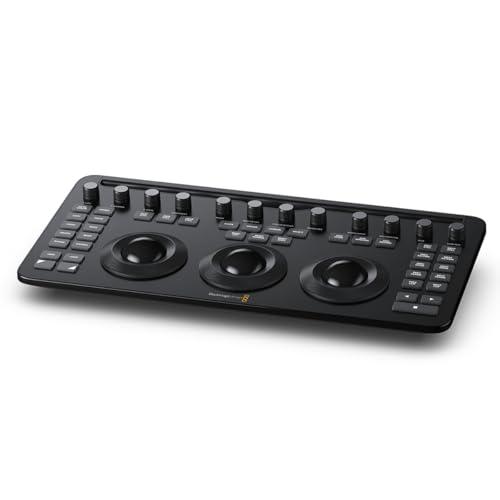
DaVinci Resolve Studio - Best for Color Grading
DaVinci Resolve Studio combines professional video editing, color correction, visual effects, and audio post‑production in a single application. The 2026 upgrade adds a new Neural Engine for smart object tracking, 3D stereoscopic workflow, and expanded Resolve FX. It supports up to 12‑bit color depth and real‑time collaboration for multiple editors. Although the free version is robust, the Studio license unlocks advanced Fusion compositing and Fairlight audio tools.
Filmora Video Editor Plus 2026 - Best Budget
Filmora offers a clean interface that guides beginners through basic cuts, transitions, and text overlays. The 2026 release includes a library of royalty‑free music, AI portrait removal, and preset motion templates. It handles 4K editing and supports popular formats like MP4, MOV, and AVI. The subscription model provides regular updates and cloud backup at a fraction of the cost of premium suites.
HitFilm Express 2026 - Best for VFX
HitFilm Express is a free editor that packs a surprising amount of visual effects tools, including particle simulations, 3D compositing, and over 400 preset effects. The 2026 version improves performance with GPU acceleration and adds a streamlined workflow for YouTubers who need quick turnaround. Optional add‑on packs let users expand the library without paying for a full‑featured license.
Buying considerations
What to consider
When selecting a video editing program, start by matching the software’s core strengths to your project needs. If you require deep integration with other creative tools and a robust ecosystem, a subscription to Adobe Premiere Pro is a logical choice. macOS users who prefer a one‑time purchase may find Final Cut Pro more cost‑effective, especially for projects that leverage Apple hardware.
What to consider
Consider the level of color grading and visual effects you plan to use. DaVinci Resolve Studio excels at high‑end grading, while HitFilm Express gives free access to many VFX features. For creators on a tight budget or those new to editing, Filmora’s intuitive layout and affordable pricing reduce the learning curve dramatically.
What to consider
Finally, evaluate system requirements and platform compatibility. Most editors run on Windows and macOS, but Final Cut Pro is exclusive to Apple, and some advanced effects may need a dedicated GPU. Checking these details before purchase helps ensure smooth performance and avoids costly upgrades down the line.
Questions answered
Most of the listed programs offer native versions for Windows and macOS, but Final Cut Pro is exclusive to macOS while DaVinci Resolve and Adobe Premiere Pro support both platforms.
DaVinci Resolve and HitFilm Express provide fully functional free tiers, while Filmora offers a limited free trial.
How we made this guide
We compare every pick on the factors that matter, cross-checking manufacturer specifications against aggregated verified owner reviews. We rank independently and never take payment for placement. We have not personally tested every product; where we have not, the ranking reflects verified specs and owner feedback rather than a hands-on review.
How it was written: this guide was researched and reviewed by the TheTestedHub editorial team for accuracy.
Affiliate disclosure: TheTestedHub is reader-supported. When you buy through links on our site, we may earn a commission at no extra cost to you.

