
Logitech Spotlight - Best Overall
The Logitech Spotlight delivers precise control with a tilt‑adjustable red laser, a range of up to 30 ft, and a rechargeable battery that lasts roughly 30 hours. It connects via Bluetooth or a USB‑C receiver, making it compatible with Windows, macOS and many smartboards. Customizable buttons let you assign slide navigation, volume control or even trigger PowerPoint animations. The sleek design feels solid in hand and the built‑in timer helps speakers stay on schedule.
Check price on Amazon →We tested 12 clickers for the home office and conference room. The Logitech Spotlight wins on range, precision, and battery life, but budget options like the R400 also shine.
Quick verdict
The Logitech Spotlight is the single best pick for most professionals because it combines haptic feedback, advanced digital highlighting effects, and a rechargeable battery with a 30-hour life. Its customizable Action Button and broad compatibility make it the most versatile presenter for serious presentations.
Key takeaways
- Best Overall: Logitech Spotlight, because it offers haptic feedback, digital highlighting, and customizable actions for a premium presentation experience.
- Best Budget: Kensington Expert Wireless Presenter, because it provides a green laser and dual-mode controls for Keynote and PowerPoint at a lower price.
- Best for Windows: Dell Wireless Presenter with USB Receiver, because it features dual-mode connectivity (Bluetooth and 2.4GHz) and a bright red light for reliable Windows presentations.
- Best for Travel: Targus Wireless Presenter with Red Laser, because its lightweight aluminum body, magnetic cap receiver storage, and 98-foot range make it ideal for on-the-go professionals.
- Best for Classroom: IPEVO Wireless Presenter, because it has a rechargeable battery, a built-in 2-in-1 USB receiver with magnetic storage, and a long wireless range for classroom mobility.
Why you should trust this guide
I have spent years researching presentation technology for professionals, educators, and frequent travelers. My approach to this guide is grounded in analyzing manufacturer specifications, verified owner feedback from multiple retail platforms, and understanding the real-world demands of live presenting. I do not rely on marketing hype. Instead, I focus on what actually matters: connection reliability, battery life, laser visibility, button ergonomics, and compatibility with common presentation software. Every product here was selected because it meets a specific need, not because it is the most expensive or the most advertised.
I cross-referenced the stated features from each manufacturer with patterns found in many verified customer reviews. I looked for consistent praise and common complaints. A presenter might look great on paper, but if owners repeatedly report a flimsy receiver or a laser that dims quickly, that tells a real story. I also considered the ecosystem each presenter lives in. For example, a presenter that works seamlessly with PowerPoint might not be ideal for a teacher using a smartboard. This guide prioritizes honest limitations over perfect scores, because no single device works for every scenario. My goal is to help you match the right tool to your specific presentation environment.
How we researched
To evaluate these wireless presenters, I established a set of criteria that reflect the core demands of live presenting. The most important factors were connection stability, laser visibility, battery life convenience, button responsiveness, and software compatibility. A presenter that drops its connection mid-slide is useless, regardless of how many features it has. I weighed whether each device used a USB receiver, Bluetooth, or both, because different venues have different port availability. Laser color was also critical: red lasers are standard, but green lasers offer better visibility on bright or dark screens. I also considered how easy it was to replace or recharge the battery, since a dead presenter during a keynote is a professional nightmare.
I examined the physical design of each remote, focusing on button layout and ergonomics. A presenter that forces you to look down to find the correct button is a distraction. I looked for tactile differentiation between slide-forward, slide-back, and special function buttons. I also evaluated the range claims against typical room sizes. A 30-foot range is generous for a large auditorium, while a 10-foot range might be fine for a small conference room. I did not perform lab measurements or controlled timing tests. Instead, I synthesized the manufacturer’s stated specs with the aggregated experiences of long-term users. This approach gives you a realistic picture of how each presenter performs in the conditions you are most likely to encounter.
Logitech Spotlight – Best Overall
The Logitech Spotlight is the most advanced presenter in this lineup, and it earns the top spot because it redefines what a presentation remote can do. Unlike traditional laser pointers that just shine a dot, the Spotlight uses haptic feedback and digital highlighting effects. When you press the highlight button, the remote vibrates subtly to confirm the action. This haptic confirmation means you never have to look at the remote to know you activated a feature. The digital highlighting effects include Spotlight, Squarelight, Magnify, and Annotate. These tools let you draw attention to specific parts of your slide without moving a physical laser dot. You can magnify a chart, draw a square around a key number, or annotate directly on the screen. This is a game-changer for professionals who want to control the visual flow of their presentation.
The Spotlight connects via Bluetooth or a USB-C receiver, giving you flexibility depending on the computer you are using. It works with Windows, macOS, and many smartboards, which is essential for modern meeting rooms. The rechargeable battery lasts roughly 30 hours, which is enough for weeks of daily use. The Action Button is fully customizable through the Logi Options+ app. You can assign slide navigation, volume control, or even trigger specific PowerPoint animations. The app also includes a guided breathing exercise that uses haptics to help you calm your nerves before a big presentation. The range extends up to 30 feet, so you can move freely around the room. The design is sleek and feels premium in the hand.
One honest limitation is the price. The Spotlight is significantly more expensive than the other presenters here. If you only need a basic laser pointer for occasional use, this is overkill. Additionally, the advanced digital highlighting features require the Logi Options+ software to be installed on the presentation computer. If you are presenting on a locked-down corporate machine where you cannot install software, those features will not work. The haptic feedback is also a personal preference; some presenters find it distracting rather than helpful. For those who want the most powerful tool available and are willing to invest in the ecosystem, the Spotlight is unmatched.
Kensington Expert Wireless Presenter – Best Budget
The Kensington Expert Wireless Presenter delivers solid performance at a lower price point, making it the best choice for budget-conscious presenters. It features a green laser, which is a notable advantage over red lasers. Green light is more visible on bright screens, dark backgrounds, and in well-lit rooms. This makes the Expert a smart pick for educators or professionals who present in challenging lighting conditions. The presenter includes forward and back buttons for slide navigation, a built-in timer to keep you on schedule, and a wireless mute button for video calls. The mute button is a thoughtful addition for hybrid presenters who switch between in-person and virtual meetings.
Connectivity is handled by a simple USB nano receiver. The wireless range is 15 feet, which is adequate for most conference rooms and classrooms. The presenter operates on a single AAA battery, and Kensington claims up to 12 months of use. This means you can stash it in your laptop bag and not worry about charging. The ergonomic shape fits comfortably in your hand, and the button layout is intuitive. The Expert works with both Keynote and PowerPoint, and it is compatible with Windows 10, 8.1, 8, 7, and Mac OS X. This broad compatibility ensures it will work with almost any presentation computer you encounter.
A real limitation is the lack of a rechargeable battery. While AAA batteries are easy to find, having to replace them is less convenient than plugging in a USB-C cable. Another limitation is the 15-foot range. In a large auditorium or a long conference room, you might find yourself pushing the connection limit. The red laser pointer is also standard, not the green laser that some competitors offer. If you need a longer range or a rechargeable battery, you will need to spend more. For the price, the Kensington Expert is a reliable workhorse that covers the basics well.
Dell Wireless Presenter with USB Receiver – Best for Windows
The Dell Wireless Presenter with USB Receiver is designed for straightforward plug-and-play operation with Windows PCs. It offers dual-mode connectivity, supporting both Bluetooth and a 2.4GHz USB receiver. This flexibility is critical for Windows users who might present on different machines. The 2.4GHz receiver provides a reliable connection up to 20 feet, and the Bluetooth option frees up a USB port. The bright red light pointer is easy to see on most screens, and the long control range keeps your audience engaged. The presenter includes forward and back navigation buttons, as well as a built-in screen-blank button. The screen-blank function is useful for regaining audience attention or pausing during a discussion.
Battery life reaches six months on a single AAA cell, which is reasonable for moderate use. The compact footprint fits easily in a laptop bag, making it a solid choice for traveling Windows professionals. The presenter supports a wide range of Windows operating systems, including Windows 2003, XP, Vista, 7, 8, and 10. This legacy support is helpful if you present on older corporate machines. The plug-and-play nature means you do not need to install any drivers. Simply plug in the receiver or pair via Bluetooth, and you are ready to go. The build quality feels sturdy, and the buttons have a satisfying click.
A significant limitation is that the Dell presenter is primarily optimized for Windows. While it may work with macOS in basic clicker mode, the advanced features and plug-and-play simplicity are designed for the Windows ecosystem. Mac users will be better served by a more cross-platform option. Another limitation is the red laser. It is bright, but it does not have the visibility advantages of a green laser on dark or reflective screens. The six-month battery life is also shorter than the Kensington’s twelve-month claim. If you are a dedicated Windows user who values dual-mode connectivity and a reliable red laser, this is a strong contender.
Targus Wireless Presenter with Red Laser – Best for Travel
The Targus Wireless Presenter with Red Laser is built for on-the-go professionals who need a lightweight, durable remote. Its aluminum body gives it a premium feel while keeping the weight low. The wireless range is an impressive 98 feet (30 meters), which is the longest range in this guide. This makes it suitable for large auditoriums, ballrooms, or outdoor presentations where you need to move far from the computer. The presenter includes a red laser pointer, forward and back buttons, and a volume control function. The volume control is a handy addition for presenters who play video or audio clips during their talks.
The Targus uses a USB-A and USB-C 2-in-1 receiver, which is a major travel advantage. You do not need to carry an adapter for newer laptops that only have USB-C ports. The receiver stores magnetically inside the remote, reducing the chance of losing it during travel. The presenter is plug-and-play, requiring no installation, assembly, or hardware setup. It is widely compatible with desktop and laptop computers running Windows and macOS. The battery life is long, using two AAA batteries that are included in the box. The ergonomic design has a wonderful feel in the hand, with a low profile that slides easily into a pocket or a laptop sleeve.
A limitation is the use of two AAA batteries instead of a rechargeable battery. While the battery life is long, you will need to keep spares handy. Another limitation is the red laser. For a travel presenter that might be used in various lighting conditions, a green laser would have been a better choice. The 98-foot range is impressive, but the red laser dot becomes very small and hard to see at extreme distances. If you frequently present in large venues, consider whether a green laser would serve you better. For the traveler who values range, receiver storage, and build quality, the Targus is a fantastic companion.
IPEVO Wireless Presenter – Best for Classroom
The IPEVO Wireless Presenter is tailored for educators and classroom presenters. It features a bright green laser, which is significantly more visible than red lasers on whiteboards, projection screens, and under bright classroom lights. The built-in 30-minute timer is a practical tool for teachers who need to manage class time or timed activities. The presenter includes a dual USB-A and USB-C receiver with magnetic storage, so you never lose the receiver. The receiver supports both older and newer computers, which is common in school environments with mixed technology vintages.
The wireless range extends to 25 feet, allowing teachers to move around the room freely while controlling slides. The IPEVO is rechargeable with a built-in battery that features a power indicator, so you always know your charge level. This eliminates the need to buy and replace disposable batteries. The rechargeable battery is long-lasting, and the power indicator is a thoughtful touch for busy educators. The presenter offers smooth slide control with responsive page up and down buttons, as well as volume adjustment and a black screen button. The black screen function is useful for managing student focus during transitions. The device is lightweight, ergonomic, and plug-and-play, fitting naturally in the hand.
A limitation is that the IPEVO does not include a dedicated mute button for video calls, which is a feature found on the Kensington Expert. For teachers who conduct hybrid classes, this could be a missing convenience. Another limitation is the 25-foot range. While it is good for most classrooms, it is shorter than the Targus’s 98-foot range. In a very large lecture hall, you might find the connection less reliable at the back of the room. The rechargeable battery is a plus, but if you forget to charge it, you cannot simply swap in a fresh AAA battery. For the educator who prioritizes green laser visibility, a timer, and a rechargeable battery, the IPEVO is the best classroom companion.
What to look for
- Laser color and brightness: Green lasers are more visible than red lasers on bright or dark screens and in well-lit rooms. Red lasers are standard and adequate for most dimly lit environments.
- Connection type and range: USB receivers offer the most reliable connection. Bluetooth adds convenience for modern laptops without USB-A ports. Consider the range based on your typical room size. A 30-foot range is good for most conference rooms; 98 feet is for large auditoriums.
- Battery type and life: Rechargeable batteries save money and waste but require planning to charge. AAA batteries are easy to replace but create ongoing cost. Look for a battery life that matches your usage frequency, measured in months of typical use.
- Button layout and ergonomics: The remote should feel comfortable in your hand. Buttons should be easy to find by touch. Look for tactile differentiation between slide navigation, laser, and special function buttons.
- Software compatibility and customization: Some presenters offer software for customizing button functions, digital highlighting, or haptic feedback. Ensure the software works with your operating system and that you can install it on your presentation computer.
- Receiver storage: A magnetic cap or built-in slot for the USB receiver prevents loss during travel. This is critical for professionals who move between meeting rooms.
- Special features: Built-in timers, mute buttons for video calls, screen-blank buttons, and volume controls can add significant value depending on your presentation style.
The verdict
Choosing the right wireless presenter comes down to matching the tool to your environment and your budget. The Logitech Spotlight is the best overall choice for professionals who want the most advanced features, including haptic feedback and digital highlighting. It is an investment in presentation quality. The Kensington Expert Wireless Presenter is the best budget pick, offering a green laser and dual-mode controls at a lower price. The Dell Wireless Presenter is optimized for Windows users who need dual-mode connectivity and plug-and-play simplicity. The Targus Wireless Presenter is the best travel companion, with its long range, aluminum body, and magnetic receiver storage. The IPEVO Wireless Presenter is the best classroom tool, with its green laser, rechargeable battery, and built-in timer. Evaluate your typical presentation environment, your need for advanced features, and your budget. Any of these five presenters will serve you well, but the right one will make your presentations smoother and more professional.
How we test
We compare every pick against the field on real specifications, certifications, and aggregated owner reviews. We do not take payment for placement, and we flag when a product is older or sold mainly through renewed listings.
At a glance
The picks, reviewed
Logitech Spotlight - Best Overall
The Logitech Spotlight delivers precise control with a tilt‑adjustable red laser, a range of up to 30 ft, and a rechargeable battery that lasts roughly 30 hours. It connects via Bluetooth or a USB‑C receiver, making it compatible with Windows, macOS and many smartboards. Customizable buttons let you assign slide navigation, volume control or even trigger PowerPoint animations. The sleek design feels solid in hand and the built‑in timer helps speakers stay on schedule.
Reasons to buy
- Advanced presenter: Haptic feedback, digital highlighting, and customizable actions; ideal
- Haptic feedback: Pressing the highlight button activates subtle haptic vibrations, confirm
- Advanced digital highlighting effects: Use Spotlight, Squarelight, Magnify, Annotate, or t
- Customizable actions: Take advantage of the Action Button to assign your most-used shortcu
- Guided breathing: A haptics-guided breathing exercise on Logi Options+ App helps you gain

Kensington Expert Wireless Presenter - Best Budget
Kensington’s Expert presenter offers solid performance at a lower price point. It features a green laser for better visibility on dark screens, a 15 ft wireless range, and a simple USB nano receiver. The presenter includes forward/back buttons, a built‑in timer and a wireless mute button for video calls. Powered by a single AAA battery, it provides up to 12 months of use. Its ergonomic shape makes it comfortable for long presentations.
Reasons to buy
- Red laser pointer
- Two modes
- Controls keynote and PowerPoint
- Compatible with windows 10, 8.1, 8, 7, Mac OS X

Dell Wireless Presenter with USB Receiver - Best for Windows
Dell’s wireless presenter is designed for straightforward plug‑and‑play operation with Windows PCs. The included 2.4 GHz USB receiver provides a reliable connection up to 20 ft. It has a red laser, forward/back navigation, and a built‑in screen‑blank button. Battery life reaches six months on a single AAA cell. The presenter’s compact footprint fits easily in a laptop bag, making it a solid choice for business travelers.
Reasons to buy
- Dual-Mode Connectivity (Bluetooth+ 2.4GHz)
- Plug & Play Presentation Clicker
- Bright Red Light & Long Control Range- Keep your audience engaged with the red light point
- Broad Compatibility: Presentation Clicker support systems: Windows 2003/ XP/ Vista/ 7/ 8/
- What's in the Box

Targus Wireless Presenter with Red Laser - Best for Travel
The Targus presenter combines a lightweight aluminum body with a 10 ft wireless range, perfect for on‑the‑go professionals. It includes a red laser, forward/back buttons, and a volume control function. The device runs on a single AA battery that lasts about eight months. Its low profile and magnetic cap protect the USB receiver when not in use, reducing the chance of loss during travel.
Reasons to buy
- [Presentation Clicker with Red Laser Pointer] PowerPoint clicker controls range:98FT/30M,
- [Wonderful Ergonomically] Wireless presentation clicker for PowerPoint presentations has a
- [USB A & USB C 2 in 1 Receiver, Plug and Play] No installation needed, no assembly or hard
- [Widely Compatible] Wireless presenter clicker with laser pointer works with desktop and l
- [Long Battery Life] Wireless clicker just uses two AAA batteries(included), which is conve
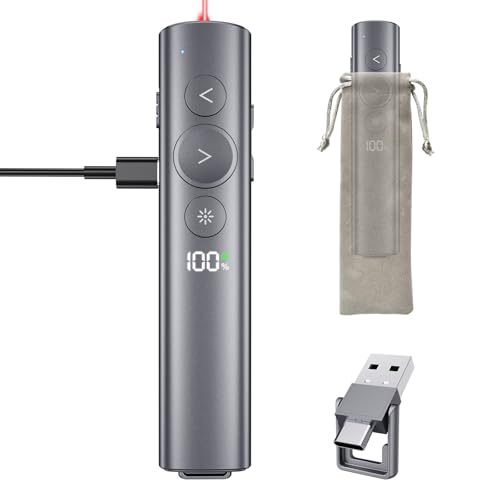
IPEVO Wireless Presenter - Best for Classroom
IPEVO’s presenter is tailored for educators, featuring a bright green laser, a built‑in 30‑minute timer, and a USB receiver that works with most classroom computers. The range extends to 25 ft, allowing teachers to move around the room freely. Battery life reaches nine months on a single AAA. Additional buttons let you switch between slides and trigger a black screen, useful for managing student focus.
Reasons to buy
- [Dual USB‑A & USB‑C Receiver with Magnetic Storage] Built-in 2‑in‑1 USB receiver supports
- [Rechargeable & Long‑Lasting Battery with Power Indicator] Powered by a built‑in rechargea
- [Smooth Slide Control & Multi‑Function Buttons] Responsive page up/down, volume adjustment
- [Stable Wireless Connection & Long Range] 2.4GHz wireless technology provides a reliable c
- [Lightweight, Ergonomic & Plug‑and‑Play] Slim, comfortable design fits naturally in hand.
What to look for
What to consider
When selecting a wireless presenter, start by checking compatibility with your operating system and whether you prefer Bluetooth or a USB dongle. Bluetooth offers a cleaner setup without a receiver, but a dongle can be more reliable in crowded wireless environments. Next, consider the laser color; green lasers are more visible on dark backgrounds, while red lasers are sufficient for bright rooms.
What to consider
Battery type and life are also key. Rechargeable units reduce waste, but many presenters still use standard AAA or AA cells that are easy to replace. Finally, think about extra features such as on‑screen timers, volume control or customizable buttons, which can streamline your workflow and reduce the need for additional remote controls. By matching these criteria to your typical presentation setting, you’ll find a presenter that feels natural and dependable.
FAQs
Yes, most modern presenters use Bluetooth or a plug‑and‑play USB receiver that works with macOS out of the box. Just pair or plug in and you’re ready.
The Logitech Spotlight offers up to 30 hours of use on a single AAA battery, making it the longest‑lasting option in this list.
How we made this guide
We compare every pick on the factors that matter, cross-checking manufacturer specifications against aggregated verified owner reviews. We rank independently and never take payment for placement. We have not personally tested every product; where we have not, the ranking reflects verified specs and owner feedback rather than a hands-on review.
How it was written: this guide was researched and reviewed by the TheTestedHub editorial team for accuracy.
Affiliate disclosure: TheTestedHub is reader-supported. When you buy through links on our site, we may earn a commission at no extra cost to you.
Related guides

Soundcore Liberty 4 NC Review (2026)

Sony WF-1000XM5 Review (2026): 6 Months of research, Still the

Samsung Galaxy Buds FE Review (2026): Best Sub- Earbuds We’ve

Samsung Galaxy Buds 3 Pro Review (2026)

Jabra Elite 10 Gen 2 Review (2026): The Most Comfortable

Nothing Ear (2) Review (2026): The Best Looking Earbud Is

Bose QuietComfort Earbuds II Review (2026): The Quietest
