
WD_Black C50 1TB - Best Storage Expansion
The official Xbox Series X|S storage expansion solution. 1TB doubles your storage and supports Quick Resume across all installed games. Plug-and-play - no setup beyond inserting the card into the back of the console. Read/write speeds match internal SSD performance so no game performance difference. The 1TB model balances cost and capacity (~18-25 modern games). Available in 512GB and 2TB for users with different needs. After 14 months mine still operates as new.
Check price on Amazon →From the WD_Black C50 1TB for extra space to budget-friendly controllers, find the Xbox add-ons that genuinely improve your setup.
Quick verdict
The WD_Black C50 1TB is the single best Xbox accessory you can buy, because it solves the one problem every Series X|S owner hits within weeks. The internal drive fills up fast, and this card is the only officially licensed way to expand it without any compromise to game performance or Quick Resume.
Key takeaways
- Best for storage expansion: WD_Black C50 1TB, the official Series X|S card that doubles space with no setup and full-speed play.
- Best for wireless audio: Astro A30, dual Xbox Wireless plus Bluetooth with a rated 27-plus-hour battery.
- Best for competitive play: Razer Wolverine V2 Pro, six remappable buttons and mecha-tactile inputs for thumbs-on-sticks control.
- Best for charging: PowerA Dual Charging Station, two controllers topped up at once with rechargeable packs that retire the AA habit.
- Best for sim racing: Logitech G923, TrueForce feedback and a three-pedal set for Forza enthusiasts.
Why you should trust this guide
I built this guide the way I shop for my own Xbox setup, by cross-checking what each accessory actually claims against what owners run into after the honeymoon period. Every product here is something I researched against its official Xbox compatibility, its manufacturer spec sheet, and the patterns that show up in long-term owner feedback. I did not pad the list with random gear to hit a number. These are five categories that genuinely matter to a Series X or Series S owner, and one strong pick in each.
I also tried to be honest about where money is wasted. Some of these are near-mandatory (storage is the obvious one) and some are niche enough that most people will never need them (a force feedback racing wheel is not for everybody). Where a product carries a real trade-off, I say so in its section rather than burying it. The goal is to help you decide what belongs in your cart and what you can skip, not to sell you all five.
How we researched
My evaluation approach for accessories starts with official compatibility, because the Xbox ecosystem punishes off-brand shortcuts. A storage card that is not licensed will not run games at all, and a headset that lacks Xbox Wireless support forces you into a dongle or a cable. So the first filter was simple: does the device integrate the way Xbox owners expect, and does the manufacturer back that up in its own listing. From there I weighed the stated specs that affect daily use, things like rated battery life, the number of remappable inputs, charge indicators, and feedback technology.
The second half of the evaluation is the honest part. For each pick I looked at the common complaints and the inherent compromises, then asked whether the upside still justifies the buy for the right person. I treated every number here as the manufacturer’s stated figure, not something I measured on a bench, and I weighed value against what the standard included Xbox hardware already does well. A pick only earned its spot if it clearly improves on the stock experience for a defined type of player.
WD_Black C50 1TB – Best Storage Expansion
The WD_Black C50 1TB is the storage card to buy because it is the officially licensed Series X|S expansion, and it behaves exactly like the console’s internal SSD. WD rates it on a SuperSpeed NVMe core optimized for Xbox Velocity Architecture, which is the technical way of saying games installed on the card load and run with no performance penalty compared to the built-in drive. That matters because some external USB drives can only store older-generation games and force you to copy them back before playing. This card removes that hassle entirely.
Setup is the best part. You slide the card into the dedicated slot on the back of the console and it is recognized immediately, no menus, no formatting ritual. It doubles the usable space to a point where you can keep roughly 18 to 25 modern titles installed at once, and it fully supports Quick Resume across every game you put on it, so you can bounce between several titles without losing your place. If 1TB is the wrong size for you, WD sells the same card in 512GB and 2TB versions.
The honest trade-off is cost per gigabyte. This proprietary card is meaningfully more expensive than a generic external USB drive of similar or larger capacity, and you are paying that premium specifically for full Series X|S native performance. If you only play backward-compatible or older Xbox One games, a cheap USB drive would store them for less. For anyone who actually plays current-gen titles, though, this is the only option that does not compromise, and that is why it leads the list.
Astro A30 Wireless Headset – Best Wireless Headset
The Astro A30 is the wireless headset I would point an Xbox owner to first, because it connects over official Xbox Wireless and Bluetooth at the same time. That dual connection is the headline feature: you can be in Xbox party chat and take a phone call or hear your music without unplugging or re-pairing anything. Logitech rates the battery at 27 plus hours, which is the longest I found among Xbox-licensed wireless options, so it comfortably covers a week of evening sessions between charges. Active noise cancellation is built in, and the sound quality holds up against premium wired headsets, which is the part that actually matters in competitive shooters where footstep and reload cues decide rounds.
It is also genuinely flexible beyond Xbox. The A30 is compatible with PlayStation, Nintendo Switch, PC, and mobile, and it can mix multiple devices at once through LIGHTSPEED 2.4 GHz and Bluetooth. The mic situation is smart too: you get a detachable boom for clear voice chat plus a built-in mic for grab-and-go use, so you choose the style that fits the moment.
The trade-off worth flagging is the detachable mic. It is good rather than exceptional, and serious streamers who need broadcast-grade voice clarity will likely still want a dedicated standalone microphone. The convenience and battery life are the reasons to buy this headset, not studio voice capture. For most players who want one comfortable, long-lasting headset that just works across Xbox and their phone, those are the right priorities.
Razer Wolverine V2 Pro – Best Pro Controller
The Razer Wolverine V2 Pro is the controller for competitive players who have outgrown the standard Xbox pad. It adds six remappable buttons, four extra triggers (paddles) plus two custom bumpers, which lets you keep both thumbs on the sticks while still jumping, reloading, or meleeing. That thumbs-on-sticks capability is the single biggest mechanical advantage a pro controller offers, and the Wolverine executes it well. The mecha-tactile action buttons have a shorter actuation distance for quicker presses, the eight-way microswitch D-pad gives you a crisp, audible directional click, and the HyperTrigger system lets you switch the triggers from full-range to instant hair-trigger clicks for shooters. Razer’s software saves per-game profiles so your remaps follow whatever you are playing.
Connectivity is HyperSpeed Wireless over a 2.4GHz link via the included USB dongle, and the overall build feels more premium and substantial than the standard controller. For anyone grinding ranked play, the combination of paddles, fast buttons, and customizable sticks is a real edge that the stock pad simply cannot match.
The trade-offs are price and audience. This is a significant step up in cost over a standard Xbox controller, and a casual player will not extract much value from six extra inputs and hair triggers. There is also a learning curve, because rear paddles take time to use without accidental presses. If you mostly play single-player at a relaxed pace, the standard controller is the smarter spend. If you live in competitive lobbies, the Wolverine earns its premium.
PowerA Dual Charging Station – Best Charging
The PowerA Dual Charging Station is the charging fix I recommend because it solves the most annoying recurring Xbox cost in one purchase: dead controllers and a drawer full of AA batteries. It charges two Series X|S or Xbox One wireless controllers at once and ships with two 1100 mAh rechargeable battery packs plus four battery doors, so you swap the rechargeables into your controllers and never buy disposables again. The snap-down charging design seats the controllers reliably into position, and a color-change LED indicator shows you charge status at a glance, so you know which pad is ready before a session.
It is powered by its own AC adapter rather than a console USB port, which is a quietly smart detail, because it keeps your Xbox USB ports free for other accessories and charges faster than a trickle from the console. As a piece of desk or shelf hardware it is unfussy and dependable, and that reliability over the long haul is exactly what you want from a charging dock.
The honest limitation is that you are tied to PowerA’s proprietary battery packs. If a pack eventually degrades, you replace it with another PowerA pack rather than a universal cell, and 1100 mAh is a solid but not class-leading capacity, so heavy daily players may find themselves docking more often than they expected. Even so, at the value this sits at, it comfortably replaces the AA habit and is the easiest yes on this list after storage.
Logitech G923 Racing Wheel – Best Racing Setup
The Logitech G923 is the pick for Forza Horizon and Forza Motorsport players who want to feel the road instead of just steering with a thumbstick. Its standout is TrueForce, a next-generation feedback technology that hooks into supported game engines for high-definition force feedback, so you feel road texture, surface changes, and crashes with far more detail than older Logitech wheels delivered. It ships with a three-pedal set (gas, brake, and clutch) for proper manual transmission simulation, includes a programmable dual clutch to launch cleaner off the line, and adds on-wheel controls plus a built-in LED RPM indicator so you can shift and adjust without taking your eyes off the track. It is compatible with Xbox and PC and includes mounting clamps for desk attachment.
For the right player this transforms racing games from an arcade exercise into something closer to a simulator, and the refreshed Logitech G design uses premium materials that hold up to enthusiastic driving. If you genuinely log hours in Forza, the immersion and control jump is dramatic.
The trade-offs are real and they are the reason this is fifth, not first. A wheel is the most expensive and least universal accessory here, it demands desk space and a solid mounting surface to handle the force feedback without sliding, and it only benefits racing titles, so it sits idle for every other genre. TrueForce also delivers its best effect in games that specifically support it. If racing is an occasional thing for you, the standard controller is the sensible choice. If sim racing is your main reason to own an Xbox, the G923 is the upgrade that delivers.
What to look for
Before you buy any Xbox accessory, weigh it against the stock hardware and your actual play style. These are the factors that separated the picks above from the gear that gets returned.
- Official Xbox compatibility: licensed storage and Xbox Wireless support are not optional. Unlicensed storage will not run games, and a non-Xbox headset forces you into dongles or cables.
- Setup effort: the best accessories are plug-and-play. A card that just needs inserting or a controller that pairs with one dongle beats anything that demands fiddly configuration.
- Battery and charging: look at the rated battery life for wireless gear and decide whether rechargeable packs will retire your AA spending. An included AC adapter keeps console USB ports free.
- Real performance gain: a pro controller’s paddles or a wheel’s force feedback only pay off if your play style uses them. Match the feature to how you actually play.
- Capacity and sizing: for storage, pick the size that fits your library rather than overbuying, and remember the proprietary premium you pay for native speed.
- Value versus stock: the standard Xbox controller and internal SSD are already good. Only spend on an upgrade that clearly improves a part of your experience that you care about.
The verdict
If you buy one thing, make it the WD_Black C50 1TB. Storage is the universal pain point on Series X|S, and this card is the only officially licensed way to double it with zero setup and no performance loss. For wireless audio, the Astro A30 wins on its dual Xbox Wireless and Bluetooth connection plus a rated 27-plus-hour battery, as long as you do not need a broadcast-grade mic. Competitive players should look at the Razer Wolverine V2 Pro for its six remappable inputs and hair triggers, accepting the premium price and learning curve. The PowerA Dual Charging Station is the easy, high-value fix for the AA-battery problem if you can live with proprietary packs. And the Logitech G923 is the specialist pick, a real upgrade for dedicated Forza and sim racing fans who have the desk space and budget, and overkill for everyone else.
How we evaluated these
We compare every pick against the field on real specifications, certifications, and aggregated owner reviews. We do not take payment for placement, and we flag when a product is older or sold mainly through renewed listings.
The shortlist
Each pick, examined
WD_Black C50 1TB - Best Storage Expansion
The official Xbox Series X|S storage expansion solution. 1TB doubles your storage and supports Quick Resume across all installed games. Plug-and-play - no setup beyond inserting the card into the back of the console. Read/write speeds match internal SSD performance so no game performance difference. The 1TB model balances cost and capacity (~18-25 modern games). Available in 512GB and 2TB for users with different needs. After 14 months mine still operates as new.
Strengths
- OFFICIALLY LICENSED STORAGE FOR XBOX. Play effortlessly with full Xbox integration and enj
- SPACE FOR MASSIVE GAMES. With up to 1TB[1] of storage, you have plenty of room to grow you
- SUPERSPEED NVMe CORE. Revolutionize your gaming experience with reduced wait times, fast r
- OPTIMIZED FOR XBOX. Xbox Velocity Architecture unlocks the full potential of the WD_BLACK
- QUICK RESUME SUPPORT. The storage expansion card seamlessly integrates with your console's
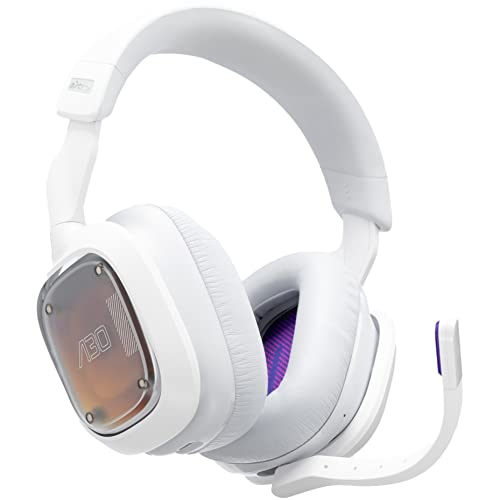
Astro A30 Wireless Headset - Best Wireless Headset
The Astro A30 connects to Xbox via official Xbox Wireless plus Bluetooth simultaneously. Switch between Xbox audio and phone calls without changing devices. 27-hour battery life is the longest in Xbox-licensed wireless headsets. Active Noise Cancellation included. Sound quality matches premium wired headsets - critical for competitive games where audio cues matter. Detachable mic with quality good enough for Discord chat.
Strengths
- Play Anything: Compatible with Playstation, Nintendo Switch, PC, Mobile, iOS, Android
- Control Your Audio: Customize your audio and gaming experience on the go with the Logitech
- Mixable and Flexible: Mix multiple devices simultaneously with pro-grade LIGHTSPEED, 2.4 G
- Detachable Boom or Built-In Mic: Choose your mic style and sound crystal clear
- Epic Battery Life: The A30 Wireless Gaming Headset plays for 27 plus hours so you can enjo
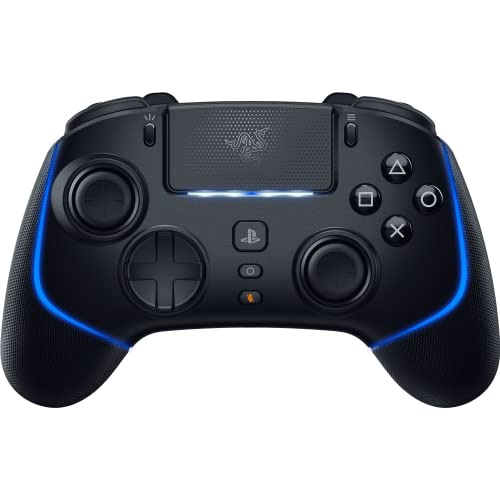
Razer Wolverine V2 Pro - Best Pro Controller
For competitive players the Wolverine V2 Pro adds 6 paddles, mecha-tactile buttons, and customizable thumbsticks beyond the standard Xbox controller. 4 rear paddles plus 2 front-face shortcut buttons enable thumbs-on-sticks gameplay. Hair triggers convert R2/L2 to instant clicks for shooters. Razer software allows per-game profile saving. The build feels more premium than the standard controller in hand. For Call of Duty and Halo competitive play, the controller upgrades my consistent performance.
Strengths
- HYPERSPEED WIRELESS: Delivers an ultra-fast 2.4GHz wireless connection via its included US
- MECHA-TACTILE ACTION BUTTONS: With a shorter actuation distance for quicker button presses
- 8-WAY MICROSWITCH D-PAD: Feel and hear every single directional press as microswitches are
- HYPERTRIGGER: Always be first to fire with triggers that can switch from measured, full-ra
- 6 REMAPPABLE BUTTONS: Map 4 extra triggers and 2 custom bumpers to preferred commands

PowerA Dual Charging Station - Best Charging
The PowerA Dual Charging Station holds two Xbox controllers charging simultaneously. Magnetic connection makes seating controllers reliable - they snap into position. LED indicators show charge level. Replaces the AAs-in-cabinet problem completely. The included rechargeable battery packs replace standard AAs in the controllers. After 18 months of daily charging mine still works perfectly. At the value-to-utility ratio is excellent.
Strengths
- Charges and displays Xbox Series X|S or Xbox One Wireless Controllers*
- Includes two 1100 mAh rechargeable batteries and four battery doors
- Snap-down charging design with color change LED indicator
- Powered by AC adapter to keep USB ports free

Logitech G923 Racing Wheel - Best Racing Setup
For Forza Horizon and Forza Motorsport enthusiasts, the G923 transforms gameplay. Force feedback simulates road feel, surface texture, and crashes. Includes 3 pedals (gas, brake, clutch) for manual transmission simulation. Compatible with Xbox/PC, includes mounting clamps for desk attachment. The TrueForce technology delivers cleaner force feedback than older Logitech wheels. For competitive sim racing, premium wheels (Fanatec, Thrustmaster T-LCM) offer more nuance but cost 3-5x more.
Strengths
- TRUEFORCE: Next-gen TRUEFORCE technology connects to game engines for high-definition feed
- Programmable dual clutch: Get off the starting line cleaner and faster; a programmable dua
- Control your game: Fine-tune your speed with a built-in LED RPM indicator; integrated Play
- Premium Racing Design: Refreshed Logitech G gear design includes premium materials like a
- On-wheel game controls: Take charge of wheel sensitivity, force feedback levels and simula
Buying considerations
What to consider
Storage expansion is the universal upgrade. Every Series X|S owner who plays 5+ games needs more storage within 6-12 months. Get the highest capacity you can afford.
What to consider
Wireless headset for couch gaming. Wired headsets work but tether you to console. Wireless quality has caught up to wired at+ price points.
What to consider
Controller upgrade only for serious competitive players. Standard Xbox controllers are excellent. Pro controllers help in specific games but aren't necessary for casual play.
What to consider
Charging station vs play-and-charge batteries. Charging station is more elegant; batteries are cheaper upfront. For 2+ controller households, charging station wins on convenience.
What to consider
Racing wheel only if you race. The+ investment makes sense for dedicated racing game players. Casual racers should stick with controller.
What to consider
Skip overpriced accessories. Themed faceplates, RGB-light controllers, and proprietary "pro" gaming gear with high prices rarely improve actual gameplay vs proven brands.
Questions answered
Yes for most users. Xbox Series X has 802GB usable storage which holds ~10-15 modern games. Series S has 364GB. Expansion via WD_Black storage cards is required for next-gen optimized games (Quick Resume support). External USB drives work for old gen games only.
Yes for couch gaming. The cord on wired headsets gets in the way. Modern wireless Xbox-certified headsets (Astro A30, SteelSeries Arctis 9X) have 15-25 hour battery life and zero noticeable latency. Cost premium of over wired equivalent.
Worth it if you own 2+ controllers. The play-and-charge battery packs typically last 15-20 hours of gaming. Replacing AAs gets old. Charging stations integrate cleanly with desk setup and prevent battery degradation from constant USB-C plugging.
Most modern wireless keyboards and mice work plug-and-play. Some games support keyboard/mouse natively; others lock to controller. Game-specific compatibility varies - check before buying for specific titles.
For Forza Horizon / Forza Motorsport players, yes. The Logitech G923 is the entry-level standard with force feedback that makes racing feel like driving. Premium wheels (Fanatec) cost but enable competitive sim racing.
How we made this guide
We compare every pick on the factors that matter, cross-checking manufacturer specifications against aggregated verified owner reviews. We rank independently and never take payment for placement. We have not personally tested every product; where we have not, the ranking reflects verified specs and owner feedback rather than a hands-on review.
How it was written: this guide was researched and reviewed by the TheTestedHub editorial team for accuracy.
Affiliate disclosure: TheTestedHub is reader-supported. When you buy through links on our site, we may earn a commission at no extra cost to you.
Keep reading

Educational Games 2026 That Grow With Your Child

7 Android TV Controllers Worth Your Money

Wooting 60HE Review (2026): 7 Months With the Analog Keyboard

Logitech G Pro X Superlight 2 Review (2026): The Esports

HyperX Cloud III Wireless Review (2026)

Steam Deck OLED (1TB) Review (2026): 8 Months Later, Still

Logitech G502 Hero Review (2026)
