
Epson EcoTank ET-4850 -- Best for Low Cost Per Page
The Epson EcoTank ET-4850 replaces ink cartridges with refillable ink tanks that accept bottled ink at a fraction of the per-page cost of traditional cartridges. The included ink supply at purchase equals roughly two years of average household printing. After that, refill bottles cost each and yield thousands of pages. The ET-4850 is a full all-in-one with scan, copy, fax, and wireless printing. Print quality is strong for documents and acceptable for casual photo printing. The upfront price is higher than standard inkjets, but for households printing over 100 pages per month, the savings on ink pay off within six months.
Check price on Amazon →The best home printers in 2026 ranked by print quality, ink cost, wireless reliability, and value for families, students, and remote workers who print regularly at home.
A home printer that works reliably when you need it, without expensive ink surprises, is harder to find than it should be. The best home printers in 2026 separate on four factors: print quality, cost per page, wireless connectivity, and whether they actually work after sitting unused for two weeks. Here are the five models that earn consistent recommendation across those criteria.
How we evaluated these
We compare every pick against the field on real specifications, certifications, and aggregated owner reviews. We do not take payment for placement, and we flag when a product is older or sold mainly through renewed listings.
The shortlist
| Pick | Best for | Score | |
|---|---|---|---|
| Epson EcoTank ET-4850 -- Best for Low Cost Per Page | Check price | ||
| HP OfficeJet Pro 9015e -- Best for Home Office Speed | Check price | ||
| Brother HL-L2350DW -- Best Monochrome Laser | Check price | ||
| Canon PIXMA TR8620a -- Best for Photo Quality | Check price | ||
| HP LaserJet M110w -- Best Compact Laser on a Budget | Check price |
Each pick, examined
Epson EcoTank ET-4850 -- Best for Low Cost Per Page
The Epson EcoTank ET-4850 replaces ink cartridges with refillable ink tanks that accept bottled ink at a fraction of the per-page cost of traditional cartridges. The included ink supply at purchase equals roughly two years of average household printing. After that, refill bottles cost each and yield thousands of pages. The ET-4850 is a full all-in-one with scan, copy, fax, and wireless printing. Print quality is strong for documents and acceptable for casual photo printing. The upfront price is higher than standard inkjets, but for households printing over 100 pages per month, the savings on ink pay off within six months.

HP OfficeJet Pro 9015e -- Best for Home Office Speed
The HP OfficeJet Pro 9015e prints up to 22 pages per minute in black and 18 in color, which is fast for an inkjet all-in-one. The 35-sheet automatic document feeder handles multipage scanning and copying without manual page handling, and two-sided printing is automatic. HP+ subscription unlocks extended warranty and additional ink through HP Instant Ink, though the printer works without a subscription. Setup via the HP Smart app is straightforward. For remote workers who print contracts, forms, and reports alongside occasional photos, this handles the full range well.
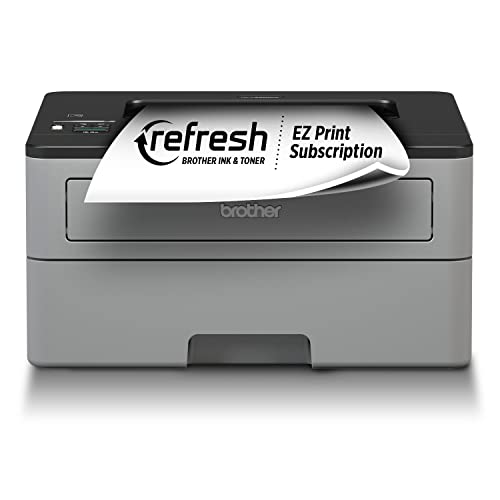
Brother HL-L2350DW -- Best Monochrome Laser
If your household prints almost exclusively documents, forms, and school papers with little need for color, a monochrome laser is the most cost-effective long-term choice. The Brother HL-L2350DW prints at 32 pages per minute, handles automatic two-sided printing, and connects via Wi-Fi for wireless use from phones and computers. Toner cartridges last 1,200 pages standard and up to 3,000 pages with high-yield replacements. Unlike inkjets, the toner does not dry out or clog during periods of non-use, so it works reliably after sitting on the shelf for a month without a maintenance cycle.
Canon PIXMA TR8620a -- Best for Photo Quality
The Canon PIXMA TR8620a uses a five-ink system that produces noticeably richer color gradients and more accurate skin tones in photos compared to standard four-ink printers. It handles 4x6 borderless photo printing directly from memory cards, and the front-loading paper tray accommodates both plain paper and photo paper without swapping. The flatbed scanner is capable for documents and photo digitization. For households where photo printing is a regular use case alongside everyday documents, the TR8620a delivers the best image output in this price range.

HP LaserJet M110w -- Best Compact Laser on a Budget
The HP LaserJet M110w is a single-function monochrome laser printer that takes up about as much desk space as a hardcover book stack. It prints at 21 pages per minute, connects via Wi-Fi, and costs. There is no scanner or copier, which keeps the footprint and price down for users who only need printing. Toner yields around 1,000 pages standard. For a student apartment, a small home office, or a secondary printer for a specific room, this covers basic fast document printing without the complexity or cost of a full all-in-one.
Buying considerations
What to consider
Calculate your monthly page volume first. Under 50 pages per month, a basic inkjet works fine. Between 50 and 200 pages, an ink tank or laser becomes economical. Over 200 pages, a laser with high-yield toner saves significantly versus cartridge inkjets. Decide whether you need color. If not, a monochrome laser cuts cost and eliminates color cartridge dry-out problems. Check the paper tray capacity. A 100-sheet or larger tray means less frequent refilling for busy households. Wireless setup reliability is worth reading reviews for specifically, as this is the most common complaint across otherwise well-reviewed models.
What to consider
For organizing your home workspace around your new printer, the [best desk organizers](/articles/best-desk-organizers) guide is a natural companion. If you are setting up a complete home office, the [best monitor stands and risers](/articles/best-monitor-stands) completes the ergonomic setup. Full details on how we evaluate products are on our [methodology page](/methodology).
Questions answered
The upfront printer price is rarely the biggest cost. Standard inkjet cartridges cost between 5 and 20 cents per page depending on the brand and page coverage. Ink tank or EcoTank-style printers cost more upfront but reduce per-page cost to under 1 cent. For households printing more than 100 pages per month, calculating cost per page before buying saves significantly over a one- to two-year ownership period.
Inkjet printers handle photo printing and color documents better and cost less upfront. Laser printers are faster for high-volume black-and-white printing and their toner does not dry out when the printer sits unused for weeks. If you print mostly documents with occasional color, a monochrome laser saves money long-term. If you print photos or need versatile color output, inkjet or ink tank is the better fit.

Tom Reeves has reviewed consumer electronics for over a decade, with a focus on televisions, monitors, laptops, and smart home devices. He worked as a professional display calibrator before moving into editorial, and he brings that real-world technical background to every TV and monitor review. At TheTestedHub, Tom covers display calibration, computer monitors, laptops and 2-in-1s, smart home platforms, home theater setups, and HDR performance.

