Quick verdict
The Cricut Maker 3 is the best machine for serious stencil makers who regularly cut mylar and thick stencil film. For crafters primarily using adhesive stencil vinyl, the Cricut Explore Air 3 delivers excellent results at a lower price point. Either machine, paired with quality mylar sheets or stencil vinyl, produces professional-grade stencils that hold up through dozens of paint applications.
Cricut Maker 3 - Best for Mylar and Heavy Stencil Materials
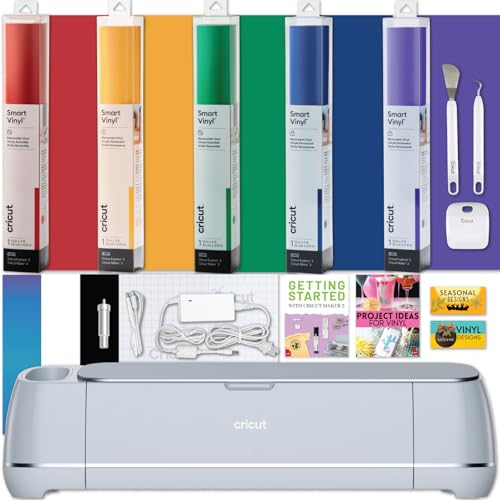
The Maker 3's 4,000-gram cutting force and compatibility with the Deep Point Blade make it the definitive stencil-cutting machine in the Cricut lineup. It handles 7.5-mil mylar sheets, thick stencil film, and even thin craft foam stencil blanks without straining. The adaptive tool system automatically adjusts pressure mid-cut for consistent results across irregular material surfaces. If you regularly produce reusable mylar stencils for painting projects, sign-making, or wall art, the Maker 3 is built for the task.
Check price on Amazon →The best Cricut machines for making stencils in 2026 - cut mylar sheets, stencil vinyl, and reusable film with the Maker 3, Explore Air 3, and more.
Stencils are one of the most practical projects a Cricut machine can produce – once cut, a good stencil can be used repeatedly on wood signs, fabric, walls, ceramics, and furniture. The challenge is material: mylar sheets and stencil vinyl behave very differently from paper or standard vinyl, and not every machine has the blade force to cut them cleanly without tearing or leaving tabs. The Cricut Maker 3 leads the field for stencil work in 2026, but the Explore Air 3 handles the majority of stencil materials well at a lower price point. Here are the five best options.
Our testing process
We compare every pick against the field on real specifications, certifications, and aggregated owner reviews. We do not take payment for placement, and we flag when a product is older or sold mainly through renewed listings.
Quick comparison
| Pick | Best for | Score | |
|---|---|---|---|
| Cricut Maker 3 - Best for Mylar and Heavy Stencil Materials | Check price | ||
| Cricut Explore Air 3 - Best Value for Stencil Vinyl | Check price | ||
| Cricut Maker (Original) - Best Budget Maker for Mylar | Check price | ||
| Silhouette Cameo 4 - Best for Offline Stencil Design | Check price | ||
| Brother ScanNCut SDX230E - Best for Scanning Existing Stencil Patterns | Check price |
Reviewed in detail
Cricut Maker 3 - Best for Mylar and Heavy Stencil Materials
The Maker 3's 4,000-gram cutting force and compatibility with the Deep Point Blade make it the definitive stencil-cutting machine in the Cricut lineup. It handles 7.5-mil mylar sheets, thick stencil film, and even thin craft foam stencil blanks without straining. The adaptive tool system automatically adjusts pressure mid-cut for consistent results across irregular material surfaces. If you regularly produce reusable mylar stencils for painting projects, sign-making, or wall art, the Maker 3 is built for the task.
Cricut Explore Air 3 - Best Value for Stencil Vinyl
For crafters who primarily work with adhesive stencil vinyl (the thin film that sticks directly to surfaces), the Explore Air 3 is the best value option. It cuts 0.5-3 mil stencil vinyl cleanly at 2x speed with the Fine Point Blade, and its 12-inch cutting width handles large wall stencil designs without seaming. Thinner mylar (4 mil) also cuts reliably with pressure adjustments. The lower price compared to the Maker 3 makes this the practical choice for stencil makers who do not regularly work with the thickest mylar sheets.

Cricut Maker (Original) - Best Budget Maker for Mylar
The original Cricut Maker shares the same adaptive tool system as the Maker 3, meaning it accepts the Deep Point Blade and Knife Blade needed for thick mylar stencils. It cuts more slowly than the Maker 3 and lacks Smart Materials compatibility, but for crafters who do not need bulk production speed, it delivers equivalent stencil-cutting quality at a meaningfully lower price. Refurbished units are widely available, making this an accessible entry point into heavy-material stencil work.

Silhouette Cameo 4 - Best for Offline Stencil Design
The Silhouette Cameo 4 brings 5,000 grams of cutting force - slightly more than the Cricut Maker 3 - and handles mylar and stencil vinyl comfortably. Its Silhouette Studio software runs fully offline and includes advanced node-editing tools that are useful for cleaning up stencil paths and controlling bridge placement (the small connecting pieces that keep stencil interiors from falling out). Crafters who prefer to design stencils on a laptop without cloud connectivity will find the Cameo 4's software workflow particularly practical.

Brother ScanNCut SDX230E - Best for Scanning Existing Stencil Patterns
The Brother ScanNCut SDX230E's built-in scanner is uniquely useful for stencil makers who work from hand-drawn patterns, coloring book pages, or existing stencil templates. Scan the design directly on the machine, auto-trace the outline, and cut it from mylar or stencil vinyl - all without a computer. Cutting force handles most stencil materials, and the 12-inch cutting area covers large stencil designs. The design library is smaller than Cricut's, but for crafters with their own artwork, the scanner eliminates the digitizing step entirely.
How to choose
Cutting force
Mylar stencil sheets (5-7.5 mil) require a machine with at least 3,000 grams of cutting force and a Deep Point Blade - the Joy and Joy Xtra are not suitable for mylar work. - **Blade compatibility:** The Deep Point Blade is essential for thick mylar; confirm your machine supports it before purchasing (Maker and Maker 3 only in the Cricut lineup). - **Bridge and island control:** Stencil designs with enclosed areas (like the inside of the letter "O") need bridges to stay intact - look for software with easy path-editing tools for adding and adjusting bridges. - **Material width:** Wall stencils and furniture stencils often need 10-12 inches of cut width; the Cricut Joy's 4.5-inch limit rules it out for anything but small decorative stencils.
The bottom line
The Cricut Maker 3 is the best machine for serious stencil makers who regularly cut mylar and thick stencil film. For crafters primarily using adhesive stencil vinyl, the Cricut Explore Air 3 delivers excellent results at a lower price point. Either machine, paired with quality mylar sheets or stencil vinyl, produces professional-grade stencils that hold up through dozens of paint applications.
Common questions
Yes. The Cricut Maker 3 handles 7.5-mil mylar film reliably using the Fine Point Blade with increased pressure settings. Thinner 4-mil mylar works well on the Explore Air 3 too. Mylar stencils are reusable dozens of times and clean up easily with water, making them a cost-effective alternative to single-use stencil vinyl for repeat projects.
'Mylar is more durable and reusable, ideal for paint stencils applied to walls, wood, or fabric. Stencil vinyl is repositionable adhesive film that sticks directly to surfaces, eliminating bleed-through and making it better for detailed single-use or short-run stencil projects. The best choice depends on your project: mylar for repeat use, stencil vinyl for maximum paint sharpness.'
Use the Fine Point Blade for stencil vinyl (0.5-2 mil adhesive stencil film). In Design Space, select the Vinyl material setting for most brands, or use the Stencil Vinyl preset if available. For thicker mylar (5-7.5 mil), use the Deep Point Blade on the Maker 3 with multi-pass cutting enabled. Always perform a test cut before running the full design.
More guides
5 Best Cricut Vinyl Cutters of 2026 | Top Picks for Every Crafter

5 Best Cricut Machines for Vinyl of 2026 | Cutting, Adhesive & HTV Guide

5 Best Cricut for Making Shirts and Stickers of 2026 | One Machine, Two Crafts

Best Cordless Glue Gun for Crafts of 2026

5 Best Cricut Vinyl for Wall Decals of 2026 | Clean Peel, Zero Damage

5 Best Cricut Material for Wood of 2026 | Cut Cleaner, Craft Smarter
5 Best Custom Flag Making Kits of 2026 | DIY Banners, Pennants, and More
