Quick verdict
For budget gaming, the **AOC C24G1A** is the clear winner at and FreeSync Premium at that price is remarkable. For users who want a bigger screen without spending more, the **Acer ED270R** gives you 27 inches at. If you just want a reliable, no-fuss daily driver from a name brand, the **Samsung C27F390F** delivers. And if eye comfort is a priority, the **ASUS VP249QGR** packs 144Hz and
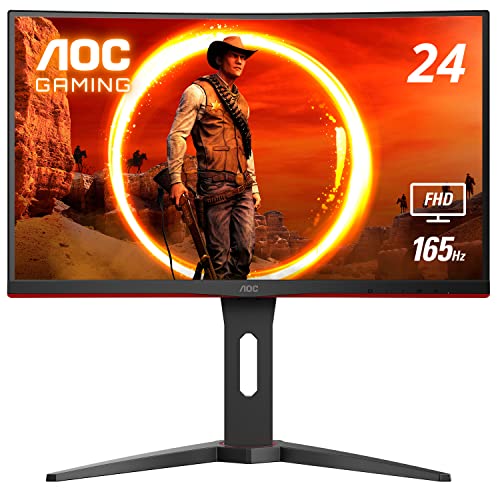
AOC C24G1A - Best Budget Curved for Gaming
The AOC C24G1A punches well above its price tag. A 165Hz VA panel with 1ms MPRT response time and AMD FreeSync Premium means you're getting legitimate gaming monitor specs at a budget price. The 1500R curve is immersive at 24 inches and works well at standard desk viewing distances.
Check price on Amazon →A tight budget doesn't mean settling for a flat, boring screen. These five curved monitors prove you can get an immersive, well-performing display without spending more thancurrent pricing.
Curved monitors used to command a significant price premium over flat alternatives. That’s no longer true. In 2026, you can get a genuine curved panel – with a proper 1500R or 1800R curve – for well. These five monitors prove that budget-friendly and boring aren’t the same thing.
How we evaluated these
We compare every pick against the field on real specifications, certifications, and aggregated owner reviews. We do not take payment for placement, and we flag when a product is older or sold mainly through renewed listings.
The shortlist
| Pick | Best for | Score | |
|---|---|---|---|
| AOC C24G1A - Best Budget Curved for Gaming | Check price | ||
| Acer ED270R - Best Budget 27-Inch Curved | Check price | ||
| Samsung C27F390F - Best Brand Name Budget Pick | Check price | ||
| Philips 241E1SC - Most Affordable Curved Option | Check price | ||
| ASUS VP249QGR - Best Eye-Care Gaming Budget Pick | Check price |
Each pick, examined
AOC C24G1A - Best Budget Curved for Gaming
The AOC C24G1A punches well above its price tag. A 165Hz VA panel with 1ms MPRT response time and AMD FreeSync Premium means you're getting legitimate gaming monitor specs at a budget price. The 1500R curve is immersive at 24 inches and works well at standard desk viewing distances.
Strengths
- 165Hz VA panel - outstanding gaming specs for the price
- 1ms MPRT response time
- AMD FreeSync Premium
- 1500R curve is immersive without being extreme
Drawbacks
- 24 inches feels small if you sit more than 30 inches away
- VA panel has typical off-axis color limitations
- Stand is height-fixed (tilt only)
Acer ED270R - Best Budget 27-Inch Curved
If you want a larger screen without spending more, the Acer ED270R gives you 27 inches of curved FHD at. The 1800R curve feels comfortable at desk distance, and 75Hz is a meaningful step up from 60Hz for general use and casual gaming. Acer's build quality is reliable and the warranty is solid.
Strengths
- 27-inch screen at a genuinely budget price
- 1800R curve - comfortable and immersive
- 75Hz - smoother than base 60Hz panels
- AMD FreeSync support
Drawbacks
- 1080p looks softer than QHD at 27 inches
- Basic tilt-only stand
- No USB hub or advanced connectivity

Samsung C27F390F - Best Brand Name Budget Pick
Samsung's C27F390F is a reliable, widely available 27-inch FHD curved monitor that consistently earns strong user reviews. Samsung's VA panel technology delivers the deep blacks and high contrast ratio that make games and movies look genuinely good - even at this price. It's a safe, proven pick from a trusted brand.
Strengths
- Samsung VA panel quality - deep blacks, punchy contrast
- Widely available with good retailer support
- Plug-and-play ease with consoles and PCs
- Clean aesthetic without distracting design
Drawbacks
- 60Hz only - bottom of the refresh rate range
- No adaptive sync
- Tilt-only stand

Philips 241E1SC - Most Affordable Curved Option
At the Philips 241E1SC is the entry point for curved monitor ownership. It's a 24-inch FHD panel with a proper curved display, flicker-free backlight, and Philips LowBlue Mode for eye comfort. It's not a gaming monitor and won't wow you with specs, but for everyday use and media consumption it's perfectly capable.
Strengths
- Lowest price of the five picks
- Flicker-free backlight for comfortable viewing
- Philips LowBlue Mode for eye strain reduction
- VESA mountable for wall or arm setups
Drawbacks
- 75Hz only - not for competitive gaming
- Limited connectivity (HDMI + VGA)
- Basic stand with tilt only

ASUS VP249QGR - Best Eye-Care Gaming Budget Pick
ASUS's VP249QGR combines 144Hz gaming performance with the brand's Eye Care suite (flicker-free, low blue light) in a compact 24-inch package. The IPS panel - unusual at this budget tier - delivers better colors and viewing angles than the VA competition at similar prices, making it a strong all-rounder.
Strengths
- IPS panel at a budget price - better colors than VA alternatives
- 144Hz with ASUS Eye Care suite
- Adaptive-Sync / FreeSync compatible
- Slim bezels and clean design
Drawbacks
- IPS contrast is lower than VA picks - mediocre in dark rooms
- 24 inches is limiting for productivity multitasking
- Curve is gentle compared to VA alternatives
Buying considerations
Curve radius
Budget monitors commonly use 1500R or 1800R curves. 1500R is more pronounced and feels more immersive; 1800R is gentler and more versatile for mixed use. Both are comfortable.
Refresh rate
Even a step from 60Hz to 75Hz makes scrolling and general motion noticeably smoother. For gaming, aim for 144Hz or 165Hz if your budget allows - the AOC C24G1A and ASUS VP249QGR both hit 144Hz+.
Panel type
VA panels dominate the budget curved market and offer excellent contrast for the money. IPS panels are rarer at this price but worth it if color accuracy and wide viewing angles matter to you.
Stand flexibility
Budget monitors almost universally ship with tilt-only stands. If you need height adjustment, budget an extra for a VESA monitor arm - most budget curved monitors support VESA 75x75 or 100x100 mounting.
Final word
For budget gaming, the **AOC C24G1A** is the clear winner at and FreeSync Premium at that price is remarkable. For users who want a bigger screen without spending more, the **Acer ED270R** gives you 27 inches at. If you just want a reliable, no-fuss daily driver from a name brand, the **Samsung C27F390F** delivers. And if eye comfort is a priority, the **ASUS VP249QGR** packs 144Hz and
Questions answered
You can get a solid curved monitor for in 2026. At that price you're mostly looking at 24-inch 1080p panels with 60-144Hz. Spending unlocks 27-inch panels and higher refresh rates. Below the build quality and panel quality tend to drop significantly.
Budget monitors from established brands like AOC, Acer, Samsung, and Philips are generally well-made and will last 4-6 years under normal use. Very cheap no-name monitors can have inconsistent panels and weaker warranty support - sticking to known brands even in the budget tier is worth it.
24 inches is ideal if you sit close to your monitor - within 24-30 inches. The curve effect is subtle at 24 inches but the size feels right at normal desk distances. If you sit further back, 27 inches is noticeably better for immersion.

Tom Reeves has reviewed consumer electronics for over a decade, with a focus on televisions, monitors, laptops, and smart home devices. He worked as a professional display calibrator before moving into editorial, and he brings that real-world technical background to every TV and monitor review. At TheTestedHub, Tom covers display calibration, computer monitors, laptops and 2-in-1s, smart home platforms, home theater setups, and HDR performance.
Keep reading

LG UltraGear 27GR95QE Review (2026): 6 Months on the OLED

Dell UltraSharp U2723QE Review (2026): The Best 27-Inch 4K Office Monitor

LG UltraFine 27UQ850V 4K Monitor Review (2026): IPS Black, Tested 7 Months

BenQ PD2725U Review (2026): The 27-Inch 4K Creator Monitor to Buy

ASUS ProArt PA279CRV Review (2026): The

5 Best Samsung Curved Monitors of 2026 | From Budget to Flagship

5 Best Curved Monitors for Your Eyes of 2026 | Ergonomic All-Day Comfort
