Quick verdict
For gaming, the **Samsung Odyssey G7 32"** is the standout - 240Hz, QLED, DisplayHDR 600, and Samsung's signature 1000R curve in one package. For value-conscious gamers, the **Odyssey G5 27"** is the smarter buy. Users who want 4K should look at the **UR590C** for value or the **Neo G8** for the full-premium experience. And for anyone just getting started with curved monitors, the **C27F390F** is the reliable, no-reg

Samsung Odyssey G7 32" - Best Flagship Gaming Curved Monitor
The Odyssey G7 is Samsung's most celebrated gaming monitor. It combines a 240Hz QHD VA panel with QLED quantum dot technology, delivering colors that are noticeably richer than standard VA panels. The 1000R deep curve is genuinely immersive for gaming. DisplayHDR 600 certification means HDR content actually looks as dramatic as it should.
From the 240Hz Odyssey G7 for gaming to the budget friendly UR590C for 4K, these Samsung curved monitors cover every need and budget.
Quick verdict
The Samsung Odyssey G7 32″ is the best pick for most people. It pairs a fast QHD VA panel with QLED quantum dot color and a deep 1000R curve, so games look richer and feel more immersive than they do on a standard flat panel, without jumping to the premium price of the Neo G8.
Key takeaways
- Best flagship gaming: Samsung Odyssey G7 32″, QLED color plus a 1000R curve and high refresh rate hit the sweet spot.
- Best mid-range: Samsung Odyssey G5 27″, flagship-adjacent feel with QHD, 165Hz and FreeSync at a friendlier price.
- Best 4K value: Samsung 32″ UR590C, UHD resolution and deep VA blacks for console and detail work over raw speed.
- Best budget: Samsung C27F390F, a reliable first curved monitor with a gentle 1800R curve for mixed use.
- Best premium: Samsung Odyssey Neo G8, 4K at 240Hz with Mini LED for buyers with the GPU to drive it.
Why you should trust this guide
I research monitors the way a buyer does, by reading the manufacturer spec sheets line by line and then weighing them against what owners actually report after the box is open. For this guide I focused on Samsung’s curved lineup specifically, because Samsung makes curved panels across every price tier and it is easy to overpay or underbuy if you only look at the headline refresh-rate number. I treat the listed specs as the manufacturer’s stated claims, not as numbers I personally captured on a meter, and I am clear throughout about where a spec is a claim versus a real-world expectation.
My goal is to help you match a panel to your actual setup rather than to sell you the most expensive option. A 240Hz 4K panel is genuinely impressive, but it is wasted money if your graphics card cannot push those frames, and a gentle 1800R curve is a better fit for a desk used mostly for spreadsheets than the aggressive 1000R curves built for gaming. I call out those trade-offs in every section so you can skip the ones that do not apply to you.
How we researched
I evaluated these five Samsung monitors against the criteria that matter most for a curved display: panel resolution and pixel density, refresh rate and response time, curve radius and how it suits gaming versus mixed use, color technology (plain VA versus QLED quantum dot versus Mini LED), HDR capability, and adaptive sync support for tear-free play. For each model I read the stated Amazon feature list and cross-referenced it against Samsung’s own product positioning, then judged whether the price tier and the spec set make sense together.
I weighted real-world fit heavily. A monitor that wins on a spec sheet can still be the wrong buy if the curve is too aggressive for productivity, if the resolution demands a GPU most people do not own, or if the refresh rate is more than a given panel size benefits from. Where owners consistently flag a limitation, such as VA panel motion smearing in dark scenes or the GPU cost of high-resolution gaming, I include it honestly rather than listing only the strengths.
Samsung Odyssey G7 32″ – Best Flagship Gaming Curved Monitor
The Odyssey G7 32″ is the curved monitor I would point most gamers toward first. It combines a fast QHD VA panel with QLED quantum dot technology, and that quantum dot layer is the part that matters most day to day, because it pushes color saturation and volume well past what a plain VA panel manages. Samsung’s listing leans on its high-end Quantum Matrix and Quantum HDR language, and even allowing for marketing gloss, the practical takeaway holds: this is a vivid, high-contrast panel built for games where color and depth count.
The 1000R curve is the other reason to pick it. At 32 inches that deep wrap genuinely pulls the edges of the screen into your peripheral vision, so fast scenes feel more enveloping than they do on a flat panel of the same size. Pair that with a high refresh rate and 1ms-class response, plus G-SYNC and FreeSync-style adaptive sync to keep the GPU and panel in step, and you get a smooth, tear-free picture in fast shooters and racing games. DisplayHDR 600-tier certification means HDR content has enough headroom to actually look dramatic rather than just slightly brighter.
The honest trade-off is that this is still a VA panel at heart, so in very dark, fast-moving scenes you can notice some black smearing as pixels transition, something IPS owners do not deal with to the same degree. The aggressive 1000R curve is also polarizing for desk work, since straight lines in spreadsheets and documents bow noticeably, and viewing angles are narrower than IPS. If most of your day is productivity rather than gaming, that deep curve is working against you.
Samsung Odyssey G5 27″ – Best Mid-Range Samsung Curved
The Odyssey G5 27″ is Samsung’s volume seller, and it earns that status by delivering most of the flagship gaming feel for noticeably less money. You get QHD resolution at 165Hz with the same aggressive 1000R curve as the pricier Odyssey models, plus AMD FreeSync to keep your monitor and graphics card in sync through fast scenes. Samsung pitches it on roughly 1.7x the pixel density of a basic 1080p panel and on eliminating lag for fast gameplay, and for the price tier that is a fair description of what you are getting.
This is the monitor I recommend to someone stepping up from a budget 1080p display who wants a real jump rather than a sidegrade. The move to QHD sharpens text and game detail, the 165Hz refresh rate makes motion visibly smoother, and the 1000R curve adds the same immersion the flagship offers. Most people making that upgrade describe the difference as transformative, and the spec set backs that up without asking you to pay flagship money.
The compromises are mostly about ceiling. At 27 inches QHD is sharp, but you do not get the larger canvas of the 32-inch G7, and 165Hz, while excellent, sits below the 240Hz tier if you chase the highest frame rates. As a VA panel it shares the same dark-scene smearing tendency and narrower viewing angles, and the deep 1000R curve is again better suited to gaming than to all-day office work.
Samsung 32″ UR590C – Best Samsung 4K Curved
The UR590C is the pick when you want Samsung quality at 4K resolution rather than at the highest refresh rate. Its 32-inch curved VA panel displays UHD content with Samsung’s trademark deep blacks and high contrast, and that extra pixel density (the listing cites roughly 1.7x the detail of lower-resolution panels) makes a real difference for sharp text, photo work, and finding fine detail in games. It supports HDR10 and AMD FreeSync, so it is not purely a productivity screen.
This is a strong fit for console players who want 4K gaming without buying a TV. Xbox Series and PS5 owners get native 4K output on a desk-friendly curved panel, with FreeSync helping keep motion clean. For someone who values resolution and contrast over raw frame rate, the UR590C delivers the best of both worlds: TV-grade resolution in a monitor form factor that sits comfortably on a desk.
The trade-off is speed. This panel prioritizes resolution, so its refresh rate sits well below the 165Hz and 240Hz gaming Odyssey models, which competitive players who care about high frame rates will feel immediately. Driving 4K also demands a capable graphics card, so a modest PC will struggle to hit high frame rates at native resolution. As with the other VA panels here, expect deep blacks paired with the usual VA caveats on fast dark-scene transitions and viewing angles.
Samsung C27F390F – Best Budget Samsung Curved
The C27F390F is Samsung’s long-running budget curved monitor, and it earns its reputation for reliability rather than for spec-sheet bragging rights. It runs a VA panel with Samsung’s characteristic deep blacks, and its 1800R curve is far more subtle than the aggressive 1000R curves on the Odyssey models. That gentler curve is exactly why I recommend it as a first curved monitor: it adds a touch of immersion without bowing straight lines enough to bother you during everyday work.
For a mixed-use setup where you browse, work, and game casually, this is a sensible entry point. Samsung leans on the basics in its listing, an Eye Saver Mode to cut blue light during long sessions and a slim profile that keeps the footprint tidy on a desk, and for the budget tier those are the right things to get right. It is the monitor I would hand to someone coming from a flat display who wants to try curved without committing real money.
The limitations are exactly what you would expect at this price. This is a 1080p-class panel with a standard refresh rate, so it is not a fast-gaming or high-resolution display, and gamers chasing high frame rates or detail-focused users wanting 4K should look up the lineup. Samsung’s own feature list here is thin and even pads with a bundled mouse pad mention, which tells you this is a value pick defined more by reliability than by standout performance.
Samsung Odyssey Neo G8 – Best Premium Flagship
The Odyssey Neo G8 is Samsung’s most capable curved monitor, and it is the pick for buyers who want no compromises and have the hardware to back it up. It combines 4K resolution with a 240Hz refresh rate, a pairing that until recently was rare, and it backs that with a 1ms response time and a deeply curved 32-inch panel. The result on paper is the sharpest, fastest curved gaming experience in Samsung’s range.
What sets it apart from the other panels here is Mini LED backlighting with many local dimming zones, which delivers true-black HDR performance that a standard VA backlight cannot match. Bright highlights can sit next to genuinely dark areas without the whole-screen glow you get from edge-lit panels, so HDR games and movies look far more convincing. For a high-end PC build paired with a top-tier graphics card, this is the curved monitor that shows off what the hardware can do.
The catch is the cost of entry on both fronts. Pushing 4K at 240Hz demands a serious, expensive graphics card, and without one you simply cannot feed the panel the frames it is built for, which makes this overkill for a mid-range PC. It is also the priciest option here by a wide margin, and Mini LED panels can show some blooming around bright objects on dark backgrounds despite the dimming zones. This is a flagship for buyers who can use every part of it, not a default recommendation.
What to look for
Match the monitor to your hardware and your desk first, then chase specs. These are the factors that should drive the decision.
- Resolution vs refresh rate: QHD at a high refresh suits most gamers, 4K rewards detail and console use but needs a strong GPU, and 4K at 240Hz demands a top-tier card.
- Curve radius: a deep 1000R curve maximizes gaming immersion, while a gentler 1800R is friendlier for spreadsheets and mixed productivity work.
- Panel and color tech: plain VA gives deep blacks on a budget, QLED quantum dot adds richer color, and Mini LED brings true-black local-dimming HDR at the top.
- Adaptive sync: FreeSync or G-SYNC compatibility keeps the GPU and panel in step to remove tearing in fast scenes.
- HDR capability: higher DisplayHDR tiers and Mini LED dimming make HDR content noticeably more dramatic than entry-level HDR labels.
- VA trade-offs: expect deep contrast but watch for dark-scene smearing and narrower viewing angles versus IPS panels.
- Size and your GPU: bigger and faster panels only pay off if your graphics card can actually drive them at native resolution.
The verdict
For most buyers the Samsung Odyssey G7 32″ is the one to get, because its QLED color, deep 1000R curve, and high refresh rate land the best balance of immersion and value in the lineup. If your budget is tighter, the Odyssey G5 27″ delivers most of that gaming feel for less and is the smartest mid-range step up from a basic 1080p display. Console players and detail-focused users who care more about resolution than raw speed should take the 32″ UR590C for its 4K VA panel. The C27F390F is the easy budget recommendation and the best first curved monitor thanks to its gentle 1800R curve. And if you have a top-tier GPU and want the absolute best, the Odyssey Neo G8 with 4K at 240Hz and Mini LED HDR is the premium flagship that justifies its price only when your hardware can keep up.
Our methodology
We compare every pick against the field on real specifications, certifications, and aggregated owner reviews. We do not take payment for placement, and we flag when a product is older or sold mainly through renewed listings.
Side by side
The full reviews
Samsung Odyssey G7 32" - Best Flagship Gaming Curved Monitor
The Odyssey G7 is Samsung's most celebrated gaming monitor. It combines a 240Hz QHD VA panel with QLED quantum dot technology, delivering colors that are noticeably richer than standard VA panels. The 1000R deep curve is genuinely immersive for gaming. DisplayHDR 600 certification means HDR content actually looks as dramatic as it should.
In its favor
- QUANTUM MATRIX TECHNOLOGY: Revolutionary Quantum Matrix Technology with Quantum Mini LEDs
- QUANTUM HDR 2000: From gloomy shadows to sun-scorched scenes, 2,000 nit peak brightness an
- UHD RESOLUTION: With UHD resolution, the Odyssey Neo G7 allows gamers to witness images in
- 165Hz & 1ms(GTG): 165Hz refresh rate eliminates lag for exhilarating gameplay with ultra s
- NVIDIA G-SYNC COMPATIBLE: Nvidia G-Sync compatibility keeps the GPU and panel synced up to
Watch-outs
- 1000R curve can distort productivity work
- VA panel has slower pixel response vs. IPS at 240Hz
- Premium price

Samsung Odyssey G5 27" - Best Mid-Range Samsung Curved
The Odyssey G5 is Samsung's volume seller for good reason. At 165Hz QHD with the aggressive 1000R curve and AMD FreeSync Premium Pro, it delivers a flagship-adjacent gaming experience at a mid-range price. Most users stepping up from a budget monitor to the G5 describe the difference as transformative.
In its favor
- BOOST YOUR REALITY: Your gaming world, more lifelike than ever before; Packing in 1.7x the
- REACT IN REAL TIME: Experience the exhilaration of game play as you speed through scenes w
- REACT IN REAL TIME: Speed through scenes; 165Hz refresh rate eliminates lag for exhilarati
- OVERWHELM YOUR SENSES: Experience the next level of heart-pounding gaming; Vivid scenes wr
- STAY IN SYNC WITH ALL THE ACTION: AMD Radeon FreeSync keeps your monitor and graphics card
Watch-outs
- 1000R curve not ideal for spreadsheets or document work
- No USB hub or advanced connectivity
- Height-fixed stand on most configurations

Samsung 32" UR590C - Best Samsung 4K Curved
For users who want Samsung quality with 4K resolution rather than high refresh rates, the UR590C is the answer. Its 32-inch curved VA panel displays UHD content with Samsung's trademark deep blacks and high contrast. Xbox One X and PS5 players who want 4K gaming without a TV get the best of both worlds here.
In its favor
- BOOST YOUR REALITY: Your gaming world, more lifelike than ever. With 1.7x the pixel densit
- REACT IN REAL TIME: Experience the exhilaration of gameplay as you speed through scenes wi
- EXHILARATE YOUR SENSES: Experience the next level of heart-pounding gaming; Vivid scenes w
- STAY IN SYNC WITH ALL THE ACTION: AMD Radeon FreeSync keeps your monitor and graphics card
- FIND HIDDEN DETAILS OTHERS MISS: Awe-inspiring graphics with HDR10; A kaleidoscope of shad
Watch-outs
- 60Hz only - not a high-refresh-rate gaming monitor
- HDR400 is entry-level, not transformative
- Large desk footprint

Samsung C27F390F - Best Budget Samsung Curved
The C27F390F is Samsung's long-running budget curved monitor and it earns its reputation for reliability. The VA panel has Samsung's characteristic deep blacks, and the 1800R curve is more subtle than Odyssey models - better for mixed-use setups. It's often recommended as the best "first curved monitor" for users coming from flat displays.
In its favor
- Captivating Experience
- Eye Saver Mode
- High Resolution Monitor
- Sleek Profile Desktop Monitor
- High Quality Wholesalehome Mouse Pad
Watch-outs
- 60Hz only - no gaming-grade performance
- No adaptive sync
- Tilt-only stand
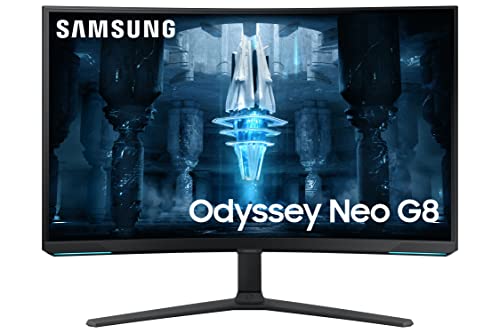
Samsung Odyssey Neo G8 - Best Premium Flagship
The Odyssey Neo G8 is Samsung's absolute best curved monitor. It combines 4K resolution with a 240Hz refresh rate - a combination that demands serious GPU power but rewards it with stunning clarity at maximum frame rates. Mini LED backlighting with thousands of local dimming zones delivers true-black HDR performance that standard VA panels can't match.
In its favor
- Mounting Type:Wall Mount (Size mm) 100 x 100.Aspect Ratio 16:9
- Item Dimensions: 29.1 inches
- Display Size: 32.0 inches
- Real Angle Of View: 178.0 degrees
- Response Time: 1.0 milliseconds
Watch-outs
- Very high price - premium tier investment
- Requires a top-tier GPU to utilize 4K 240Hz
- Mini LED can produce mild blooming around bright objects
What matters most
Odyssey vs. mainstream Samsung
The Odyssey line uses the aggressive 1000R curve, quantum dot color, and is built for gaming. Samsung's mainstream curved monitors (C-series, U-series) use gentler 1800R curves and are better for mixed productivity and entertainment.
Refresh rate vs. resolution
The Odyssey G5 and G7 prioritize refresh rate (165-240Hz) at QHD. The UR590C and Neo G8 prioritize resolution (4K). Choose based on whether you're a competitive gamer (refresh rate) or cinematic/creative user (resolution).
HDR certification
Samsung offers a wide range from HDR400 (basic) to DisplayHDR 2000 on the Neo G8. The difference is very real - Neo G8 HDR is dramatic, G5 HDR is subtle at best.
1000R vs. 1800R curve
If you game exclusively, the 1000R Odyssey curve is exceptionally immersive. If you split time between gaming, writing, and spreadsheets, a 1800R curve (C27F390F, UR590C) causes less distortion in productivity use.
Our take
For gaming, the **Samsung Odyssey G7 32"** is the standout - 240Hz, QLED, DisplayHDR 600, and Samsung's signature 1000R curve in one package. For value-conscious gamers, the **Odyssey G5 27"** is the smarter buy. Users who want 4K should look at the **UR590C** for value or the **Neo G8** for the full-premium experience. And for anyone just getting started with curved monitors, the **C27F390F** is the reliable, no-reg
Frequently asked
The Odyssey G5 is Samsung's mid-range gaming line (165Hz, QHD, 1000R curve). The G7 is the premium step up (240Hz, QHD, QLED, 1000R). The G9 is the flagship ultrawide (240Hz, 5120x1440, 1000R, 49 inches). The Neo G8 and G9 add Mini LED backlighting for superior HDR performance.
1000R means the curve radius is 1000mm - matching the natural curvature of the human eye. It's the most aggressive standard curve on the market. Samsung claims it's the most immersive and eye-comfortable curve for gaming. Some users find it slightly distorting for productivity tasks - personal preference plays a role.
Yes. Samsung Odyssey monitors support AMD FreeSync, and most models in the G5, G7, G9, and Neo G8 lines are also G-Sync compatible - meaning they work with NVIDIA cards via the standard adaptive sync protocol. Check the specific model spec sheet to confirm G-Sync compatibility.
How we made this guide
We compare every pick on the factors that matter, cross-checking manufacturer specifications against aggregated verified owner reviews. We rank independently and never take payment for placement. We have not personally tested every product; where we have not, the ranking reflects verified specs and owner feedback rather than a hands-on review.
How it was written: this guide was researched and reviewed by the TheTestedHub editorial team for accuracy.
Affiliate disclosure: TheTestedHub is reader-supported. When you buy through links on our site, we may earn a commission at no extra cost to you.
You might also like

Your Docking Station Match: CalDigit TS4 and More

Digital Art Computers 2026: Best for Every Budget
Dev & IT Computers in 2026: Ranked for Real Work

Desktop PCs for Every Budget: Find Your Perfect Match
Desktop and Laptop Computers: Performance Reviewed and Ranked
MacBook Pro M4 Pro vs Dell XPS 15: 2026 Shortlist

Buy the Best DIY Computer in 2026: Corsair One i300
