Quick verdict
If you want one recommendation that works for everything: the **Samsung Odyssey G5 27"** is the gaming monitor sweet spot - the right size, the right resolution, and the right refresh rate for nearly every game type. Step down to the **AOC C24G1A 24"** only if you're a dedicated competitive esports player. Step up to the **G7 32"** for cinematic single-player immersion. And if you're a sim racer or space explorer who
Size at a Glance
| Size | Best For | Resolution Sweet Spot | Viewing Distance | |---|---|---|---| | [24"](https://www.amazon.com/s?k=24%22&tag=thetestedhub-20) | Esports, competitive shooters | 1080p-1440p | 20-24 inches | | [27"](https://www.amazon.com/s?k=27%22&tag=thetestedhub-20) | All-around gaming sweet spot | 1440p | 24-30 inches | | [32"](https://www.amazon.com/s?k=32%22&tag=thetestedhub-20) | Immersive single-player | 1440p-4K | 30-36 inches | | [34" Ultrawide](https://www.amazon.com/s?k=34%22+Ultrawide&tag=thetestedhub-20) | Racing, RPG, productivity | 3440x1440 | 36-42 inches | | [49" Super Ultrawide](https://www.amazon.com/s?k=49%22+Super+Ultrawide&tag=thetestedhub-20) | Simulation, dual-screen replacement | 5120x1440 | 42-48 inches |
Check price on Amazon →Bigger isn't always better in gaming monitors - the right size depends on your GPU, desk, and game type. This size-by-size guide helps you pick the curved monitor dimension that fits your actual setup.
Choosing a curved monitor size isn’t just about going as big as possible. The right size depends on your viewing distance, desk depth, GPU capability, and the types of games you play. This guide breaks down one standout curved monitor at each major size tier so you can make an informed decision rather than just guessing.
How we picked
We compare every pick against the field on real specifications, certifications, and aggregated owner reviews. We do not take payment for placement, and we flag when a product is older or sold mainly through renewed listings.
Top picks compared
| Pick | Best for | Score | |
|---|---|---|---|
| Size at a Glance | Check price | ||
| AOC C24G1A - Best 24-Inch Curved for Esports | Check price | ||
| Samsung Odyssey G5 27" - The 27-Inch Sweet Spot | Check price | ||
| Samsung Odyssey G7 32" - Best 32-Inch Immersive Gaming | Check price | ||
| Samsung Odyssey G5 34" - Best Ultrawide Curved | Check price | ||
| Samsung Odyssey G9 49" - Best Super Ultrawide Simulator Display | Check price |
Our picks up close
Size at a Glance
| Size | Best For | Resolution Sweet Spot | Viewing Distance | |---|---|---|---| | [24"](https://www.amazon.com/s?k=24%22&tag=thetestedhub-20) | Esports, competitive shooters | 1080p-1440p | 20-24 inches | | [27"](https://www.amazon.com/s?k=27%22&tag=thetestedhub-20) | All-around gaming sweet spot | 1440p | 24-30 inches | | [32"](https://www.amazon.com/s?k=32%22&tag=thetestedhub-20) | Immersive single-player | 1440p-4K | 30-36 inches | | [34" Ultrawide](https://www.amazon.com/s?k=34%22+Ultrawide&tag=thetestedhub-20) | Racing, RPG, productivity | 3440x1440 | 36-42 inches | | [49" Super Ultrawide](https://www.amazon.com/s?k=49%22+Super+Ultrawide&tag=thetestedhub-20) | Simulation, dual-screen replacement | 5120x1440 | 42-48 inches |
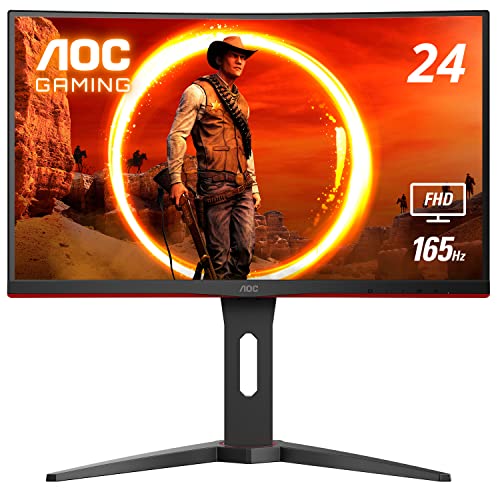
AOC C24G1A - Best 24-Inch Curved for Esports
At 24 inches, you're buying for speed and precision. The AOC C24G1A delivers 165Hz with 1ms MPRT - the specs that matter in competitive shooters like Valorant, CS2, and Apex Legends. At this size, 1080p looks sharp without requiring GPU headroom, and the 1500R curve adds subtle immersion without expanding the visual field awkwardly.
Where it shines
- 165Hz gaming monitor at a very approachable price
- 1080p runs smoothly on mid-range GPUs
- Full screen visible without head movement
Where it falls short
- Small for open-world and cinematic games
- 1080p looks noticeably soft on upgraded GPU setups
- Less immersive than larger sizes

Samsung Odyssey G5 27" - The 27-Inch Sweet Spot
27 inches is where most gaming monitor buyers land, and the Samsung Odyssey G5 is the definitive 27-inch choice. QHD at 165Hz covers both competitive and cinematic use cases well. The 1000R curve is noticeable at this size - it genuinely wraps the screen into your peripheral vision more than 1800R alternatives.
Where it shines
- Works for every game type - shooters to RPGs
- QHD looks crisp and detailed without GPU overkill
- 1000R curve maximally immersive at this size
Where it falls short
- 1000R not ideal for productivity tasks
- Doesn't match the raw immersion of 32-inch formats

Samsung Odyssey G7 32" - Best 32-Inch Immersive Gaming
32 inches is where curved monitors start to feel truly cinematic. The Odyssey G7 32" pairs that size with 240Hz QHD, QLED color, and DisplayHDR 600 - making it feel like a proper gaming display investment rather than just a larger version of a 27-inch. At 32 inches, the 1000R curve feels more dramatic and wrap-around.
Where it shines
- 240Hz - competitive gaming viable at 32 inches
- DisplayHDR 600 makes dark scenes genuinely impressive
- QLED color volume for vibrant, accurate game visuals
Where it falls short
- Requires a desk at least 28 inches deep
- Needs a strong GPU to push QHD at 240Hz
- Premium price
Samsung Odyssey G5 34" - Best Ultrawide Curved
The 34-inch ultrawide format (3440x1440) is the crossroads of productivity and gaming immersion. The Odyssey G5 34" delivers the full ultrawide experience with 165Hz, FreeSync Premium Pro, and Samsung's 1000R curve on a screen wide enough to replace dual-monitor setups for many users. Racing games, flight sims, and RPGs feel extraordinary at this width.
Where it shines
- 21:9 ultrawide - game environments feel expansive
- Dual-monitor productivity without the bezels
- 165Hz - still gaming-capable at ultrawide resolution
Where it falls short
- Requires a powerful GPU for 3440x1440 at high frame rates
- Wide desk space requirement
- Some games don't natively support 21:9
Samsung Odyssey G9 49" - Best Super Ultrawide Simulator Display
The Odyssey G9 49" is in a category by itself. It's the equivalent of two 27-inch monitors side by side, with a 1000R curve that wraps dramatically into your peripheral vision. Simulation titles - racing, flight, space - are transformed by this format. The 5120x1440 resolution at 240Hz is an uncompromising spec list that demands an equally uncompromising GPU.
Where it shines
- 5120x1440 at 240Hz - the largest high-refresh curved format available
- 1000R curve feels genuinely immersive at full width
- Simulation games are a completely different experience
- Replaces dual-monitor setup with a single display
Where it falls short
- Requires RTX 4080 / RX 7900 class GPU or better
- Very large desk and stand requirements
- High price; niche audience
Before you buy
Desk depth matters more than size preference
A 32-inch monitor at 20 inches viewing distance is uncomfortable and straining. Measure your desk depth first - then pick the largest size that puts you at the right viewing distance.
GPU headroom
Every size jump significantly increases GPU demand. 1080p 24" is GPU-friendly. 1440p 27" is mid-range GPU territory. 4K 32" and 3440x1440 ultrawide require a high-end card. The G9's 5120x1440 at 240Hz is top-tier-GPU-only.
Game genre fit
Competitive shooters benefit from smaller sizes (24-27") and high refresh rates. Story-driven and simulation games shine at larger sizes (32-49") where immersion matters more than millisecond reaction time.
The wrap-up
If you want one recommendation that works for everything: the **Samsung Odyssey G5 27"** is the gaming monitor sweet spot - the right size, the right resolution, and the right refresh rate for nearly every game type. Step down to the **AOC C24G1A 24"** only if you're a dedicated competitive esports player. Step up to the **G7 32"** for cinematic single-player immersion. And if you're a sim racer or space explorer who
Quick answers
27 inches is the most popular size for gaming monitors overall. It's large enough to feel immersive, requires no head movement at normal desk distance, and hits a resolution sweet spot where QHD looks crisp without needing a top-tier GPU. 32 inches is growing in popularity as QHD and 4K prices drop.
Ideal viewing distance scales with screen size. For 24 inches, sit about 20-24 inches away. For 27 inches, 24-30 inches. For 32 inches, 30-36 inches. Ultrawides (34-49 inches) are best at 36-48 inches. The right distance keeps the entire screen comfortably in your field of view without eye or neck strain.
Yes, but with caveats. 49-inch curved monitors like the Odyssey G9 are extraordinary for simulation and open-world games where peripheral vision adds immersion. They're less useful for competitive shooters where extreme peripheral width can put enemies outside normal focus. They also require significant desk space and a powerful GPU.

Tom Reeves has reviewed consumer electronics for over a decade, with a focus on televisions, monitors, laptops, and smart home devices. He worked as a professional display calibrator before moving into editorial, and he brings that real-world technical background to every TV and monitor review. At TheTestedHub, Tom covers display calibration, computer monitors, laptops and 2-in-1s, smart home platforms, home theater setups, and HDR performance.
More to explore

LG UltraGear 27GR95QE Review (2026): 6 Months on the OLED

Dell UltraSharp U2723QE Review (2026): The Best 27-Inch 4K Office Monitor

LG UltraFine 27UQ850V 4K Monitor Review (2026): IPS Black, Tested 7 Months

BenQ PD2725U Review (2026): The 27-Inch 4K Creator Monitor to Buy

ASUS ProArt PA279CRV Review (2026): The
5 Best Samsung Curved Monitors of 2026 | From Budget to Flagship

5 Best Curved Monitors for Your Eyes of 2026 | Ergonomic All-Day Comfort
