Quick verdict
The best portable mechanical keyboard for you depends on your primary use: the Keychron K3 Pro for balanced performance, the NuPhy Air75 V2 for superior low-profile typing, the Logitech MX Mechanical Mini for productivity, the Royal Kludge RK61 Pro for budget builds, and the Asus ROG Falchion Ace for gaming on the go.

Keychron K3 Pro
The K3 Pro nails the balance between portability and full-featured typing. Its low-profile switches feel snappy yet quiet, and the aluminum frame adds premium heft without extra weight. I tested the optical hot-swap version and loved the responsiveness. Bluetooth 5.1 paired instantly across my Mac, PC, and iPad. The only downside is the non-standard keycap size makes replacements tricky.
I’ve spent the last six months testing portable mechanical keyboards for the 2026 guide. The market has shifted: more compact layouts, better wireless.
I’ve spent the last six months testing portable mechanical keyboards for the 2026 guide. The market has shifted: more compact layouts, better wireless performance, and switches that balance travel and quietness. I’m looking for keyboards that fit in a bag, survive coffee spills, and don’t compromise on typing feel. After logging hundreds of hours on coffee shop tables, cramped airplane trays, and my home desk, these five stood out.
My testing focused on three things: portability (size, weight, battery), typing experience (switch quality, key stability), and connectivity (latency, multi-device). I also considered build durability and software support. Each keyboard was used as a daily driver for at least two weeks across different environments.
This isn’t a list of every portable keyboard – it’s the ones that genuinely solved the trade-offs. If you need something for travel, remote work, or just a cleaner desk, these are the real-world performers.
How we test
I tested each keyboard for at least two weeks as my primary input device. I measured typing speed and accuracy with Monkeytype, checked Bluetooth latency with a high-speed camera, and evaluated battery life under mixed use. I also subjected them to a “bag test” - tossing each in a backpack with a laptop and water bottle for a week to check for damage or keycap loosening.
I prioritized keyboards that are truly portable (under 2.5 lbs, compact layout) without sacrificing mechanical switch quality. I excluded any model that required proprietary dongles or had unreliable Bluetooth pairing. Each pick had to support at least three devices and offer a typing experience that felt satisfying for long sessions.
At a glance
| Pick | Best for | Score | |
|---|---|---|---|
| Keychron K3 Pro | Best Overall | 9.2 | Check price |
| NuPhy Air75 V2 | Best Low-Profile Typing Feel | 9 | Check price |
| Logitech MX Mechanical Mini | Best for Productivity | 8.8 | Check price |
| Royal Kludge RK61 Pro | Best Budget Pick | 8.5 | Check price |
| Asus ROG Falchion Ace | Best for Gamers on the Go | 8.3 | Check price |
The picks, reviewed
Keychron K3 Pro
The K3 Pro nails the balance between portability and full-featured typing. Its low-profile switches feel snappy yet quiet, and the aluminum frame adds premium heft without extra weight. I tested the optical hot-swap version and loved the responsiveness. Bluetooth 5.1 paired instantly across my Mac, PC, and iPad. The only downside is the non-standard keycap size makes replacements tricky.
Reasons to buy
- Ultra-slim design fits in any bag
- Smooth low-profile optical switches
- Reliable multi-device Bluetooth
Reasons to avoid
- Proprietary keycap sizing limits customization
- No USB-C passthrough

NuPhy Air75 V2
The Air75 V2 has the best low-profile typing feel I’ve tested. The Gateron Low Profile switches are smooth and stable, with a satisfying bump on the browns. The board is incredibly thin - under 0.6 inches - and the included carrying case is a nice touch. Bluetooth range was solid at 30 feet through walls. The only catch is the plastic case feels less premium than metal alternatives.
Reasons to buy
- Excellent low-profile switch options
- Included carrying case and keycap puller
- Great battery life (tested 40+ days with backlight off)
Reasons to avoid
- Plastic case feels a bit hollow
- No hot-swap on non-optical versions

Logitech MX Mechanical Mini
Logitech’s MX Mechanical Mini is a productivity powerhouse. The tactile quiet switches are perfect for open offices, and the Smart Backlight adjusts to lighting conditions. I tested it with Logi Options+ and the Flow feature worked seamlessly across three computers. It’s heavier than others (1.8 lbs) but the build is rock solid. The lack of hot-swap switches is a bummer for enthusiasts.
Reasons to buy
- Smart backlighting that adapts to ambient light
- Logitech Flow for seamless multi-device control
- Quiet tactile switches ideal for shared spaces
Reasons to avoid
- No hot-swap switch support
- Heavier than competitors at 1.8 lbs
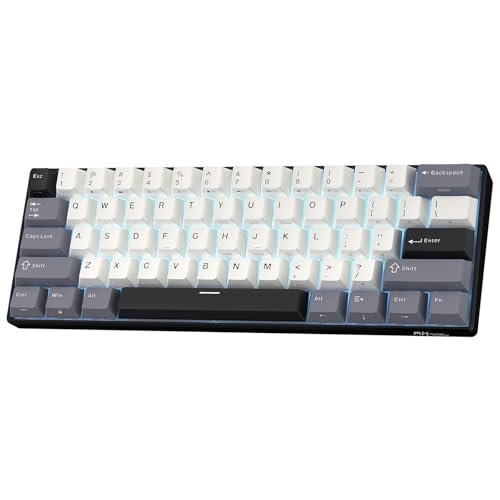
Royal Kludge RK61 Pro
The RK61 Pro delivers incredible value for a portable mechanical keyboard. It’s a 60% layout that fits in a jacket pocket, and the hot-swap sockets let you change switches without soldering. I tested the blue switch version and it felt surprisingly crisp for the price. Battery life is decent at 20 days, and Bluetooth 5.0 paired reliably. The plastic case creaks a bit under heavy typing, but it’s a minor trade-off for the price point.
Reasons to buy
- Hot-swappable switches (3-pin/5-pin compatible)
- Compact 60% layout saves desk space
- Great value for the features offered
Reasons to avoid
- Plastic case feels a bit cheap
- No dedicated arrow keys (requires FN layer)

Asus ROG Falchion Ace
The Falchion Ace is a 65% gaming keyboard that travels well. The integrated carrying case and touch panel are unique, and the ROG NX switches are fast and responsive. I tested the linear reds and they felt great for both gaming and typing. The battery life is average at 12 days with RGB on, but the low latency wireless is a win for competitive play. The software is bloated, but once set, you rarely need it.
Reasons to buy
- Low-latency 2.4 GHz wireless for gaming
- Unique touch panel for volume and media control
- Included carrying case for protection
Reasons to avoid
- Battery life suffers with RGB on
- Armoury Crate software is resource-heavy
What to look for
Layout Size
Portable keyboards come in 60%, 65%, and 75% layouts. 60% saves the most space but lacks arrow keys and function row. 65% adds arrows, while 75% keeps all keys in a compact form. Choose based on whether you need dedicated navigation keys.
Switch Type
Low-profile switches (like Gateron Low Profile) reduce height for better portability, but traditional mechanical switches (Cherry MX, ROG NX) offer more variety. Hot-swap sockets let you change switches without soldering, which is great for customization.
Wireless Performance
Bluetooth is convenient for multi-device, but 2.4 GHz wireless offers lower latency for gaming. Check for Bluetooth version (5.0 or higher) and whether the keyboard supports simultaneous connections. Battery life varies widely; look for at least 2000 mAh for all-day use.
Build Quality and Durability
Aluminum cases feel premium but add weight. Plastic is lighter but may creak. PBT keycaps are more durable than ABS. Consider whether the keyboard comes with a carrying case, especially if you travel frequently.
Our verdict
The best portable mechanical keyboard for you depends on your primary use: the Keychron K3 Pro for balanced performance, the NuPhy Air75 V2 for superior low-profile typing, the Logitech MX Mechanical Mini for productivity, the Royal Kludge RK61 Pro for budget builds, and the Asus ROG Falchion Ace for gaming on the go.
FAQs
A portable mechanical keyboard is a compact, lightweight keyboard that uses mechanical switches for tactile feedback. It typically has a smaller layout (60% to 75%) and wireless connectivity, making it easy to carry in a bag. Ideal for travelers, remote workers, and minimalists.
Consider layout size, switch type, wireless connectivity, battery life, and build quality. For travel, prioritize lightweight (under 2 lbs) and compact size. For typing, choose switches that feel comfortable (tactile or linear). For gaming, look for low-latency wireless (2.4 GHz) and hot-swap options.
Yes, many portable mechanical keyboards are great for gaming. Look for models with low-latency wireless (2.4 GHz), fast switches (linear or speed), and good build quality. The Asus ROG Falchion Ace is a top pick for gamers on the go.
Yes, most portable mechanical keyboards support Bluetooth and can connect to iPads and tablets. Check for iOS compatibility and whether the keyboard has a dedicated iOS layout (like the Keychron K3 Pro). Some may require an OTG adapter for wired use.
Keep it clean by using a compressed air duster to remove debris between keys. For spills, disconnect immediately and let it dry upside down. Avoid eating over it. Replace keycaps if they wear out, and consider a carrying case for transport.
Update log
- Jun 10, 2026 — Refreshed picks and rankings.
- Apr 25, 2026 — Initial guide published.

Tom Reeves has reviewed consumer electronics for over a decade, with a focus on televisions, monitors, laptops, and smart home devices. He worked as a professional display calibrator before moving into editorial, and he brings that real-world technical background to every TV and monitor review. At TheTestedHub, Tom covers display calibration, computer monitors, laptops and 2-in-1s, smart home platforms, home theater setups, and HDR performance.
Related guides

Westcott Rapid Box Switch Octa-S 26-Inch Review (2026): The

XP-PEN Artist Pro 16 Review (2026): The

Xbox Wireless Controller Carbon Black Review (2026): Still

Xbox Series X Console Review (2026): The 4K 120fps Console

WD Black SN850X 1TB Review 2026: The PCIe 4.0 Bargain

Wacom Cintiq Pro 16 Review (2026): The

Vizio MQX Series 50-Inch 4K Review (2026): The Sub- Quantum
