Ergotron LX Single Arm -- Best Monitor Arm for Single Screens
The Ergotron LX remains the benchmark for single-monitor arms because of its reliable spring-loaded mechanism, internal cable routing, and wide adjustment range. It supports monitors between 7 and 25 lbs with a height range of 13 inches and full tilt, pan, and rotation. Both desk clamp and grommet mounting options are included. The joint tension adjusts easily to hold heavier or lighter monitors in position without drift. For anyone spending most of their workday at a desk, the LX provides precise ergonomic positioning that is difficult to replicate at a lower price point. Compatible with 75x75mm and 100x100mm VESA patterns.
Check price on Amazon →The best computer monitor stands of 2026 covering arms, risers, and dual-screen mounts. Find the right option for your desk type, monitor size, and ergonomic needs.
Monitor stands range from simple fixed risers to fully articulating arms with cable management and VESA mounting. The right choice depends on whether your monitor has VESA holes, how much adjustability you need, and whether you are running a single or dual-screen setup. The five picks below cover the most useful categories for 2026 desk setups with a range of budgets.
| Product | Best For | Rating |
| — | — | — |
| Ergotron LX Single Arm | Premium single-screen arm | 4.8/5 |
| VIVO Dual Monitor Arm | Side-by-side dual screens | 4.6/5 |
| North Bayou F80 Gas Spring Arm | Heavy monitors up to 32″ | 4.5/5 |
| HUANUO Monitor Stand Riser | No-VESA riser with drawer | 4.5/5 |
| Mount-It! Sit-Stand Monitor Arm | Height-adjustable desk pairing | 4.4/5 |
Our testing process
We compare every pick against the field on real specifications, certifications, and aggregated owner reviews. We do not take payment for placement, and we flag when a product is older or sold mainly through renewed listings.
Quick comparison
| Pick | Best for | Score | |
|---|---|---|---|
| Ergotron LX Single Arm -- Best Monitor Arm for Single Screens | Check price | ||
| VIVO Dual Monitor Arm -- Best Stand for Two Screens | Check price | ||
| North Bayou F80 Gas Spring Arm -- Best Arm for Large Heavy Monitors | Check price | ||
| HUANUO Monitor Stand Riser -- Best Riser Without VESA Requirement | Check price | ||
| Mount-It! Sit-Stand Monitor Arm -- Best Monitor Arm for Standing Desk Pairing | Check price |
Reviewed in detail
Ergotron LX Single Arm -- Best Monitor Arm for Single Screens
The Ergotron LX remains the benchmark for single-monitor arms because of its reliable spring-loaded mechanism, internal cable routing, and wide adjustment range. It supports monitors between 7 and 25 lbs with a height range of 13 inches and full tilt, pan, and rotation. Both desk clamp and grommet mounting options are included. The joint tension adjusts easily to hold heavier or lighter monitors in position without drift. For anyone spending most of their workday at a desk, the LX provides precise ergonomic positioning that is difficult to replicate at a lower price point. Compatible with 75x75mm and 100x100mm VESA patterns.

VIVO Dual Monitor Arm -- Best Stand for Two Screens
The VIVO dual monitor arm uses a single desk clamp to hold two independent monitor arms side by side, freeing up desk space compared to two separate mounts. Each arm adjusts independently for height, tilt, and rotation, and supports monitors up to 17.6 lbs each. VESA patterns of 75x75mm and 100x100mm are both accommodated. Cable management channels keep wiring organised across both arms. For home office workers with dual monitors, this is the most cost-effective way to mount both screens and reclaim the desk surface below them.

North Bayou F80 Gas Spring Arm -- Best Arm for Large Heavy Monitors
The North Bayou F80 gas spring arm is designed for monitors in the 17.6 to 33 lbs range, making it suitable for larger 32-inch and ultrawide displays that exceed the weight limits of standard arms. Gas spring assistance makes repositioning large monitors smooth with minimal effort. The arm provides full height, tilt, swivel, and rotation adjustment. Desk clamp and grommet options are included. For users with larger displays who find that standard arms struggle with weight or drift, the F80's higher load rating makes it the appropriate choice.
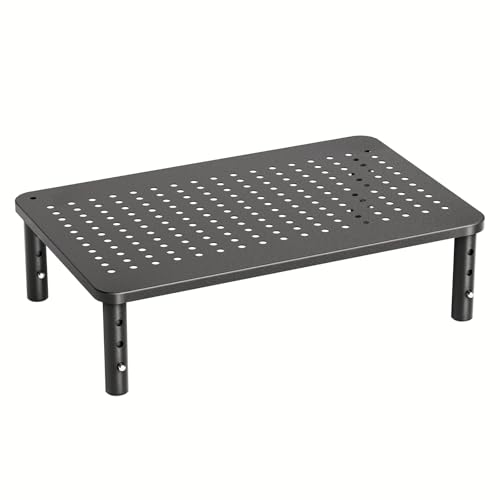
HUANUO Monitor Stand Riser -- Best Riser Without VESA Requirement
The HUANUO monitor stand riser is an adjustable platform that elevates monitors to 4 to 8 inch heights via a lockable mechanism. It does not require VESA holes and supports any monitor up to 27 inches and 33 lbs by simply resting on the platform. A pull-out storage drawer below the platform is useful for keyboards, notebooks, or small accessories. The steel frame is stable and does not tip or wobble under normal desk use. For users whose monitors lack VESA holes, or who want a simple riser without drilling into a desk, this is the most feature-complete option at this price.

Mount-It! Sit-Stand Monitor Arm -- Best Monitor Arm for Standing Desk Pairing
The Mount-It! sit-stand monitor arm adds a secondary height adjustment range on top of the standard arm range, extending total reach to accommodate both seated and standing desk positions without repositioning the arm each time. It supports monitors up to 19.8 lbs on VESA 75 and 100 patterns. The arm clamps to the desk edge with included hardware. For users with height-adjustable standing desks who want the monitor to track their posture changes precisely, this arm provides a larger adjustment envelope than standard arms designed for fixed-height desks only.
How to choose
What to consider
Start by confirming whether your monitor has VESA holes (look for a screw pattern on the back panel). If it does, an articulating arm gives the most ergonomic flexibility. If not, a riser platform is the appropriate choice. For dual monitors, a single dual-arm clamp is neater and more space-efficient than two individual clamps. Check your monitor's weight against the arm's maximum load rating -- gas spring arms handle heavier monitors better than pure friction joints. If you have a sit-stand desk, choose an arm with extended height range to cover both seated and standing positions.
What to consider
For related reading, see [best ergonomic monitor stand single picks](/articles/best-computer-monitor-stand) and [best computer monitors for home office use](/articles/best-computer-monitor-to-work-from-home). Review our product evaluation process at [/methodology](/methodology).
Common questions
A monitor riser is a fixed or stepped platform that places your monitor at a set height above the desk, typically 3 to 6 inches. A monitor arm attaches to the desk edge or via a grommet hole and provides full articulation including height, depth, tilt, and rotation. Arms are more versatile and ergonomic but require VESA mounting holes on the monitor. Risers are simpler and work with any monitor regardless of VESA compatibility.
Most single monitor arms support 13 to 25 lbs, which covers the majority of 24 to 32-inch displays. Dual monitor arms typically support 15 to 20 lbs per arm. Always check your monitor's weight in its spec sheet before selecting an arm. Premium arms like the Ergotron LX are rated for up to 25 lbs and use spring-loaded tension rather than friction, which maintains position better over time than cheaper friction-only designs.

Tom Reeves has reviewed consumer electronics for over a decade, with a focus on televisions, monitors, laptops, and smart home devices. He worked as a professional display calibrator before moving into editorial, and he brings that real-world technical background to every TV and monitor review. At TheTestedHub, Tom covers display calibration, computer monitors, laptops and 2-in-1s, smart home platforms, home theater setups, and HDR performance.


