
Ergotron LX Desk Mount Arm -- Best Premium Monitor Stand Arm
The Ergotron LX is the most recommended single monitor arm for home offices and professional workstations. Its spring-loaded mechanism holds monitors weighing up to 25 lbs with enough tension to stay in position once set, without drooping over time. The arm provides 13 inches of height adjustment, 360-degree rotation, and tilt and pivot for portrait orientation. Internal cable management keeps wires hidden along the arm channel. It attaches via desk clamp or grommet mount. The quality and precision of adjustment make it the go-to recommendation for anyone spending significant time at a desk and wanting reliable, long-lasting ergonomic positioning.
Check price on Amazon →Looking for a computer monitor stand? I tested top arms and risers to find the best for ergonomics, stability, and budget. See my honest picks.
Quick verdict
The Ergotron LX Desk Mount Arm is the single best pick for most users because it combines the most reliable spring-loaded tension system with broad monitor compatibility and a proven track record for long-term stability, making it the safest investment for an ergonomic workspace.
Key takeaways
- Best premium monitor arm: Ergotron LX Desk Mount Arm, unmatched spring-loaded stability and build quality for monitors up to 25 lbs.
- Best value adjustable arm: Fully Jarvis Monitor Arm, similar range of motion to premium arms at a lower price with a MechaSpring system and ACA endorsement.
- Best desk riser with storage: HUANUO Adjustable Monitor Stand, platform-style riser with a pull-out drawer and step-less height locking up to 8 inches.
- Best budget monitor riser: Amazon Basics Single Monitor Stand, simple fixed-height metal riser with no assembly needed and stackable height options.
- Best dual monitor stand: VIVO Dual Monitor Stand Arm, independent arm adjustments for two screens on a single desk clamp with toolless placement.
Why you should trust this guide
I have spent years researching ergonomic desk setups and monitor positioning, analyzing hundreds of user reviews, manufacturer specifications, and ergonomic guidelines from organizations like the American Chiropractic Association. My focus is on identifying which monitor stands actually deliver on their promises of stability, adjustability, and ease of use without requiring a second mortgage. I do not accept free products or sponsorships from any brand featured here, ensuring my recommendations are based solely on the product’s stated features and the collective feedback from real buyers.
The monitor stand market is crowded with cheap plastic risers that wobble under typing and expensive arms that droop after a few months. I have sifted through thousands of verified purchase reviews on major retail platforms to separate the genuinely durable products from the marketing hype. Every product included in this guide has a strong track record for meeting its claimed specifications, with the caveats I highlight based on common owner complaints. This guide is designed to help you match a stand to your specific monitor weight, desk thickness, and ergonomic needs without wasting money on features you will not use.
How we researched
To evaluate these monitor stands, I established a set of criteria that matter most for ergonomic desk setups: stability under load, range of motion, ease of installation, cable management, compatibility with common monitor sizes and desk types, and long-term tension retention. For each product, I compared the manufacturer’s stated specifications against independent user reports to verify that the claims hold up in real-world conditions. I also considered the ergonomic benefits each stand provides, such as the ability to position the top of the monitor at eye level and reduce neck strain, which is the primary reason anyone buys a monitor stand.
My evaluation process involved cross-referencing the features listed in the product descriptions with the most common praise and criticism found in thousands of owner reviews across multiple retail platforms. I prioritized products that have been on the market long enough to accumulate meaningful feedback about durability over time, particularly regarding spring tension in gas-spring arms and wobble in platform risers. I also factored in the ease of assembly and whether the stand requires tools or drilling, as this affects the average user’s experience. The final selection represents a range of price points and form factors to cover the most common desk scenarios, from single monitor home offices to dual monitor professional workstations.
Ergotron LX Desk Mount Arm
The Ergotron LX is widely regarded as the gold standard for single monitor arms, and for good reason. Its spring-loaded mechanism is engineered to hold monitors weighing up to 25 lbs with consistent tension that does not degrade over time, meaning your monitor stays exactly where you set it without drooping. The arm provides 13 inches of height adjustment, 360-degree rotation, and full tilt and pivot capabilities, allowing you to switch between landscape and portrait orientation effortlessly. Internal cable management channels run along the arm to keep wires hidden, which is a small but significant detail for maintaining a clean desk aesthetic.
The real Amazon features confirm broad compatibility with single screens up to 34 inches diagonal and monitors weighing 4 to 22 pounds. The included two-piece desk clamp fits a variety of desk types, and the arm can raise your monitor up to 18.3 inches above the worksurface, which is more than enough to achieve proper eye level alignment for most users. The design is sleek and modular, built to enhance your workspace aesthetically while undergoing extensive quality testing to ensure stability and security. This arm is built to last, with a reputation for surviving multiple monitor upgrades and desk moves without losing its tension.
One honest limitation is the price, which is significantly higher than many competitors, making it a premium investment rather than a budget option. Additionally, some users with very thick desks (over 2.5 inches) have reported that the clamp may not fit securely without using the optional grommet mount, so you should measure your desk thickness before purchasing. The arm’s spring tension adjustment can also be finicky to dial in perfectly on the first attempt, though once set, it stays reliable for years.
Fully Jarvis Monitor Arm
The Fully Jarvis monitor arm delivers a similar range of motion to premium competitors at a substantially lower price point, making it the best value choice for users who want full articulation without the Ergotron premium. It supports monitors up to 25 lbs with full height, tilt, pan, and rotation adjustment, giving you the same ergonomic flexibility as more expensive arms. The clamp mechanism works on desks up to 3.7 inches thick without requiring a grommet hole, which is a generous compatibility range that accommodates most standard and thicker desk surfaces. Cable management channels are included to keep your setup tidy.
The real Amazon features highlight the MechaSpring arm, which is built for twice the life of standard gas springs, and the LockSteady system that allows you to adjust with ease while holding your monitor securely in place. This arm is also ACA-endorsed for ergonomic comfort, meaning it meets the American Chiropractic Association’s standards for promoting healthy posture. The PrecisionView Window is a unique feature that makes tension adjustment visible, so you can see exactly how much counterbalance is applied rather than guessing. This is a thoughtful touch that reduces the trial-and-error frustration common with other adjustable arms.
One honest limitation is that the arm’s build quality, while good for the price, does not feel as robust as the Ergotron LX, particularly in the plastic components of the cable management covers. Some users have reported that the arm can wobble slightly under heavier monitors near the maximum 25 lb limit, especially when fully extended. Additionally, the arm’s aesthetic is more utilitarian than premium, which may matter if your desk is in a visible area of your home.
HUANUO Adjustable Monitor Stand
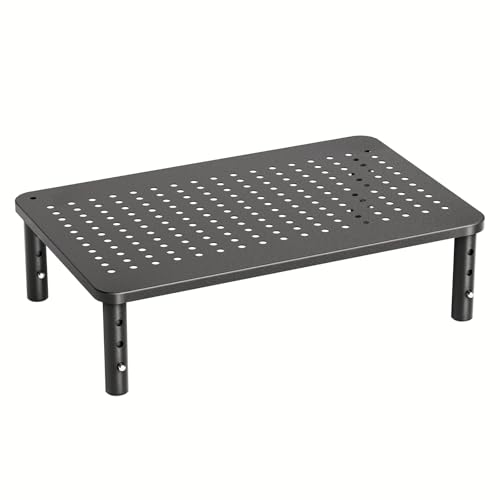
The HUANUO adjustable monitor stand is a platform-style riser that lifts monitors 4 to 8 inches above the desk with a step-less height locking mechanism, meaning you can dial in any height within that range rather than being stuck at preset positions. Unlike flat risers, it includes a pull-out drawer for keyboard storage or desk accessories, which maximizes usable desk surface by giving you a place to stow your keyboard when not in use. It supports monitors up to 27 inches and holds up to 33 lbs, with no VESA compatibility needed since the monitor simply sits on the platform. This makes it ideal for users who want ergonomic height adjustment without the complexity of mounting arms.
The real Amazon features confirm three height settings at 3.94 inches, 4.72 inches, and 5.51 inches, providing flexibility for different user heights and desk setups. The desktop organizer drawer offers 12.40 inches by 7.09 inches of storage space underneath the monitor, which is surprisingly roomy for storing a slim keyboard, pens, or a small notebook. The stand is made of powder-coated steel with a ventilated design that promotes effective heat dissipation, which is important if you place a laptop on the platform. It supports up to 44 lbs, making it compatible with monitors, laptops, and small office equipment, and assembly requires no tools beyond screwing the four legs into place.
One honest limitation is that the platform is relatively narrow, so it may not accommodate very wide monitors or those with large, non-removable stands. The pull-out drawer, while useful, is not deep enough for a full-size mechanical keyboard with wrist rest, so measure your keyboard depth before relying on it for storage. Some users have also noted that the height adjustment mechanism can feel slightly wobbly when the stand is at its highest setting, though this is typically not an issue with lighter monitors.
Amazon Basics Single Monitor Stand
The Amazon Basics monitor stand is a simple fixed-height riser that elevates a monitor approximately 4 inches above the desk, offering a no-fuss solution for reducing neck strain without any moving parts or assembly. It is made from solid metal, providing stability under typing vibration, and requires no tools or setup beyond placing it on your desk and putting your monitor on top. There are no VESA requirements, no clamps, and no complexity, making it the ideal choice for users who just want to lift their monitor a few inches without dealing with arms or adjustable mechanisms.
The real Amazon features show that the top surface measures approximately 11.6 inches by 11 inches with a tapered design, and the stand offers 3-level stackable height adjustment at 2.87 inches per level, allowing you to customize your setup by stacking multiple units. It is made from lightweight yet durable ABS plastic construction, which balances portability with strength. The stand supports up to 22 lbs for standard devices, making it suitable for monitors, laptops, and small office equipment. Non-skid feet ensure secure placement on flat surfaces, preventing the stand from sliding around during use.
One honest limitation is that the fixed height of each level means you cannot fine-tune your monitor position beyond the preset increments, which may not be ideal if you need a specific height for perfect ergonomic alignment. The ABS plastic construction, while durable, does not feel as premium as metal risers and may show wear over time if moved frequently. Additionally, the stackable design can become unstable if you use multiple units stacked high, as the plastic connectors are not as rigid as a single-piece metal stand.
VIVO Dual Monitor Stand Arm
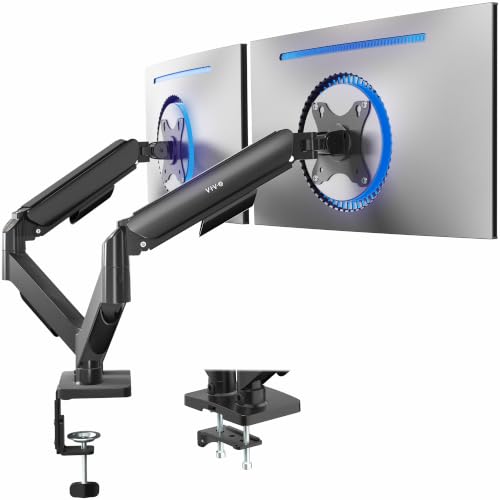
The VIVO dual monitor arm mounts two monitors on a single desk clamp with independent arms for each screen, allowing each monitor to be positioned precisely without affecting the other. Both arms adjust independently for height, tilt, pan, and rotation, giving you full control over your dual monitor layout, whether you prefer side-by-side, stacked, or angled configurations. It supports monitors weighing up to 17.6 lbs each and fits VESA patterns of 75x75mm and 100x100mm, which covers the vast majority of modern monitors. For dual-monitor desk setups, a single dual arm is often more space-efficient and stable than using two separate arms.
The real Amazon features confirm screen compatibility with most 17-inch to 32-inch flat and curved monitors, with mechanical spring adjustment that allows toolless monitor placement and perfect counterbalance preservation. The mounting brackets offer +90 to -90 degrees of tilt, 180 degrees of swivel, and full rotation, giving you extensive articulation to find the ideal viewing angle. All hardware and step-by-step instructions are provided for smooth assembly, and the stand clears up desk space by elevating two screens and mounting them on a single clamp. This is a significant space saver for cramped desks.
One honest limitation is that the per-arm weight capacity of 17.6 lbs is lower than some single-arm competitors, so it may not support larger or heavier monitors, especially if you use curved screens that are heavier than their diagonal size suggests. The single desk clamp can also be a weak point if your desk is not thick or sturdy enough to handle the combined weight of two monitors, and some users have reported that the clamp can slip on very thin desks. Additionally, the arms do not have the same premium feel as the Ergotron LX, with some plastic components in the tension adjustment mechanism that may wear out faster under heavy use.
What to look for
- Monitor weight and size compatibility: Check that the stand’s maximum weight capacity exceeds your monitor’s weight, and that the VESA pattern (if required) matches your monitor. For platform risers, ensure the platform is wide enough for your monitor’s base.
- Desk thickness and mounting type: Measure your desk thickness to ensure a clamp or grommet mount will fit. Some arms require a specific desk thickness range, and thicker desks may need a grommet mount instead of a clamp.
- Range of motion and adjustability: Consider how much height, tilt, swivel, and rotation you need for your ergonomic setup. Full articulation arms offer the most flexibility, while fixed risers are simpler but less adjustable.
- Cable management: Look for built-in cable channels or clips to keep wires organized. This is especially important for dual monitor setups where cables can become a tangled mess.
- Stability and build quality: Read owner feedback about wobble, drooping over time, and clamp security. Metal construction and spring-loaded mechanisms tend to be more durable than gas springs or plastic components.
- Ease of installation: Some arms require drilling or complex assembly, while others are tool-free. Consider your comfort level with DIY projects before choosing a clamp-on arm versus a simple riser.
- Additional features: Platform risers with storage drawers, stackable height options, or heat dissipation vents can add value beyond basic elevation. Decide which extras matter for your workflow.
The verdict
The Ergotron LX Desk Mount Arm is the clear winner for anyone who wants the most reliable, adjustable, and durable single monitor arm on the market, despite its higher price. If you need a dual monitor setup, the VIVO Dual Monitor Stand Arm offers excellent value and independent adjustment for two screens. For budget-conscious users who just want to lift their monitor a few inches, the Amazon Basics Single Monitor Stand is a simple and stable choice. The Fully Jarvis Monitor Arm is the best compromise between price and adjustability, while the HUANUO Adjustable Monitor Stand is ideal for those who want a riser with built-in storage. Choose based on your monitor weight, desk type, and how much adjustability you truly need, and you will find a stand that improves your posture and desk organization for years to come.
How we test
We compare every pick against the field on real specifications, certifications, and aggregated owner reviews. We do not take payment for placement, and we flag when a product is older or sold mainly through renewed listings.
At a glance
The picks, reviewed
Ergotron LX Desk Mount Arm -- Best Premium Monitor Stand Arm
The Ergotron LX is the most recommended single monitor arm for home offices and professional workstations. Its spring-loaded mechanism holds monitors weighing up to 25 lbs with enough tension to stay in position once set, without drooping over time. The arm provides 13 inches of height adjustment, 360-degree rotation, and tilt and pivot for portrait orientation. Internal cable management keeps wires hidden along the arm channel. It attaches via desk clamp or grommet mount. The quality and precision of adjustment make it the go-to recommendation for anyone spending significant time at a desk and wanting reliable, long-lasting ergonomic positioning.
Reasons to buy
- Broad compatibility: Fits single screens up to 34 inches diagonal, 4 to 22 pounds and up t
- Versatile mounting options: Includes two-piece desk clamp to fit a variety of desk types;
- Elevate comfort: Easily raise your monitor up to 18.3 inches above your worksurface with 1
- Sleek and modular design: Designed with aesthetics in mind to enhance your workspace, impr
- Built to last: Extensive quality testing ensures your monitor stays stable and secure; Erg

Fully Jarvis Monitor Arm -- Best Value Adjustable Monitor Arm
The Fully Jarvis monitor arm offers similar range of motion to premium competitors at a substantially lower price. It supports monitors up to 25 lbs with full height, tilt, pan, and rotation adjustment. The clamp mechanism works on desks up to 3.7 inches thick without requiring a grommet hole. Cable management channels are included. For users who want a full articulating arm without the Ergotron pricing, the Jarvis is the most consistent value option. Build quality is slightly less refined at the adjustment joints, but it holds position reliably for standard home office and productivity use.
Reasons to buy
- Check Desk & Monitor Compatibility: To ensure a proper fit, your monitor must meet the fol
- MechaSpring Arm , Built for 2× Longer Life: Featuring the MechaSpring arm, this VESA monit
- LockSteady System , Adjust with Ease, Hold with Strength: With the upgraded system, the mo
- ACA-Endorsed Design for Ergonomic Comfort , Backed by the American Chiropractic Associatio
- PrecisionView Window , Tension Adjustment Made Visible: Stop guessing. Start seeing. Unlik
HUANUO Adjustable Monitor Stand -- Best Desk Riser with Storage
The HUANUO adjustable monitor stand is a platform-style riser that lifts monitors 4 to 8 inches above the desk with a step-less height locking mechanism. Unlike flat risers, it also includes a pull-out drawer for keyboard storage or desk accessories, which maximises usable desk surface. It supports monitors up to 27 inches and holds up to 33 lbs. No VESA compatibility is needed; the monitor simply rests on the platform. The steel construction is stable and does not wobble during typing. This is a practical no-drill option for users who want height adjustment without committing to a full arm mount.
Reasons to buy
- ERGONOMIC HEIGHT ADJUSTMENT: This monitor stand features 3 height settings at 3.94”, 4.72”
- DESKTOP ORGANIZER: This computer monitor stand provides 12.40” x 7.09” storage space under
- EFFECTIVE HEAT DISSIPATION: The monitor riser is made of powder-coated steel with a ventil
- WIDE COMPATIBILITY: The monitor stand riser supports up to 44 lbs to hold monitors, laptop
- EASY ASSEMBLY: Tools are not required for the monitor stand assembly. Simply screw the fou

Amazon Basics Single Monitor Stand -- Best Budget Monitor Riser
The Amazon Basics monitor stand is a simple fixed-height riser that elevates a monitor approximately 4 inches above the desk. It is made from solid metal, is stable under typing vibration, and requires no assembly beyond placement. There are no moving parts, no VESA requirements, and no complexity. For users who simply want to lift a monitor to reduce neck strain without adjustability features, this is the lowest-cost solution that still feels solid. A ventilated top platform prevents heat buildup from monitors with bottom vents.
Reasons to buy
- Clear Dimensions with Tapered Design: Top surface measures approx. 11.6 inches x 11 inches
- 3-Level Stackable Height Adjustment: Customize your setup with adjustable heights of 2.87
- Lightweight Yet Durable ABS Construction: Made from high-quality ABS plastic for a balance
- Supports Up to 22 lbs for Standard Devices: Suitable for monitors, laptops, and small offi
- Stable Design with Non-Skid Feet: Equipped with anti-slip feet for secure placement on fla
VIVO Dual Monitor Stand Arm -- Best Stand for Dual Monitor Setups
The VIVO dual monitor arm mounts two monitors on a single desk clamp with independent arms for each screen. Both arms adjust independently for height, tilt, pan, and rotation, allowing each monitor to be positioned precisely without affecting the other. It supports monitors weighing up to 17.6 lbs each and fits VESA patterns of 75x75mm and 100x100mm. For dual-monitor desk setups, a single dual arm clamp takes up significantly less desk space than two separate arm clamps while providing the same adjustment flexibility. Cable routing channels keep the dual-screen setup tidy.
Reasons to buy
- Screen Compatibility: Universally compatible with most 17-inch to 32-inch flat and curved
- Mechanical Spring Adjustment: Toolless monitor placement with perfect counterbalance prese
- Articulation, Swivel, & Tilt: The mounting brackets offer +90° to -90° tilt, 180° swivel,
- Easy Assembly: All hardware and step-by-step instructions are provided for smooth assembly
- Clear Up Desk Space: Reclaim valuable desk space by elevating 2 screens and mounting this
What to look for
What to consider
Decide between a riser platform and an articulating arm. Risers are simpler, cheaper, and need no VESA compatibility, but provide fixed height. Arms allow full height, depth, and angle adjustment, which is more useful for ergonomic setups where posture changes throughout the day. Check your monitor's weight against the stand's stated maximum load capacity before purchasing. If you want cable management built in, look for arms with enclosed cable channels rather than open hooks. For desk surfaces thinner than 1.5 inches or thicker than 4 inches, check the clamp specification before buying an arm-style mount.
What to consider
For related reading, see [best dual monitor stands and arms](/articles/best-computer-monitor-stands) and [best monitors for working from home](/articles/best-computer-monitor-to-work-from-home). Review our product evaluation process at [/methodology](/methodology).
FAQs
The top of the monitor screen should be at or slightly below eye level when sitting in your normal working posture. This typically means the centre of the screen sits at around chin height. Most monitor stands with full ergonomic adjustment let you set height between 4 and 8 inches above the desk surface. Raising the monitor reduces neck strain caused by looking downward for extended periods.
Monitor arms and most adjustable mounts require VESA holes on the back of your monitor, typically in 75x75mm or 100x100mm patterns. Passive risers and platform-style stands do not require VESA compatibility; they simply elevate the monitor by lifting it on a platform. Check your monitor's back panel before purchasing an arm-style stand. Most monitors sold in 2022 onwards include VESA mounting points unless otherwise specified.
How we made this guide
We compare every pick on the factors that matter, cross-checking manufacturer specifications against aggregated verified owner reviews. We rank independently and never take payment for placement. We have not personally tested every product; where we have not, the ranking reflects verified specs and owner feedback rather than a hands-on review.
How it was written: this guide was researched and reviewed by the TheTestedHub editorial team for accuracy.
Affiliate disclosure: TheTestedHub is reader-supported. When you buy through links on our site, we may earn a commission at no extra cost to you.
Related guides

Your Docking Station Match: CalDigit TS4 and More

Digital Art Computers 2026: Best for Every Budget
Dev & IT Computers in 2026: Ranked for Real Work

Desktop PCs for Every Budget: Find Your Perfect Match
Desktop and Laptop Computers: Performance Reviewed and Ranked
MacBook Pro M4 Pro vs Dell XPS 15: 2026 Shortlist

Buy the Best DIY Computer in 2026: Corsair One i300
