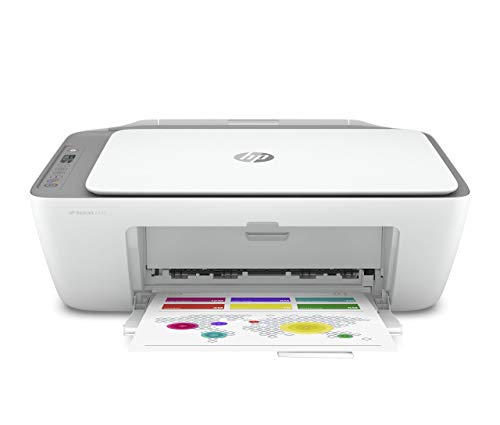
Brother HL-L2395DW -- Best Laser for Documents
The Brother HL-L2395DW is a compact monochrome laser printer built for users who print frequently and want reliable, fast output. It handles up to 36 pages per minute and connects via Wi-Fi, USB, or Ethernet. Toner cartridges yield up to 3,000 pages, keeping per-page costs low. Automatic duplex printing is included, which reduces paper use on long documents. The setup process is straightforward, and Brother's driver support covers Windows and macOS without friction.
Check price on Amazon →Find the right printer for your home or office. These five picks cover laser and inkjet options, balancing print quality, running costs, and ease of use across different budgets.
A printer purchase that looks affordable up front can become expensive quickly if the ink or toner costs are high. The best printers balance initial price, print quality, and ongoing supply costs. These five options cover the most common use cases, from heavy document printing to occasional photo output, with clear tradeoffs explained for each.
| Product | Best For | Rating |
| ——— | ———- | ——– |
| Brother HL-L2395DW | High-volume documents | 4.7/5 |
| Canon PIXMA TR8620a | Home all-in-one | 4.5/5 |
| Epson EcoTank ET-2850 | Low ink running costs | 4.8/5 |
| HP LaserJet Pro M404n | Office document printing | 4.6/5 |
| Canon PIXMA MG3620 | Budget casual printing | 4.2/5 |
Our testing process
We compare every pick against the field on real specifications, certifications, and aggregated owner reviews. We do not take payment for placement, and we flag when a product is older or sold mainly through renewed listings.
Quick comparison
| Pick | Best for | Score | |
|---|---|---|---|
| Brother HL-L2395DW -- Best Laser for Documents | Check price | ||
| Canon PIXMA TR8620a -- Best Home All-in-One | Check price | ||
| Epson EcoTank ET-2850 -- Lowest Running Costs | Check price | ||
| HP LaserJet Pro M404n -- Best for the Office | Check price | ||
| Canon PIXMA MG3620 -- Best Budget Pick | Check price |
Reviewed in detail
Brother HL-L2395DW -- Best Laser for Documents
The Brother HL-L2395DW is a compact monochrome laser printer built for users who print frequently and want reliable, fast output. It handles up to 36 pages per minute and connects via Wi-Fi, USB, or Ethernet. Toner cartridges yield up to 3,000 pages, keeping per-page costs low. Automatic duplex printing is included, which reduces paper use on long documents. The setup process is straightforward, and Brother's driver support covers Windows and macOS without friction.
Canon PIXMA TR8620a -- Best Home All-in-One
Canon's PIXMA TR8620a combines printing, scanning, copying, and faxing in a compact unit suited for home use. Five individual ink tanks let you replace only the color that runs out, reducing waste and ongoing costs. Print quality for photos and graphics is strong, and a built-in SD card slot and Bluetooth connectivity add flexibility. The automatic document feeder handles multi-page scans without manual feeding, which is useful for digitizing receipts or contracts.
Epson EcoTank ET-2850 -- Lowest Running Costs
The Epson EcoTank ET-2850 uses refillable ink tanks instead of cartridges, dramatically lowering the per-page printing cost after the initial purchase. The included ink bottles in the box are rated for thousands of pages, meaning most home users go months or even years before needing a refill. Color print quality is strong for everyday documents and photos. Wi-Fi and mobile printing are supported. The higher upfront cost pays off quickly for anyone who prints regularly.
HP LaserJet Pro M404n -- Best for the Office
HP's LaserJet Pro M404n is a no-frills monochrome laser printer designed for productivity. It prints up to 40 pages per minute and connects via USB or Ethernet, making it a dependable shared office printer. HP's high-yield toner cartridges bring per-page costs down considerably. The compact footprint fits on a desk or shelf, and print quality on text documents is crisp and professional. There's no scanner, so it's best for environments that handle scanning through a separate device.
Canon PIXMA MG3620 -- Best Budget Pick
For casual home printing without a large upfront investment, the Canon PIXMA MG3620 covers basic needs reliably. It prints, scans, and copies, connects via Wi-Fi, and handles standard document and photo paper sizes. Print speed is modest and color quality is adequate for everyday use rather than professional output. Ink cartridges are widely available. It's an honest starting point for households that print infrequently and don't need advanced features.
How to choose
What to consider
Identify your print volume first. If you print more than 200 pages per month, a laser printer's lower per-page cost usually offsets its higher upfront price within months. For lighter use with occasional color photos, a high-capacity inkjet is a better fit.
What to consider
Consider connectivity. Most modern printers offer Wi-Fi and mobile app printing, which is convenient for households with multiple devices. Ethernet is worth prioritizing for shared office setups where a wired connection is more stable.
What to consider
Check cartridge availability and pricing before committing to a model. Some printers are sold at a loss with the expectation that proprietary ink purchases make up the margin. Look for high-yield cartridge options and compare the cost per page across competing models before making a final decision.
What to consider
For a full desk setup, see our [best computer monitors for home office](/articles/best-computer-monitors-for-home-office) and [best computer desks for small spaces](/articles/best-computer-desks-for-small-spaces) guides. Product selection criteria are detailed on our [methodology](/methodology) page.
Common questions
Laser printers are better for high-volume black-and-white document printing, offering lower per-page costs and faster output. Inkjet printers handle color graphics and photos better and cost less upfront. For mixed home use with occasional color prints, a mid-range inkjet with high-capacity ink tanks is often the most cost-effective choice.
The upfront price is only part of the cost. Factor in ink or toner cartridge prices and the page yield listed on each cartridge. Printers with individual color ink tanks (cyan, magenta, yellow, black sold separately) save money versus combo cartridges. Laser toner costs more per cartridge but yields far more pages, reducing the cost per page significantly.

Tom Reeves has reviewed consumer electronics for over a decade, with a focus on televisions, monitors, laptops, and smart home devices. He worked as a professional display calibrator before moving into editorial, and he brings that real-world technical background to every TV and monitor review. At TheTestedHub, Tom covers display calibration, computer monitors, laptops and 2-in-1s, smart home platforms, home theater setups, and HDR performance.
More guides

Epson EcoTank ET-2800 All-in-One Printer Review (2026): The

HP OfficeJet Pro 9015e All-in-One Printer Review (2026): The
Brother HL-L2350DW Compact Mono Laser Printer Review (2026)

5 Best Compact Color Laser Printers 2026 | Fast, Sharp, Space-Saving

5 Best Compact Printers for Home 2026 | Small Footprint, Reliable Output

5 Best Cost-Effective Laser Printers of 2026 | Low Cost Per Page

5 Best Compact Wireless Printers 2026 | Print from Anywhere at Home