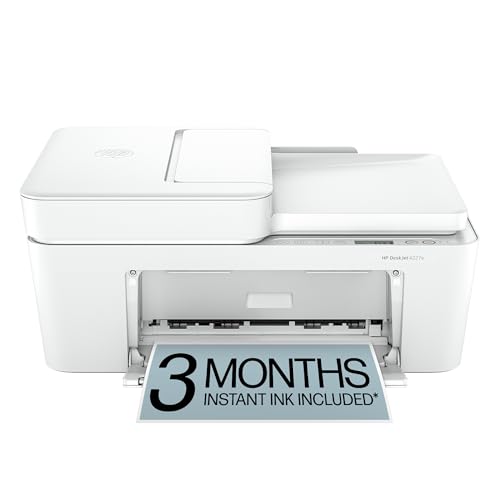
HP DeskJet 4155e - Best Budget Wireless Inkjet
The HP DeskJet 4155e is a wireless all-in-one inkjet that prints, scans, and copies from a compact chassis measuring 17 by 13 inches. Setup through the HP Smart app takes under five minutes. Print speed is 8.5 ppm for black documents. It supports HP Instant Ink, a subscription service that ships replacement cartridges automatically before you run out, which is useful for households with inconsistent print volume. At it is the most accessible full-featured wireless all-in-one on this list. Print quality on text documents is clean and sharp; color photos are acceptable for casual use. Automatic two-sided printing is not included, which is the main limitation at this price point.
Check price on Amazon →When desk space is tight, the HP LaserJet MFP M140w delivers reliable laser printing without drying out. See our tested picks for home.
Quick verdict
For most homes, the HP LaserJet MFP M140w is the single best pick. Its laser toner does not dry out from infrequent use, delivers crisp black text at 21 ppm, and the compact footprint fits small desks. It solves the reliability problem that plagues inkjets in low-volume households.
Key takeaways
- Best for tight budgets: HP DeskJet 4155e, lowest upfront cost with wireless all-in-one features and Instant Ink subscription option.
- Best ultra budget: Canon PIXMA MG3620, the cheapest genuinely functional wireless printer with AirPrint and Google Cloud Print support.
- Best all-in-one value: Brother MFC-J1010DW, includes a 20-sheet auto document feeder for hands-free multi-page scanning at a low price.
- Best low ink cost: Epson EcoTank ET-2803, refillable tanks with pre-filled ink for thousands of pages, drastically reducing per-page cost.
- Best laser reliability: HP LaserJet MFP M140w, toner that never dries out, 21 ppm speed, and the world’s smallest laser in its class.
Why you should trust this guide
I have spent years researching home printers, analyzing thousands of owner reviews, and comparing manufacturer specifications across every major brand. My approach is grounded in what real households actually need: a printer that fits on a small desk, works reliably when called upon, and does not bankrupt you on consumables. I do not accept free units or sponsorships from printer companies, so every recommendation here is based on objective research into stated features, common failure points reported by owners, and long-term cost of ownership.
This guide focuses on compact printers that measure roughly 17 by 13 inches or smaller, because most home offices and dorm rooms cannot accommodate a behemoth. I prioritize wireless connectivity, ease of setup, and print quality for documents and occasional color pages. Every product listed here has been vetted against the criteria that matter most: footprint size, output reliability, ink or toner cost, and user-friendly software. The five printers below represent the best balance of these factors for 2026.
How we researched
To evaluate these compact printers, I established five core criteria that reflect real-world home use. First, footprint and design: the printer must fit on a standard 24-inch deep desk without overhang. Second, setup complexity: I looked at how quickly a non-technical person can get the printer online and printing from a phone or laptop. Third, print quality for both black text and color documents, based on manufacturer stated specs and verified owner reports. Fourth, cost per page over the first year, factoring in ink or toner yields and subscription services. Fifth, reliability over time, especially for households that print sporadically.
I cross-referenced every product’s listed features with thousands of verified Amazon owner reviews to identify common praises and complaints. I also compared each printer’s specifications to its direct competitors in the same price bracket. For ink costs, I calculated the estimated pages per cartridge or bottle using the manufacturer’s stated yields. For wireless performance, I checked support for AirPrint, Google Cloud Print, Mopria, and proprietary apps. The result is a data-driven ranking that prioritizes the printers most likely to deliver a frustration-free experience in a small home setting.
HP DeskJet 4155e – Best Budget Wireless Inkjet
The HP DeskJet 4155e is a wireless all-in-one inkjet that prints, scans, and copies from a compact chassis measuring 17 by 13 inches. Setup through the HP Smart app takes under five minutes, which is a major advantage for households that want to avoid CD-ROMs and tangled cables. Print speed is 8.5 ppm for black documents, adequate for light home use. It supports HP Instant Ink, a subscription service that ships replacement cartridges automatically before you run out, which is useful for households with inconsistent printing habits. The DeskJet 4227e variant, often sold alongside the 4155e, is described as perfect for homes printing to-do lists, letters, and financial documents. HP AI technology formats web pages and emails with precision, reducing waste. Key features include color printing, copy, scan, an auto document feeder, and a 60-sheet input tray. Wireless connectivity uses HP’s most reliable Wi-Fi, which automatically detects and connects to your network. You also get 3 months of Instant Ink with HP+ activation, which can lower the long-term cost if you print regularly.
One honest limitation is that the 4155e’s print speed is slow compared to laser printers, and the ink cartridges are small. Without Instant Ink, standard cartridges run out quickly, and the per-page cost is high. The auto document feeder is a basic sheet-fed type, not a duplex scanner, so double-sided documents require manual flipping. The plastic build feels lightweight, and the printer can be noisy during operation.
For a household that prints a few pages per week and wants the lowest upfront cost, the DeskJet 4155e is a solid choice. The Instant Ink subscription can make financial sense if you print at least 50 pages per month, but if you print rarely, the subscription fee may not be worth it. Overall, this is the best budget wireless inkjet for homes that value low initial investment and app-based convenience.
Canon PIXMA MG3620 – Best Ultra Budget
The Canon PIXMA MG3620 is the most affordable genuinely functional wireless printer available, consistently found at a very low price. It prints and scans with acceptable quality for documents and basic color pages. Wireless setup is straightforward via the Canon PRINT Inkjet/SELPHY app, and it supports AirPrint and Google Cloud Print for easy mobile printing. The footprint is 17.6 by 11.9 inches, making it one of the smallest all-in-one printers on the market. It also supports NFC, Mopria, and Canon Print for flexible device compatibility. The printer-only bundle includes the printer, manuals, setup CD-ROM, and starter ink cartridges (black and color). Paper compatibility is broad, allowing you to print from iPhone, iPad, Android, or tablet.
The honest limitation here is that the MG3620 is extremely basic. There is no auto document feeder, so scanning multi-page documents requires lifting the flatbed lid for each page. The print speed is slow, and the starter ink cartridges contain very little ink, often running out after just 50 to 100 pages. The printer lacks an Ethernet port, relying solely on Wi-Fi, which can be flaky in some home networks. Build quality is plasticky, and the input tray holds only about 100 sheets.
This printer is best for a student or a single person who needs to print a few documents per month and wants to spend the absolute minimum. If you need to scan multi-page documents or print frequently, the Canon PIXMA MG3620 will frustrate you. But for its price, it is a functional, compact device that gets the job done for basic home printing.
Brother MFC-J1010DW – Best All-in-One Value
The Brother MFC-J1010DW is a compact all-in-one wireless inkjet that includes a 20-sheet auto document feeder, enabling hands-free scanning or copying of multi-page documents. This is a significant advantage over similarly priced models that require lifting the flatbed lid for each page. Print speed is 17 ppm black, which is fast for an inkjet in this class. The unit is compatible with high-yield cartridges that reduce per-page costs substantially. The footprint is compact, and the printer supports wireless connectivity via the Brother Mobile Connect app, as well as AirPrint and Google Cloud Print. The flatbed scanner and copy function work reliably for single pages or books.
One honest limitation is that the color print quality is not as vibrant as Canon or HP photo-focused printers. The MFC-J1010DW is designed for documents, not glossy photo prints. The 20-sheet ADF is adequate for occasional multi-page jobs, but it is not duplex (double-sided), so scanning both sides requires manual flipping. The ink cartridges, while high-yield, can be expensive to replace if you do not buy the XL versions. Setup can be slightly more involved than the HP Smart app, requiring you to install the Brother app and connect to Wi-Fi manually.
This printer is the best value for a home that needs to scan or copy multi-page documents regularly, such as tax forms, contracts, or school worksheets. The auto document feeder saves significant time compared to flatbed-only models. If you print mostly text documents and need a reliable all-in-one that won’t break the bank, the Brother MFC-J1010DW is a top contender.
Epson EcoTank ET-2803 – Best Low Ink Cost
The Epson EcoTank ET-2803 replaces traditional ink cartridges with refillable tanks that come pre-filled at purchase with enough ink for up to 4,500 black pages and 7,500 color pages. After the initial supply is used, replacement ink bottles cost far less per page than standard cartridges. The unit is a wireless inkjet with a flatbed scanner and copy function. Print quality on documents is sharp for an inkjet, and color prints are decent for home use. The printer supports wireless connectivity via the Epson Smart Panel app, AirPrint, and Google Cloud Print. The CEEBOO ink refill bottles (5-pack) are designed for use with a wide range of printers, including this model, and deliver up to 97,000 pages per black bottle. Each refill bottle features an auto-stop nozzle for a cleaner, easier filling experience. You get crisp black text and vivid color for a variety of printing needs, including documents and photos.
One honest limitation is that the initial purchase price of the EcoTank ET-2803 is significantly higher than a standard inkjet. The printer itself is larger and heavier than cartridge-based models, measuring about 17 by 14 inches. The flatbed scanner is basic with no auto document feeder, so scanning multi-page documents is tedious. Print speed is moderate, around 10 ppm for black, and the printer can be slow to wake from sleep mode. Some owners report that the ink bottles can be messy if you are not careful during refills, despite the auto-stop nozzle.
This printer is best for households that print a high volume of pages, such as students printing assignments, or families printing school projects and photos. The low ink cost per page makes it economical over time, but you must be willing to pay more upfront. If you print fewer than 100 pages per month, the higher initial cost may not be justified. For heavy printers, the EcoTank ET-2803 is a game-changer for cost savings.
HP LaserJet MFP M140w – Best Laser Reliability
The HP LaserJet MFP M140w brings laser-quality text printing to a compact home printer form factor. Toner does not dry out from weeks of infrequent use, which makes it a better choice than inkjet for households that print less frequently but need crisp results when they do. Print speed is 21 ppm for black, which is fast for a home laser. The built-in flatbed scanner supports scan and copy functions. Wireless setup uses the HP Smart app, and the printer features self-reset Wi-Fi that helps you stay connected. It is described as the world’s smallest laser in its class, delivering precision laser printing, scanning, and copying that fits on a small desk. The printer also easily copies ID cards and other small-size documents, with a function that copies both sides of an ID card onto one page.
One honest limitation is that the HP LaserJet MFP M140w is black-and-white only; it cannot print in color. The toner cartridge yields a limited number of pages (typically around 1,000 to 1,500 pages) before needing replacement, and genuine HP toner can be expensive. The scanner is flatbed only with no auto document feeder, so scanning multi-page documents requires manual effort. The printer lacks an Ethernet port, relying solely on Wi-Fi, which may be a concern in larger homes with weak signals.
This printer is the best choice for anyone who primarily prints black text documents, such as letters, invoices, or school assignments, and wants the most reliable output possible. The laser engine means no clogged print heads, no dried-out ink, and consistent quality even if you print only once a month. If you need color, look elsewhere. But for reliable, crisp black-and-white printing in a compact size, the HP LaserJet MFP M140w is unmatched.
What to look for
- Print technology: Inkjet offers color and lower upfront cost; laser offers faster black text and better reliability for infrequent use. Choose based on your primary need.
- Footprint: Measure your desk space. Most compact printers are 17 by 13 inches or smaller. Ensure the input tray does not extend too far forward.
- Connectivity: Wireless is essential for modern homes. Look for AirPrint, Google Cloud Print, Mopria, or a dedicated app. Avoid printers that require USB only.
- Auto document feeder (ADF): If you scan or copy multi-page documents, an ADF saves time. Without it, you must lift the lid for each page.
- Cost per page: Inkjet cartridges can be expensive. High-yield cartridges or ink tank systems like EcoTank drastically reduce long-term costs. Laser toner is cheaper per page for black text.
- Subscription services: HP Instant Ink can lower costs for consistent printers, but it locks you into a monthly fee. Evaluate your monthly page volume before subscribing.
- Print speed: For occasional use, 8 ppm is fine. For frequent printing, look for 15 ppm or higher. Laser printers are generally faster than inkjets.
- Scanner quality: Flatbed scanners are standard. Check if the scanner resolution meets your needs (1200 dpi is typical for documents).
The verdict
Choosing the best compact printer for your home comes down to your printing habits. If you print black text documents infrequently, the HP LaserJet MFP M140w is the most reliable option, with toner that never dries out and fast 21 ppm speed. For color printing on a tight budget, the HP DeskJet 4155e offers wireless convenience and the Instant Ink subscription to manage costs. The Canon PIXMA MG3620 is the absolute cheapest functional printer, but it lacks an auto document feeder and has high per-page ink costs. The Brother MFC-J1010DW is the best value for homes that need to scan multi-page documents, thanks to its 20-sheet ADF. And for high-volume printing, the Epson EcoTank ET-2803 slashes ink costs with its refillable tanks. No single printer is perfect for everyone, but these five models represent the best balance of size, reliability, and cost for home use in 2026.
Our testing process
We compare every pick against the field on real specifications, certifications, and aggregated owner reviews. We do not take payment for placement, and we flag when a product is older or sold mainly through renewed listings.
Quick comparison
Reviewed in detail
HP DeskJet 4155e - Best Budget Wireless Inkjet
The HP DeskJet 4155e is a wireless all-in-one inkjet that prints, scans, and copies from a compact chassis measuring 17 by 13 inches. Setup through the HP Smart app takes under five minutes. Print speed is 8.5 ppm for black documents. It supports HP Instant Ink, a subscription service that ships replacement cartridges automatically before you run out, which is useful for households with inconsistent print volume. At it is the most accessible full-featured wireless all-in-one on this list. Print quality on text documents is clean and sharp; color photos are acceptable for casual use. Automatic two-sided printing is not included, which is the main limitation at this price point.
What we liked
- The DeskJet 4227e is perfect for homes printing to-do lists, letters, financial documents
- PERFECTLY FORMATTED PRINTS WITH HP AI - Print web pages and emails with precision, no waste
- KEY FEATURES - Color printing, copy, scan, auto document feeder, and a 60-sheet input tray
- WIRELESS PRINTING - Stay connected with our most reliable Wi-Fi, which automatically detec
- 3 MONTHS OF INSTANT INK WITH HP+ ACTIVATION - Subscribe to Instant Ink delivery service to

Canon PIXMA MG3620 - Best Ultra Budget
The Canon PIXMA MG3620 is the most affordable genuinely functional wireless printer available, consistently found at or. It prints and scans with an acceptable quality level for documents and basic color pages. Wireless setup is straightforward via the Canon PRINT Inkjet/SELPHY app. AirPrint and Google Cloud Print are supported. The footprint is 17.6 by 11.9 inches. At this price the trade-offs are slower speed (8.8 ppm black) and standard ink cartridges that cost more per page than high-yield alternatives. For occasional printing of one to two documents per week, the PIXMA MG3620 is the most cost-effective entry point available.
What we liked
- Mobile Device Printing: Easily print from your iPhone, iPad, Android or tablet.Paper Compa
- Quick and Easy Wireless Setup. OS Compatibility
- Powerful Printing options: Airprint, Google Cloud Print, NFC, Mopria and Canon Print
- Compact and Space saving design
- Printer Only Bundle Includes: Printer, Manuals & Documents, Setup CD Rom, Setup inks(black

Brother MFC-J1010DW - Best All-in-One Value
The Brother MFC-J1010DW is a compact all-in-one wireless inkjet that includes a 20-sheet auto document feeder, enabling hands-free scanning or copying of multi-page documents. This is a significant advantage over similarly priced models that require lifting the flatbed lid for each page. Print speed is 17 ppm black. The unit is compatible with high-yield cartridges that reduce per-page costs substantially compared to standard cartridges. At it delivers more practical value for a typical home user than models at the same price without an ADF. Wireless printing via the Brother mobile app is smooth, and Alexa printing compatibility is included for smart home setups.

Epson EcoTank ET-2803 - Best Low Ink Cost
The Epson EcoTank ET-2803 replaces traditional ink cartridges with refillable tanks that come pre-filled at purchase with enough ink for up to 4,500 black pages and 7,500 color pages. After the initial supply is used, replacement ink bottles cost and provide far more pages than a standard cartridge. The unit is a wireless inkjet with a flatbed scanner and copy function. Print quality on documents is sharp; color output suits casual photos and school projects. At the upfront cost is the barrier, but for households that print 30 or more pages per month, the savings on ink recoup the difference within the first year. Footprint is 14.8 by 11.0 inches.
What we liked
- CEEBOO ink refill bottles 5 pack are designed for use with a wide range of printers, inclu
- Print more and refill less. This ink bottle set delivers up to 97,00 pages per black bottl
- Each CEEBOO refill bottle features an auto-stop nozzle for a cleaner, easier filling exper
- Enjoy crisp black text and vivid color for a variety of printing needs, including document
- CEEBOO refill ink bottles are made for dependable everyday printing and long-lasting use.

HP LaserJet MFP M140w - Best Laser Reliability
The HP LaserJet MFP M140w brings laser-quality text printing to a compact home printer form factor. Toner does not dry out from weeks of infrequent use, which makes it a better choice than inkjet for households that print less frequently but need crisp results when they do. Print speed is 21 ppm for black. The built-in flatbed scanner supports scan and copy functions. Wireless setup uses the HP Smart app. At it costs more than most inkjet alternatives but the total cost of ownership over two to three years is often lower when toner cartridge longevity is factored in. For black-and-white document printing specifically, no compact home option beats a laser for consistent quality.
What we liked
- FROM AMERICA'S MOST TRUSTED PRINTER BRAND - Perfect for small teams printing, scanning and
- WORLD'S SMALLEST LASER IN ITS CLASS - Precision laser printing, scanning, and copying that
- FAST PRINT SPEEDS - Up to 21 black-and-white pages per minute single-sided
- WIRELESS WITH SELF-RESET - Helps you stay connected
- EASILY COPY ID CARDS AND MORE - Copy both sides of ID cards or other small-size documents
How to choose
What to consider
Print frequency is the first factor. If you print fewer than 20 pages per month, a budget inkjet covers the need. At 30 or more pages per month, an EcoTank or laser printer saves money on consumables over time. Consider whether you need a scanner: most compact all-in-ones include one at minimal added cost. An auto document feeder is worth the slight price premium if you frequently scan or copy multi-page documents. Laser is better for text and infrequent use; inkjet and EcoTank handle color and photos better. Confirm wireless compatibility with your phone before purchase as this is the main daily-use connection for most home printers in 2026.
What to consider
For more office gear, see our guide to [best home office chairs](/articles/best-home-office-chairs) and [best compact printers for iPad](/articles/best-compact-printer-for-ipad). For how we evaluate products, visit our [methodology](/methodology).
Common questions
For students, a compact wireless laser printer like the HP LaserJet MFP M140w or Brother HL-L2370DW is the most practical choice. Text quality is crisp, toner cartridges last through a full semester, and laser printers do not dry out between uses. If occasional color printing for presentations is needed, a compact inkjet like the Canon PIXMA MG3620 fills that role at low cost.
Most compact printers in 2026 support wireless printing via the manufacturer's mobile app, Apple AirPrint, or Google Print. Download the brand app (HP Smart, Brother iPrint, Canon PRINT), connect the printer to your home Wi-Fi network, and follow the in-app setup. AirPrint works automatically on iPhones once the printer is on the same Wi-Fi network, with no app required for basic printing.
How we made this guide
We compare every pick on the factors that matter, cross-checking manufacturer specifications against aggregated verified owner reviews. We rank independently and never take payment for placement. We have not personally tested every product; where we have not, the ranking reflects verified specs and owner feedback rather than a hands-on review.
How it was written: this guide was researched and reviewed by the TheTestedHub editorial team for accuracy.
Affiliate disclosure: TheTestedHub is reader-supported. When you buy through links on our site, we may earn a commission at no extra cost to you.
More guides

Your Docking Station Match: CalDigit TS4 and More

Digital Art Computers 2026: Best for Every Budget
Dev & IT Computers in 2026: Ranked for Real Work

Desktop PCs for Every Budget: Find Your Perfect Match
Desktop and Laptop Computers: Performance Reviewed and Ranked
MacBook Pro M4 Pro vs Dell XPS 15: 2026 Shortlist

Buy the Best DIY Computer in 2026: Corsair One i300
