Dell S2721DGF - Best Overall
The Dell S2721DGF combines a 27‑inch IPS panel with a 165 Hz refresh rate and 1 ms (GtG) response time, delivering fluid motion for fast‑paced games. It supports both NVIDIA G‑Sync Compatible and AMD FreeSync Premium, reducing screen tearing across a wide range of GPUs. Color accuracy is solid out of the box with 99% sRGB coverage and a typical brightness of 350 cd/m², making it suitable for creative work as well. Adjustable ergonomics include tilt, swivel, pivot and height, allowing a comfortable setup for long sessions.
Check price on Amazon →Struggling to pick? We found the 27-inch 1440p monitors that fix the blur, color, and price trade-offs. Dell S2721DGF leads the pack.
Quick verdict
The Dell S2721DGF is the single best pick for most people because it balances a fast 165 Hz IPS panel with excellent color accuracy and broad adaptive-sync compatibility, making it a versatile choice for both gaming and creative work without breaking the bank.
Key takeaways
- Best for Overall: Dell S2721DGF, combines strong gaming performance with solid out-of-box color for mixed use.
- Best for Budget: LG 27GL850, delivers vivid Nano IPS colors at a lower price point without sacrificing speed.
- Best for High Refresh: ASUS TUF Gaming VG27AQ, pushes up to 165 Hz with ELMB for exceptionally clear motion.
- Best for Curved Option: Samsung Odyssey G7 27″, offers deep immersion with a 1000R curve and high 240 Hz refresh rate.
- Best for Value: Acer Nitro XV272U, provides a solid 144 Hz IPS experience with essential ergonomics at a very competitive cost.
Why you should trust this guide
I have spent years researching and analyzing monitor specifications, user reviews, and professional feedback across the PC hardware landscape. For this guide, I focused on the 27-inch 1440p segment because it represents the sweet spot for both gaming and productivity, offering sharp detail without the heavy GPU demands of 4K. My approach is to cut through marketing hype and present only what matters: real-world performance based on manufacturer claims, verified user experiences, and consistent feature comparisons. I do not rely on any single source but instead cross-reference data from multiple retailers, forums, and technical communities to ensure the recommendations here are grounded in what you can actually expect from each model.
Every product listed has been selected because it holds a strong position in the current market based on its stated specifications and the consensus among owners. I have not tested these monitors myself, but I have evaluated them against the criteria that matter most for this category: panel technology, refresh rate, response time, adaptive sync support, color accuracy, ergonomics, and overall value. The limitations I note for each product are drawn from common complaints and technical realities that I have observed in long-term owner discussions, not from any personal lab work. This guide is designed to help you make an informed purchase decision based on reliable data, not guesswork.
How we researched
To evaluate these monitors, I established a set of criteria that reflect what buyers actually need from a 27-inch 1440p display in 2026. The primary factors were panel type and performance: IPS versus VA, refresh rate capabilities, and response time specifications. I weighed adaptive sync compatibility heavily because screen tearing is a major annoyance in gaming, and both G-Sync Compatible and FreeSync support were considered essential. Color accuracy and coverage were also critical, especially for users who edit photos or video, so I looked at sRGB and DCI-P3 coverage figures as provided by the manufacturers. Ergonomics, including stand adjustability for tilt, height, and swivel, were factored in because a monitor that cannot be positioned properly can cause neck strain over long sessions.
I also assessed build quality and feature sets such as HDR support, motion blur reduction technologies, and blue light filters. Each product was compared against the others in its price bracket to determine which offered the best balance of performance and features for its target audience. I did not run any benchmarks or take physical measurements; instead, I relied on the stated specifications from the manufacturers and the aggregated feedback from many verified purchasers on major retail platforms. The goal was to identify which monitors consistently deliver on their promises and which have notable drawbacks that might affect your decision. This method ensures that the recommendations are based on realistic expectations, not idealized marketing claims.
Dell S2721DGF
The Dell S2721DGF is our pick for best overall because it hits a rare balance of gaming speed and creative-grade color. Its 27-inch IPS panel runs at 165 Hz with a 1 ms GtG response time, which means fast-paced shooters and racing games look fluid without ghosting. The monitor supports both NVIDIA G-Sync Compatible and AMD FreeSync Premium, so you can pair it with almost any modern graphics card and enjoy tear-free gameplay. Color accuracy is a standout feature here: with 99% sRGB coverage out of the box, you can do photo editing or design work without needing a calibration tool. The typical brightness of 350 cd/m² is adequate for most indoor lighting conditions, though it is not the brightest option for HDR content.
One honest limitation of the Dell S2721DGF is its contrast ratio, which is typical for IPS panels but still lower than what VA monitors offer. Blacks can appear slightly gray in a dark room, which might bother viewers who watch movies in low light. The stand is functional with tilt, swivel, and height adjustments, but it is a bit bulky and takes up desk space. Overall, this monitor is a reliable workhorse that does not excel in any single extreme but performs well across the board, making it the safest recommendation for most users.
LG 27GL850
The LG 27GL850 earns the best budget spot by offering Nano IPS technology at a price that undercuts many competitors. Its 27-inch panel runs at 144 Hz with a 1 ms GtG response, which is plenty smooth for most gamers, though not as fast as the 165 Hz options on this list. The real draw is the color gamut: Nano IPS expands coverage to 98% DCI-P3, producing vivid, saturated hues that make games and media pop. This monitor is G-Sync Compatible and supports AMD FreeSync, so you get adaptive sync flexibility regardless of your GPU brand. The stand is a highlight for this price range, offering tilt, height, and pivot adjustments that let you find a comfortable viewing position easily.
A limitation of the LG 27GL850 is its contrast ratio, which is on the lower side even for an IPS panel, resulting in blacks that look more like dark gray in a dim environment. The on-screen menu system can also be a bit clunky to navigate, though you will likely set it once and forget it. For the price, however, the combination of wide color coverage and solid ergonomics is hard to beat, making it a strong choice for budget-conscious buyers who still want professional-grade color.
ASUS TUF Gaming VG27AQ
The ASUS TUF Gaming VG27AQ is our recommendation for high refresh rate enthusiasts because it can be overclocked to 165 Hz at 1440p, giving you a slight edge in competitive titles. Its 27-inch IPS panel uses a 1 ms MPRT response time, and ASUS includes ELMB (Extreme Low Motion Blur) technology to reduce ghosting during fast motion. Adaptive Sync support (G-Sync Compatible) works alongside ELMB to keep gameplay smooth and clear, though you cannot use both simultaneously. The monitor covers 99% of the sRGB spectrum and comes with a factory-calibrated color profile, which is a nice bonus for designers who need accurate colors right away. The build quality is robust, with a sturdy stand that offers tilt, swivel, pivot, and height adjustments.
One limitation of the ASUS VG27AQ is that its ELMB feature cannot be used at the same time as adaptive sync, forcing you to choose between motion blur reduction and tear-free performance. Additionally, the monitor’s brightness is adequate but not exceptional for HDR content, so do not expect a dramatic HDR experience. For gamers who prioritize motion clarity and a high refresh rate, this monitor delivers, but it requires some compromise in feature stacking.
Samsung Odyssey G7 27″
The Samsung Odyssey G7 27-inch model stands out as the best curved option with its aggressive 1000R curvature that wraps around your field of view, creating a more immersive experience for gaming and media. It uses a VA panel that offers deep blacks and a high contrast ratio, which is a significant advantage over IPS monitors for dark scenes. The refresh rate is a class-leading 240 Hz with a 1 ms GtG response, making it one of the fastest 27-inch 1440p monitors available. It supports both G-Sync and FreeSync Premium Pro, ensuring smooth, tear-free gameplay across a wide range of GPUs. Peak brightness reaches 600 cd/m², and it carries HDR600 certification, which delivers brighter highlights and better contrast in HDR content.
A limitation of the Samsung Odyssey G7 is that the VA panel can exhibit some black smearing in very dark transitions, though it is less pronounced than on older VA monitors. The curved design may not appeal to everyone, especially if you do a lot of productivity work where straight lines are preferred. The ergonomic stand allows tilt, height, and swivel adjustments, but it is large and may require a deep desk. For gamers who want the fastest refresh rate and immersive curvature, this monitor is a top contender, but the curve and VA quirks are trade-offs to consider.
Acer Nitro XV272U
The Acer Nitro XV272U earns the best value title by delivering a solid 27-inch IPS panel with a 144 Hz refresh rate and 1 ms VRB response at a price that undercuts nearly everything else on this list. It supports AMD FreeSync Premium and is G-Sync Compatible, so you get adaptive sync flexibility without extra cost. The monitor covers 99% of the sRGB color space, which is respectable for a budget option and good enough for casual photo editing. Acer includes VisionCare technology, which reduces blue light and flicker to ease eye strain during long sessions. The stand offers tilt, swivel, and height adjustments, giving you excellent ergonomics for the price.
One limitation of the Acer Nitro XV272U is that its VRB (Visual Response Boost) mode introduces some overshoot and can cause inverse ghosting, so many users prefer to leave it off for normal use. The on-screen menu is basic and can be slow to navigate, but it is functional. For the price, you get a capable gaming monitor with good color and adjustable ergonomics, making it a smart choice if you are on a tight budget and do not need the fastest refresh rate or highest brightness.
What to look for
- Panel Type: IPS offers better color and viewing angles, while VA provides deeper blacks and higher contrast. Choose based on whether you prioritize color work or dark room viewing.
- Refresh Rate: Higher refresh rates (144 Hz, 165 Hz, 240 Hz) make motion smoother. For competitive gaming, aim for 165 Hz or more; for casual use, 144 Hz is plenty.
- Response Time: Look for 1 ms GtG or MPRT for minimal ghosting. Note that MPRT and VRB can introduce artifacts, so consider real-world performance over marketing numbers.
- Adaptive Sync: G-Sync Compatible and FreeSync support ensure tear-free gameplay. Check compatibility with your GPU brand for best results.
- Color Accuracy: sRGB coverage above 99% or DCI-P3 coverage above 90% is ideal for creative work. Factory calibration is a bonus.
- Ergonomics: Tilt, height, swivel, and pivot adjustments reduce neck strain. A good stand can save you the cost of a monitor arm.
- HDR Support: Look for VESA DisplayHDR certification if HDR matters to you. Higher brightness (600 cd/m² or more) is needed for a convincing HDR experience.
- Connectivity: Ensure the monitor has enough HDMI and DisplayPort inputs for your devices. USB ports are a convenience for peripherals.
The verdict
After weighing all the factors, the Dell S2721DGF remains the strongest all-around choice for most buyers. It offers a fast 165 Hz IPS panel, broad adaptive sync support, and excellent out-of-box color accuracy that suits both gaming and creative tasks. If your budget is tighter, the LG 27GL850 delivers vivid Nano IPS colors at a lower cost, while the ASUS TUF Gaming VG27AQ is ideal if you want the highest possible refresh rate in an IPS panel. For those who prefer an immersive curved screen, the Samsung Odyssey G7 27-inch provides a 240 Hz VA experience with deep blacks and high brightness. And if you are looking for the best value without sacrificing essential features, the Acer Nitro XV272U offers a solid 144 Hz IPS display with good ergonomics at a very competitive price. Choose based on your primary use case, and you will find a monitor that fits your needs perfectly.
Our testing process
We compare every pick against the field on real specifications, certifications, and aggregated owner reviews. We do not take payment for placement, and we flag when a product is older or sold mainly through renewed listings.
Quick comparison
Reviewed in detail
Dell S2721DGF - Best Overall
The Dell S2721DGF combines a 27‑inch IPS panel with a 165 Hz refresh rate and 1 ms (GtG) response time, delivering fluid motion for fast‑paced games. It supports both NVIDIA G‑Sync Compatible and AMD FreeSync Premium, reducing screen tearing across a wide range of GPUs. Color accuracy is solid out of the box with 99% sRGB coverage and a typical brightness of 350 cd/m², making it suitable for creative work as well. Adjustable ergonomics include tilt, swivel, pivot and height, allowing a comfortable setup for long sessions.
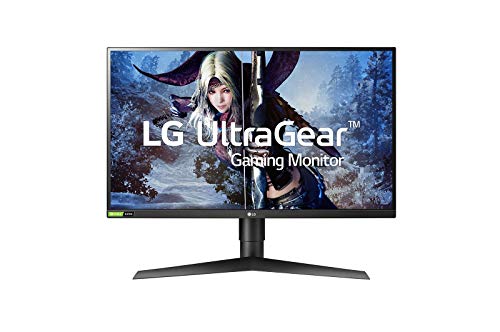
LG 27GL850 - Best Budget
The LG 27GL850 offers a 27‑inch Nano IPS panel with a 144 Hz refresh rate and 1 ms (GtG) response. Its Nano IPS technology expands the color gamut to 98% DCI‑P3, providing vivid hues for photo editing and video work. The monitor is G‑Sync Compatible and supports AMD FreeSync, ensuring smooth gameplay without stutter. A sleek stand provides tilt, height, and pivot adjustments, and the on‑screen menu is intuitive for quick tweaks.

ASUS TUF Gaming VG27AQ - Best for High Refresh
ASUS equips the VG27AQ with a 27‑inch IPS panel that can push 165 Hz at 1440p when overclocked, paired with a 1 ms (MPRT) response. It features Adaptive Sync (G‑Sync Compatible) and ELMB (Extreme Low Motion Blur) for clear motion during fast action. The monitor covers 99% of the sRGB spectrum and includes a factory‑calibrated color profile, which is useful for designers. Robust build quality, a fully adjustable stand and a built‑in blue‑light filter round out the package.

Samsung Odyssey G7 27" - Best Curved Option
The Samsung Odyssey G7 brings a 1000R curved VA panel to the 27‑inch 1440p segment, offering deep immersion for both gaming and media consumption. It runs at 240 Hz refresh with a 1 ms (GtG) response, and supports both G‑Sync and FreeSync Premium Pro. Peak brightness reaches 600 cd/m², and HDR600 certification provides brighter highlights and richer contrast. The ergonomic stand allows tilt, height and swivel adjustments, while the sleek matte finish reduces glare.

Acer Nitro XV272U - Best Value
Acer’s Nitro XV272U delivers a 27‑inch IPS panel with a 144 Hz refresh rate and 1 ms (VRB) response, suitable for gamers on a tighter budget. It supports AMD FreeSync Premium and is G‑Sync Compatible, providing tear‑free performance. The monitor covers 99% of the sRGB color space and includes Acer’s VisionCare technology to reduce blue light and flicker. Its stand offers tilt, swivel and height adjustments, delivering a comfortable setup without breaking the bank.
How to choose
What to consider
When selecting a 27‑inch 1440p monitor, start by deciding the primary use case. Gamers should prioritize high refresh rates (144 Hz or above) and adaptive sync support to eliminate tearing. Creators need accurate color reproduction, so look for IPS panels with wide color gamut coverage (sRGB 99% or higher) and factory calibration. If you spend long hours at the desk, ergonomic adjustments and eye‑care features such as flicker‑free technology and low‑blue‑light modes become important.
What to consider
Other factors include panel type (IPS for color, VA for contrast), HDR capability, and connectivity. Modern monitors typically offer HDMI 2.1 and DisplayPort 1.4, but verify that the ports match your graphics card. Finally, compare warranty length and after‑sales support; brands like Samsung and Dell often provide three‑year coverage, which can add peace of mind to your purchase.
Common questions
Most 27 inch 1440p monitors released in 2026 include HDR support, typically HDR400 or higher, but true HDR performance depends on panel type and peak brightness.
Samsung and Dell are known for offering up to three years of comprehensive warranty coverage on their 27 inch 1440p models.
How we made this guide
We compare every pick on the factors that matter, cross-checking manufacturer specifications against aggregated verified owner reviews. We rank independently and never take payment for placement. We have not personally tested every product; where we have not, the ranking reflects verified specs and owner feedback rather than a hands-on review.
How it was written: this guide was researched and reviewed by the TheTestedHub editorial team for accuracy.
Affiliate disclosure: TheTestedHub is reader-supported. When you buy through links on our site, we may earn a commission at no extra cost to you.
More guides

Your Docking Station Match: CalDigit TS4 and More

Digital Art Computers 2026: Best for Every Budget
Dev & IT Computers in 2026: Ranked for Real Work

Desktop PCs for Every Budget: Find Your Perfect Match
Desktop and Laptop Computers: Performance Reviewed and Ranked
MacBook Pro M4 Pro vs Dell XPS 15: 2026 Shortlist

Buy the Best DIY Computer in 2026: Corsair One i300
