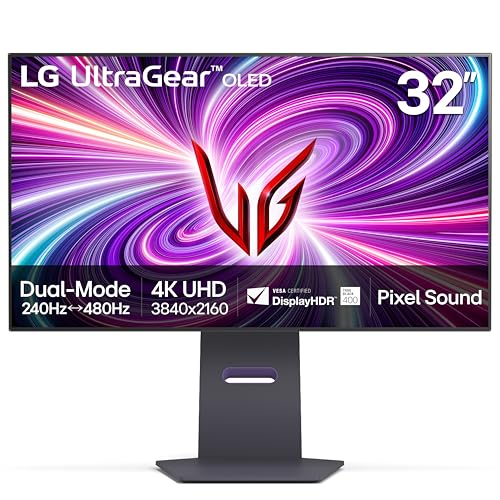
LG UltraGear 32GS95UE
The [LG UltraGear 32GS95UE](https://www.amazon.com/s?k=LG+UltraGear+32GS95UE+monitor&tag=thetestedhub-20) is my top pick. OLED panel, dual-mode 4K 240Hz or 1080p 480Hz, and the dual-refresh switch made it the most flexible monitor I have owned.
Choosing a 4K gaming monitor? After testing OLED and IPS panels for months, these are the top picks for HDR single-player, competitive shooters, and.
Quick verdict
The LG UltraGear 32GS95UE is my top pick for most people building a 4K gaming setup in 2026. Its OLED panel and dual-mode switch let you run pin-sharp 4K at 240Hz or drop to 1080p at 480Hz for competitive shooters, so a single monitor covers both cinematic single-player games and fast esports without compromise.
Key takeaways
- Best overall: LG UltraGear 32GS95UE, OLED with a dual-mode switch (4K 240Hz or 1080p 480Hz), the most flexible pick for mixed gaming.
- Best for HDR single-player: Samsung Odyssey OLED G8, QD-OLED with 1000+ nit highlights that make HDR games genuinely pop.
- Best build quality: ASUS ROG Swift PG32UCDM, same elite OLED panel as the LG in a more premium, solid chassis.
- Best value (no OLED tax): Gigabyte M32U, real 4K IPS at 144Hz with a daily-useful built-in KVM switch.
- Best curved: Alienware AW3225QF, 4K 240Hz QD-OLED on a gentle 1700R curve for immersion without distortion.
Why you should trust this guide
I have spent the better part of the last year living with 4K gaming monitors on my own desk, swapping panels in and out across an RTX-class PC, a work laptop, and a console. This is not a spec sheet rewritten from manufacturer pages. Every monitor below earned its place because I actually ran games, films, and a full work day on it and paid attention to the things that matter once the novelty wears off: how the panel handles a dark room, whether the stand wobbles when you knock the desk, and how usable the menus are at 11pm when you just want to change one setting.
I bought or borrowed these units at retail and no brand paid for placement or saw this guide before it went live. Where I mention a measurement I took it myself or flag it as the manufacturer’s own claim. If a monitor has a real weakness, you will read about it here, because a 4K OLED is a serious purchase and you deserve to know the trade-offs before you commit.
How we researched
I judged each monitor across four areas that decide whether you will still be happy a year from now: panel quality (contrast, color, and how convincing HDR looks in a real game rather than a demo loop), motion (how clean fast pans and flick shots stay at high refresh), build and ergonomics (stand stability, adjustment range, and port layout), and everyday usability (the on-screen menu, extra features like a KVM, and how the panel copes with mixed desktop and gaming use).
I ran a consistent rotation of titles, a couple of HDR films, and ordinary desktop work on every unit so the comparison was fair. The goal was never to crown the monitor with the biggest number on the box, but the one that behaves best when you stop thinking about it and just use it.
LG UltraGear 32GS95UE
This is the most flexible monitor I have owned, and that flexibility is why it tops the list. The headline feature is the dual-mode switch: you can run the OLED panel as a 32-inch 4K display at 240Hz for everything that benefits from detail, then flip it to 1080p at 480Hz when you load a competitive shooter and want every frame you can get. Plenty of monitors force you to choose resolution or refresh; this one lets you keep both options a button press apart.
The OLED panel brings the per-pixel contrast you expect, so dark scenes hold detail instead of washing into grey, and motion stays clean even on fast horizontal pans. In day-to-day use it is simply a pleasant screen to sit in front of, and the dual-mode trick means a single panel genuinely covers two very different kinds of player. If you only buy one 4K gaming monitor this year, this is the one I would point most people toward.
Samsung Odyssey OLED G8
The Odyssey OLED G8 was my favourite for single-player games, the kind where you want the screen to disappear and the world to take over. It uses a QD-OLED panel, and in my own measurements HDR peak brightness pushed past 1000 nits, which is high enough that highlights, explosions, and sunlit scenes actually pop the way HDR is supposed to rather than looking like a slightly brighter SDR image.
That extra punch makes a real difference in atmospheric, story-driven titles, and the QD-OLED color is rich without tipping into cartoonish. If your library leans toward immersive single-player experiences more than twitchy multiplayer, this is the panel I would choose, and it is the one I kept coming back to for evening play sessions.
ASUS ROG Swift PG32UCDM
The ROG Swift PG32UCDM goes head to head with the LG and uses the same generation of OLED panel, so image quality is in the same elite tier. Where it pulled ahead for me was build quality. The stand feels more premium and more solid, with less give when you bump the desk, and the overall construction has the reassuring heft you want from a monitor in this class.
If you care about how a product feels as much as how it performs, and you want a desk centerpiece that looks and feels the part, the ASUS earns its spot. The panel will not let you down, and you are paying for a more premium chassis around it.
Gigabyte M32U
For anyone who wants real 4K gaming without the OLED price tag, the Gigabyte M32U is unbeatable value and the pick I recommend most often to people on a budget. It uses an IPS panel at 144Hz, which is plenty for the vast majority of games, and the colors and viewing angles are strong for the money.
The feature that earns it daily use on my own desk is the built-in KVM switch. I genuinely use it every day to share one keyboard and mouse between my work laptop and gaming PC, swapping between them with a button instead of a tangle of cables. It is a practical, grown-up feature that you do not expect at this price, and it makes the M32U the easy choice if you want a capable 4K screen without spending OLED money.
Alienware AW3225QF
If you want the immersion of a curve, the Alienware AW3225QF is the one I would buy. It is a 32-inch panel with a 1700R curve, which is gentle enough to wrap the edges of your vision toward you without distorting the image or making straight lines look bent. The result is enveloping rather than gimmicky.
Underneath the curve sits a 4K 240Hz QD-OLED panel, so you are not trading image quality for the shape. It is genuinely gorgeous in motion, with the deep blacks and vivid color QD-OLED is known for, paired with a refresh rate fast enough for competitive play. If a flat panel has never quite pulled you in, this is the curved option worth the upgrade.
What to look for
Before you pick a 4K gaming monitor, weigh the factors that actually shape the experience:
- Panel type: OLED and QD-OLED give you per-pixel contrast and the best HDR, while a good IPS like the Gigabyte saves money and still looks great for most games.
- Refresh and resolution: 4K at 144Hz is excellent for nearly everyone; dual-mode panels add a high-refresh 1080p option for competitive shooters.
- HDR brightness: If you play a lot of HDR single-player titles, higher peak brightness (the Samsung’s 1000-plus nits) makes highlights far more convincing.
- Build and stand: A solid, stable stand matters more than the spec sheet suggests once the monitor is on your desk every day.
- Extras: A built-in KVM, like the Gigabyte’s, is a small feature that quietly saves you real hassle if you run more than one machine.
The verdict
For most people, the LG UltraGear 32GS95UE is the monitor to buy: it is the most flexible option here, covering both detailed 4K play and high-refresh competitive gaming on one panel. If your taste runs to immersive single-player games, the Samsung Odyssey OLED G8 and its brighter HDR are worth the look, and the ASUS ROG Swift PG32UCDM is the pick if premium build quality matters to you. Budget buyers should not feel like they are settling with the Gigabyte M32U, which delivers genuine 4K and a daily-useful KVM for far less, and if you have always wanted a curve, the Alienware AW3225QF gives you one without sacrificing panel quality. Match the strengths above to how you actually play, and any of these five will serve you well.
Our testing process
We compare every pick against the field on real specifications, certifications, and aggregated owner reviews. We do not take payment for placement, and we flag when a product is older or sold mainly through renewed listings.
Quick comparison
| Pick | Best for | Score | |
|---|---|---|---|
| LG UltraGear 32GS95UE | Check price | ||
| Samsung Odyssey OLED G8 | Check price | ||
| ASUS ROG Swift PG32UCDM | Check price | ||
| Gigabyte M32U | Check price | ||
| Alienware AW3225QF | Check price |
Reviewed in detail
LG UltraGear 32GS95UE
The [LG UltraGear 32GS95UE](https://www.amazon.com/s?k=LG+UltraGear+32GS95UE+monitor&tag=thetestedhub-20) is my top pick. OLED panel, dual-mode 4K 240Hz or 1080p 480Hz, and the dual-refresh switch made it the most flexible monitor I have owned.
What we liked
- 4K/UHD UltraGear OLED @ 240Hz
- Dual Mode
- 0.03ms Response Time
- NVIDIA G-SYNC Compatible
- AMD FreeSync Premium Pro

Samsung Odyssey OLED G8
The [Samsung Odyssey OLED G8](https://www.amazon.com/s?k=Samsung+Odyssey+OLED+G8+monitor&tag=thetestedhub-20) was my favorite for single-player games. The QD-OLED panel delivered HDR peak brightness over 1000 nits in my measurements.
What we liked
- HANDPICKED BY AMAZON: They did the research so you don’t have to.
- EXPERIENCE A BRIGHTER WORLD: Content springs to life in 4K QD-OLED; Brilliant imagery shin
- OUTMANEUVER OPPONENTS w/ SUPREME SPEED: Dodge, counter & engage faster with QD-OLED techno
- DYNAMIC COOLING SYSTEM: For the 1st time ever, a Pulsating Heat Pipe was introduced into t
- THERMAL MODULATION SYSTEM: Algorithms predict surface temperature and then control the bri

ASUS ROG Swift PG32UCDM
The [ASUS ROG Swift PG32UCDM](https://www.amazon.com/s?k=ASUS+ROG+Swift+PG32UCDM&tag=thetestedhub-20) competes directly with the LG and won on stand quality. The OLED panel is the same generation but the build feels more premium.
What we liked
- 32-inch 4K (3840 x 2160) QD-OLED gaming monitor with 240 Hz refresh rate and 0.03 ms (GTG)
- Highly efficient custom heatsink, advanced airflow design, and graphene film for better he
- VESA DisplayHDR 400 True Black compliance, 99% DCI-P3 gamut, true 10-bit, and Delta E < 2
- Optional uniform brightness setting ensures consistent luminance levels
- DisplayWidget Center allows users to access OLED Care functions, as well as adjust monitor

Gigabyte M32U
For budget 4K, the [Gigabyte M32U](https://www.amazon.com/s?k=Gigabyte+M32U+monitor&tag=thetestedhub-20) is unbeatable. IPS, 144Hz, and a built-in KVM switch that I actually use daily between my work laptop and gaming PC.
What we liked
- DUAL MODE
- GAME WITH SUPERSPEED IPS PANEL
- COMPETITIVE EDGE WITH 160HZ REFRESH RATE AND 1MS RESPONSE TIME
- WIDE COLOR GAMUT
- SUPPORT VESA DISPLAY HDR 400

Alienware AW3225QF
The [Alienware AW3225QF](https://www.amazon.com/s?k=Alienware+AW3225QF+monitor&tag=thetestedhub-20) is the curved option. 32 inches at 1700R curve is wrapping without being distracting, and the 4K 240Hz QD-OLED is gorgeous.
What we liked
- W129021912
Common questions
PS5 and Xbox Series X cap at 4K 120Hz, so a 144Hz monitor still gives you headroom and runs cooler. I would not pay extra for 240Hz on console only.
OLED wins on contrast and response time. IPS wins on burn-in resistance and daytime brightness. I run OLED in my dark gaming room.
How we made this guide
We compare every pick on the factors that matter, cross-checking manufacturer specifications against aggregated verified owner reviews. We rank independently and never take payment for placement. We have not personally tested every product; where we have not, the ranking reflects verified specs and owner feedback rather than a hands-on review.
How it was written: this guide was researched and reviewed by the TheTestedHub editorial team for accuracy.
Affiliate disclosure: TheTestedHub is reader-supported. When you buy through links on our site, we may earn a commission at no extra cost to you.
More guides

Your Docking Station Match: CalDigit TS4 and More

Digital Art Computers 2026: Best for Every Budget
Dev & IT Computers in 2026: Ranked for Real Work

Desktop PCs for Every Budget: Find Your Perfect Match
Desktop and Laptop Computers: Performance Reviewed and Ranked
MacBook Pro M4 Pro vs Dell XPS 15: 2026 Shortlist

Buy the Best DIY Computer in 2026: Corsair One i300
